
1. Introduction
The Carpuride W702T PRO is a 7-inch waterproof display system designed for motorcycles, integrating advanced features such as wireless CarPlay, Android Auto, and a built-in Tire Pressure Monitoring System (TPMS). This device enhances your riding experience by providing navigation, communication, and entertainment functionalities directly on your motorbike's handlebars. It also includes dual Bluetooth connectivity for seamless audio transmission and intercom capabilities, along with environmental sensors like a compass and barometer.
2. Package Contents
Please verify that all items listed below are present in your package:
- Carpuride W702T PRO Display Unit
- Square Bracket
- U-shaped Support Rod
- Power Cable (for motorcycle battery connection)
- USB Cable (for motorcycle USB port connection)
- 2 x TPMS Tire Sensors
- User Manual
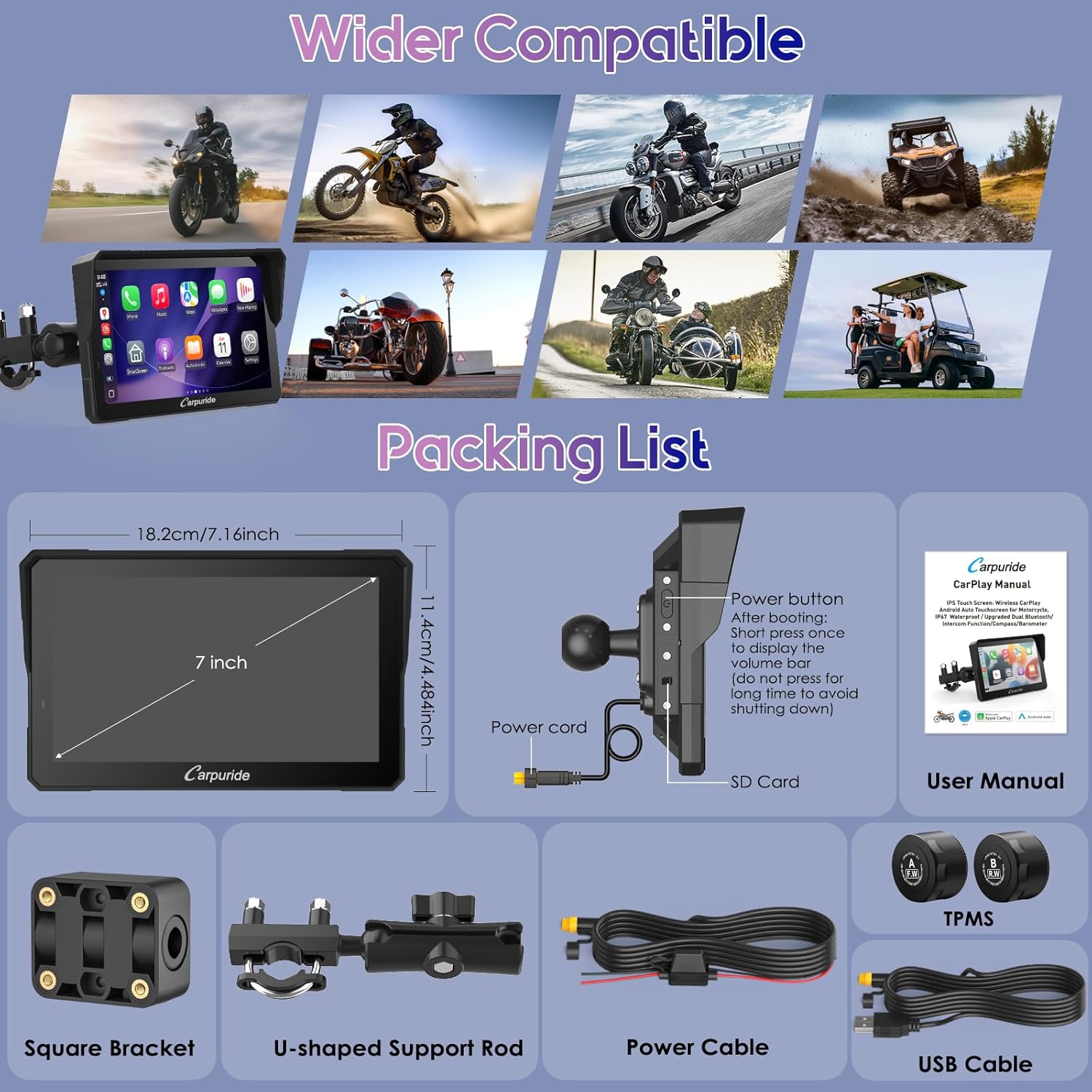
Image: Contents of the Carpuride W702T PRO package, including the main unit, mounting accessories, power cables, TPMS sensors, and the instruction manual.
3. Product Overview
The Carpuride W702T PRO is designed to provide a comprehensive and safe riding experience. Key features include:
- Wireless CarPlay & Android Auto: Seamless smartphone integration for navigation, calls, music, and messaging.
- Built-in TPMS System: Real-time tire pressure and temperature monitoring with two included sensors.
- Dual Bluetooth Connectivity: Allows simultaneous connection to a smartphone and two Bluetooth headsets/helmets for audio and intercom.
- Music Sharing & Intercom: Share audio and communicate with a passenger via BT Trans function.
- Sensor Light: Automatic screen brightness adjustment for optimal visibility in varying light conditions.
- EQ Effect: Customizable audio settings for various music styles.
- Compass & Barometer: Integrated tools for navigation and environmental awareness.
- IP67 Waterproof Design: Withstands various weather conditions.
- Capacitive Touch Screen: Responsive and easy to use.
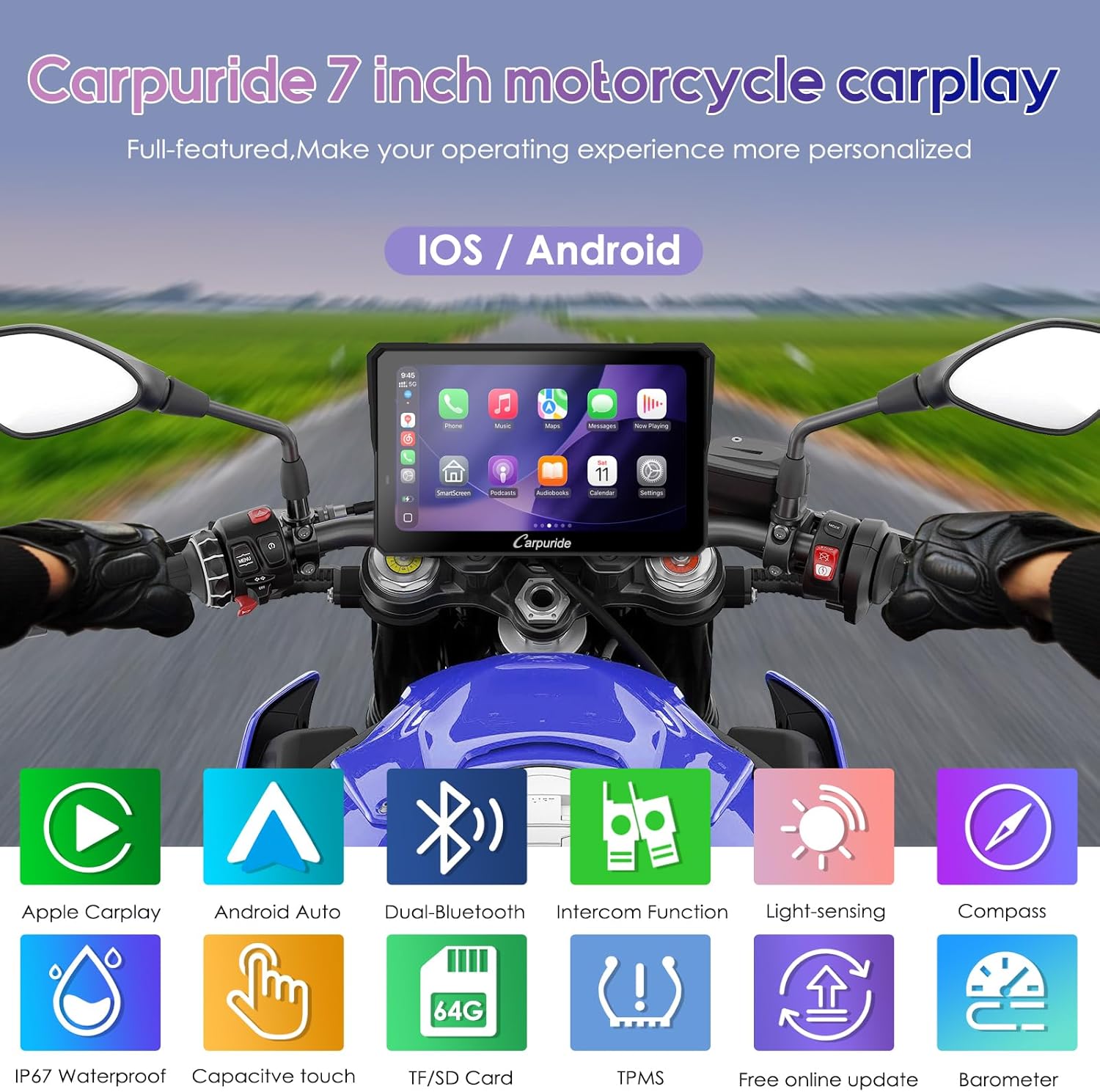
Image: Overview of the Carpuride W702T PRO's main features, including CarPlay, Android Auto, Dual Bluetooth, TPMS, and environmental sensors.

Image: The Carpuride W702T PRO operating effectively in diverse riding environments, highlighting its waterproof and anti-glare screen capabilities.
4. Setup
4.1 TPMS Installation
The TPMS system includes two tire sensors for real-time pressure and temperature monitoring. Follow these steps to install them:
- Remove the valve cap: Unscrew and take off the cap from the motorcycle tire valve.
- Loosen the nut: Rotate the nut on the valve counterclockwise to loosen it.
- Install the sensor: Screw the TPMS sensor onto the tire valve.
- Tighten the nut: Secure the nut by rotating it clockwise against the sensor.
- Check for air leaks: Apply soapy water to the valve and connected parts. If bubbles appear, it indicates an air leak that needs to be addressed.

Image: Illustration of the built-in TPMS system, showing the display interface with tire pressure and temperature readings, and the physical TPMS sensors.
4.2 Power Connection Options
The W702T PRO offers two methods for power supply:
- Motorcycle Power Line: Connect the provided power line to your motorcycle's battery, ensuring it provides 12V and 1A. The device has built-in reverse protection.
- Motorcycle USB Port: If your motorcycle's USB port provides 5V and 2.5A or higher, use the USB boost cable to directly connect the W702T PRO. Note: If the USB port outputs less than 5V, 2A, it is not recommended to use this method as it may cause the device to shut down automatically.
4.3 Mounting the Device
Use the square bracket and U-shaped support rod to securely mount the W702T PRO to your motorcycle's handlebars. Ensure the device is positioned for optimal visibility and accessibility without obstructing your view or controls.
5. Operating Instructions
5.1 Wireless CarPlay & Android Auto
Connect your smartphone wirelessly to the W702T PRO via Bluetooth to access CarPlay or Android Auto. This allows you to use map navigation, make phone calls, play music, and send text messages with voice assistance from Siri or Google Assistant, keeping your focus on the road.
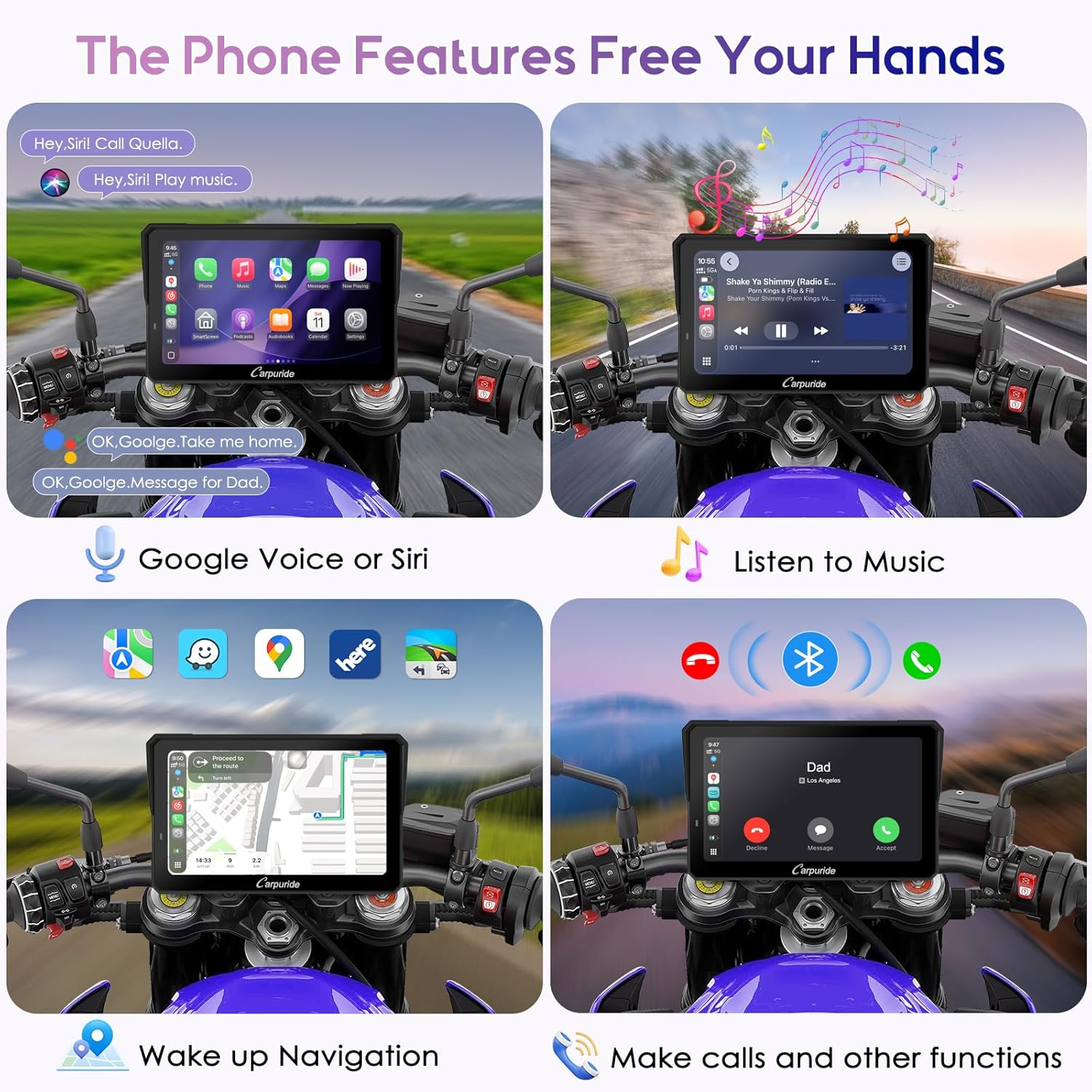
Image: Demonstrates hands-free phone features available through CarPlay/Android Auto, including voice commands, music playback, navigation, and call management.
5.2 Dual Bluetooth Connectivity
The W702T PRO features built-in dual Bluetooth. You can pair the touchscreen with your smartphone and simultaneously connect to a Bluetooth-enabled headset or helmet. This enables hands-free calls and music playback directly through your helmet audio.
5.3 Music Sharing & Intercom
Utilize the BT Trans function to connect two Bluetooth helmets simultaneously to the CarPlay screen. This allows both the rider and passenger to share music and use the intercom function for communication without interruption during the ride.

Image: Visual representation of the music sharing and intercom functionality, allowing two Bluetooth helmets to connect to the device for shared audio and communication.
5.4 Sensor Light & EQ Effect
- Sensor Light: The device automatically adjusts screen brightness based on ambient light conditions, reducing eye strain and ensuring clear visibility during day and night riding.
- EQ Effect: Access the built-in equalizer function to customize audio output for various music genres and personal preferences.
5.5 Compass & Barometer
- Compass: Provides directional guidance to help you stay on course, especially useful in unfamiliar areas.
- Barometer: Monitors real-time altitude changes, which is beneficial for understanding environmental conditions, particularly in mountainous terrain.

Image: Displays the functionality of the light sensor for automatic brightness adjustment, local media playback, the digital compass, and the barometer for altitude readings.
5.6 Headset Connection Modes
The W702T PRO supports different Bluetooth connection modes for headsets:
- Bluetooth Trans (Single-Connection Mode): Connect one Bluetooth headset or helmet to the device. Ensure the headset is discoverable. Do not connect your mobile phone directly to the headset to avoid interference.
- Bluetooth Trans (Dual-Connection Mode): Through the BT Trans function, audio from the Carpuride screen (e.g., from an inserted TF card) can be transmitted to two Bluetooth headsets (Bluetooth 1 and Bluetooth 2). This enables music sharing and intercom between rider and passenger.
- CarPlay/Android Auto (Bluetooth Audio): When using CarPlay or Android Auto, connect your smartphone to the Carpuride screen, and then connect the Carpuride screen to a single Bluetooth headset or helmet for audio transmission.
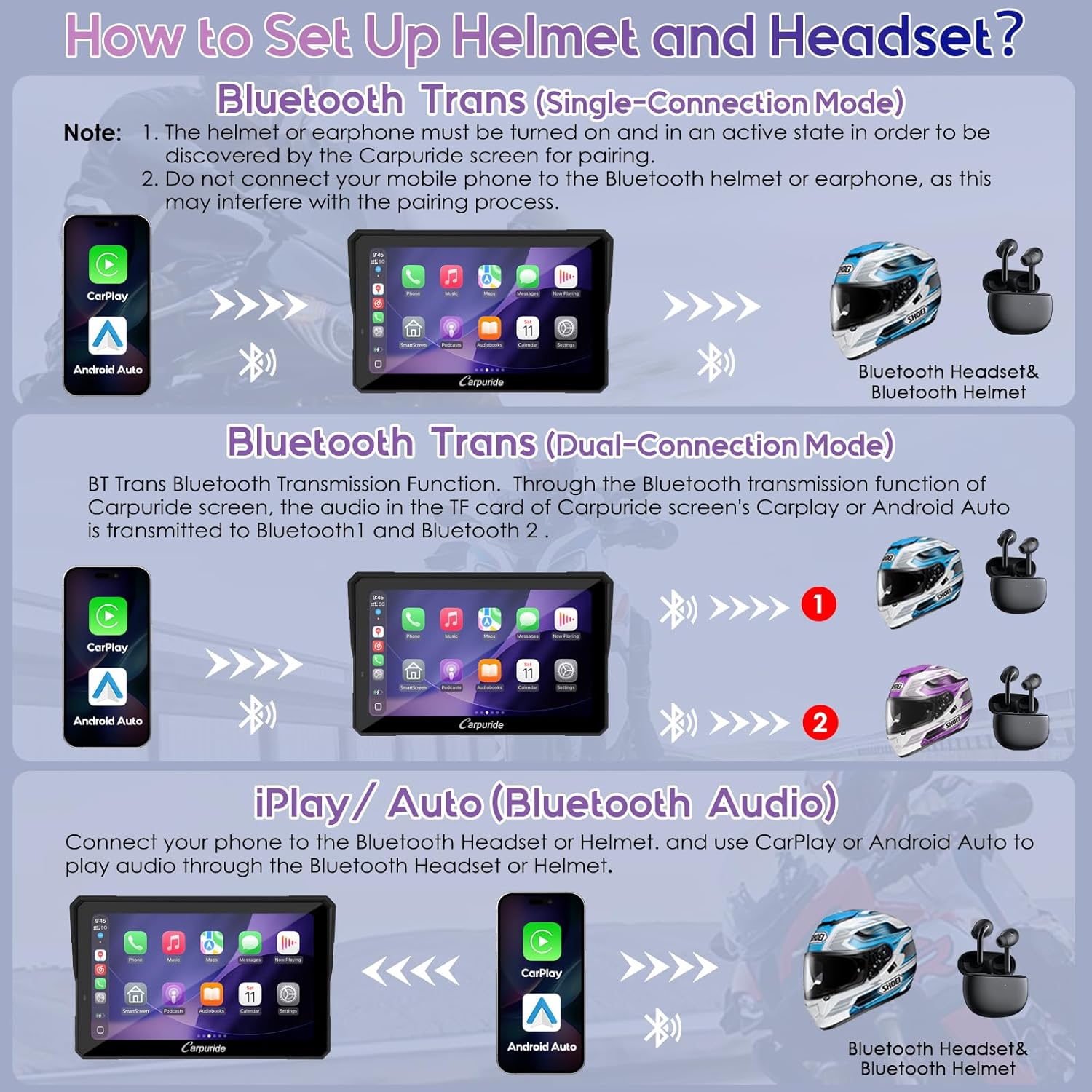
Image: Detailed explanation of how to set up and connect Bluetooth helmets and headsets in single, dual (BT Trans), and CarPlay/Android Auto modes.
6. Maintenance
To ensure the longevity and optimal performance of your Carpuride W702T PRO:
- Regularly clean the screen with a soft, damp cloth. Avoid abrasive cleaners.
- Ensure all connections are secure and free from corrosion.
- While the device is IP67 waterproof, avoid prolonged submersion or high-pressure water jets.
- Store the device in a cool, dry place when not in use for extended periods.
7. Troubleshooting
- Device not powering on: Check power connections. Ensure the motorcycle power line provides 12V, 1A, or the USB port provides at least 5V, 2.5A.
- Bluetooth connection issues: Ensure your smartphone and headsets are in pairing mode and within the effective Bluetooth range (approximately 10m). Avoid connecting your phone directly to the headset when using BT Trans mode.
- No audio in Bluetooth Trans mode: In BT Trans mode, voice assistant commands and phone call audio are transmitted only to Bluetooth 1. Ensure the primary rider connects to Bluetooth 1.
- Screen brightness not optimal: The sensor light automatically adjusts brightness. Ensure the sensor is not obstructed.
- TPMS not displaying data: Verify that the TPMS sensors are correctly installed and tightened. Check for air leaks.
8. Specifications
| Feature | Specification |
|---|---|
| Item Weight | 2.2 pounds |
| Product Dimensions | 7.2 x 1.74 x 4.49 inches |
| Display Size | 7 Inches |
| Screen Size | 7 Inches |
| Connectivity Technology | Bluetooth |
| Special Features | 2 Tire Pressure Sensors, Dual Bluetooth, For Android Auto, For Apple CarPlay, Waterproof |
| Map Type | Worldwide (via connected smartphone) |
| Touch Screen Type | Capacitive |
| Manufacturer | Carpuride |
9. Warranty and Support
The Carpuride W702T PRO comes with a 1-year warranty from the date of purchase, covering manufacturing defects. For technical support, troubleshooting assistance, or warranty claims, please refer to the contact information provided in your product packaging or visit the official Carpuride website.
Always ensure you are using the device according to the instructions provided in this manual to maintain warranty validity.


