
PINDOWS PDS-8021
PINDOWS Digital Sports Watch User Manual
Model: PDS-8021
1. Introduction
Thank you for choosing the PINDOWS Digital Sports Watch. This manual provides detailed instructions to help you understand and utilize all the features of your new watch, including its chronograph, stopwatch, alarm, calendar, and LED backlight functions. Designed for durability and versatility, this watch is suitable for various indoor and outdoor activities.

Figure 1: Front view of the PINDOWS Digital Sports Watch.
2. Product Overview
2.1. Watch Components and Buttons
Familiarize yourself with the watch's buttons and display areas:

Figure 2: Diagram illustrating the watch's buttons and display areas.
- LIGHT Button (Top Left): Activates the LED backlight.
- MODE Button (Bottom Left): Cycles through different modes (Time, Chronograph, Alarm, Timer).
- START/PAUSE Button (Top Right): Starts/pauses chronograph, adjusts settings.
- RESET Button (Bottom Right): Resets chronograph, adjusts settings.
- Time Display: Shows current time, date, and other indicators.
2.2. Product Parameters
Key specifications and dimensions of the PINDOWS Digital Sports Watch:
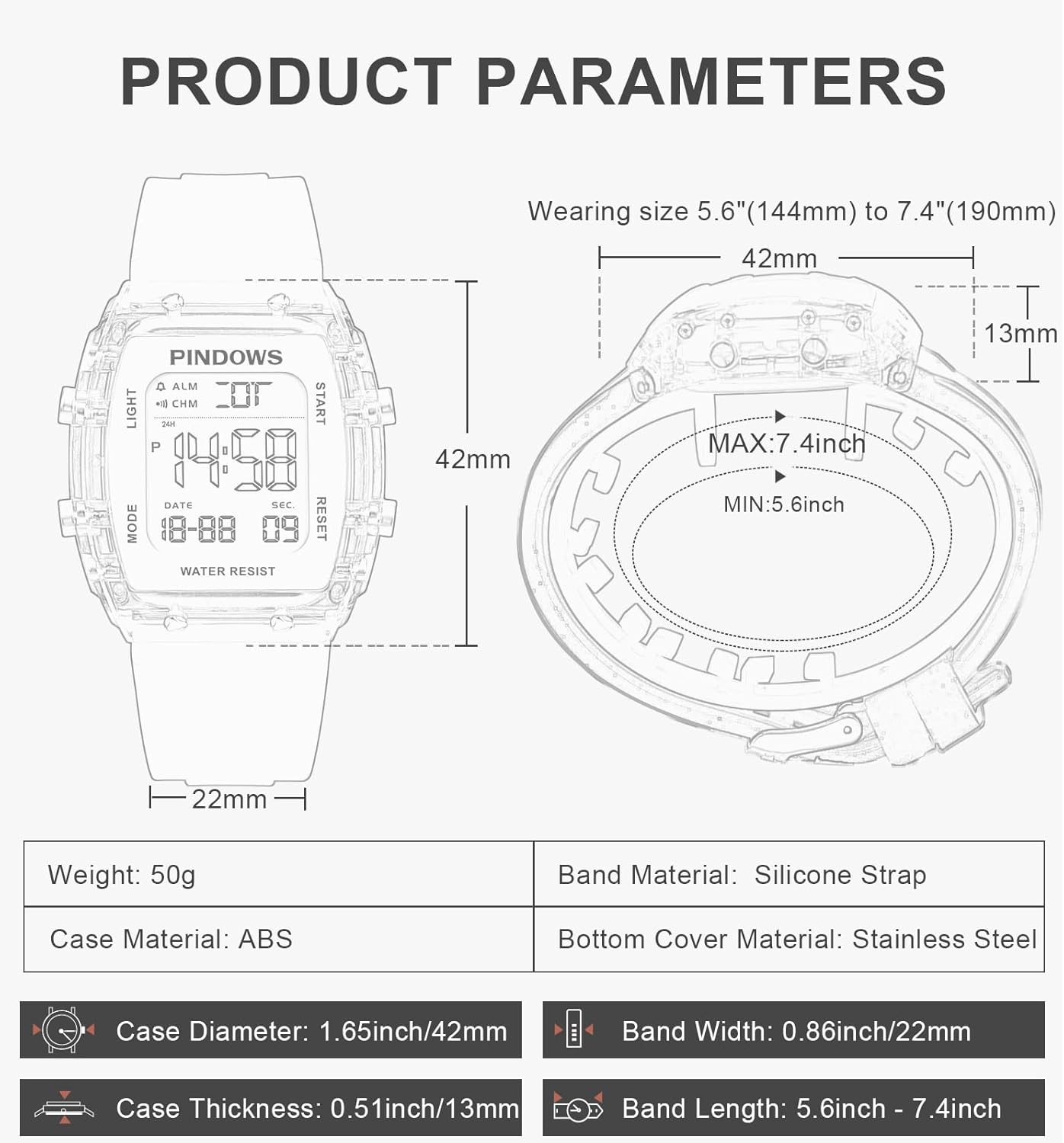
Figure 3: Detailed product parameters and dimensions.
| Parameter | Value |
|---|---|
| Weight | 50g |
| Case Material | ABS |
| Case Diameter | 1.65 inch / 42mm |
| Case Thickness | 0.51 inch / 13mm |
| Band Material | Silicone Strap |
| Bottom Cover Material | Stainless Steel |
| Band Width | 0.86 inch / 22mm |
| Band Length | 5.6 - 7.4 inch (144mm - 190mm) |
3. Setup
3.1. Setting Time and Date
- From the Time Display mode, press the MODE button three times to enter the Time Setting mode. The seconds will start flashing.
- Press the RESET button to reset the seconds to zero.
- Press the START/PAUSE button to move the flashing selection to the hour digit.
- Press the RESET button to adjust the hour. Note the 'P' indicator for PM in 12-hour format.
- Press the START/PAUSE button to move the flashing selection to the minute digit.
- Press the RESET button to adjust the minutes.
- Continue pressing the START/PAUSE button to cycle through year, month, and day settings, adjusting each with the RESET button.
- Once all settings are complete, press the MODE button to exit the Time Setting mode and return to the normal Time Display.
3.2. 12/24 Hour Format Selection
While in the Time Setting mode (seconds flashing), press the START/PAUSE button until the hour digit is flashing. Press the START/PAUSE button again to toggle between 12-hour (with 'A' for AM, 'P' for PM) and 24-hour formats.
4. Operating Instructions
4.1. Chronograph (Stopwatch) Function
- From the Time Display mode, press the MODE button once to enter Chronograph mode. The display will show "00:00:00".
- Press the START/PAUSE button to start the stopwatch.
- Press the START/PAUSE button again to pause the stopwatch.
- While paused, press the RESET button to reset the stopwatch to "00:00:00".
- To record lap times, press the RESET button while the stopwatch is running. The display will show the lap time, but the stopwatch will continue running in the background. Press RESET again to return to the running stopwatch display.
- Press the MODE button to exit Chronograph mode.
4.2. Alarm Function
- From the Time Display mode, press the MODE button twice to enter Alarm mode. The alarm time will be displayed.
- Press the START/PAUSE button to toggle the alarm ON/OFF. An alarm icon will appear/disappear on the display.
- To set the alarm time, press the RESET button. The hour digit will flash.
- Press the START/PAUSE button to adjust the hour.
- Press the RESET button to move to the minute digit.
- Press the START/PAUSE button to adjust the minutes.
- Press the RESET button again to confirm and exit alarm setting.
- Press the MODE button to exit Alarm mode.
4.3. Hourly Chime Function
While in Alarm mode, press the RESET button twice to move the flashing selection to the hourly chime indicator (usually represented by a bell icon or 'CHM'). Press the START/PAUSE button to toggle the hourly chime ON/OFF. When ON, the watch will beep every hour on the hour.
4.4. Timer Function
The watch features a countdown timer. To access and set it:
- From the Time Display mode, press the MODE button four times to enter Timer mode. The display will show the current timer setting or "00:00".
- Press the RESET button to enter timer setting mode. The hour digit will flash.
- Press the START/PAUSE button to adjust the hour.
- Press the RESET button to move to the minute digit.
- Press the START/PAUSE button to adjust the minutes.
- Press the RESET button again to confirm the timer setting.
- Press the START/PAUSE button to start the countdown.
- Press the START/PAUSE button again to pause/resume the countdown.
- While paused, press the RESET button to reset the timer to its initial set value.
- When the timer reaches zero, an alarm will sound.
- Press the MODE button to exit Timer mode.
4.5. LED Backlight
Press the LIGHT button (top left) at any time to illuminate the display with a bright LED backlight. The backlight will remain on for a few seconds, allowing for easy readability in low-light conditions.

Figure 4: The watch display with its LED backlight activated.
5. Maintenance
5.1. Water Resistance
Your PINDOWS Digital Sports Watch is designed with 50-meter (5ATM) water resistance. This means it is suitable for daily use, showering, swimming in shallow water, and light rain exposure. However, it is not suitable for diving, snorkeling, or high-pressure water activities.
- Do not press any buttons while the watch is submerged in water.
- Avoid exposing the watch to hot water or steam, as this can compromise the water-resistant seals.
- After exposure to saltwater, rinse the watch with fresh water and dry it thoroughly.

Figure 5: The watch is designed to withstand water splashes and shallow swimming.
5.2. Cleaning
To clean your watch, wipe it with a soft, damp cloth. For stubborn dirt, a mild soap solution can be used, followed by rinsing with clean water and thorough drying. Avoid using harsh chemicals or abrasive materials, which can damage the watch's finish or components.
5.3. Battery Replacement
The watch is powered by a CR2032 battery. When the display becomes dim or functions become erratic, it may be time to replace the battery. Battery replacement should ideally be performed by a qualified watch technician to ensure proper sealing and water resistance are maintained.

Figure 6: The stainless steel back cover of the watch, indicating water resistance and model number.
6. Troubleshooting
| Problem | Possible Cause | Solution |
|---|---|---|
| Display is blank or dim. | Low battery or battery depleted. | Replace the battery (CR2032). Consult a professional if unsure. |
| Buttons are unresponsive. | Temporary software glitch or water ingress. | Try pressing all buttons firmly. If wet, dry thoroughly. If issue persists, contact support. |
| Time is incorrect. | Time not set correctly or accidental adjustment. | Refer to Section 3.1 "Setting Time and Date" to reset the time. |
| Water inside the display. | Water resistance compromised. | Stop using the watch immediately. Seek professional repair to prevent further damage. |
7. Specifications
- Model Number: PDS-8021
- Power Source: 1 x CR2032 Battery (included)
- Water Resistance: 50M (5ATM)
- Functions: Time, Date, Day of Week, Chronograph (Stopwatch), Alarm, Hourly Chime, Timer, LED Backlight
- Display Type: Digital
- Case Dimensions: 42mm (width) x 13mm (thickness)
- Band Material: Silicone
- Case Material: ABS
- Back Cover: Stainless Steel
8. Warranty and Support
PINDOWS provides a 12-month warranty service for this product from the date of purchase. This warranty covers manufacturing defects and material flaws under normal use. It does not cover damage caused by misuse, accidents, unauthorized repairs, or normal wear and tear.
For any questions, concerns, or warranty claims, please contact our customer support team. We are committed to providing the best products and service possible.
Please refer to your purchase documentation or the retailer's website for specific contact information.