
Giro 7146096
Giro Ratio Snow Helmet User Manual
Model: 7146096
1. Introduction
Thank you for choosing the Giro Ratio Snow Helmet. This helmet is designed to provide comfort and protection for snow sports. It features Thermostat Control Adjustable Venting and Mips technology for enhanced safety and user experience. Please read this manual thoroughly before using your helmet to ensure proper fit, function, and care.
2. Product Features
- In-mold Construction: Fuses the helmet's outer shell with the EPS foam liner, enhancing durability and reducing weight.
- Vertical Tuning: Allows for precise adjustment of the helmet's vertical position on your head for a customized fit.
- Giro Goggle Compatible: Designed to integrate seamlessly with Giro goggles for an optimal fit and clear vision.
- Adjustable Vents (Thermostat Control): Enables easy, on-the-fly adjustment of airflow to manage temperature and prevent goggle fogging.
- Ear Warmers: Integrated ear pads provide warmth and comfort.
- Mips Technology: Multi-directional Impact Protection System designed to reduce rotational forces to the head during certain impacts.
3. Setup and Fit Adjustment
Proper helmet fit is crucial for safety and comfort. Follow these steps to ensure your helmet is correctly adjusted.
3.1 Initial Fit Check
Place the helmet on your head. It should feel snug and level, covering your forehead. The front brim should sit just above your eyebrows.

Figure 1: Front view of the Giro Ratio Snow Helmet. The helmet should sit level on the head, with the brim just above the eyebrows.
3.2 Adjusting the Fit System (In Form 2 Fit System)
The In Form 2 Fit System allows for easy adjustment of the helmet's circumference and vertical position.
- Circumference Adjustment: Locate the dial at the back of the helmet. Turn the dial clockwise to tighten the fit for a snug feel, and counter-clockwise to loosen.
- Vertical Tuning: The fit system can also be adjusted vertically. Gently pull or push the entire fit system up or down to find the most comfortable and secure position on your head.
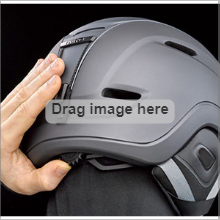
Figure 2: The In Form 2 Fit System dial for adjusting helmet circumference.
3.3 Chin Strap Adjustment
Adjust the chin strap so it is snug but comfortable under your chin. There should be enough room to fit two fingers between the strap and your chin. The strap should not cover your ears.

Figure 3: Proper helmet and chin strap fit with goggles.
3.4 Goggle Integration
The Giro Ratio helmet is designed for seamless integration with Giro goggles. Place your goggles on your face, then pull the goggle strap over the helmet. Secure the goggle strap using the goggle retainer clip at the back of the helmet. This prevents the goggles from slipping.

Figure 4: Rear view of the helmet, highlighting the goggle retainer clip.
4. Operating Instructions
4.1 Adjusting Ventilation (Thermostat Control)
The helmet features adjustable vents to control airflow and temperature.
- Locate the Thermostat Control slider on the top of the helmet.
- Slide it forward to open the vents for maximum airflow, or backward to close them for warmth.

Figure 5: The Thermostat Control slider for adjusting helmet ventilation.
5. Maintenance
5.1 Cleaning Your Helmet
- Use only mild soap and water to clean the helmet's exterior and interior padding.
- Avoid harsh chemicals, solvents, or abrasive cleaners, as these can damage the helmet's materials and compromise its protective qualities.
- Allow the helmet to air dry completely before storage. Do not expose to direct heat.
5.2 Storage
Store your helmet in a cool, dry place, away from direct sunlight and extreme temperatures. Avoid storing it near heat sources or in areas where it could be crushed or damaged.
6. Troubleshooting
- Helmet feels loose or too tight: Adjust the In Form 2 Fit System dial at the back of the helmet. Ensure the vertical tuning is also set correctly.
- Goggles fogging: Ensure the helmet's vents are open using the Thermostat Control slider. Check that your goggles are properly seated and not obstructing the helmet's ventilation channels.
- Goggles slipping: Make sure the goggle strap is secured under the goggle retainer clip at the back of the helmet.
7. Specifications
| Brand | Giro |
| Model Name | Giro Ratio Snow Helmet |
| Model Number | 7146096 |
| Color | Matte Trail Green |
| Size | Small |
| Age Range | Adult |
| Outer Material | Polycarbonate (PC), Acrylonitrile Butadiene Styrene (ABS) |
| Inner Material | Polyester |
| Item Weight | 1.08 Kilograms |
| Item Dimensions | 8 x 5 x 5 inches |
| Special Features | Ventilation, Customizable |
| Recommended Uses | Snowboarding |
| Included Components | Snow Helmet |
| UPC | 196178017749 |
8. Warranty and Support
This Giro Ratio Snow Helmet comes with a 1 Year Manufacturer Warranty. For warranty claims or technical support, please contact Giro customer service through their official website or the retailer where the product was purchased.
Visit the Official Giro Store on Amazon for more information and support resources.
9. Important Safety Information
WARNING: No helmet can protect the wearer against all foreseeable impacts. For maximum protection, the helmet must fit properly and all retention straps must be securely fastened. Any helmet that has sustained an impact should be replaced immediately, even if there is no visible damage. Do not modify the helmet or use it for purposes other than intended.
WARNING: This helmet is designed for snow sports only. It is not intended for motor sports or other activities.
10. Product Video
Video 1: Official Giro Sport Design product overview. This video showcases various Giro snow sports products in action, demonstrating their use in a dynamic environment.
Ask a question about this manual
Ask about setup, troubleshooting, compatibility, parts, safety, or missing instructions. Manuals+ will review the question and use this page’s manual context to help answer it.