
SUNYIN SP03
Contents
Wireless Page Turner Pedal User Manual
Brand: SUNYIN | Model: SP03
Introduction
The SUNYIN SP03 Wireless Page Turner Pedal is a Bluetooth-enabled foot pedal designed to provide hands-free page turning for digital music sheets, e-books, presentations, and more. This device enhances your practice and performance by eliminating the need for manual page turning, allowing for uninterrupted focus.
Product Features
- Hands-Free Operation: Seamlessly turns pages, allowing for continuous practice or performance without manual interruption.
- Anti-Slip & Silent Design: Features a specially designed quiet mechanism and grippy rubber pads on the bottom to prevent sliding, ensuring stable use during recording or live performances.
- Long Battery Life: Equipped with a rechargeable battery providing up to 60 hours of continuous working time on a single full charge (approximately 2 hours charging time). LED indicators show battery status.
- Easy & Stable Bluetooth Connection: Simple pairing process with stable signal transmission up to 33 feet (10 meters) without interference.
- Five Control Modes: Offers versatile functionality with 5 common modes: Page Up/Down, Indicator Left/Right, Indicator Up/Down, Mouse-clicking Left/Right, and Keyboard Space-bar/Enter. A 'repeat switch' allows for continuous scrolling.
- Wide Compatibility: Compatible with multiple platforms including phones, tablets (iPad, Android), Mac, and PC. Suitable for various applications such as web browsing, photography, reading, music sheets, and presentations.
Package Contents
Please check the package for the following items:
- SUNYIN SP03 Wireless Page Turner Pedal (Black)
- USB-A to USB-C Charging Cable
- User Manual
Setup
Charging the Device
Before first use, fully charge the pedal. Connect the supplied USB-A to USB-C charging cable to the pedal's charging port and a 5V, 0.5A USB power source (e.g., computer USB port, wall adapter). A full charge takes approximately 2 hours. The LED indicator will show charging status (Green: 60-100%, Blue: 30-60%, Red: <30%).
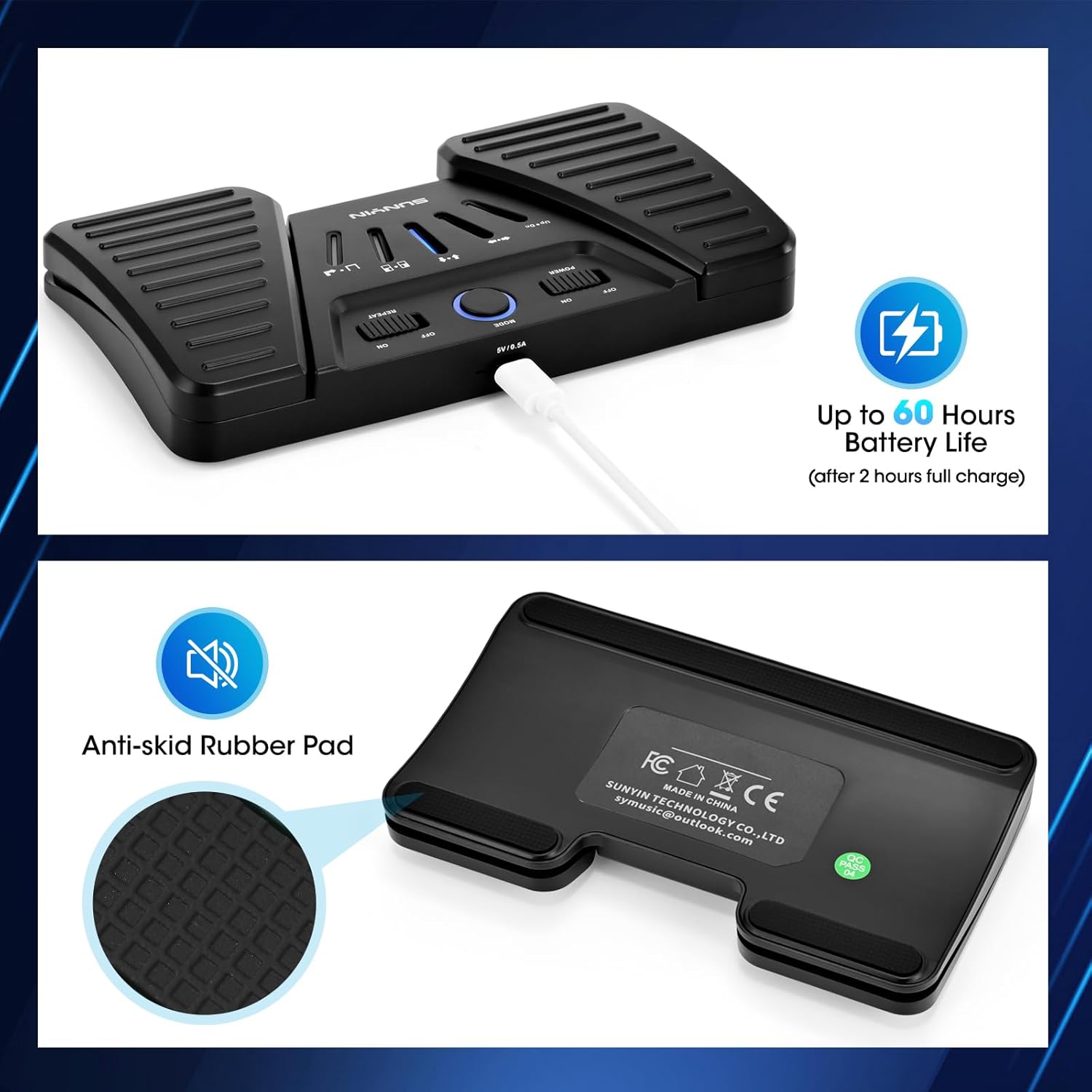
The image displays the SUNYIN SP03 pedal with its charging port and LED battery indicators (Green for 60-100%, Blue for 30-60%, Red for less than 30% battery). A USB cable is shown connected to the charging port.
Bluetooth Pairing
- Ensure the pedal is charged.
- Turn on the pedal by sliding the "POWER" switch to "ON".
- On your device (phone, tablet, computer), enable Bluetooth.
- Search for available Bluetooth devices. The pedal will appear as "SP-1/2/3S" (depending on color variant).
- Select the pedal from the list to pair. Once paired, the connection will be stable.

This image illustrates the Bluetooth connectivity of the SUNYIN SP03 pedal, showing it wirelessly connected to a smartphone, an iPad, and a laptop (Mac/PC), highlighting its broad compatibility.
Operating Instructions
The SUNYIN SP03 pedal features a minimalist function panel with a mode switch and repeat switch. The mode indicator lights show the currently selected function.

A close-up view of the SUNYIN SP03 pedal's control panel, highlighting the "POWER" switch, "MODE" button, and "REPEAT" switch, along with the mode indicator lights.
Mode Selection
Press the "MODE" button to cycle through the five available control modes. The corresponding indicator light will illuminate to show the active mode:
- Page Up & Down: For turning pages forward and backward (e.g., music scores, e-books).
- Indicator Left & Right: For navigating horizontally.
- Indicator Up & Down: For navigating vertically.
- Mouse-clicking Left/Right: Simulates mouse clicks.
- Keyboard Space-bar/Enter: Simulates spacebar or enter key presses.
Repeat Function
Slide the "REPEAT" switch to "ON" to enable continuous page turning or scrolling when a pedal is held down. This is useful for quickly navigating long documents or music sheets.
Using the Pedals
Once a mode is selected, press the left or right pedal to activate the corresponding function. For example, in "Page Up & Down" mode, the right pedal typically advances the page, and the left pedal goes back a page.
This video demonstrates the various operating modes of the SUNYIN SP03 Wireless Page Turner Pedal, including page up/down, left/right arrow, and up/down arrow functions, showcasing its versatility in controlling digital content.
Maintenance
- Cleaning: Wipe the pedal with a soft, dry cloth. Do not use abrasive cleaners or immerse in water.
- Storage: Store the pedal in a cool, dry place away from direct sunlight and extreme temperatures.
- Battery Care: To prolong battery life, avoid fully discharging the battery frequently. Charge the device regularly, even if not in constant use.
- Placement: The pedal features anti-slip rubber pads on the bottom. For optimal stability, avoid using it on soft carpets.

This image highlights the anti-skid rubber pads located on the bottom of the SUNYIN SP03 pedal, designed to provide stability and prevent movement during use.
Troubleshooting
| Problem | Possible Cause | Solution |
|---|---|---|
| Pedal does not turn on. | Battery is low or dead. | Charge the pedal fully using the provided USB cable. |
| Cannot pair with device. | Bluetooth is off on device; pedal is too far; interference; already paired. | Ensure Bluetooth is enabled on your device. Move pedal closer to device. Turn off other Bluetooth devices. Unpair and re-pair if previously connected. |
| Pedal not responding in application. | Incorrect mode selected; application not compatible; application settings. | Cycle through modes to find the correct one for your application. Check if your application supports external keyboard/foot pedal input. Adjust application settings if necessary. |
| Battery drains quickly. | Frequent use; aging battery; left on when not in use. | Ensure the pedal is turned off when not in use. Charge regularly. If battery life significantly degrades, contact support. |
Specifications
- Model Name: SP03
- Brand: SUNYIN
- Connectivity Technology: Bluetooth
- Power Source: Battery Powered (1 Lithium Polymer battery, included)
- Battery Life: Up to 60 hours (continuous use)
- Charging Time: Approximately 2 hours
- Product Dimensions: 3.5 x 9 x 1 inches (approx. 8.9 x 22.9 x 2.5 cm)
- Item Weight: 9.6 ounces (approx. 272 grams)
- Color: Black
- Number of Keys: 2
- Supported Software: [Any] (Compatible with most apps supporting external keyboard/foot pedal input)
- Country of Origin: China
Warranty and Support
For warranty information and technical support, please contact SUNYIN customer service. You can typically find contact details on the product packaging or the official SUNYIN website.
Email: symusic@outlook.com
Please retain your proof of purchase for warranty claims.
Ask a question about this manual
Ask about setup, troubleshooting, compatibility, parts, safety, or missing instructions. Manuals+ will review the question and use this page’s manual context to help answer it.