
1. Introduction
The Bitmini Lucky Miner LV06 is a compact and portable cryptocurrency mining machine designed for personal and home use. It integrates a 5nm ASIC chip and advanced technology to ensure efficient and stable operation. The LV06 supports the SHA-256 algorithm, allowing it to mine various cryptocurrencies including BTC, BCH, BSV, and DGB. Its Wi-Fi connectivity and plug-and-play design offer ease of use and flexibility.
2. Safety Information
Please read and understand all safety instructions before operating the device. Failure to follow these instructions may result in electric shock, fire, or damage to the product.
- Power Supply: Use only the provided power adapter and cable. Ensure the power source matches the specified voltage (100-240V AC).
- Ventilation: Ensure adequate airflow around the miner. Do not block ventilation openings. Operate in a well-ventilated area to prevent overheating.
- Environment: Avoid exposing the device to moisture, dust, or extreme temperatures. Keep away from flammable materials.
- Handling: Do not attempt to open or repair the device yourself. Refer all servicing to qualified personnel.
- Firmware: Do not update the firmware without consulting customer service. Incorrect firmware updates can render the device inoperable.
3. Package Contents
Verify that all items are present in the package:
- Bitmini Lucky Miner LV06 Unit
- Power Adapter
- AC Power Cord

Image 3.1: The Lucky Miner LV06 unit shown alongside its power adapter and AC power cord, illustrating the complete package contents.
4. Product Overview
The Lucky Miner LV06 features a compact design with essential components for operation and monitoring.

Image 4.1: An angled view of the Bitmini Lucky Miner LV06, highlighting its compact form factor, front ventilation grille, and small display screen.

Image 4.2: A top-down view of the Bitmini Lucky Miner LV06, showing the display screen, the 'LV06' model designation, and the Bitcoin logo over the main fan grille.
4.1 Key Components
- Display Screen: A small screen on the top surface provides real-time status updates.
- Ventilation Grilles: Located on the front and sides to ensure proper cooling.
- DC Power Input: Located at the rear for connecting the power adapter.
- Status Indicators: (If present, typically small LEDs) Indicate power, network, or mining status.
5. Setup
Follow these steps to set up your Bitmini Lucky Miner LV06.
5.1 Power Connection
- Connect the DC output plug of the power adapter to the DC power input port on the rear of the LV06 miner.
- Connect the AC power cord to the power adapter.
- Plug the AC power cord into a standard 100-240V AC electrical outlet.
- The device will power on automatically.
5.2 Network Connection (Wi-Fi)
The LV06 miner is designed for easy Wi-Fi configuration. It is compatible with computers and smartphones for initial setup and monitoring.
- Upon first power-on, the miner will broadcast a Wi-Fi hotspot or attempt to connect to a pre-configured network.
- Using a computer or smartphone, search for available Wi-Fi networks and connect to the miner's hotspot (SSID typically starts with 'LV06' or 'Bitmini').
- Open a web browser and navigate to the miner's default IP address (refer to the device's display or packaging for the specific IP, e.g., 192.168.X.X).
- Log in using the default credentials (refer to the device's documentation for username and password).
- In the web interface, navigate to the network settings and select your home Wi-Fi network. Enter the password and save the settings.
- The miner will restart and connect to your home Wi-Fi network. You can then access its web interface via its new IP address on your local network.
6. Operation
Once connected to your network, you can configure and start mining.
6.1 Initial Configuration and Pool Settings
- Access the miner's web interface via your computer or smartphone.
- Navigate to the 'Miner Settings' or 'Pool Configuration' section.
- Enter the details for your chosen mining pool, including the pool URL, worker name, and password. The LV06 supports various SHA-256 cryptocurrencies such as BTC, BCH, BSV, and DGB.
- Select your preferred mining mode (SOLO, PPLNS, PPS, PROP) if applicable and supported by your pool.
- Save the settings. The miner will automatically begin mining.
6.2 Monitoring
You can monitor the miner's performance through its web interface. Key metrics include:
- Hash Rate: Displays the current mining speed.
- Temperature: Shows the operating temperature of the ASIC chip.
- Fan Speed: Indicates the speed of the cooling fan.
- Accepted Shares: Number of valid shares submitted to the mining pool.
7. Maintenance
Regular maintenance ensures optimal performance and longevity of your miner.
7.1 Cleaning
- Periodically clean the exterior of the miner and the ventilation grilles using a soft, dry cloth.
- Use compressed air to gently clear dust from the fan and internal components, ensuring the device is powered off and unplugged before cleaning.
- Do not use liquid cleaners or solvents.
7.2 Ventilation
Ensure the miner is placed in an area with unobstructed airflow. Avoid stacking multiple devices directly on top of each other without proper spacing.
7.3 Firmware Updates
WARNING: Do not update the firmware without explicit instructions and files from Bitmini customer service. Unauthorized or incorrect firmware updates can permanently damage the device and void your warranty.
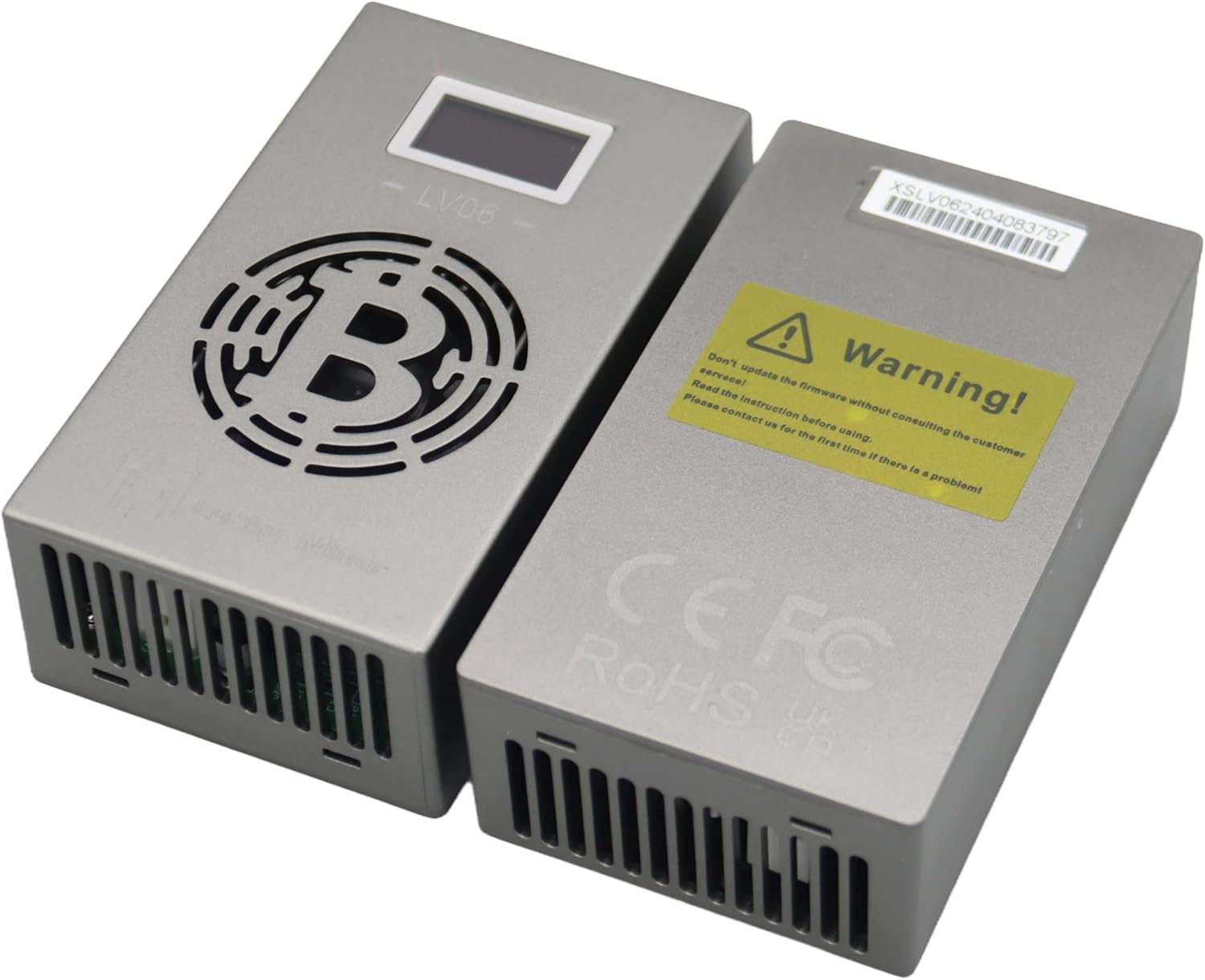
Image 7.1: Two Lucky Miner LV06 units, one displaying a prominent warning sticker regarding firmware updates and the importance of consulting customer service before proceeding.
8. Troubleshooting
If you encounter issues, refer to the following common problems and solutions:
- Miner does not power on:
- Check if the power adapter and AC cord are securely connected to the miner and the power outlet.
- Verify the power outlet is functional.
- No Wi-Fi connection:
- Ensure the Wi-Fi password entered is correct.
- Check if the miner is within range of your Wi-Fi router.
- Restart the miner and your Wi-Fi router.
- Low or zero hash rate:
- Verify your mining pool settings (URL, worker name, password) are correct.
- Check your internet connection stability.
- Ensure the mining pool is operational.
- Overheating:
- Ensure ventilation grilles are not blocked.
- Operate the miner in a cooler environment.
- Clean any dust accumulation from the fan and grilles.
For persistent issues, contact Bitmini customer support.
9. Specifications
| Feature | Specification |
|---|---|
| Model Name | LV06 |
| Product Dimensions (L x W x H) | 4.13 x 2.36 x 1.3 inches (10.5 x 6 x 3.3 cm) |
| Manufacturer | Bitmini |
| Algorithm | SHA-256 |
| Supported Cryptocurrencies | BTC, BCH, BSV, DGB, and others (up to 42 types) |
| ASIC Chip | BM1366 (5nm) |
| Output Wattage | 13 Watts |
| Cooling Method | Air Cooling |
| Connectivity | Wi-Fi |
| Power Supply Design | Semi-Modular |
| Compatible Devices (for monitoring/configuration) | Computers, Smartphones |
10. Warranty and Support
For warranty information, technical support, or service inquiries, please contact Bitmini customer service through the official channels provided at the point of purchase or on the manufacturer's website. Keep your proof of purchase for warranty claims.