
1. Introduction
This manual provides essential instructions for the setup, operation, maintenance, and troubleshooting of your MGI Zip Navigator Remote Controlled Golf Cart. Please read this manual thoroughly before using the product to ensure safe and efficient operation. The MGI Zip Navigator is designed to enhance your golfing experience by providing effortless transportation of your golf clubs across various terrains.
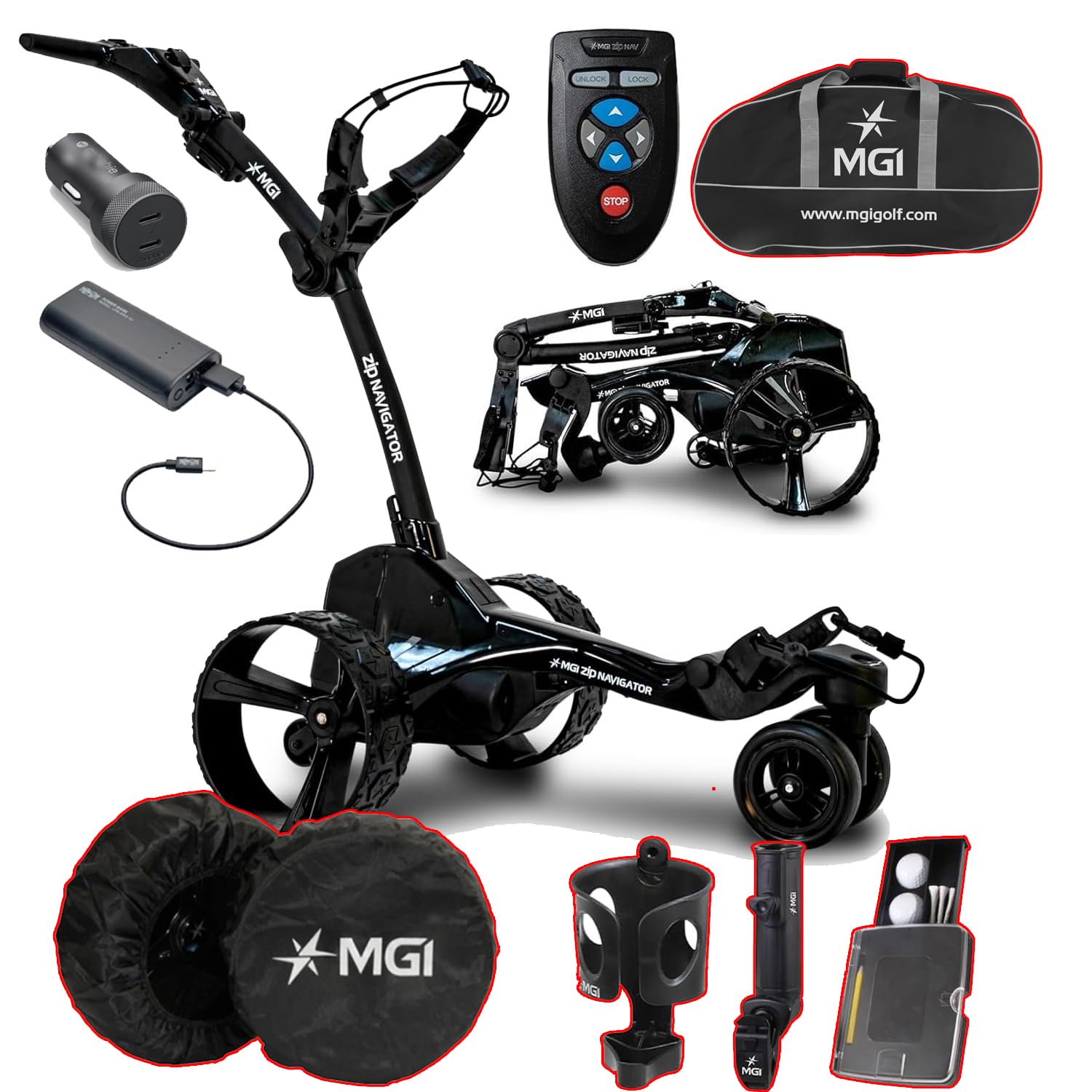
This image displays the MGI Zip Navigator golf cart in its operational state, alongside its remote control, battery pack, charging cable, travel bag, wheel covers, cup holder, umbrella holder, and a golf ball/tee holder.
2. What's in the Box
Verify that all components are present upon unpacking:
- MGI Zip Navigator Golf Cart Frame
- Remote Control
- Zip High Performance Lithium 36 Hole Battery
- Battery Charger
- USB Charging Port (integrated into handle)
- Travel Cover (for Power Bundle & Travel Cover variant)
- Wheel Covers
- Cup Holder
- Umbrella Holder
- Golf Ball and Tee Holder
- User Manual (this document)
3. Setup
3.1 Unpacking
Carefully remove all components from the packaging. Retain the packaging for future storage or transport if needed.
3.2 Assembly (Zip Fold Technology)
The MGI Zip Navigator features an innovative Zip Fold system for quick setup and compact storage. To unfold the cart:
- Place the folded cart on a flat surface.
- Release the main latch mechanism.
- Gently extend the frame until it locks into its operational position.
- Ensure all locking mechanisms are securely engaged before use.
- The rear wheels can be inverted on the axle to reduce the footprint when not in use.
The MGI Zip Navigator golf cart is shown in its folded position, highlighting its compact design for easy transport and storage. The rear wheels can be inverted to further reduce its footprint.
3.3 Battery Installation and Charging
The MGI Zip Navigator uses a 'Click & Go' Lithium Battery System.
- Charging: Connect the battery charger to a power outlet and then to the battery's color-coded charge port (Red & Black). The charger indicator will show Red when charging and Green when fully charged.
- Installation: Once charged, align the battery with the vertical slot on the cart and click it into place. Ensure it is securely seated.
- Removal: Use the easy-to-access lifting handle to remove the battery when needed.
The image shows the compact lithium battery pack and its charging cable, demonstrating the 'Click & Go' system for easy installation and removal.
4. Operating Instructions
4.1 Remote Control Operation
The MGI Zip Navigator is controlled via a full-directional remote. Familiarize yourself with the buttons:
- Directional Arrows: Use these to move the cart forward, backward, left, and right.
- UNLOCK: Activates the remote control.
- LOCK: Deactivates the remote control to prevent accidental movement.
- STOP: Immediately halts the cart's movement.
The remote control features directional arrows for forward, backward, left, and right movement, along with 'UNLOCK', 'LOCK', and 'STOP' buttons for precise control of the golf cart.
4.2 Digital Display and Settings
The cart features an advanced digital display:
- Variable Speed Control: Adjust speed from 1 to 20.
- Battery Level Indicator: Four color-coded levels show the remaining charge.
- Distance Modes: Two resettable distances (A & B) in yards or meters, and a total odometer in miles or kilometers.
- USB Charging Port: Located underneath the top handle for charging remote control or mobile devices.
4.3 Navigating Terrain
The MGI Zip Navigator is designed for various course conditions:
- Automatic Downhill Speed: This feature automatically adjusts the cart's speed when descending slopes, maintaining control.
- Patented Gyroscope: Automatically tracks the cart on a straight course, even on uneven ground, allowing you to walk freely.
- Twin 230 Watt Motors: Provide reliable power and agility for smooth movement.
4.4 Adjusting the Cart
Customize the cart for your comfort:
- Adjustable Ergonomic T-Bar Top Handle: Features a premium soft rubber grip for comfortable handling.
- Adjustable Independent Top Bag Support: Ensures a secure and customized fit for various golf bag sizes.
5. Maintenance
5.1 Cleaning
Regular cleaning helps maintain your cart's performance and appearance:
- Wipe down the frame and wheels with a damp cloth after each use to remove dirt and debris.
- Avoid using harsh chemicals or abrasive cleaners.
- Ensure all electrical components are dry before storage.
5.2 Battery Care
Proper battery care extends its lifespan:
- Always fully charge the battery after each use, even if only partially discharged.
- Store the battery in a cool, dry place.
- If storing for extended periods, charge the battery every 1-2 months to prevent deep discharge.
5.3 Storage
When not in use, store your MGI Zip Navigator properly:
- Fold the cart using the Zip Fold Technology to its most compact size.
- Consider inverting the rear wheels for additional space saving.
- Store in a dry, protected area away from extreme temperatures.
- Use the provided travel cover for protection during transport or storage.
Various accessories are displayed, including protective wheel covers, a cup holder, an umbrella holder, and a compact holder for golf balls and tees, all designed to enhance the user experience.
6. Troubleshooting
If you encounter issues with your MGI Zip Navigator, refer to the following common problems and solutions:
| Problem | Possible Cause | Solution |
|---|---|---|
| Cart does not power on. | Battery not installed correctly or discharged. | Ensure battery is fully charged and securely clicked into place. |
| Remote control not responding. | Remote battery low or not paired. | Charge the remote control via the cart's USB port. Refer to pairing instructions in the full manual (if applicable). Ensure remote is 'UNLOCKED'. |
| Cart veers off course. | Gyroscope calibration needed or uneven terrain. | The patented gyroscope should correct this automatically. If persistent, ensure the cart is on level ground when starting. |
| Cart struggles on inclines. | Battery charge low. | Ensure battery is fully charged before use. |
For issues not listed here, please contact MGI customer support.
7. Specifications
| Feature | Specification |
|---|---|
| Display Size | 2.5 Inches |
| Warranty | 3 Year Manufacturer |
| Human Interface Input | Touchscreen (on cart display), Remote Control |
| Connectivity Technology | Bluetooth |
| Motors | Twin 230 Watt Motors |
| Folded Dimensions (Inverted Rear Wheels) | 27.55 X 18.5 x 16.5 Inches |
| Weight (No Battery) | 28.6 LBS |
| Weight (With Battery) | 34.96 LBS |
| Battery Type | Lithium (36 Hole Extended) |
8. Warranty and Support
Your MGI Zip Navigator Golf Cart comes with a 3-Year Manufacturer Warranty. This warranty covers defects in materials and workmanship under normal use. Please retain your proof of purchase for warranty claims.
For technical support, warranty claims, or to purchase replacement parts, please visit the official MGI website or contact their customer service department. You can find more information and products at the MGI Store on Amazon.


