1. Introduction
Thank you for purchasing the Philips DLP2558CW 4900mAh Mobile Battery. This manual provides essential information for the safe and efficient use of your device. Please read it thoroughly before use and retain it for future reference.

Image 1.1: The Philips DLP2558CW Mobile Battery, showcasing its compact design and integrated foldable USB-C connector.
2. Safety Information
To ensure safe operation and prevent damage, please observe the following precautions:
- Do not expose the device to extreme temperatures, direct sunlight, or high humidity.
- Avoid dropping, impacting, or disassembling the device.
- Keep out of reach of children.
- Use only compatible charging cables and adapters.
- If the device shows signs of swelling, leakage, or unusual heat, discontinue use immediately.
- Dispose of the battery according to local regulations.
This product is PSE certified, indicating compliance with Japanese electrical appliance safety standards.
3. Package Contents
Verify that all items are present in the package:
- Philips DLP2558CW Mobile Battery x 1
- USB-C to USB-C Charging Cable x 1
- Instruction Manual x 1
4. Product Overview
The Philips DLP2558CW is a compact and versatile mobile battery designed for on-the-go charging. It features multiple charging options and a digital display.

Image 4.1: Key features of the mobile battery, highlighting its portability and charging capabilities.

Image 4.2: The integrated Type-C cable can be used for charging or as a convenient carrying strap.
Key Components:
- Foldable USB-C Connector: For direct plug-in charging of compatible devices (e.g., iPhone 15/16 series).
- Built-in Retractable Type-C Cable: Functions as both an input and output cable, supporting PD & QC3.0 fast charging.
- USB-C Port: Additional input/output port for charging devices or recharging the power bank.
- LED Digital Display: Shows battery percentage and fast charging status.
- Power Button: Activates the display and initiates charging.
5. Setup
Initial Charging of the Power Bank:
Before first use, fully charge the mobile battery. Connect the included USB-C cable to the power bank's USB-C port and a compatible USB wall adapter (not included). Alternatively, use the built-in Type-C cable to connect to an adapter.
Case Compatibility:
The foldable USB-C connector has a length of 5mm. To ensure proper connection and avoid interference with charging, please ensure your smartphone case thickness does not exceed 5mm.

Image 5.1: Illustration of the USB-C connector length and its interaction with phone cases.
6. Operating Instructions
Charging Your Device:
The power bank offers three methods to charge your devices:
- Direct Plug-in (Foldable USB-C Connector): Extend the foldable USB-C connector and plug it directly into your compatible device (e.g., iPhone 15/16 series). Charging will begin automatically.
- Using the Built-in Type-C Cable: Pull out the retractable Type-C cable and connect it to your device's Type-C port.
- Using the USB-C Port: Connect your device to the power bank's USB-C port using a separate USB-C to USB-C cable (if your device requires it).

Image 6.1: Direct charging using the integrated foldable USB-C connector.
Charging the Power Bank:
You can recharge the power bank using two methods:
- Via USB-C Port: Connect the included USB-C cable to the power bank's USB-C port and a USB wall adapter.
- Via Built-in Type-C Cable: Use the built-in Type-C cable to connect the power bank to a USB wall adapter.

Image 6.2: Two methods for recharging the power bank itself.
Pass-through Charging:
The power bank supports pass-through charging, allowing you to charge both your device and the power bank simultaneously. Connect the power bank to a wall adapter, then connect your device to the power bank. The power bank will charge your device while also recharging itself.

Image 6.3: Pass-through charging in action, charging both the power bank and a connected smartphone.
Simultaneous Charging (Up to 3 Devices):
The power bank can charge up to three devices concurrently using its various output options:
- Foldable USB-C Connector
- Built-in Type-C Cable
- USB-C Port

Image 6.4: Charging three devices at once, showcasing the versatility of the power bank.
7. LED Display Guide
The integrated LED digital display provides real-time information about the power bank's status.
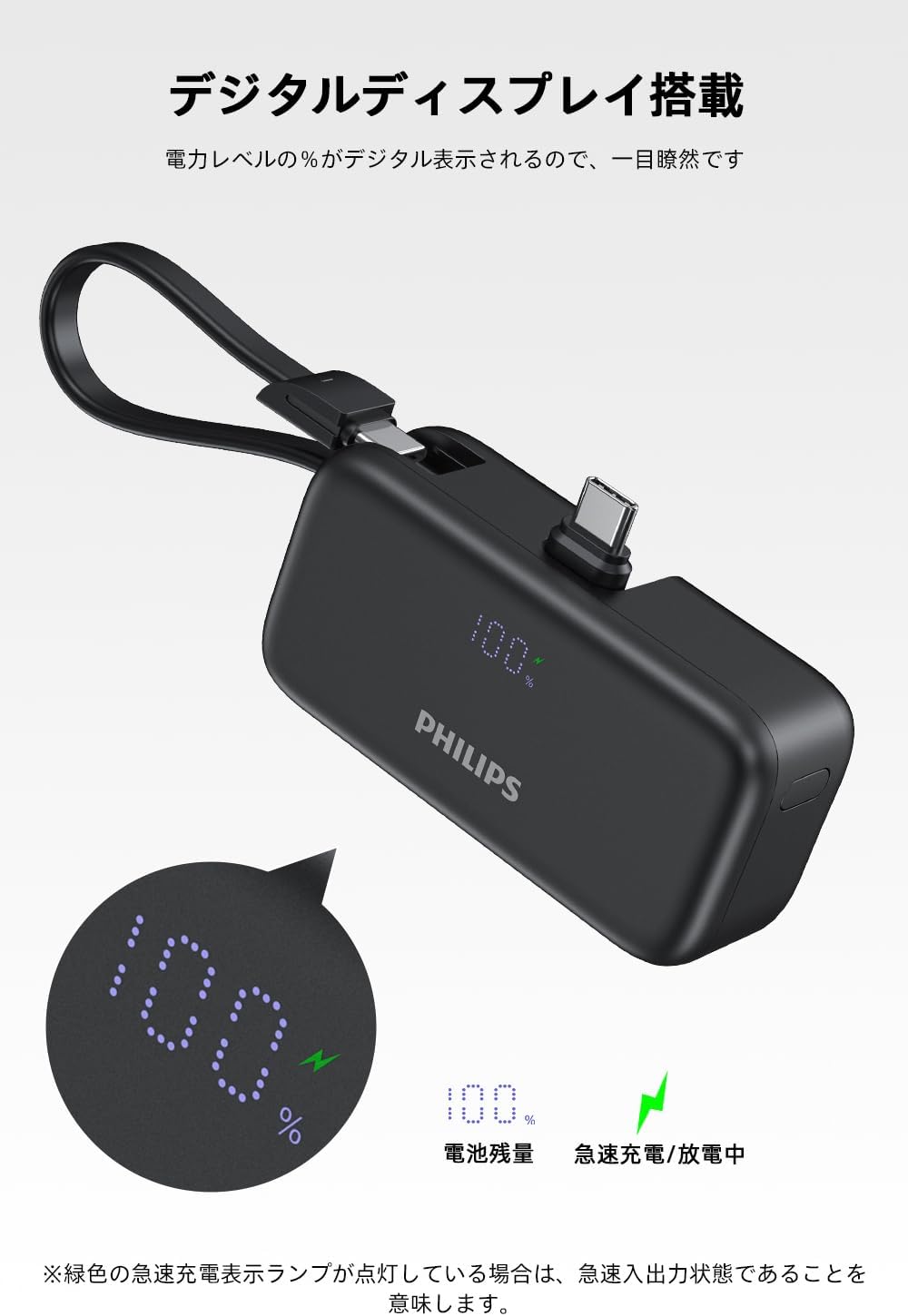
Image 7.1: The LED display indicating full charge and fast charging status.
- Battery Percentage: Displays the current charge level of the power bank from 0-100%.
- Fast Charging Indicator: A green lightning bolt icon illuminates when the power bank is in a fast input or output charging state.
Press the power button briefly to activate the display and check the battery level.
8. Maintenance
Proper maintenance ensures the longevity and performance of your mobile battery:
- Cleaning: Wipe the device with a soft, dry cloth. Do not use harsh chemicals or abrasive cleaners.
- Storage: Store the power bank in a cool, dry place away from direct sunlight and extreme temperatures. For long-term storage, it is recommended to keep the battery charged to around 50-70%.
- Battery Health: To maintain battery health, avoid fully discharging the power bank frequently.
9. Troubleshooting
If you encounter issues with your Philips DLP2558CW, refer to the following common problems and solutions:
| Problem | Possible Cause | Solution |
|---|---|---|
| Device not charging from power bank. | Power bank is discharged; incorrect connection; device incompatibility; phone case interference. | Recharge the power bank. Ensure connectors are fully inserted. Check device compatibility. Remove phone case if it's thicker than 5mm. |
| Power bank not recharging. | Charging cable or adapter is faulty; incorrect connection. | Try a different USB-C cable and wall adapter. Ensure connections are secure. |
| Slow charging. | Non-fast charging cable/adapter; multiple devices charging simultaneously. | Use a PD/QC3.0 compatible cable and adapter. Disconnect other devices for faster charging of a single device. |
| LED display not working. | Power bank is completely discharged; display malfunction. | Charge the power bank. If the issue persists, contact customer support. |
10. Specifications
Detailed technical specifications for the Philips DLP2558CW Mobile Battery:
- Model Number: DLP2558CW
- Battery Capacity: 4900mAh
- Battery Type: Lithium Polymer
- Dimensions: 7.9 x 2.6 x 3.9 cm
- Weight: 110 g
- Input (USB-C Port / Built-in Type-C Cable): Max 19.98W (e.g., 5V/3A, 9V/2.22A, 12V/1.5A)
- Output (Foldable USB-C Connector / Built-in Type-C Cable / USB-C Port): Max 22.5W (e.g., 5V/3A, 9V/2.22A, 12V/1.5A)
- Special Features: Digital Display, Pocket Size, Built-in Cable, Lightweight, Fast Charging, Pass-through Function, Foldable USB-C Connector
- Safety Certifications: PSE Certified
- Color: Black
- Origin: China

Image 10.1: The power bank incorporates a 4-stage battery protection system for enhanced safety.
11. Warranty and Support
This Philips product comes with a one-year warranty from the date of purchase. All Philips products sold by our company are genuine. If you have any questions or require assistance, please do not hesitate to contact our customer support.
For further information or support, please visit the official Philips website or contact your retailer.


