
1. Introduction
The femometer Smart Ring Gen2 Ceramic is a sophisticated health and fertility tracker designed for continuous monitoring of various physiological parameters. This device provides insights into sleep patterns, heart rate, heart rate variability (HRV), blood oxygen levels, daily activity, and basal body temperature (BBT) for accurate cycle and ovulation tracking. Its ultra-thin, lightweight, and durable design ensures comfortable 24/7 wear.
2. What's in the Box
- Femometer Smart Ring
- Charger Case
- USB Cable
- Quick Start Guide
- Manual
3. Setup
3.1 Sizing Your Ring
To ensure accurate data collection and comfort, selecting the correct ring size is crucial. It is recommended to use a femometer Sizing Kit to determine your best fit before purchasing the Smart Ring.
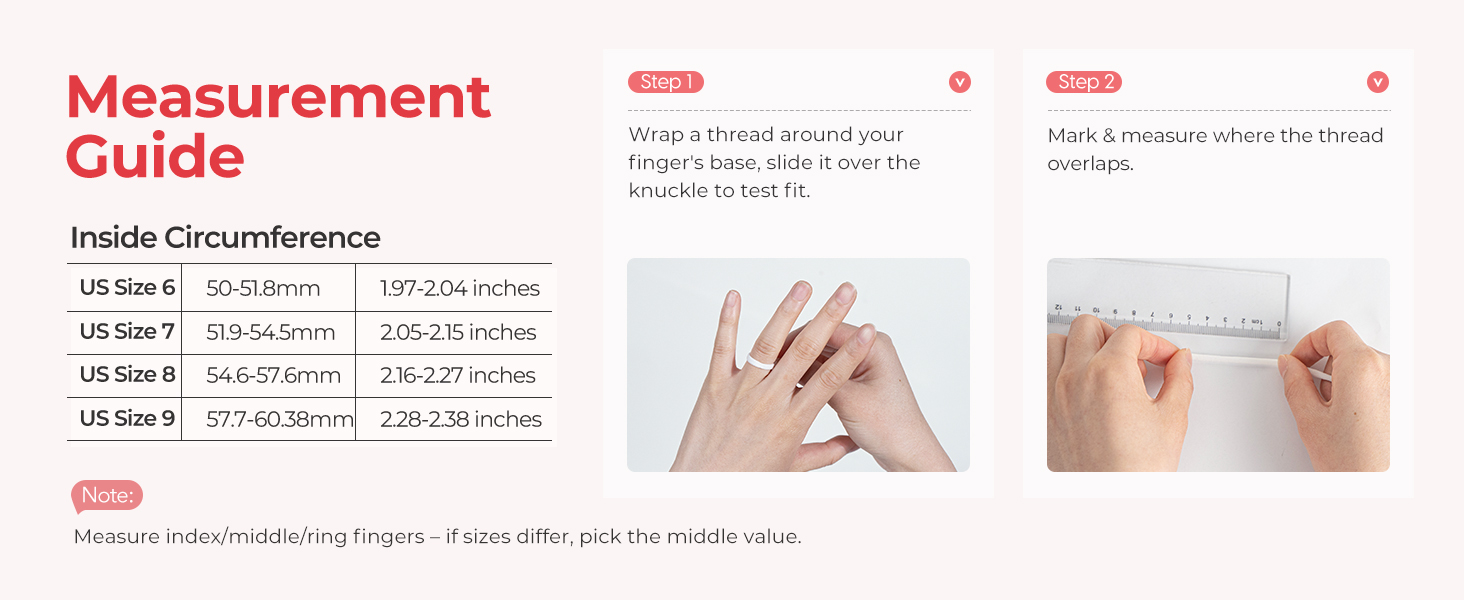
Measurement Guide: This image illustrates how to measure your finger circumference using a thread and ruler to find the correct ring size. The guide provides inside circumference measurements for US Sizes 6-9, with corresponding millimeter and inch ranges. It notes to measure index/middle/ring fingers and pick the middle value if sizes differ.
3.2 Initial Setup and App Pairing
After selecting your ring size, download the femometer app to your iOS or Android device. Follow the in-app prompts to connect and pair your Smart Ring Gen2. The app provides a lifetime free subscription for data access and analysis.

Size Before You Buy & Setup: This image outlines the three key steps for getting started: first, using a sizing kit; second, purchasing the correctly sized ring; and third, downloading the femometer app and pairing the device.
4. Operating Instructions
The femometer Smart Ring Gen2 continuously collects data throughout the day and night. Ensure the ring is worn correctly on your index, middle, or ring finger with the sensors on the underside for optimal contact.
Video: Femometer Smart Ring Gen2 for Women's All Health Tracking. This video demonstrates the ring's capabilities in monitoring sleep, stress, heart rate, and activity, showcasing its seamless integration into daily life.
4.1 Health Monitoring
The ring provides continuous heart rate monitoring and Heart Rate Variability (HRV) tracking, offering insights into your stress levels and overall health trends. It also tracks daily activity, including steps and calorie burn. All health data automatically syncs with the femometer app.

Health Monitoring: This image shows a woman engaged in physical activity while wearing the Smart Ring, emphasizing its 24/7 health companion feature.
4.2 Sleep Tracking
Gain professional sleep insights by tracking sleep stages (Deep, Light, REM) and blood oxygen levels during rest. The app provides detailed sleep scores and personalized recommendations to improve your sleep quality.

Real-Time Sleep Tracking: This image depicts a woman sleeping while wearing the Smart Ring, with an overlay showing detailed sleep data from the app, including in-bed time, time asleep, and sleep stage breakdown (Deep, Light, Awake, REM).
4.3 Advanced Cycle Tracking (BBT Technology)
The Smart Ring utilizes revolutionary Basal Body Temperature (BBT) technology, taking over 1,400 nightly temperature measurements. This provides highly accurate cycle predictions and ovulation detection, supporting women's health and fertility tracking.

A New Ovulation And Menstrual Tracking Experience: This image shows a woman interacting with the femometer app, which displays detailed cycle and BBT finger temperature curves, highlighting the ring's advanced tracking capabilities.
Video: femometer Smart Ring Gen2 for Health & Fertility Tracker. This video highlights the ring's features for comprehensive health and fertility tracking, including BBT technology for ovulation prediction.
4.4 Stress Insights
The continuous heart rate and HRV tracking provide valuable data for understanding your stress levels. The app interprets this data to help you find your best wellness plan.
4.5 Activity Tracking
Monitor your daily activity, including steps taken and calories burned, to stay informed about your physical exertion and progress towards your fitness goals.

Tracked Effortlessly: This image showcases the femometer app interface, displaying a comprehensive overview of tracked metrics such as BBT, cycle, sleep, stress, heart rate, blood oxygen, and calorie data, all collected by the Smart Ring.
5. Charging and Battery Life
The Smart Ring Gen2 offers up to 7 days of battery life on a single charge. The included portable charging case stores 5 full charges, extending the total usage time up to 35 days without needing to connect to a power outlet.

Less Charging, More Tracking: This image highlights the charging capabilities of the Smart Ring, detailing its 7-day battery life per charge, quick charging time (20-80 minutes for a full charge), and the charging case's ability to provide up to 35 days of total power.
6. Water Resistance
The femometer Smart Ring Gen2 is water-resistant up to 100 meters, making it suitable for 24/7 wear, including during showers, swimming, and other water-related activities.

Water Resistant up to 100m: This image demonstrates the ring's water resistance, showing a hand wearing the Smart Ring submerged in water, confirming its suitability for aquatic environments.
7. App Integration
The femometer Smart Ring Gen2 pairs seamlessly with the femometer app, available on iOS and Android. The app provides a user-friendly interface to view all your health data, track trends, and receive personalized insights. A lifetime subscription to the app is included with your purchase.

Lifetime Free APP Subscription: This image highlights the femometer app, showing its interface with health data and the availability on both Google Play and the App Store, emphasizing the complimentary lifetime subscription.
8. Maintenance
To ensure reliable performance and charging, regularly clean the Smart Ring's charging contacts. Gently wipe the contacts with a dry, soft cloth.

Quick Tip for Reliable Smart Ring Charging: This image provides a visual instruction on how to maintain the Smart Ring by gently wiping its charging contacts with a dry, soft cloth before charging.
9. Troubleshooting
9.1 Connectivity Issues
- Ensure Bluetooth is enabled on your smartphone.
- Make sure the ring is within range of your smartphone.
- Restart the femometer app and try reconnecting.
- If issues persist, try unpairing and re-pairing the ring in the app's settings.
9.2 Inaccurate Data Readings
- Verify the ring is worn correctly with the sensors making good contact with your skin.
- Ensure the ring is clean, especially the sensor area.
- Check for any physical damage to the ring.
- Ensure the app is updated to the latest version.
9.3 Battery Not Charging
- Clean the charging contacts on both the ring and the charging case.
- Ensure the USB cable and charger case are properly connected to a power source.
- Try a different USB cable or power adapter.
10. Specifications
| Feature | Specification |
|---|---|
| Brand | femometer |
| Model Number | Gen2 |
| Item Weight | 4 Grams (0.141 ounces) |
| Package Dimensions | 3.31 x 3.23 x 2.52 inches |
| Battery Type | Lithium Ion (2 C batteries included) |
| Battery Capacity | 21 Milliamp Hours |
| Connectivity Technology | Bluetooth |
| Wireless Communication Standard | Bluetooth |
| Operating System | Wear OS 3.0 (Compatible with iOS and Android) |
| Special Feature | Activity Tracker |
| Water Resistance | Up to 100m |
| Manufacturer | LOLLIPOP TECHNOLOGY (HANGZHOU) CO., LTD |
11. Warranty and Support
The femometer Smart Ring Gen2 includes a 1-year warranty. For any questions, technical assistance, or warranty claims, please contact our dedicated customer support team. Regular firmware updates are provided to ensure continuous improvement and optimal performance of your device.


