
1. Introduction
This manual provides detailed instructions for the safe and effective operation of your Retevis C2 GMRS Handheld Radio. Please read this manual thoroughly before using the device to ensure proper functionality and to prevent damage.
2. Safety Information
Observe the following safety precautions to reduce the risk of fire, electric shock, or personal injury:
- Do not operate the radio in explosive atmospheres (e.g., flammable gases, dust particles, metallic powders).
- Do not disassemble or modify the radio. Repairs should only be performed by authorized personnel.
- Use only Retevis-approved batteries and chargers.
- Avoid prolonged exposure to direct sunlight or extreme temperatures.
- Keep the radio away from water and moisture.
- Maintain a safe distance from medical devices like pacemakers when operating the radio.
3. Package Contents
Verify that all items are present in your package:
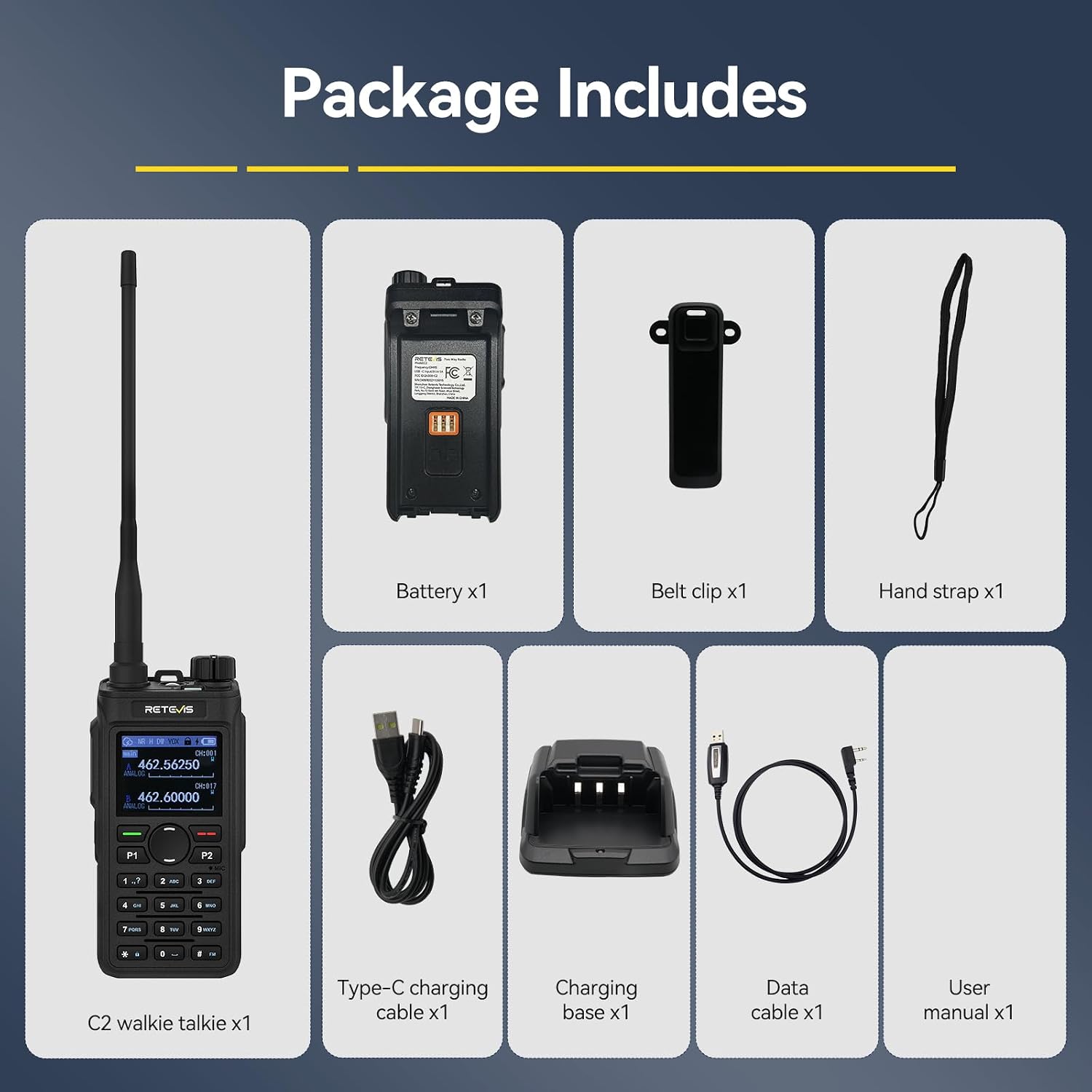
- Retevis C2 Walkie Talkie x1
- Battery x1 (2000mAh)
- Original Antenna x1
- Belt Clip x1
- Hand Strap x1
- Type-C Charging Cable x1
- Charging Base x1
- Data Cable x1
- User Manual x1
4. Product Overview
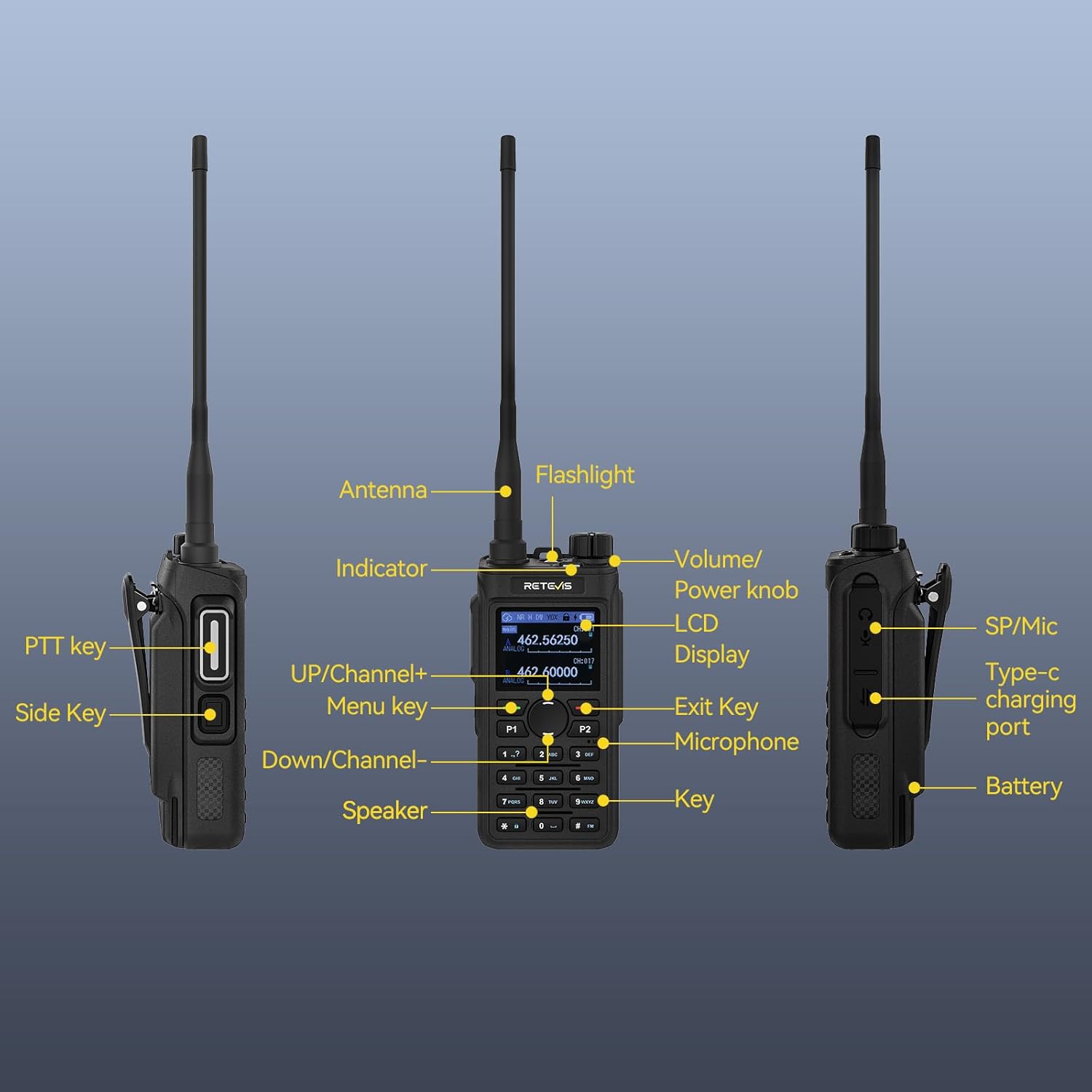
4.1 Radio Components

- Antenna: For transmitting and receiving signals.
- Indicator: LED light for status indications.
- Flashlight: Integrated LED light for illumination.
- Volume/Power Knob: Controls power on/off and audio volume.
- LCD Display: 1.77-inch color screen showing channel, frequency, battery status, and other information.
- PTT Key (Push-to-Talk): Press to transmit, release to receive.
- Side Key: Customizable function button.
- UP/Channel+ Key: Navigates menus or increases channel/frequency.
- Menu Key: Accesses the radio's menu system.
- Down/Channel- Key: Navigates menus or decreases channel/frequency.
- Speaker: Audio output.
- Microphone: Audio input for transmission.
- Exit Key: Exits menu or cancels operations.
- P1/P2 Keys: Customizable function buttons.
- Keypad: For direct frequency input and menu navigation.
- SP/Mic Port: For connecting external speaker/microphone accessories.
- Type-C Charging Port: For direct charging.
- Battery: Rechargeable power source.
4.2 Key Features
- Long Range Communication: High power output and long antenna for extended coverage, repeater capable.
- Customizable Settings: Editable menu keys and programmable P1/P2/side keys via data cable.
- AI Noise Reduction: Filters ambient noise for clear communication in loud environments.
- Extended Battery Life: 2000mAh battery provides up to 17 hours of continuous use.
- Multiple Charging Options: Supports Type-C direct charging and desktop charging.
- NOAA Weather Channels: Access to 11 NOAA channels for weather alerts.
- FM Radio Function: For entertainment and additional information.
- Durable Construction: Made from PC and ABS materials for impact resistance.
- Emergency Features: Remote and local alarm functions, built-in LED flashlight.
- Group Call: One-touch function to communicate with all team members simultaneously.
- FCC Certified: FCC ID: 2ASNS-C2.
5. Setup
5.1 Battery Installation
- Align the battery with the battery compartment on the back of the radio.
- Press the battery firmly into place until it clicks, ensuring it is securely latched.
5.2 Antenna Attachment
- Screw the antenna clockwise into the connector on the top of the radio until it is finger-tight. Do not overtighten.
5.3 Charging the Battery
Before first use, fully charge the battery. The radio supports two charging methods:
- Using the Charging Base: Place the radio with the battery installed into the charging base. Connect the Type-C charging cable to the base and a power source.
- Direct Type-C Charging: Connect the Type-C charging cable directly to the Type-C port on the side of the radio and a power source.
The charging indicator will show the charging status. A full charge typically takes several hours.

6. Operating Instructions
6.1 Power On/Off and Volume Adjustment
- Power On: Rotate the Volume/Power knob clockwise until you hear a click. The display will light up.
- Power Off: Rotate the Volume/Power knob counter-clockwise until you hear a click.
- Volume Adjustment: Rotate the Volume/Power knob clockwise to increase volume, counter-clockwise to decrease.
6.2 Channel Selection
Use the UP/Channel+ and Down/Channel- keys to navigate through available channels. You can also directly input a channel number using the keypad.
6.3 Transmitting and Receiving
- To transmit, press and hold the PTT (Push-to-Talk) button on the side of the radio. Speak clearly into the microphone.
- To receive, release the PTT button. The radio will automatically switch to receive mode.
6.4 Customizable Keys (P1, P2, Side Key)
The P1, P2, and Side keys can be programmed to quickly access frequently used functions. Refer to the menu settings for customization options. A data cable is required for advanced programming.
6.5 Dual Watch Function
The Dual Watch feature allows the radio to monitor two different channels simultaneously. When a signal is detected on either channel, the radio will switch to that channel. Activate this feature through the radio's menu.

6.6 NOAA Weather Radio
The Retevis C2 can receive 11 NOAA weather channels, providing real-time weather alerts and forecasts. This is crucial for outdoor activities. You can typically activate NOAA with a single press of a programmable P1 or P2 button.

6.7 FM Radio Function
Access the FM radio function through the menu to listen to broadcast radio stations. This feature provides additional entertainment and information during outdoor travel.
6.8 Noise Reduction
The integrated AI noise reduction chip helps filter out ambient noise, ensuring clearer voice communication, especially in noisy environments. This feature is automatically active.
6.9 Group Call
The one-touch group call function allows you to transmit to all members on the same channel simultaneously, enhancing team coordination.

6.10 Emergency Alarm
In emergency situations, activate the remote or local alarm function to alert others and seek assistance. This feature can be assigned to a programmable key.
6.11 Flashlight
The built-in LED flashlight provides illumination in dark environments. Activate it via a programmable key or through the menu.
6.12 Keyboard Lock
To prevent accidental key presses, activate the keyboard lock function. This can typically be done by pressing a specific key combination (e.g., '*' key).
6.13 VOX Function
VOX (Voice Operated Exchange) allows for hands-free transmission. When activated, the radio will transmit automatically when it detects your voice, eliminating the need to press the PTT button.
6.14 Frequency Copy / Easy Pairing
The frequency copy feature simplifies programming by allowing you to clone frequency configurations from one radio to another, facilitating easy pairing.
7. Maintenance
7.1 Cleaning
- Wipe the radio's surface with a soft, damp cloth. Do not use harsh chemicals or abrasive cleaners.
- Ensure the charging ports are free from dust and debris.
7.2 Battery Care
- Avoid fully discharging the battery regularly to prolong its lifespan.
- Store the battery in a cool, dry place when not in use for extended periods.
- If the battery is not used for a long time, charge it once every three months to maintain performance.
7.3 Storage
- Store the radio in a dry, dust-free environment.
- Remove the battery if storing the radio for an extended period.
8. Troubleshooting
| Problem | Possible Cause | Solution |
|---|---|---|
| Radio does not power on | Battery is low or not installed correctly | Charge the battery; ensure battery is securely installed. |
| Cannot transmit or receive | Incorrect channel/frequency; antenna not attached; out of range | Verify channel settings; attach antenna securely; move closer to other radios or a repeater. |
| Poor audio quality | Low signal strength; microphone/speaker obstructed; volume too low | Adjust volume; ensure clear path for signal; check for obstructions. |
| Battery drains quickly | Old battery; frequent transmission; high power setting | Replace old battery; reduce transmission time; use lower power setting if possible. |
| Keys are unresponsive | Keyboard lock is active | Deactivate keyboard lock (refer to section 6.12). |
9. Specifications
| Feature | Specification |
|---|---|
| Model Number | C2 |
| Brand | Retevis |
| Frequency Range | GMRS |
| Number of Channels | 30 |
| Talking Range Maximum | 7 Miles (actual range varies with terrain) |
| Battery Capacity | 2000mAh |
| Battery Life | Up to 17 hours (continuous use) |
| Standby Time | Up to 100 hours |
| Charging Type | USB-C, Desktop Charger |
| Display | 1.77-inch Color LCD |
| Water Resistance Level | Water Resistant |
| Special Features | NOAA Weather, Local/Remote Alarm, LED Flashlight, Repeater Capable, AI Noise Reduction, Dual Watch |
| FCC ID | 2ASNS-C2 |
| Item Weight | 1.3 pounds |
| Package Dimensions | 10.28 x 8.31 x 2.48 inches |
| Compatible Devices | Retevis Ailunce HA1G, RB26, RB26H, RB17A and other GMRS walkie-talkies with the same frequency |
10. Warranty & Support
10.1 Warranty Information
Specific warranty details are typically provided with your purchase documentation. Please retain your proof of purchase for warranty claims.
10.2 Customer Support
For any questions, technical assistance, or firmware updates, please contact Retevis customer support. You can typically reach them via the Amazon email system or through the official Retevis website.


