
1. Introduction
This manual provides detailed instructions for the assembly, operation, and maintenance of your Bellemave Twin XL Loft Bed with Desk. Please read all instructions carefully before beginning assembly and retain this manual for future reference.
1.1 Safety Information
For your safety and to prevent injuries, please adhere to the following guidelines:
- Ensure all parts are present and undamaged before assembly. Do not use if any parts are missing or broken.
- Follow assembly steps precisely. Do not overtighten screws or bolts.
- Regularly check all connections to ensure they remain tight.
- This loft bed is designed for use by individuals aged 5 years and older.
- The upper bunk is equipped with protective guardrails. Ensure they are properly installed and maintained to prevent falls.
- Do not allow jumping on the bed.
- Use only mattresses that comply with the recommended dimensions for a Twin XL bed.
- Keep small children away from the assembly area during installation.
- This product has passed the Children's Product Certificate (CPC) test, ensuring it meets safety standards.
2. Components List
Before assembly, verify that all components listed below are included in your package. If any parts are missing or damaged, please contact customer support.
- Metal Bed Frame Components (various beams, posts, and supports)
- Desk Surface
- Guardrails (for upper bunk)
- Bed Slats
- Ladders
- USB Charging Station (integrated into desk)
- LED Light Strip and Remote Control
- Assembly Hardware (screws, bolts, nuts, washers, Allen wrench)
- Instruction Manual
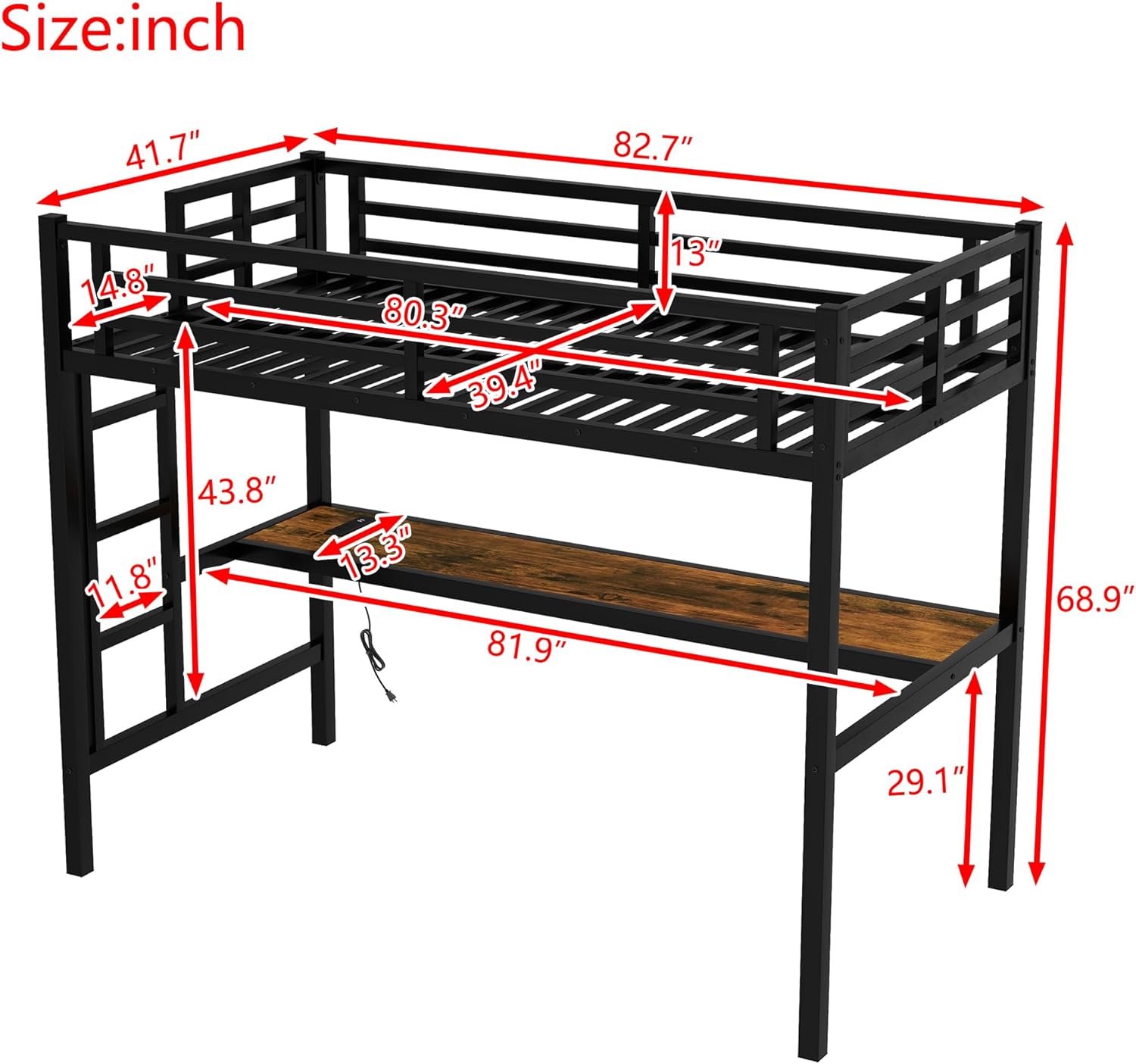
Figure 2.1: Product Dimensions and Key Components. This diagram illustrates the overall dimensions of the loft bed, including the height, length, and width, along with measurements for the desk and ladder.
3. Setup and Assembly
Assembly of the Bellemave Loft Bed is designed to be straightforward with clear, numbered instructions and all necessary tools included. It is recommended to assemble the bed with at least two adults.
- Unpack and Organize: Carefully unpack all components and lay them out on a clean, soft surface to prevent scratches. Identify each part by its corresponding number as shown in the parts list.
- Assemble the Main Frame: Begin by connecting the main vertical and horizontal metal beams according to the diagrams in the included manual. Secure connections loosely at first.
- Install the Desk: Attach the desk surface to the designated frame supports. Ensure the USB charging station cable is accessible for connection.
- Attach Ladders and Guardrails: Securely fasten the ladders to the bed frame. Install the protective guardrails around the perimeter of the upper bunk.
- Place Bed Slats: Lay the bed slats across the upper bunk frame, ensuring they are evenly spaced and securely fastened if required.
- Connect USB and LED: Plug in the USB charging station. Install the LED light strip in the designated area under the upper bunk and connect its power source.
- Final Tightening: Once all components are in place, systematically tighten all screws and bolts using the provided Allen wrench. Do not overtighten.
- Final Check: Verify that the bed is stable and all connections are secure before use.

Figure 3.1: Fully Assembled Loft Bed. This image displays the complete loft bed with the integrated desk, ready for use.

Figure 3.2: Desk Features. This image focuses on the desk area, showing the built-in USB charging port and the remote control for the LED lighting system.
4. Operating Instructions
4.1 USB Charging Station
The integrated USB charging station on the desk allows for convenient charging of electronic devices. Simply plug your device's USB cable into the available ports on the desk. Ensure the bed's power cable is connected to a wall outlet for the USB ports to function.
4.2 LED Lighting System
The DIY smart LED light strip provides customizable illumination for your desk area. Use the provided remote control to:
- Turn the lights On/Off.
- Adjust brightness levels.
- Change light colors and modes to create different ambiances.
Refer to the separate LED light strip manual (if provided) for detailed instructions on advanced features and customization.
5. Maintenance
Proper maintenance will extend the life and ensure the safety of your Bellemave Loft Bed.
- Cleaning: Wipe the metal frame and desk surface with a damp cloth. Avoid using harsh chemicals or abrasive cleaners, as they may damage the finish.
- Hardware Check: Periodically (e.g., every 3-6 months) inspect all bolts, screws, and connections to ensure they are tight. Retighten if necessary.
- Guardrails: Ensure guardrails are always securely attached and free from damage.
- Weight Capacity: Do not exceed the recommended weight capacity for the upper bunk.
6. Troubleshooting
If you encounter any issues with your loft bed, please refer to the following common solutions:
- Bed feels wobbly:
- Ensure all assembly hardware (bolts, screws) are fully tightened.
- Verify that the bed is placed on a flat, level surface.
- Check if any components are bent or damaged.
- USB ports not working:
- Confirm the bed's power cable is securely plugged into a functional wall outlet.
- Check the connection of the USB charging station to the bed's internal wiring.
- Try a different USB cable or device to rule out device-specific issues.
- LED lights not turning on/responding:
- Ensure the LED light strip is properly connected to its power source.
- Check the batteries in the remote control and replace if necessary.
- Verify that the remote control is pointed directly at the LED receiver.
- Missing or damaged parts:
- Refer to the "Components List" and contact customer support with the specific part number.
If the issue persists after attempting these solutions, please contact Bellemave customer support.
7. Specifications
| Feature | Detail |
|---|---|
| Brand | Bellemave |
| Model Number | FST00146-TX-AB1 |
| Size | Twin XL |
| Color | Black |
| Product Dimensions (L x W x H) | 82.7"L x 41.7"W x 68.9"H |
| Item Weight | 40 Pounds |
| Special Features | Desk, USB Charging Station, LED Lights |
| Included Components | Desk, Guardrails, Slat, Ladders |
| Finish Type | Lacquered |
| Furniture Finish | Black |
| Age Range (Description) | 5+ years |
| Product Care Instructions | Wipe with Damp Cloth |
| Form Factor | Loft Bed with Desk |
| UPC | 733805184766 |
8. Warranty and Support
For warranty information or technical support, please contact Bellemave customer service. Keep your purchase receipt and model number handy for faster service.
For further assistance, please visit the official Bellemave store or contact their customer support channels.