
1. Introduction
Thank you for choosing the HOMCOM Kids Height Adjustable Study Desk and Chair Set. This product is designed to provide a comfortable and functional learning environment for children aged 6-12 years. It features adjustable height for both the desk and chair, a tiltable tabletop, an integrated USB lamp with three color temperatures, and various storage solutions. Please read this manual carefully before assembly and use to ensure proper function and safety.

Image 1.1: HOMCOM Kids Desk and Chair Set in use.
2. Safety Information
No specific safety warnings are applicable beyond general product safety guidelines. Always ensure all components are securely fastened before use. Supervise young children during initial use and adjustments. Do not overload the desk or chair beyond their specified weight capacities.
3. Setup and Assembly
Assembly of the HOMCOM Kids Desk and Chair Set is required. Please follow the included instruction manual provided in the package for detailed step-by-step assembly. Ensure all parts are present before beginning assembly. Tools for assembly are typically included.
3.1. Component Identification
Before assembly, identify all components. Refer to the parts list in your package's instruction manual. Key components include:
- Desk frame and tabletop
- Chair frame and seat/backrest
- USB lamp
- Drawer, pen box, reading board, cup holder
- Fasteners and adjustment knobs
3.2. Initial Assembly Steps (General Guidance)
- Assemble the desk frame, ensuring all connections are secure.
- Attach the tabletop to the desk frame.
- Assemble the chair frame, seat, and backrest.
- Install the drawer, pen box, reading board, and cup holder as per the specific instructions.
- Attach the USB lamp to the designated slot on the desk.

Image 3.1: Overview of fully equipped components.
4. Operating Instructions
4.1. Height Adjustment for Desk and Chair
Both the desk and chair are height adjustable to accommodate children of different heights and promote good posture. To adjust the height:
- For the Desk: Locate the adjustment knobs or levers on the desk legs. Loosen them, then lift or lower the tabletop to the desired height. Securely tighten the knobs/levers to lock the desk in place. Height charts on the legs provide easy reference.
- For the Chair: Locate the adjustment mechanism on the chair legs. Loosen the fasteners, adjust the seat to the appropriate height, and then securely tighten the fasteners. If re-lowering from the highest position, you may need to briefly lift it to the highest adjustable position to release the mechanism before lowering.
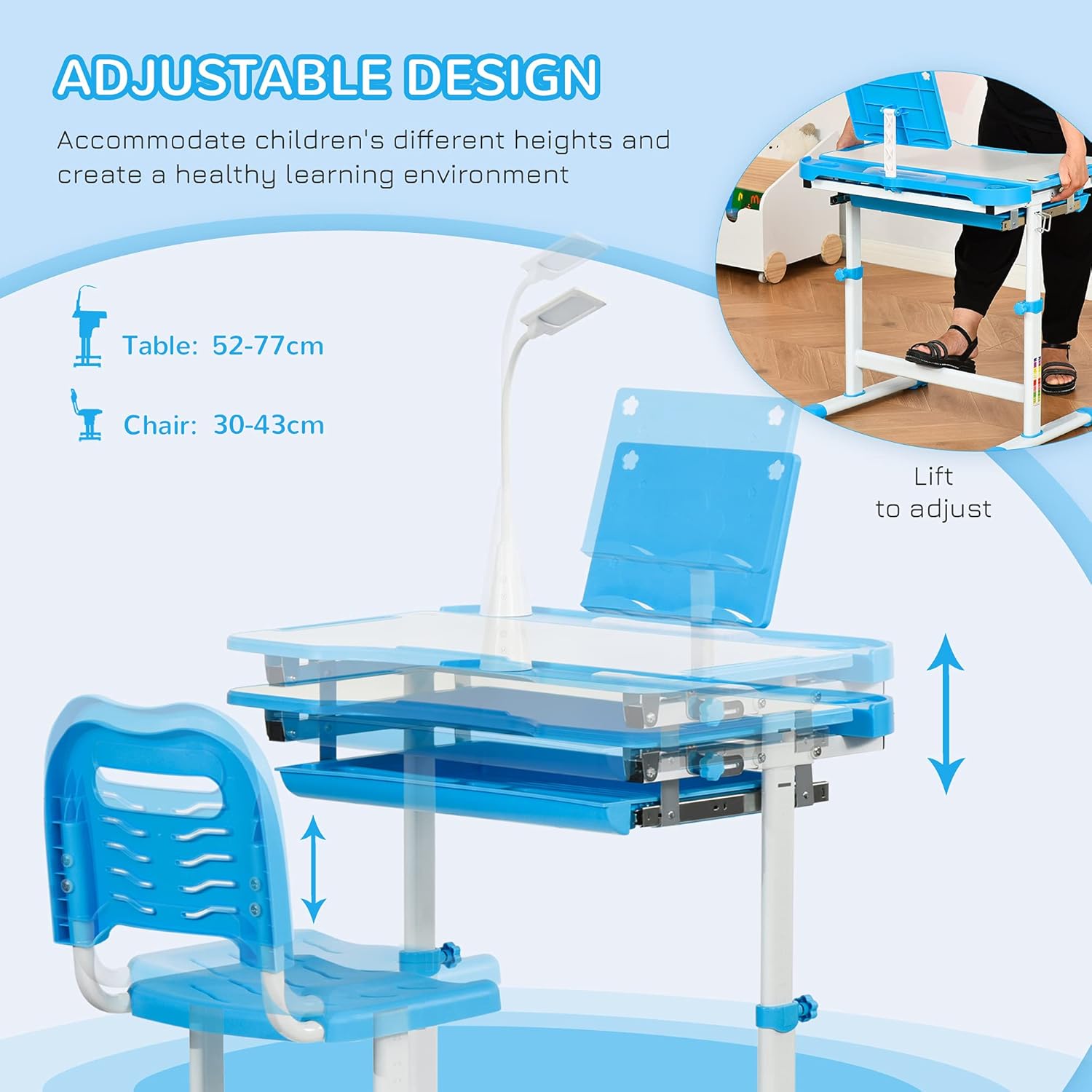
Image 4.1: Desk and chair height adjustment mechanism.

Image 4.2: Detail of chair height adjustment.
4.2. Tabletop Angle Adjustment
The tabletop can be tilted up to 45 degrees to provide an optimal angle for various activities, reducing strain on the neck and back. This feature is beneficial for writing, reading, and drawing.
- To Tilt: Locate the tilting mechanism beneath the tabletop. Release the lock, adjust the tabletop to the desired angle (0-10° for writing, 10-20° for reading, 20-45° for drawing), and then secure the lock.

Image 4.3: Tiltable desktop functionality.
4.3. USB Lamp Operation
The integrated USB lamp provides illumination with three adjustable color temperatures to suit different tasks and reduce eye strain.
- Power On/Off: Connect the USB lamp to a compatible 5V/1A USB power source. Press the power button on the lamp to turn it on or off.
- Change Color Temperature: Press the 'M' button on the lamp to cycle through the three color temperature modes: Natural Light (for daily learning/drawing), Cool Light (for writing), and Warm Light (for reading before bed).
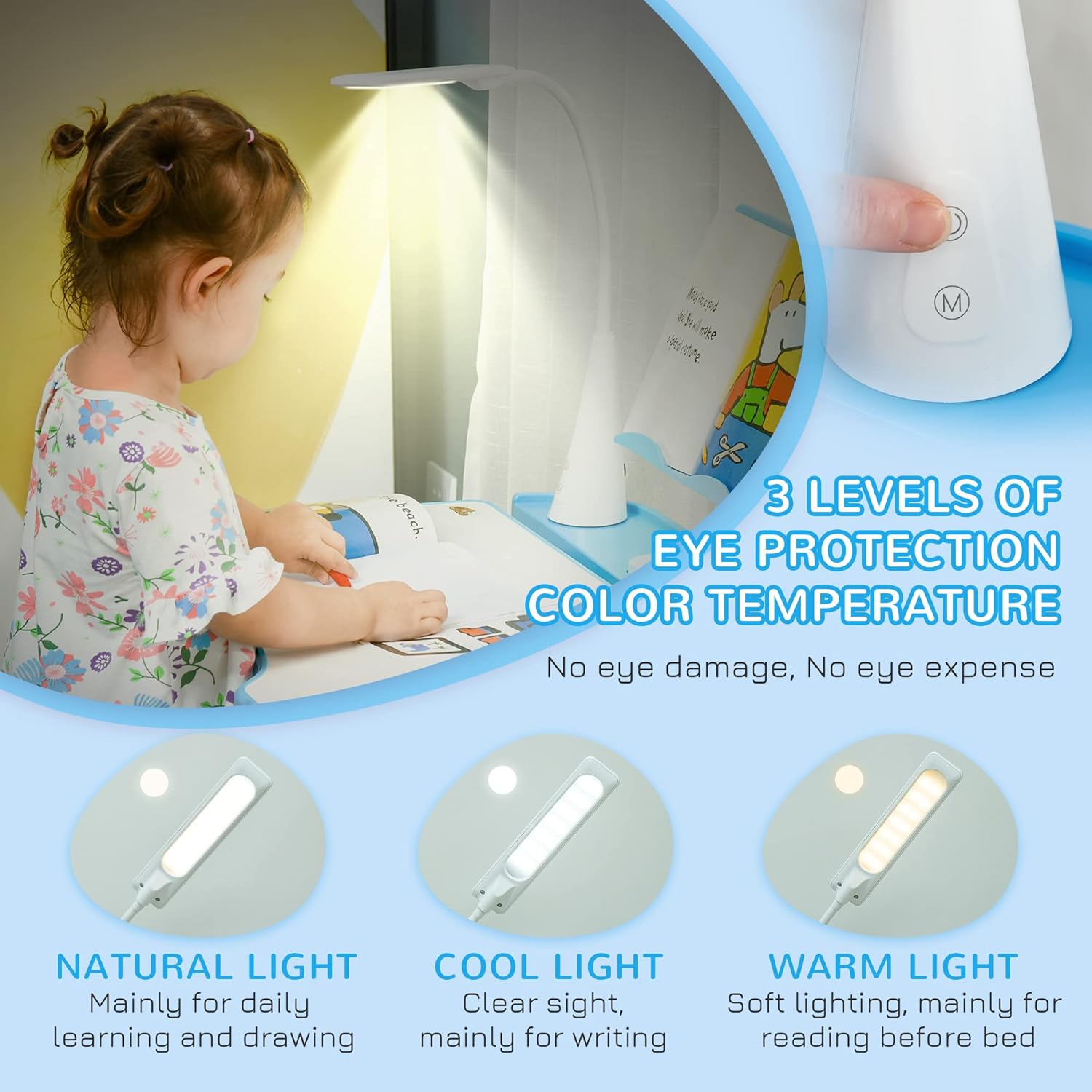
Image 4.4: USB lamp with three color temperature levels.
4.4. Storage Features
The desk includes several storage and organizational features:
- Drawer: A pull-out drawer beneath the tabletop for storing stationery and small items.
- Pen Box: A dedicated box for pens and pencils.
- Reading Board: A stand to hold books or tablets upright.
- Cup Holder: For beverages, helping to prevent spills.
- Pen Slots: Additional slots for organizing writing tools.
- Hook: A side hook for hanging backpacks or bags.
5. Maintenance
5.1. Cleaning
The desk and chair surfaces are made from MDF, steel, and PP, making them easy to clean.
- Wipe surfaces with a damp cloth.
- Avoid using abrasive cleaners or harsh chemicals, as these may damage the finish.
- Ensure the USB lamp is unplugged before cleaning.
5.2. General Care
- Periodically check all screws and fasteners to ensure they remain tight.
- Do not expose the product to extreme temperatures or direct sunlight for prolonged periods.
- Keep the product in a dry environment.
6. Troubleshooting
6.1. Difficulty Adjusting Height
- Ensure adjustment knobs/levers are fully loosened before attempting to adjust.
- Check for any obstructions in the adjustment mechanism.
- For chair height, if stuck at the highest point, try lifting it slightly higher to release the mechanism before lowering.
6.2. USB Lamp Not Working
- Verify the USB cable is securely connected to both the lamp and a functional 5V/1A USB power source.
- Test the USB power source with another device to ensure it is working correctly.
- Ensure the power button on the lamp has been pressed.
6.3. Instability
- Ensure all assembly screws and fasteners are tightened securely.
- Check if the product is placed on a flat, level surface. The desk and chair feature non-slip grips and adjustable dials on the bottom of the legs to level on uneven surfaces.
7. Specifications
| Feature | Specification |
|---|---|
| Model Number | 312-062BU |
| Table Dimensions (L x W x H) | 70L x 50W x 80-105H cm (27.56 x 19.69 x 31.5-41.34 inches) |
| Chair Dimensions (L x W x H) | 36L x 43.5W x 63-76H cm (14.17 x 17.13 x 24.8-29.92 inches) |
| Tabletop Height Adjustment Range | 52-77 cm |
| Chair Seat Height Adjustment Range | 30-43 cm |
| Tabletop Tilt Angle | Up to 45° |
| Drawer Size (W x D x H) | 54W x 35.5D x 4.5H cm |
| Pen Box Size (L x W x H) | 23.5L x 7W x 1.8H cm |
| Reading Board Size (W x D x H) | 30W x 2D x 20H cm |
| Cup Holder Size (Diameter x H) | Ø 6.8L x 2.6H cm |
| Lamp Information | 5W, 5V/1A (USB powered, 3 color temperatures) |
| Weight Capacity (Table) | 80 kg (176 lbs) |
| Weight Capacity (Chair) | 100 kg (220 lbs) |
| Suitable Age | 6-12 years |
| Materials | PP, MDF, Steel |
| Color | Blue and White |
| Assembly Required | Yes |
| Product Care Instructions | Wipe Clean |

Image 7.1: Detailed product dimensions.
8. Warranty and Support
Specific warranty information for the HOMCOM Kids Height Adjustable Study Desk and Chair Set is not provided in this manual. For warranty details, product support, or to inquire about replacement parts, please contact HOMCOM customer service directly or refer to the warranty card included with your purchase. Keep your proof of purchase for any warranty claims.