
1. Product Overview
The YGiTK 4-Channel Headphone Amplifier (Model: i4ii) is a versatile audio device designed to distribute and amplify audio signals to multiple headphones simultaneously. It features independent volume controls for each channel, multiple input options, and a unique knob lighting design. This amplifier is ideal for studio monitoring, group listening, and various audio applications.

Figure 1: Front view of the YGiTK 4-Channel Headphone Amplifier, showcasing the four independent volume knobs and output jacks.
Key Features:
- 4 Channels & 8 Outputs: Supports up to 8 headphones (4x 1/4" and 4x 1/8" TRS stereo outputs).
- Independent Volume Control: Each channel has a dedicated volume knob for personalized listening levels.
- Multiple Input Modes: Features AV stereo, 3.5mm, and 6.35mm input jacks.
- Input Mute Switches: Each input channel includes a mute switch for flexible audio mixing.
- MONO/STEREO Control: Easily switch between mono and stereo output effects.
- Innovative Lighting Design: Knobs feature evolving RGB lighting for visual appeal.
- Full Metal Housing: Durable construction designed to reduce electromagnetic interference and maintain sound quality.
2. Package Contents
Verify that all items are present in the package:
- 1 x YGiTK 4-Channel Headphone Amplifier
- 1 x 5V AC Power Adapter
- 1 x RCA Audio Cable
- 1 x 3.5mm Audio Cable
- 1 x User Manual (this document)

Figure 2: Contents of the YGiTK Headphone Amplifier package, including the amplifier unit, power adapter, and cables.
3. Setup Instructions
Connect Power: Connect the provided 5V AC power adapter to the DC 5V 2A input port on the rear of the amplifier. Plug the adapter into a standard wall outlet. The power indicator light will illuminate.
Video 1: Demonstrates unboxing, connecting the power adapter, and initial setup of the amplifier.
Connect Audio Input: Choose one of the three available input modes based on your audio source:
- AV Stereo Input: Use the RCA audio cable to connect your audio source (e.g., CD player, mixer) to the red (R) and white (L) AV input jacks.
- 3.5mm Input: Use the 3.5mm audio cable to connect your audio source (e.g., phone, MP3 player) to the 3.5mm input jack.
- 6.35mm Input: Use a 6.35mm audio cable to connect your audio source (e.g., sound card, mixer) to the 6.35mm input jack.
Note: If multiple input channels are used simultaneously, their signals will be mixed. You can use the mute switches for each input to adjust the mix.

Figure 3: Rear panel with AV stereo, 3.5mm, and 6.35mm input jacks.
Connect Headphones: Connect your headphones to the desired output channels on the front of the amplifier. Each channel provides both 1/4" and 1/8" TRS stereo headphone output jacks. Up to 8 headphones can be connected simultaneously (2 per channel).

Figure 4: Front panel with 1/4" and 1/8" TRS output jacks for each channel.

4. Operating Instructions
Power On/Off: Use the independent power switch located on the top panel to turn the amplifier on or off. This helps conserve energy.
Adjust Volume: Each of the four channels has an independent volume knob. Rotate the knob clockwise to increase volume and counter-clockwise to decrease it. This allows each listener to set their preferred monitoring volume.
Figure 5: Top panel highlighting the independent volume controls for each channel.
MONO/STEREO Control: Use the MONO/STEREO control button to switch between mono and stereo output. This allows you to simulate different audio effects or adapt to the source material.
Input Mute Switches: Each input channel (AV, 3.5mm, 6.35mm) has a dedicated mute switch. Use these switches to enable or disable specific input signals, allowing for flexible mixing of multiple audio sources.
RGB Lighting: The knob lighting design provides a visual effect. The light colors will evolve automatically. Note: RGB lights cannot be adjusted manually.
Video 2: Demonstrates the amplifier's controls, including volume adjustment, mono/stereo switching, and RGB light effects.
5. Maintenance
- Keep the amplifier in a dry, well-ventilated area, away from direct sunlight and extreme temperatures.
- Clean the exterior with a soft, dry cloth. Do not use liquid cleaners or abrasive chemicals.
- Avoid placing heavy objects on top of the amplifier.
- Ensure all cables are securely connected to prevent signal loss or damage.
6. Troubleshooting
| Problem | Possible Cause | Solution |
|---|---|---|
| No sound from headphones. |
|
|
| Distorted or low-quality sound. |
|
|
| RGB lights not working. |
|
|
7. Specifications
| Feature | Detail |
|---|---|
| Model Number | i4ii |
| Brand | YGiTK |
| Color | Black with Light |
| Output Channels | 4 (supporting 8 headphones) |
| Input Modes | AV Stereo, 3.5mm, 6.35mm |
| Output Connectors | 1/4" TRS, 1/8" TRS |
| Power Supply | DC 5V |
| Input Impedance | 22K ohm |
| Input Signal Level | +22dB |
| Output Impedance | 16K ohm min. |
| Maximum Gain | 19dB/Channel |
| Signal-to-Noise Ratio | >98dB |
| Material | Full Metal Housing |
| Dimensions (L x W x H) | 5.51 x 3.82 x 1.06 inches (14.0 x 9.7 x 2.7 cm) |
| Item Weight | 1.34 pounds |
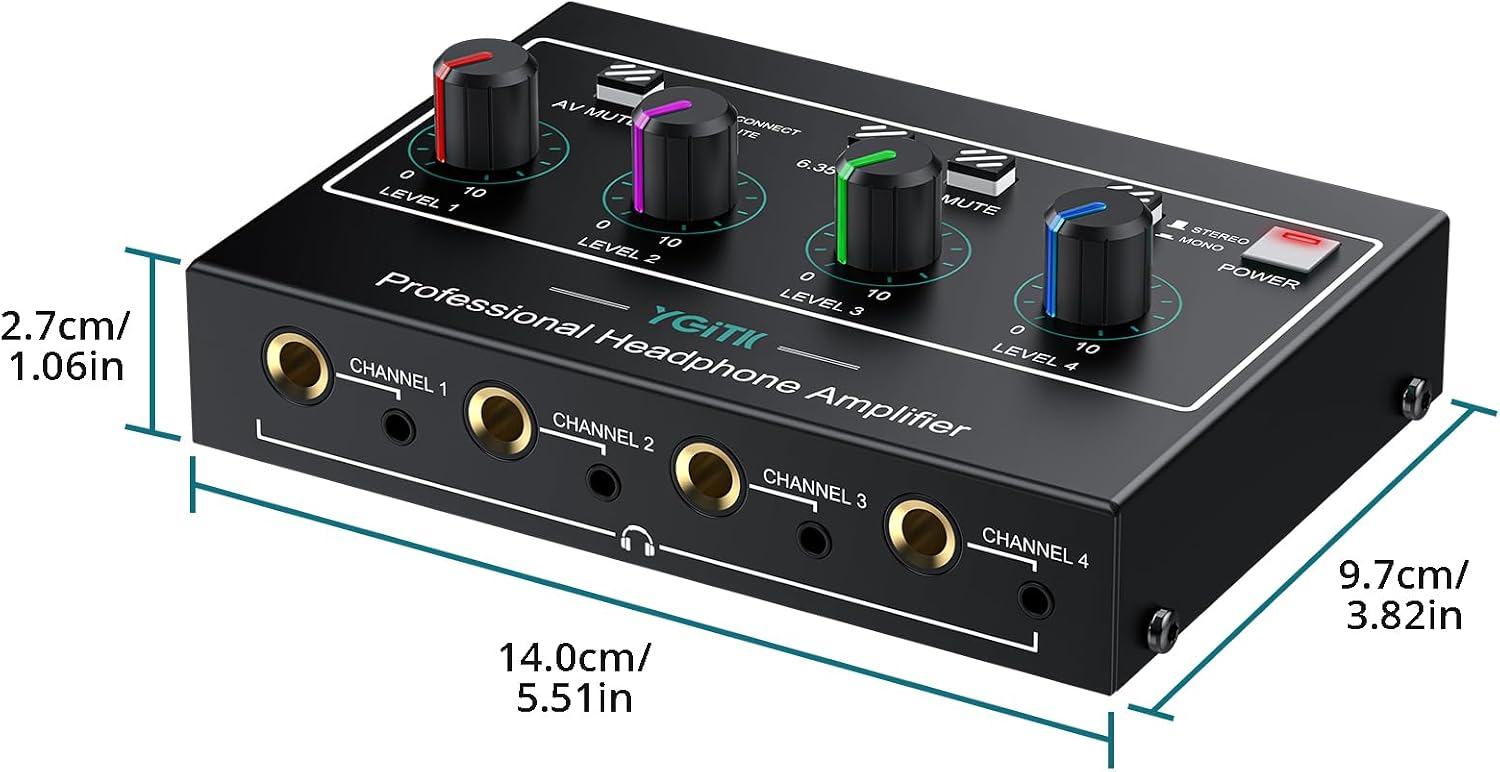
Figure 6: Physical dimensions of the amplifier unit.
8. Warranty and Support
YGiTK provides an 18-month warranty for this product. For any questions, technical support, or warranty claims, please contact YGiTK customer service through the retailer's platform or visit the official YGiTK store online.
For more information and support, please visit: YGiTK Official Store