
J.Fkne Twin Bed Frame with LED & Charging Station User Manual
Model: Bed Frame-01T
1. Product Overview
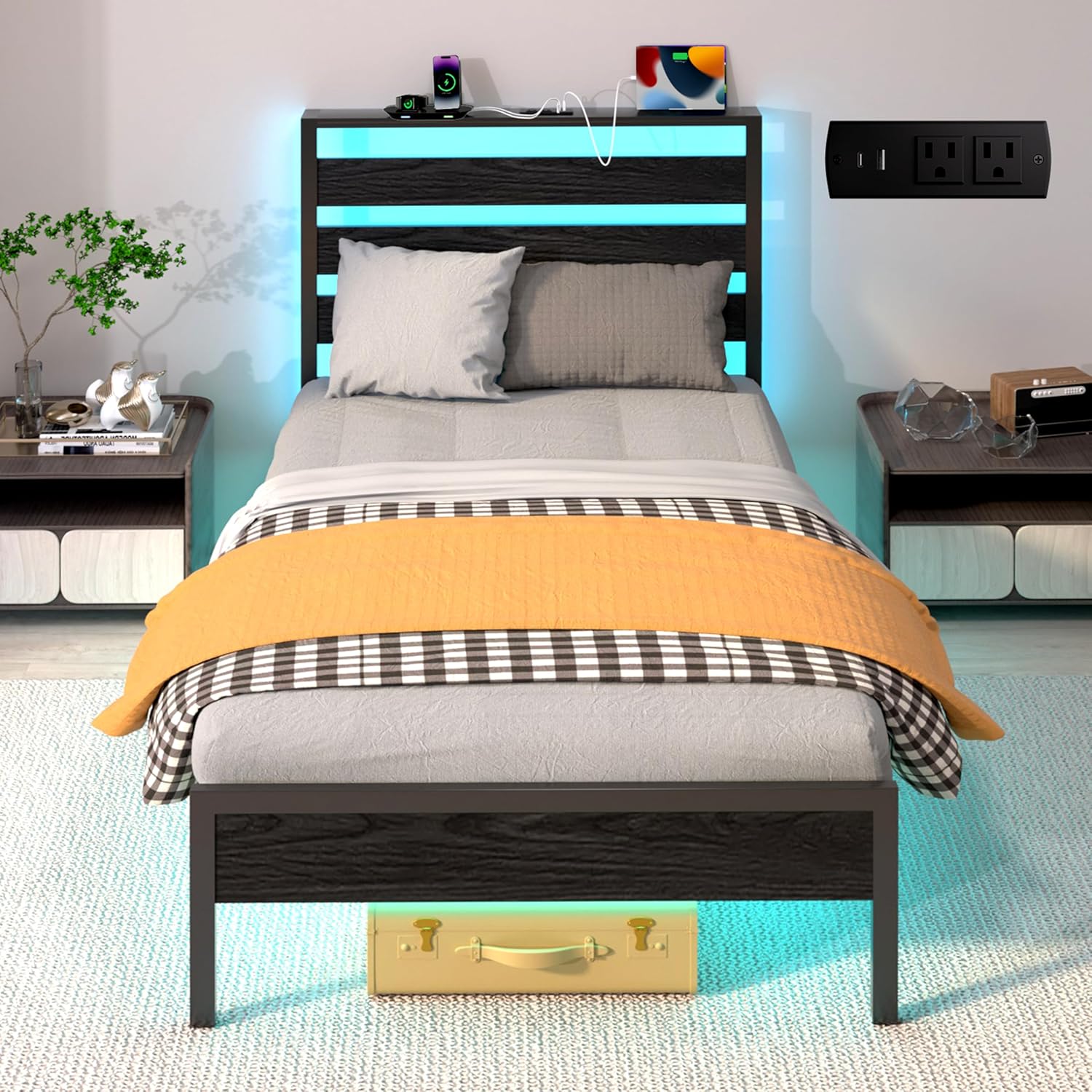
This J.Fkne Twin Bed Frame is designed to provide a comfortable and functional sleeping solution. It features a sturdy metal frame with a headboard, integrated LED lighting, and a convenient charging station. The design eliminates the need for a box spring and includes under-bed storage space.
- Versatile Storage Solution: The bed frame offers 12.4 inches of under-bed clearance, providing ample space for storage containers and keeping your bedroom organized.
- Multi-functional LED Light Bed Frame: Equipped with vibrant multi-colored RGB LED light strips, controllable via a mobile application. Users can select from over 60,000 colors, adjust brightness, and utilize various modes including music sync and timing functions.
- Convenient Charging Station: The integrated headboard includes 2 standard power outlets and 2 USB ports (1 Type-C 5V/3A, 1 USB 5V/2.4A) for charging electronic devices such as tablets and phones.
- Safe & Sturdy Construction: Crafted from high-quality metal, this frame ensures stability and support for your mattress, designed for long-lasting use.
- Easy Assembly: The bed frame is designed for quick and straightforward assembly with included tools and instructions.
2. Safety Information
Please read and understand all safety instructions before assembly and use of the bed frame. Failure to follow these instructions may result in injury or damage to the product.
- Exercise caution around sharp edges during unpacking and assembly.
- Do not exceed the maximum weight capacity of 1800 pounds on the bed frame.
- Ensure all connections are securely fastened before use. Periodically check and tighten all bolts.
- Keep electrical components (LED strips, charging station) away from water or excessive moisture.
- Do not attempt to modify the electrical components or wiring.
3. Package Contents
Verify that all components listed below are present and undamaged before beginning assembly. If any parts are missing or damaged, please contact customer support.
- Headboard components
- Side rails and footboard
- Metal support slats
- Support legs
- LED light strip with controller
- Charging station module with power cord
- Hardware pack (bolts, washers, nuts, Allen wrench)
- Installation Manual
4. Assembly Instructions
Please refer to the detailed Installation Manual included in your package for step-by-step assembly instructions. The following provides a general overview:
- Unpack all components and lay them out on a clean, soft surface to prevent scratches.
- Assemble the headboard structure according to the manual.
- Attach the side rails to the headboard and footboard.
- Install the metal support slats onto the frame. Ensure they are evenly spaced and securely fastened.
- Attach the support legs to the frame.
- Mount the LED light strip and charging station into the designated areas on the headboard, connecting all necessary cables.
- Ensure all bolts are tightened, but do not overtighten.
It is recommended to have two people for assembly to ensure safety and ease of construction.


5. Operating Instructions
5.1 LED Lighting System
The integrated RGB LED light strips offer customizable illumination for your bedroom environment.
- Power On/Off: Connect the bed frame's power cord to a standard wall outlet. Use the included remote control or the dedicated mobile application to turn the LED lights on or off.
- Color Selection: The mobile app provides access to over 60,000 color options. Select your desired color from the color wheel or preset options.
- Brightness Adjustment: Adjust the intensity of the light using the brightness controls on the remote or within the mobile app.
- Dynamic Modes: Explore various dynamic lighting modes, including fading, jumping, and flashing effects.
- Music Sync Mode: The lights can synchronize with music played through your device, creating a dynamic audio-visual experience.
- Timing Mode: Set schedules for the lights to turn on or off automatically at specific times.


5.2 Charging Station
The headboard's charging station provides convenient power access for your electronic devices.
- Power Outlets: Two standard AC power outlets are available for plugging in lamps, alarm clocks, or other small appliances.
- USB Ports: Two USB ports are provided: one Type-C (5V/3A) and one standard USB (5V/2.4A). Use these to charge smartphones, tablets, and other USB-powered devices.
- Usage: Simply plug your device's charging cable into the appropriate port. Ensure the bed frame's main power cord is connected to a live wall outlet for the charging station to function.

6. Maintenance
Regular maintenance will help prolong the life and appearance of your bed frame.
- Cleaning the Frame: Wipe down metal and headboard surfaces with a soft, damp cloth. Avoid abrasive cleaners or harsh chemicals that could damage the finish.
- LED Lights: The LED strips are generally maintenance-free. If dust accumulates, gently wipe with a dry, soft cloth. Do not use liquids directly on the LED strips.
- Charging Station: Keep the charging ports free of dust and debris. Do not insert foreign objects into the outlets or USB ports.
- Hardware Check: Periodically inspect all bolts and connections to ensure they remain tight. Retighten as necessary to maintain stability and prevent noise.
7. Troubleshooting
If you encounter issues with your bed frame, refer to the following common troubleshooting steps:
- LED Lights Not Working:
- Ensure the bed frame's main power cord is securely plugged into a functional wall outlet.
- Check that the LED strip's connector is properly seated in the controller.
- Verify the remote control batteries are functional, or check the mobile app connection.
- Charging Station Not Functioning:
- Confirm the bed frame's main power cord is plugged in and the wall outlet is active.
- Test with a different device or charging cable to rule out device-specific issues.
- Bed Frame is Noisy/Wobbly:
- Inspect all bolts and screws. Tighten any loose connections.
- Ensure the bed frame is on a level surface.
- Missing Parts or Damage:
- If you received damaged parts or are missing components, please contact J.Fkne customer service immediately for assistance.
8. Product Specifications
| Brand | J.Fkne |
| Model Number | Bed Frame-01T |
| Size | Twin |
| Product Dimensions (L x W x H) | 75"L x 38"W x 43"H |
| Compatible Mattress Size | Twin, Twin XL |
| Material | Metal |
| Finish Type | Powder Coated (Black) |
| Weight Capacity | 1800 lbs |
| Ground To Item Distance (Under-bed Clearance) | 12.4 Inches |
| Special Features | Charging Station, Ergonomic, Lighted, No Box Spring Needed, USB Port |
| Included Components | Headboard, Installation Manual |
| Assembly Required | Yes |
| Item Weight | 33.9 pounds |
| UPC | 723747184290 |
9. Warranty and Support
J.Fkne is committed to providing reliable products and customer service. While specific warranty details are not provided in this manual, please retain your proof of purchase.
If you encounter any problems with your product, such as damage, scratches, or functional issues, please contact J.Fkne customer service for assistance. Our team is available to help resolve any concerns you may have.
For further support or inquiries, please visit the official J.Fkne store or contact the seller through your purchase platform.