1. Introduction
Thank you for choosing the Kiprim LV8D Cross Line Green Laser Level. This manual provides essential information for the safe and effective operation, maintenance, and troubleshooting of your device. Please read this manual thoroughly before use and retain it for future reference.

Image 1: Kiprim LV8D Cross Line Green Laser Level, front view with green laser lines projected.
2. Safety Instructions
WARNING: LASER RADIATION. DO NOT STARE INTO BEAM.
- This device emits a Class 2 laser beam. Avoid direct eye exposure to the laser.
- Do not disassemble, modify, or attempt to repair the device. This may result in laser radiation exposure.
- Keep the device out of reach of children.
- Use the device only for its intended purpose as a leveling and alignment tool.
- Ensure the work area is clear of obstacles and potential hazards.
- Always turn off the laser level when not in use.
3. Package Contents
The Kiprim LV8D package includes the following items:
- 1x Kiprim LV8D Laser Level
- 1x User Manual
- 1x Carrying Bag
- 2x AAA Batteries
4. Product Overview
Familiarize yourself with the components and controls of your Kiprim LV8D laser level.

Image 2: Diagram showing the various components and controls of the Kiprim LV8D laser level, including the On/Off switch, status light, horizontal/vertical laser beam button, battery indicator, mode/brightness adjustment button, 1/4"-20 threaded hole, and battery cover.
Key Components:
- On/Off Switch: Powers the device on or off.
- Status Light: Indicates the device's operational status (e.g., self-leveling, locked).
- Horizontal/Vertical Laser Beam Button: Activates or deactivates horizontal and vertical laser lines independently.
- Battery Indicator: Displays the current battery level.
- Mode Button/Brightness Adjustment Button: Cycles through operating modes and adjusts laser brightness.
- 1/4"-20 Threaded Hole: For mounting the device on a tripod or other compatible accessories.
- Battery Cover: Provides access to the battery compartment.
5. Setup
5.1 Battery Installation
- Locate the battery cover on the device.
- Open the battery cover.
- Insert the two AAA batteries, ensuring correct polarity (+/-).
- Close the battery cover securely.
5.2 Mounting the Device
The Kiprim LV8D can be placed on a flat surface or mounted on a tripod for increased stability and versatility.
- On a Flat Surface: Place the laser level on a stable, level surface.
- Tripod Mounting: The device features a 1/4"-20 threaded hole on its base, compatible with standard tripods. Securely attach the laser level to a tripod for elevated or uneven work surfaces.

Image 3: The Kiprim LV8D laser level shown mounted on a tripod, highlighting the 1/4" threaded hole for compatibility with standard tripods.
6. Operating Modes
The Kiprim LV8D offers multiple operating modes to suit various applications.
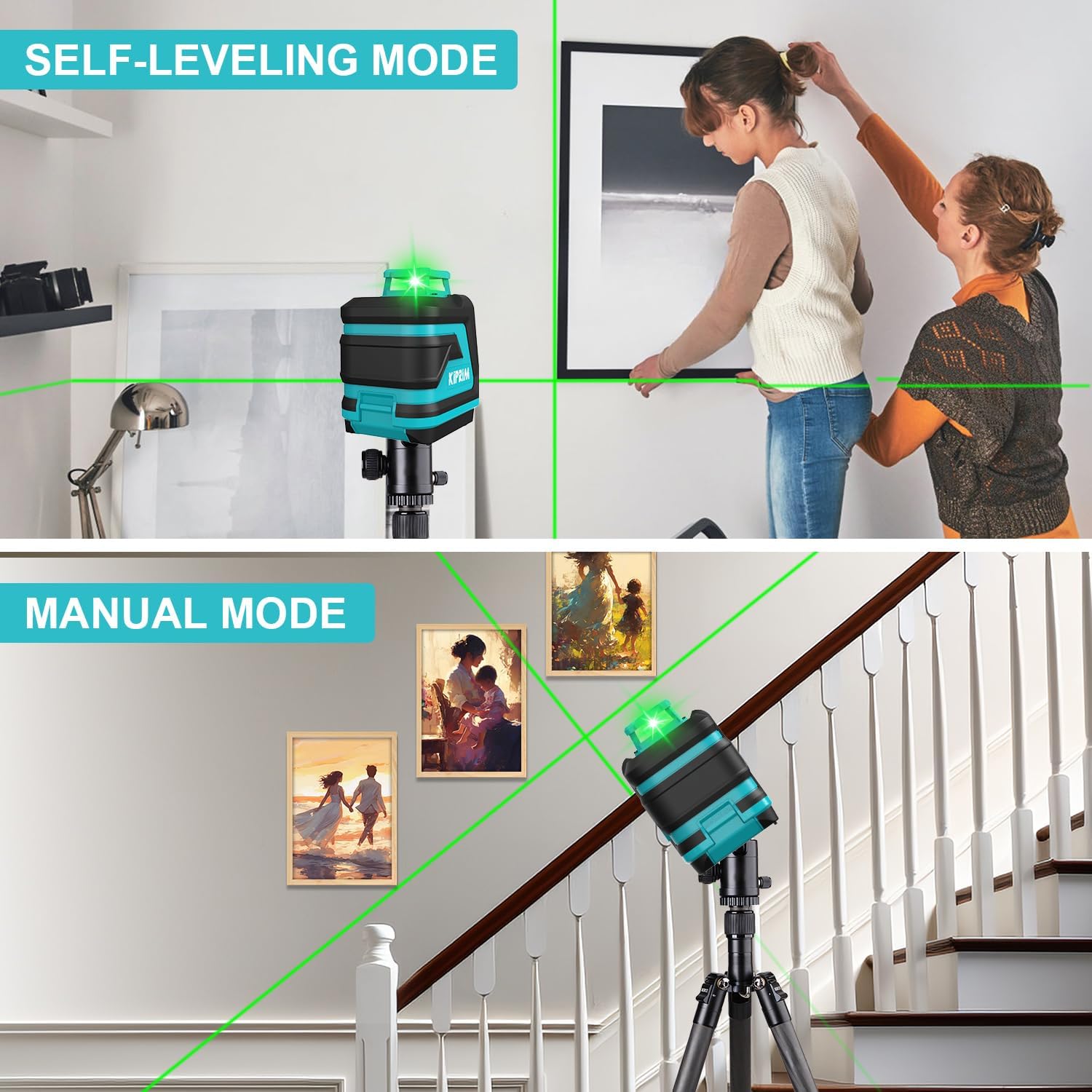
Image 4: Top panel shows the laser level in self-leveling mode, projecting horizontal and vertical lines for hanging a picture. Bottom panel shows the laser level in manual mode, projecting an angled line along a staircase railing.
6.1 Self-Leveling Mode
This mode automatically levels the laser lines for accurate horizontal and vertical alignment.
- Turn on the device using the On/Off switch.
- If the device is within its self-leveling range (typically ±3 degrees), the laser lines will automatically level. The status light will indicate a stable, leveled state.
- If the device is outside its self-leveling range, the laser lines may flash or an alarm may sound, indicating that the device needs to be adjusted to a more level position.
- Press the Horizontal/Vertical Laser Beam button to toggle between horizontal, vertical, or both lines.
6.2 Manual Mode (Locked Mode)
Manual mode allows you to project laser lines at any angle, useful for tasks like installing handrails or decorative patterns.
- With the device off, press and hold the On/Off switch for a few seconds until the laser lines activate in manual mode. The status light will indicate that the pendulum is locked.
- The laser lines will now be fixed and can be projected at any desired angle by tilting the device.
- Press the Horizontal/Vertical Laser Beam button to toggle between horizontal, vertical, or both lines.
- To exit manual mode, turn off the device.
6.3 Pulse Mode (Receiver Mode)
Pulse mode extends the working range of the laser level when used with an optional laser receiver (not included), especially in bright outdoor conditions or over long distances.

Image 5: The Kiprim LV8D laser level projecting a green laser line in pulse mode, with a worker using a laser receiver to detect the beam at a distance. The inset shows a close-up of a laser receiver display.
- In self-leveling mode, press the Mode/Brightness Adjustment button to activate pulse mode. The laser lines may appear dimmer to the naked eye, but they will be detectable by a laser receiver.
- The working range can be extended up to 50 meters (165 feet) with a compatible laser receiver.
- To exit pulse mode, press the Mode/Brightness Adjustment button again.
6.4 Adjustable Brightness
The Kiprim LV8D allows you to adjust the brightness of the laser lines to optimize visibility and conserve battery life.

Image 6: A visual representation of the Kiprim LV8D laser level projecting lines at different brightness levels (50%, 75%, 100%) and a flashing alarm state, demonstrating the adjustable brightness feature.
- While the laser is on, press the Mode/Brightness Adjustment button repeatedly to cycle through different brightness levels.
- Choose the appropriate brightness for your working environment.
7. Maintenance
Proper care and maintenance will ensure the longevity and accuracy of your Kiprim LV8D laser level.

Image 7: Visual demonstration of the Kiprim LV8D's durability, showing it as dustproof, waterproof, and resistant to falls from less than 1 meter.
- Cleaning: Wipe the device with a soft, damp cloth. Do not use abrasive cleaners or solvents. Keep the laser apertures clean.
- Storage: Store the device in its carrying bag in a dry, cool place when not in use. Remove batteries if storing for extended periods to prevent leakage.
- Handling: Although resistant to falls from less than 1 meter, avoid dropping the device to maintain its calibration and internal components.
- Environmental Protection: The device is dustproof and waterproof, but avoid prolonged exposure to extreme conditions.
8. Troubleshooting
If you encounter issues with your Kiprim LV8D, refer to the following common problems and solutions:
| Problem | Possible Cause | Solution |
|---|---|---|
| Laser does not turn on. | Low or dead batteries; Incorrect battery installation. | Replace batteries; Check battery polarity. |
| Laser lines are flashing or alarm sounds in self-leveling mode. | Device is outside its self-leveling range. | Place the device on a more level surface or adjust its position until it is within ±3 degrees of level. |
| Laser lines are dim. | Low battery; Bright ambient light; Brightness setting is low. | Replace batteries; Use a laser receiver in bright conditions; Adjust brightness setting. |
| Laser lines are not straight or accurate. | Device is not properly self-leveling; Device is in manual mode when self-leveling is desired. | Ensure the device is within its self-leveling range; Exit manual mode if self-leveling is required. |
9. Specifications
| Feature | Specification |
|---|---|
| Manufacturer | Shenzhen Kepurui Business Co.,Ltd. |
| Model Number | LV8D |
| Product Dimensions | 10.8 x 10 x 0.1 cm |
| Weight | 280 Grams |
| Laser Color | Green |
| Number of Laser Lines | 5 (4 Horizontal 360°, 1 Vertical) |
| Self-Leveling Range | ±3 degrees |
| Power Source | Battery Powered (2x AAA, included) |
| Wattage | 1 milliwatt |
| Tripod Compatibility | 1/4"-20 Thread |
| Operating Modes | Self-Leveling, Manual, Pulse |
| Material | ABS |
| First Available Date | September 27, 2024 |
10. Warranty and Support
For warranty information or technical support, please refer to the documentation included with your product or contact the seller directly. Kiprim is committed to providing reliable tools and customer satisfaction.
Seller: Kiprim Direct EU

