
1. Important Safety Information
Read all instructions carefully before using the appliance. Keep this manual for future reference.
- Electrical Safety: Ensure the oven is properly grounded. Do not operate with a damaged power cord. This appliance requires a 240V, 3000W electrical supply.
- Child Safety Lock: The oven is equipped with a safety lock to prevent accidental operation by children. Refer to the operating section for activation and deactivation.
- Anti-Scalding Features: The double-layer glass door with built-in Low-E glass provides effective heat insulation to reduce the risk of burns. Exercise caution when opening the oven door during or after operation.
- Automatic Power Off: The oven features an automatic power-off function when the door is opened during operation for enhanced safety.
- Installation: Installation must be performed by a qualified technician in accordance with local electrical codes.
2. Product Overview
The Towallmark 24-inch Electric Single Wall Oven is designed for versatile cooking with advanced features and safety mechanisms.
Key Features:
- Capacity: 2.5 Cu.ft (70L) interior volume.
- Heating Technology: 3D Surround Heating with upper inner, upper outer, rear, and lower independent heating tubes for uniform heat distribution.
- Cooking Modes: 8 baking modes including Roast, Bake, Double Grill, Grill, Broil, Steam, and Combined Steam & Grill.
- Air Frying Function: Integrated air frying for crispy results.
- Precise Temperature Control: 1℃ precise temperature control.
- Control Panel: Sensitive touch glass panel with digital display.
- Safety: Double-layer glass door, child safety lock, water shortage autochirp, open door automatic power off.
- Interior: Food-grade enamel inner cavity, easy to clean.
- Additional Functions: Heat/keep warm, reservation, clean and dry, ferment, defrost, sterilize, 108 smart menus.

Image 2.1: Front view of the Towallmark 24-inch Electric Single Wall Oven, showcasing its interior with food being cooked.
3. Setup and Installation
Proper installation is crucial for the safe and efficient operation of your oven. It is recommended that installation be performed by a qualified professional.
3.1 Unpacking
- Carefully remove all packaging materials from the oven.
- Inspect the oven for any shipping damage. Contact your retailer immediately if damage is found.
- Retain packaging materials for future transport if needed.
3.2 Included Components
Verify that all components are present:
- Stainless steel grill
- Enamel baking pan
- Absorbent sponge
- Instructions manual (this document)
- Cotton gloves
- Stainless steel air frying mesh
- Mounting screws
3.3 Dimensions and Electrical Requirements
Ensure your cabinet opening meets the specified dimensions for built-in installation.
- Product Size (L*W*H): 23.4 x 22.24 x 23.4 inches
- Built-in Size (L*W*H): 22.24 x 21.85 x 23.4 inches
- Voltage: 240V
- Wattage: 3000W

Image 3.1: Diagram showing the external and built-in dimensions of the oven for installation planning.
4. Operating Instructions
This section details how to operate your Towallmark electric oven using its touch control panel and various cooking modes.
4.1 Control Panel Overview
The oven features a sensitive touch glass panel for intuitive control.
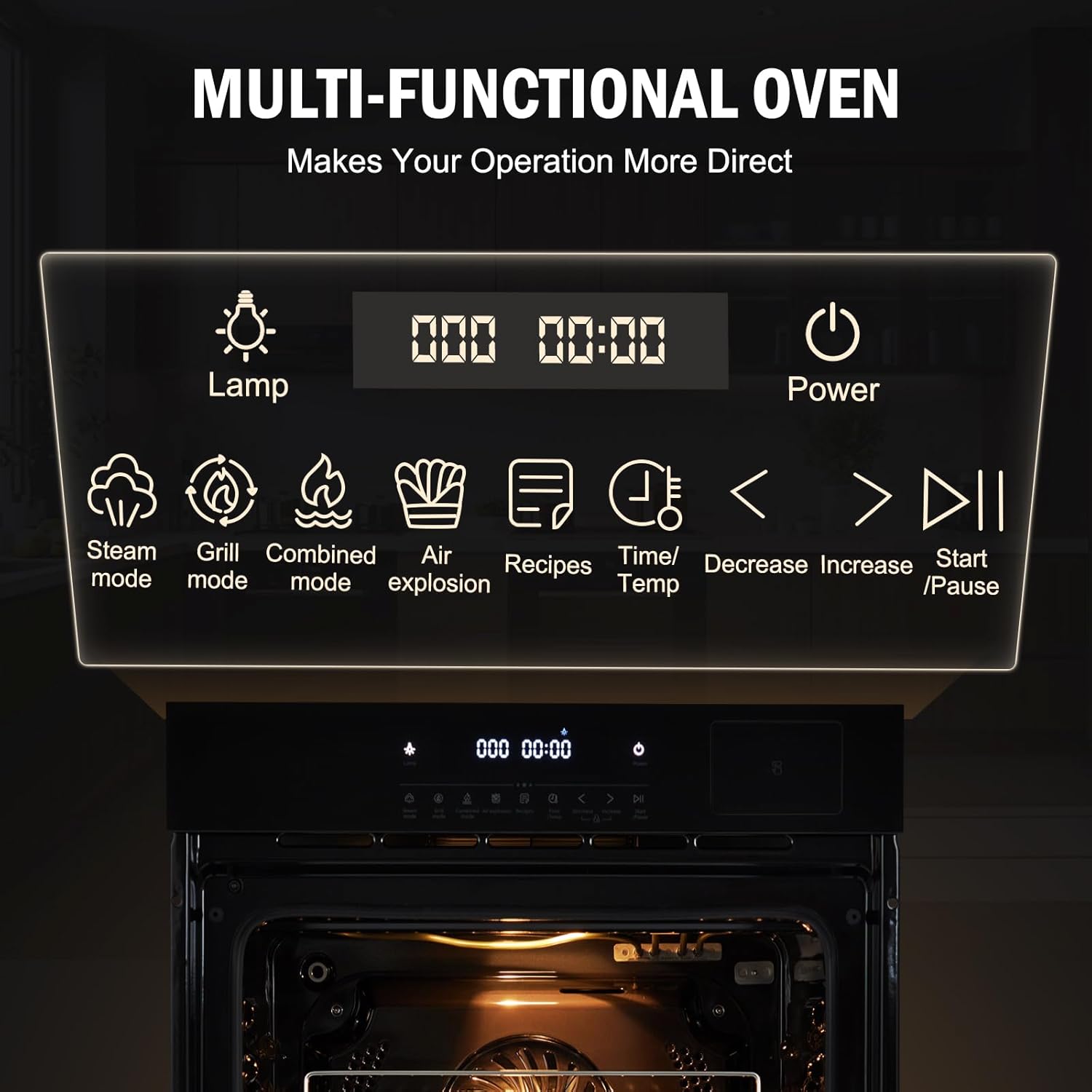
Image 4.1: Detailed view of the oven's touch control panel, showing icons for various functions like Steam, Grill, Combined, Air Explosion, Recipes, Time/Temp, Decrease, Increase, and Start/Pause.
4.2 Basic Operation
- Power On: Touch the Power icon to turn on the oven.
- Select Mode: Choose your desired cooking mode (e.g., Steam mode, Grill mode, Combined mode, Air explosion) by touching the corresponding icon.
- Set Temperature/Time: Use the Time/Temp icon, then adjust values with the Decrease and Increase icons.
- Start Cooking: Press the Start/Pause icon to begin the cooking process.
- Pause/Stop: Touch Start/Pause again to pause, or hold the Power icon to stop.
4.3 Cooking Modes
- Convection Baking: Utilizes 3D circulating hot air for even heat distribution, ideal for baking and roasting.
- Air Frying: Activates the air explosion function for crispy results with minimal oil.
- Steaming Function: Operates between 60-110℃ for gentle cooking. The pull-out water tank door allows water addition without opening the main oven door.
- Baking and Steaming Function: Combines heat and steam, operating between 100-250℃.
- Grill/Broil: For browning and crisping the surface of food.
4.4 Automatic Programming Modes
The oven includes 5 automatic programming modes and 108 smart menus for common dishes. Simply select the desired menu, and the oven will set the temperature, time, and heating mode automatically.

Image 4.2: Example of preset cooking menus, showing default temperatures and times for various food items.
5. Maintenance and Cleaning
Regular maintenance ensures the longevity and optimal performance of your oven.
5.1 Interior Cleaning
- The food-grade enamel inner cavity is designed for easy cleaning. Wipe spills immediately after the oven has cooled.
- Use a soft cloth and mild detergent. Avoid abrasive cleaners or scouring pads that can damage the enamel.
- The oven features a steam cleaning function. Refer to the operating section for instructions on activating this mode.
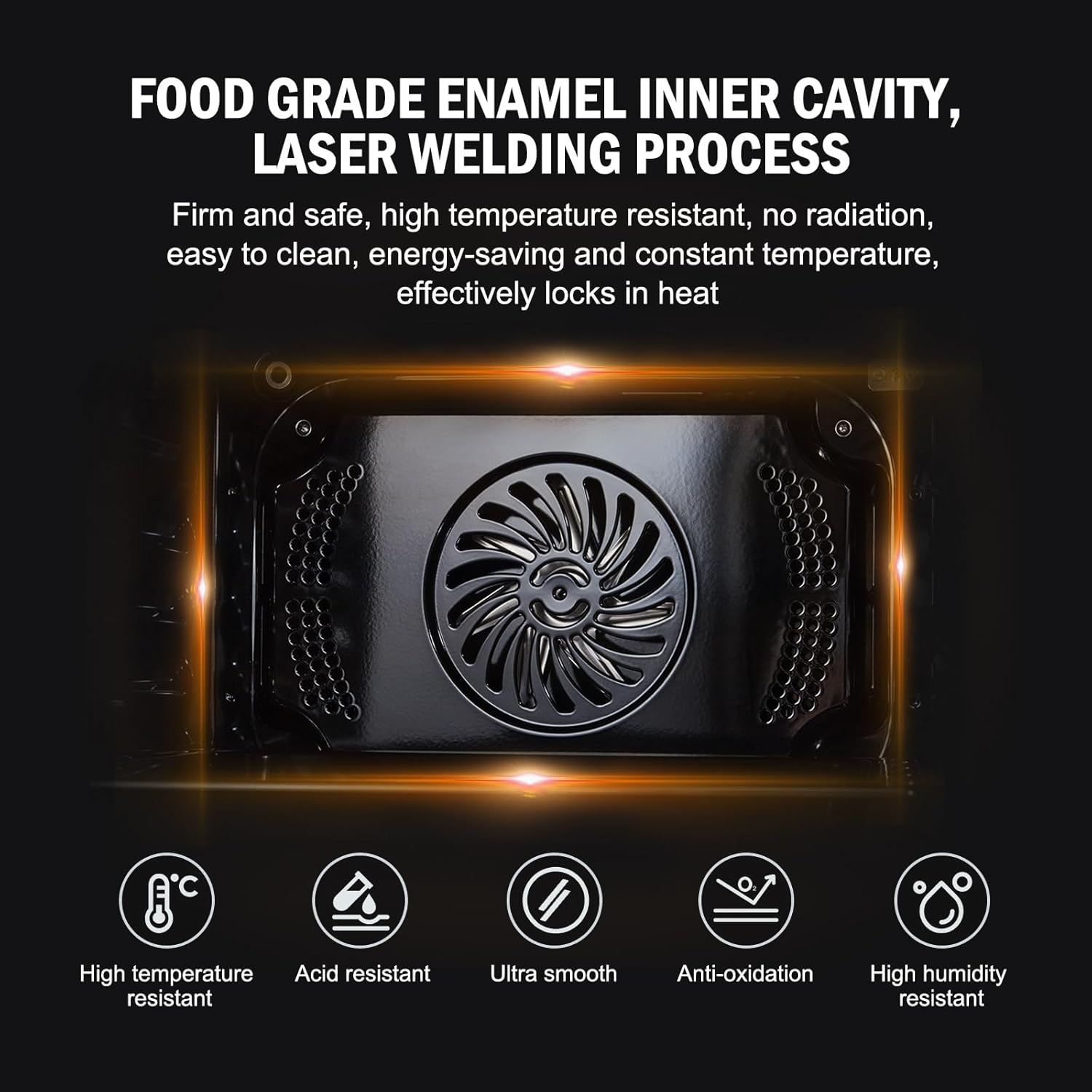
Image 5.1: View of the oven's interior, highlighting the enamel coating and the rear fan for even heat distribution.
5.2 Exterior Cleaning
- Wipe the exterior surfaces with a soft, damp cloth and mild soap.
- Do not use harsh chemicals or abrasive materials.
5.3 Door Glass Cleaning
- The oven door glass is designed to be easily removed for thorough cleaning. Consult the detailed instructions in the full manual for removal and reinstallation.
- Clean with glass cleaner or a mixture of vinegar and water.

Image 5.2: Illustration of the double-layered glass door, emphasizing its heat insulation and anti-scalding properties.
5.4 Water Tank Maintenance (for Steam Functions)
- Regularly empty and clean the water tank to prevent mineral buildup.
- The oven will emit an autochirp if there is a water shortage during steam functions. Refill the tank promptly.
6. Troubleshooting
This section provides solutions to common issues you might encounter. If the problem persists, please contact customer support.
| Problem | Possible Cause | Solution |
|---|---|---|
| Oven does not turn on | No power supply; Door not closed properly | Check circuit breaker; Ensure door is fully closed |
| Uneven cooking | Improper rack position; Overcrowding oven | Use recommended rack positions; Avoid overcrowding to allow air circulation |
| Steam function not working | Water tank empty; Tank not inserted correctly | Refill water tank; Ensure tank is securely in place |
| Child lock engaged | Accidental activation | Refer to the operating instructions to deactivate the child lock. |
7. Specifications
Detailed technical specifications for the Towallmark 24-inch Electric Single Wall Oven.
| Specification | Value |
|---|---|
| Brand Name | Towallmark |
| Model Number | J4xUkePn3moVqKHW1Opg4QOYzLcM |
| Item Weight | 88.9 pounds |
| Product Dimensions | 26.85 x 25.91 x 25.98 inches |
| Built-in Dimensions (L*W*H) | 22.24 x 21.85 x 23.4 inches |
| Capacity | 2.5 Cubic Feet (70L) |
| Voltage | 240V |
| Wattage | 3000W |
| Annual Energy Consumption | 1 Watts (Note: This value might be for standby, actual consumption varies with use) |
| Installation Type | Built-in |
| Oven Cooking Mode | Radiant, Convection, Steam |
| Burner Type | Ceramic (Heating elements) |
| Color | Black |
| Fuel Type | Electric |
| Defrost Method | Hot Air Defrost |
| Door Hinges | Downward |
| Material Type | Enamel-coated Steel, Glass |

Image 7.1: Visual representation of key technical specifications including volume, power ratings, and dimensions.
8. Warranty and Support
For warranty information or technical support, please refer to the warranty card included with your product or contact Towallmark customer service directly.
Keep your purchase receipt as proof of purchase for any warranty claims.
Contact Information: Please visit the official Towallmark website or refer to the contact details provided in your product packaging for the most up-to-date support information.