
JVC HANP40TG
JVC nearphones Open Ear True Wireless Headphones User Manual
Model: HANP40TG
Product Overview
The JVC nearphones are open-ear true wireless headphones designed for comfort and awareness of your surroundings. Featuring a Pivot Motion Mechanism for a secure fit, 16mm large drivers for clear sound, Bluetooth 5.4 for stable connectivity, and an IPX4 water-resistant rating, these headphones are suitable for various activities. The included charging case provides extended battery life.
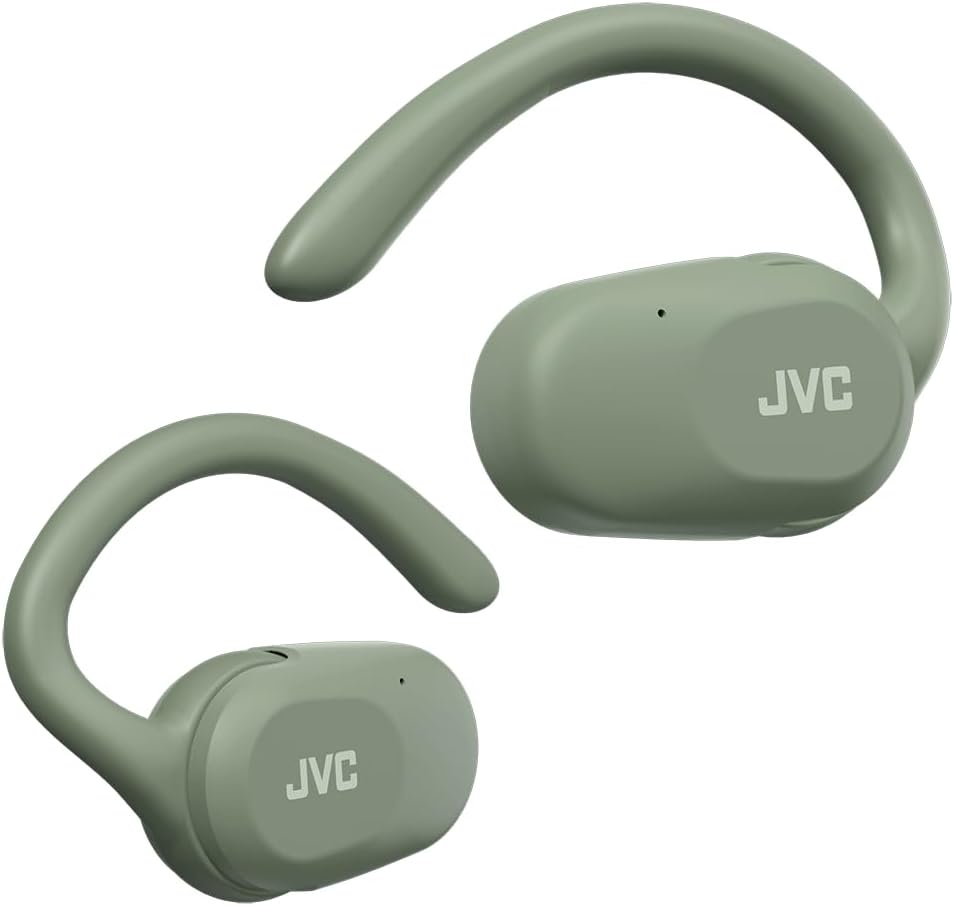
Image: A pair of JVC nearphones in green, showcasing their open-ear design and ear hooks.
What's in the Box
- JVC nearphones (Left and Right)
- Wireless Charging Case
- USB Charging Cable
Setup Guide
1. Charging the Headphones and Case
Before first use, fully charge the headphones and the charging case. Place the headphones into the charging case. Connect the USB charging cable to the case and a power source. The indicator light on the case will show charging status. A full charge provides up to 26 hours of total playback (7.5 hours from headphones + 18.5 hours from case).

Image: Illustration showing the JVC nearphones in their charging case, highlighting the 26-hour total battery life.
2. Pairing with a Bluetooth Device
- Ensure the headphones are charged.
- Open the charging case. The headphones will automatically enter pairing mode (indicator lights will flash).
- On your device (smartphone, tablet, etc.), go to Bluetooth settings and turn Bluetooth on.
- Select "JVC HANP40T" from the list of available devices.
- Once connected, the indicator lights on the headphones will stop flashing.
The headphones support Bluetooth 5.4 for a stable and efficient connection.
Operating Instructions
Wearing the Headphones
The JVC nearphones feature a Pivot Motion Mechanism and are designed to fit securely and comfortably over your ear without blocking the ear canal. This open-ear style allows you to hear ambient sounds while enjoying your audio, enhancing safety in outdoor environments.

Image: A diagram illustrating how the Pivot Motion Design of the JVC nearphones allows for a secure and natural fit around the ear.

Image: A woman performing crunches while wearing the JVC nearphones, demonstrating their secure fit during physical activity.
Touch Controls
The nearphones feature intuitive touch controls on each earbud for managing playback, calls, and sound modes.
| Action | Function |
|---|---|
| Single Tap (Left/Right) | Play/Pause, Answer/End Call |
| Double Tap (Right) | Next Track |
| Double Tap (Left) | Previous Track |
| Triple Tap (Left/Right) | Activate Voice Assistant |
| Long Press (Left/Right) | Cycle Sound Modes (Normal, Bass, High) |
Sound Modes
The headphones offer three distinct sound modes to customize your listening experience:
- Normal: Balanced audio for everyday listening.
- Bass: Enhanced bass for a richer, more impactful sound.
- High: Accentuated treble for clearer vocals and instruments.
Cycle through these modes using the long press touch control.
Single Ear Use
Either the left or right earbud can be used independently for mono listening. Simply remove one earbud from the case and leave the other in, or place one back into the case while using the other.
Maintenance and Care
Water Resistance (IPX4)
The JVC nearphones are rated IPX4, meaning they are resistant to splashing water from any direction. This makes them suitable for workouts and light rain. However, they are not designed for submersion in water. Do not expose them to strong jets of water or prolonged immersion.

Image: The JVC nearphones shown with water splashing around them, illustrating their IPX4 splashproof rating.
Cleaning
Wipe the headphones and charging case with a soft, dry cloth. Do not use abrasive cleaners or solvents. Ensure the charging contacts are clean and dry before placing the headphones back into the case for charging.
Troubleshooting
| Problem | Possible Cause | Solution |
|---|---|---|
| Headphones not pairing | Not in pairing mode, device Bluetooth off, out of range. | Ensure headphones are in pairing mode (open case), turn device Bluetooth on/off, move closer to device. |
| No sound from one earbud | Earbud not connected, low battery. | Place both earbuds back in case, close and reopen. Check battery level. |
| Low volume | Device volume too low, sound mode setting. | Increase volume on your device. Try different sound modes (Normal, Bass, High). |
| Headphones not charging | Cable issue, dirty contacts, power source issue. | Check USB cable connection. Clean charging contacts on headphones and case. Try a different power source. |
Specifications
- Model Name: NEARPHONES (HANP40T)
- Brand: JVC
- Connectivity Technology: Wireless (Bluetooth 5.4)
- Bluetooth Range: 10 Meters
- Ear Placement: Open Ear
- Audio Driver Size: 16 Millimeters
- Frequency Response: 20000 Hz
- Impedance: 16 Ohm
- Battery Life (Headphones): Up to 7.5 Hours
- Battery Life (with Charging Case): Up to 26 Hours
- Charging Case Battery Capacity: 420 Milliamp Hours
- Charging Case Charging Time: 2 Hours
- Water Resistance Level: IPX4 (Splashproof)
- Control Type: Touch Control, Voice Control
- Item Weight: 4.9 ounces
- Product Dimensions: 2.99 x 1.81 x 5.79 inches
- Material: Plastic
- Color: Green
- Manufacturer: JVC
- Country of Origin: China
Official Product Video
Video: An official product video showcasing the features and benefits of the JVC nearphones, including their open-ear design, secure fit, long battery life, touch controls, and splashproof rating.
Warranty and Support
For warranty information and customer support, please refer to the official JVC website or contact their customer service department. Keep your proof of purchase for any warranty claims.
Additional protection plans may be available for purchase to extend coverage beyond the standard manufacturer's warranty. Please check with your retailer for details on available plans.
For further assistance, visit the JVC Store on Amazon.
Related documentsHANP40TG


Ask a question about this manual
Ask about setup, troubleshooting, compatibility, parts, safety, or missing instructions. Manuals+ will review the question and use this page’s manual context to help answer it.