
1. Introduction and Overview
The NETGEAR Orbi RBK663 Tri-Band WiFi 6 Mesh System is designed to provide strong, reliable, and fast WiFi coverage throughout your home. This system enhances performance for simultaneous WiFi streaming, gaming, and browsing on multiple devices.
Key features include:
- Coverage up to 6,600 sq. ft. for up to 75 devices.
- Fast AX3800 Gigabit speed with WiFi 6 technology for uninterrupted streaming and HD video gaming.
- NETGEAR Armor for enhanced security against hackers, malware, and identity theft.
- Compatibility with any internet service provider up to 1Gbps.
- Multiple 1 Gig Ethernet ports on both the router and satellites for wired connections.
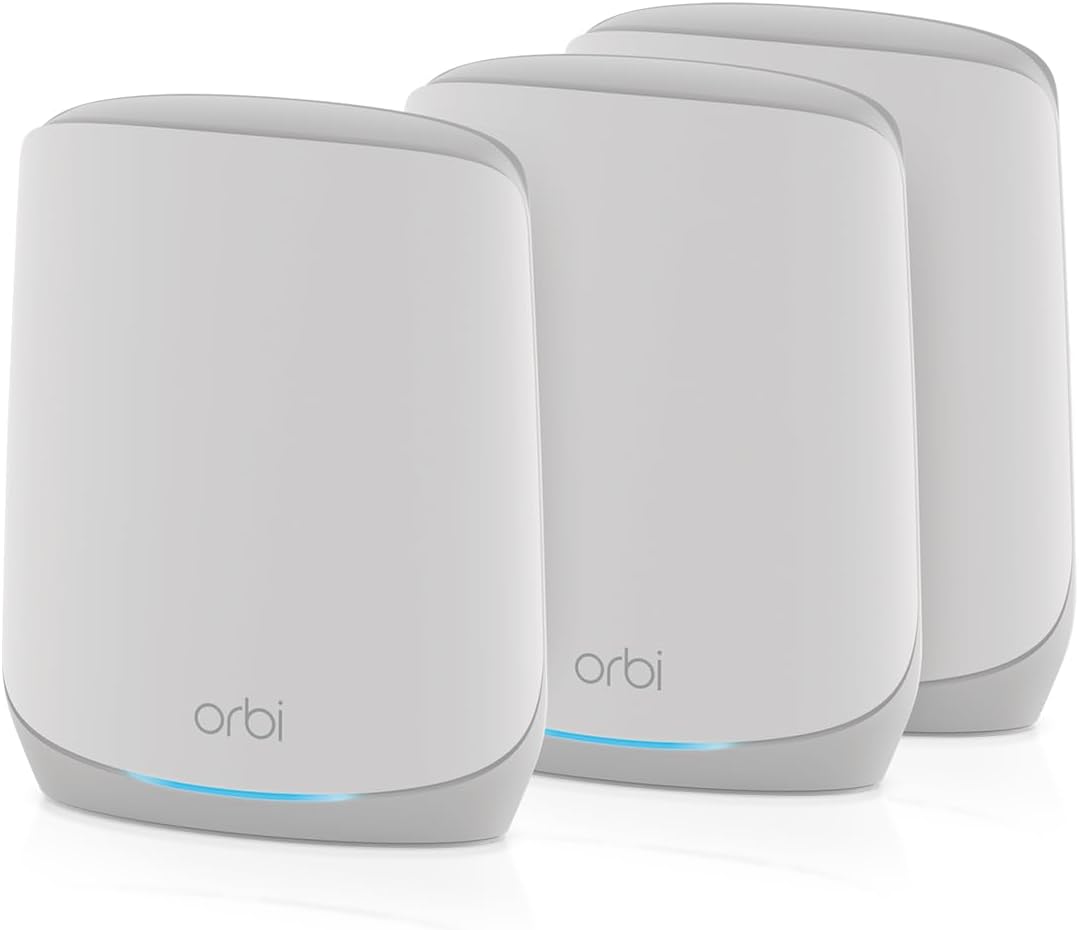
Image 1: The NETGEAR Orbi RBK663 WiFi 6 Mesh System, featuring one router and two satellite units.
2. What's in the Box
Your NETGEAR Orbi RBK663 package includes the following components:
- One (1) Orbi Router (RBR660)
- Two (2) Orbi Satellites (RBS660)
- One (1) 2m Ethernet cable
- Three (3) power adapters
- Quick start guide

Image 2: All components included in the Orbi RBK663 package, neatly arranged for easy setup.
3. Setup Guide
Setting up your Orbi Mesh System is a straightforward process primarily guided by the Orbi app.
3.1 Initial Setup Steps
- Download the Orbi App: On your mobile device, scan the QR code in the Quick Start Guide or search for 'NETGEAR Orbi' in your app store to download the Orbi app.
- Follow In-App Instructions: The Orbi app will guide you through connecting your Orbi Router to your existing modem and power.
- Connect Orbi Router: Disconnect your old router and connect the Orbi Router (RBR660) to your modem using the provided Ethernet cable. Plug in the power adapter.
- Place and Power Orbi Satellites: Place the Orbi Satellites (RBS660) in other parts of your home to extend coverage. Plug in their respective power adapters. The app will assist in syncing them with the router.
Image 3: Visual representation of the simple three-step setup process using the Orbi app.
3.2 Product Overview Video
Video 1: A brief product overview of the NETGEAR Orbi Whole Home Tri-Band Mesh WiFi 6 System, demonstrating its components and basic connectivity.
4. Operating Instructions
Once your Orbi system is set up, you can manage and monitor your network using the Orbi app.
4.1 Orbi App Features
- Network Management: View connected devices, pause internet access for specific devices, and manage guest networks.
- Speed Tests: Run internet speed tests to monitor your network performance.
- Parental Controls: Set up profiles for family members, manage internet access schedules, and block inappropriate content.
- Security Monitoring: Access NETGEAR Armor features to protect your network from online threats.

Image 4: Key performance metrics of the Orbi RBK663 system, highlighting speed, coverage, and device capacity.
4.2 Network Expansion
The Orbi system is expandable. You can extend coverage further by adding additional RBS660 satellites (sold separately), with each satellite extending coverage by up to 2,200 sq. ft.

Image 5: Illustration of how the Orbi mesh network can be expanded with additional satellites for broader home coverage.
5. Maintenance
Regular maintenance ensures optimal performance and security for your Orbi system.
5.1 Firmware Updates
NETGEAR devices include automatic firmware updates designed to help protect you and your family. Ensure your Orbi system is connected to the internet to receive these updates.
5.2 NETGEAR Armor Security
NETGEAR Armor, powered by Bitdefender, provides a powerful suite of tools to keep your home network and devices safe online. This includes enhanced protection against hackers, malware, and identity theft. A 30-day trial is included with your purchase.

Image 6: Overview of NETGEAR Armor's security features, including cybersecurity, VPN, extended warranty, and priority support.
6. Troubleshooting
If you encounter issues with your Orbi system, consider the following troubleshooting steps:
- Check Connections: Ensure all Ethernet cables are securely connected and power adapters are properly plugged in.
- Restart Devices: Power cycle your modem, Orbi Router, and Orbi Satellites. Wait a few minutes for each device to fully restart.
- Orbi App Diagnostics: Use the Orbi app to check network status, run speed tests, and identify any connected device issues.
- Reset: If issues persist, perform a factory reset on your Orbi Router and Satellites (refer to the Quick Start Guide for instructions). Note that this will erase all custom settings.
- Contact Support: If you continue to experience problems, contact NETGEAR customer support for assistance.
7. Specifications
| Feature | Detail |
|---|---|
| Model Number | RBK663-100NAS |
| Brand | NETGEAR |
| Model Name | Orbi RBK663 |
| Wireless Communication Standard | 802.11ax (WiFi 6) |
| Frequency Band Class | Tri-Band |
| Coverage | Up to 6,600 sq. ft. |
| Connected Devices | Up to 75 devices |
| Ethernet Ports (Router) | 3 x 1 Gig Ethernet ports |
| Ethernet Ports (Satellite) | 2 x 1 Gig Ethernet ports per satellite |
| Special Feature | Internet Security (NETGEAR Armor) |
| Color | White |
| Item Weight | 7.65 pounds |
| Package Dimensions | 14.92 x 12.48 x 7.32 inches |
8. Warranty and Support
NETGEAR provides support and warranty information for its products. For detailed information regarding your Orbi RBK663 system, please refer to the official NETGEAR website or contact their customer support.
8.1 Support Resources
- Online Support: Visit the NETGEAR support website for FAQs, troubleshooting guides, and software downloads.
- Community Forums: Engage with other Orbi users and NETGEAR experts on the official community forums.
- NETGEAR Armor: Includes 30-day trial for enhanced security features and priority support.
8.2 NETGEAR Orbi Mesh Systems Video
Video 2: An official video from NETGEAR Inc. providing a general overview of their Orbi Mesh Systems, highlighting key benefits and features.


