
DJI 6941565992536
DJI Flip Fly More Combo User Manual
Model: DJI Flip (RC 2) | Brand: DJI
1. Product Overview
The DJI Flip Fly More Combo combines a compact, foldable design with exceptional imaging capabilities, making it an ideal drone for both beginners and experienced pilots. It features a 4K UHD camera, intelligent flight modes, and extended battery life for comprehensive aerial photography and videography.

Figure 1.1: DJI Flip Fly More Combo with RC 2 remote controller, intelligent flight batteries, and charging hub.
Key Features:
- Fly Fearlessly: Features full-coverage propeller guards made from lightweight carbon fiber for enhanced safety.
- Lightweight and Regulation Friendly: Weighs under 249 g, often not requiring FAA registration or Remote ID in the USA.
- Your On-the-Go Director: Subject tracking keeps your subject in focus, acting as a personal cinematographer.
- Capture Every Detail: Equipped with a 1/1.3-inch CMOS sensor for clearer images with vivid detail.
- Stunning 4K/60fps HDR Video: Records ultra-high-definition video, ideal for capturing vibrant scenes.
- Extended Flight Time: Up to 31 minutes of maximum flight time for longer sessions.
2. What's in the Box
Your DJI Flip Fly More Combo package includes the following components:

Figure 2.1: All components of the DJI Flip Fly More Combo.
- DJI Flip Drone x 1
- DJI RC 2 Remote Controller x 1
- DJI Flip Intelligent Flight Battery x 3
- DJI Flip Spare Propellers (Pair) (Screws Included) x 3
- Screwdriver x 1
- DJI Flip Gimbal Protector x 1
- Type-C to Type-C PD Cable x 1
- DJI Flip Shoulder Bag x 1
- DJI Flip Parallel Charging Hub x 1
Note: Battery charger is sold separately. It is recommended to purchase the DJI 30W USB-C Charger or DJI 65W Portable Charger.
3. Setup Guide
3.1 Initial Charging
Before first use, ensure all Intelligent Flight Batteries are fully charged using the Parallel Charging Hub and a compatible charger (sold separately). The Parallel Charging Hub can charge two batteries simultaneously.
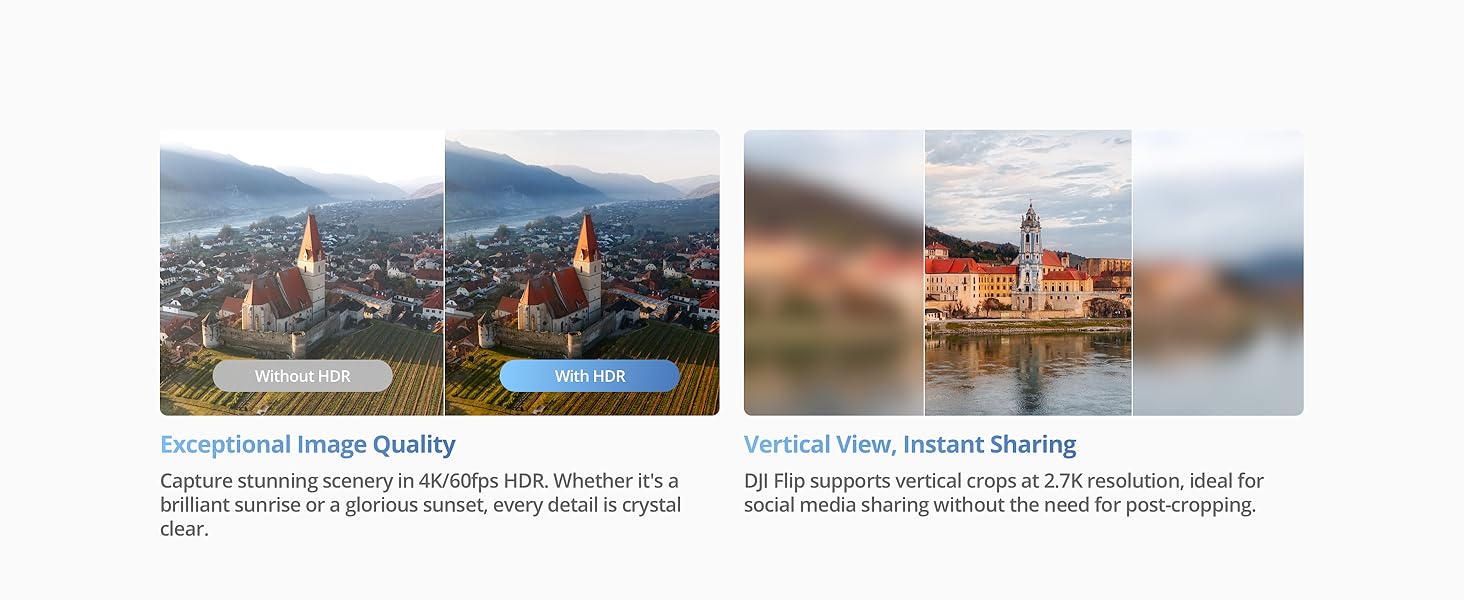
Figure 3.1: Charging Intelligent Flight Batteries with the Parallel Charging Hub.
3.2 App Installation and Activation
The DJI Flip can only be used with the DJI Fly app. Due to platform compatibility issues, the DJI Fly app has been removed from Google Play. Please visit the official DJI website to download the latest version of the DJI Fly app.
Activating DJI Flip with RC 2:
- For first-time use, connect the RC 2 remote controller to the internet via Wi-Fi or a smartphone hotspot.
- Follow the instructions displayed on the RC 2 screen to activate the device.
- After activating RC 2, connect it with the DJI Flip drone via the DJI Fly app.
- Follow the in-app instructions to activate the aircraft.
3.3 Propeller Guard Installation
The DJI Flip features built-in full-coverage propeller guards for enhanced safety. Ensure they are properly unfolded and secured before flight.
4. Operating Instructions
4.1 Basic Flight Controls
The DJI Flip can be controlled via the RC 2 remote controller or through the DJI Fly app. For palm takeoff, hold the sides of the aircraft body from below with the camera facing the subject. Ensure your hand does not block the camera and there are no obstacles obstructing the takeoff.

Figure 4.1: Controller-Free Palm Takeoff and Subject Tracking.
4.2 Intelligent Flight Modes
The DJI Flip offers various intelligent flight modes to simplify complex shots and enhance your creative possibilities:
- Subject Tracking: Keeps your chosen subject in focus, ideal for dynamic shots.
- QuickShot Modes: Provides dynamic angles for quick, simplified cinematic footage. Includes Dronie, Circle, Rocket, Spotlight, Helix, and Boomerang.

Figure 4.2: Capturing your best angle with intelligent flight modes.
4.3 Camera Operation and Imaging
The DJI Flip is equipped with a 1/1.3-inch CMOS sensor, capable of capturing 48MP photos and stunning 4K/60fps HDR video. It supports 10-bit D-Log M color mode for flexible editing and 2.7K vertical shooting for instant social media sharing.

Figure 4.3: High-quality imaging capabilities of the DJI Flip.
4.4 Return to Home (RTH)
With the RC-N3 or RC 2 controller, the DJI Flip supports Return to Home (RTH) and Failsafe RTH for seamless navigation back to you. This includes Return to Me, Low Battery RTH, and Scene Recognition RTH.
4.5 Video Transmission and Data Transfer
The drone supports O4 video transmission with up to 44000 feet / 13 km range for 1080p/60fps video. You can efficiently transfer footage to your phone via Wi-Fi at up to 30MB/s using the DJI Fly app for easy editing and sharing.
Video 4.1: DJI Flip Intro Video. This video provides a brief introduction to the DJI Flip drone and its key features.
5. Maintenance
Regular maintenance ensures the longevity and optimal performance of your DJI Flip drone.
5.1 Cleaning
- Wipe the drone body with a soft, dry cloth after each flight.
- Gently clean the camera lens with a microfiber cloth designed for optics.
- Remove any dust or debris from the motors and propeller guards.
5.2 Propeller Inspection
- Inspect propellers for any cracks, bends, or damage before each flight.
- Replace damaged propellers immediately using the provided screwdriver and spare propellers.
5.3 Battery Care
- Store batteries in a cool, dry place away from direct sunlight.
- Do not overcharge or over-discharge batteries.
- If storing for extended periods, discharge batteries to approximately 50-60% capacity.
6. Troubleshooting & FAQ
Q: Which remote controllers are compatible with DJI Flip?
A: The DJI Flip is compatible with the DJI RC 2 Remote Controller, DJI RC-N3 Remote Controller, and DJI RC-N2 Remote Controller.
Q: Is DJI Flip waterproof?
A: No. Avoid contact with water during use, as it may damage the device. If it rains during the flight, return and land as soon as possible, and wait until the aircraft is fully dry inside and out before using it again.
Q: What app do I need to install before using DJI Flip?
A: DJI Flip can only be used with the DJI Fly app. You can download the latest version of DJI Fly from the DJI Flip Downloads page on the official DJI website.
Q: Which DJI chargers are recommended for DJI Flip?
A: When charging via the Parallel Charging Hub, it is recommended to use the DJI 65W Portable Charger. When charging through the aircraft body, it is recommended to use the DJI 65W Portable Charger or the DJI 30W USB-C Charger.
7. Technical Specifications
| Feature | Specification |
|---|---|
| Brand | DJI |
| Model Name | DJI Flip |
| Model Number | 6941565992536 |
| Item Weight | 2.95 pounds (1.34 Kilograms) |
| Product Dimensions | 11"L x 9.2"W x 3.1"H |
| Color | Gray |
| Video Capture Resolution | 4K |
| Effective Still Resolution | 48 MP |
| Connectivity Technology | Bluetooth, Wi-Fi |
| Maximum Range | 13 Kilometers (O4 Transmission) |
| Battery Cell Composition | Lithium Ion |
| Max Flight Time | 31 Minutes |
| Skill Level | Intermediate |
| Optical Sensor Technology | CMOS (1/1.3-inch) |
8. Warranty and Support
DJI provides an official warranty and one-stop technical support for the DJI Flip. For detailed warranty terms, service requests, or technical assistance, please visit the official DJI website or contact DJI customer service directly.
You can find more information and support resources on the Official DJI Store.