
Introduction
This manual provides essential information for the safe and efficient operation of your ADAX Eco Basic 400W Electric Radiator. Please read these instructions carefully before installation and use, and retain them for future reference. This radiator is designed for wall mounting and features Bluetooth programming, an electronic thermostat with a timer, frost protection, and a weekly mode for optimal heating control.

Image: Front view of the Adax Eco Basic 400W electric radiator, showcasing its sleek white design suitable for wall mounting.
Safety Instructions
- Electrical Safety: Always ensure the power supply matches the voltage specified on the product label (230V). Do not operate the radiator with a damaged cord or plug.
- Placement: Maintain a safe distance from flammable materials. Do not cover the radiator, as this can cause overheating.
- Water Exposure: This appliance has an IP24 rating, making it suitable for use in bathrooms when installed correctly and away from direct water spray. Do not immerse the unit in water.
- Children and Vulnerable Persons: This appliance can be used by children aged 8 years and above and persons with reduced physical, sensory or mental capabilities or lack of experience and knowledge if they have been given supervision or instruction concerning use of the appliance in a safe way and understand the hazards involved. Children shall not play with the appliance. Cleaning and user maintenance shall not be made by children without supervision.
- Overheat Protection: The radiator is equipped with overheat protection. If it overheats, it will automatically shut off. Unplug the unit and allow it to cool before restarting.
- Installation: Installation must be performed by a qualified electrician in accordance with local wiring regulations.
Package Contents
Verify that all components are present and undamaged before proceeding with installation.
- ADAX Eco Basic Electric Radiator (400W, White)
- Wall mounting bracket
- Installation screws and wall plugs
- User Manual
Setup
1. Mounting the Radiator
The ADAX Eco Basic radiator is designed for permanent wall mounting. Ensure the chosen location allows for proper air circulation around the unit and adheres to local safety regulations, especially in bathrooms.
- Choose Location: Select a suitable wall location, preferably under a window to counteract cold drafts. Ensure there is sufficient clearance from the floor, ceiling, and adjacent walls.
- Attach Mounting Bracket: Use the provided wall mounting bracket as a template. Mark the drilling points on the wall. Drill holes and insert wall plugs. Secure the mounting bracket firmly to the wall using the screws.
- Hang Radiator: Carefully lift the radiator and hook it onto the wall mounting bracket. Ensure it is securely seated and level.
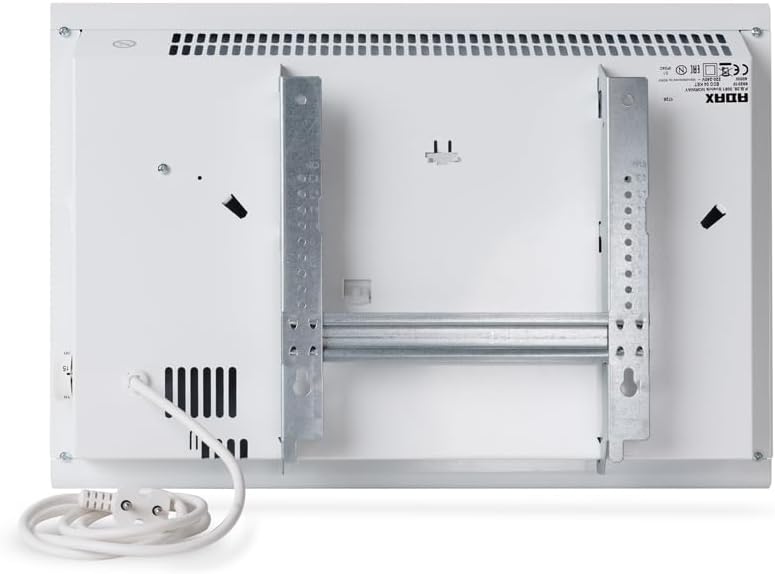
Image: Rear view of the Adax Eco Basic radiator, illustrating the integrated mounting brackets and the power cord connection point.
2. Electrical Connection
Connect the radiator to a suitable 230V power outlet. Ensure the outlet is properly grounded and capable of handling the 400W load.

Image: Close-up of the radiator's control panel, showing the digital temperature display and brand logo. Note: This model uses Bluetooth, not Wi-Fi, despite the image text.
Operating Instructions
1. Initial Power On
Once connected to power, the radiator will enter standby mode. Use the controls on the unit or the Bluetooth app to set your desired temperature.
2. Manual Temperature Control
The radiator features an electronic thermostat. Adjust the temperature directly on the unit using the control knob or buttons. The display will show the set temperature.
3. Bluetooth Programming
The ADAX Eco Basic can be controlled via a smartphone app using Bluetooth.
- Download App: Search for the official ADAX control app on your smartphone's app store.
- Enable Bluetooth: Ensure Bluetooth is enabled on your smartphone.
- Pair Device: Follow the in-app instructions to pair your smartphone with the radiator. This typically involves selecting the radiator from a list of available devices.
- Program Settings: Use the app to set desired temperatures, create weekly schedules, and activate features like frost protection or open window detection.
4. Special Features
- Frost Protection: This mode maintains a minimum temperature (e.g., 5°C) to prevent freezing in unoccupied rooms. Activate via the app or unit controls.
- Open Window Detection: The radiator can detect a sudden drop in temperature (indicating an open window) and temporarily pause heating to save energy.
- Adaptive Heating Start: The radiator learns the time required to reach the desired temperature and starts heating in advance to ensure the room is warm at the scheduled time.
- 24-Hour Programmable Timer: Set specific heating periods and temperatures for each day of the week using the Bluetooth app.
Maintenance
Regular maintenance ensures optimal performance and longevity of your radiator.
- Cleaning: Disconnect the radiator from the power supply before cleaning. Use a soft, damp cloth to wipe the exterior. Do not use abrasive cleaners or solvents.
- Dust Removal: Periodically vacuum or brush away any dust accumulated on the air vents to maintain efficient heat distribution.
- Inspection: Regularly check the power cord and plug for any signs of damage. If damage is found, contact qualified service personnel.
Troubleshooting
| Problem | Possible Cause | Solution |
|---|---|---|
| Radiator does not heat. | No power supply; thermostat set too low; overheat protection activated. | Check power connection and circuit breaker. Increase thermostat setting. Unplug and allow to cool for 30 minutes. |
| Bluetooth connection fails. | Bluetooth not enabled on phone; app issue; radiator too far. | Ensure Bluetooth is on. Restart app/phone. Move closer to radiator. Re-pair device. |
| Radiator makes unusual noises. | Expansion/contraction of metal (normal); loose mounting. | Minor clicking is normal. Check mounting screws for tightness. If noise persists or is loud, contact support. |
| Room not reaching desired temperature. | Radiator undersized for room; open window detection active; poor insulation. | Refer to the heating area guide. Close windows. Improve room insulation. Consider additional heating if necessary. |
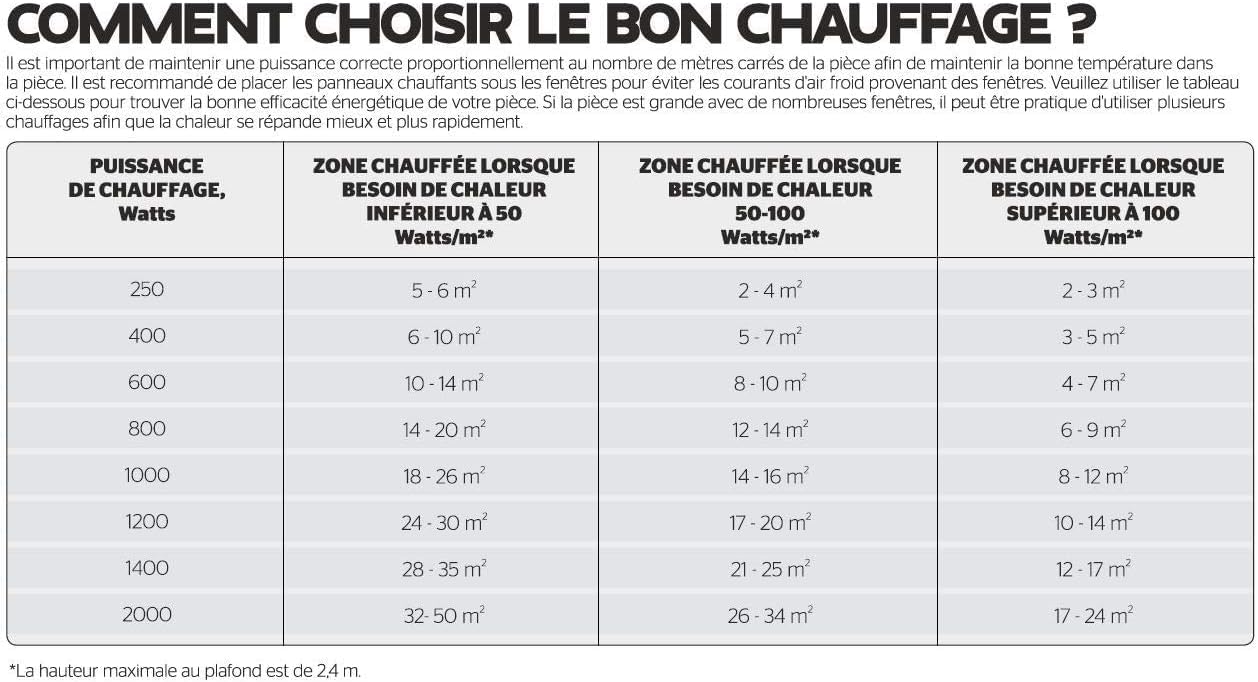
Image: Guide for selecting the correct heating power based on room size and heat demand (Watts per square meter). This helps determine if the 400W model is suitable for your space.
Specifications
| Feature | Detail |
|---|---|
| Brand | ADAX |
| Model Number | 680061 |
| Color | White |
| Power | 400 Watts |
| Voltage | 230 Volts |
| Product Dimensions (L x W x H) | 47 x 9.7 x 33 cm |
| Item Weight | 3.65 Kilograms |
| Material | Bi-material |
| Special Features | Bluetooth programming, electronic thermostat, open window detection, adaptive heating start, overheat protection, 24-hour programmable timer |
| IP Rating | IP24 (Splash-proof, suitable for bathrooms) |
| Heating Method | Convection |
| Mounting Type | Wall Mount |
| Indoor/Outdoor Use | Indoor |
Warranty and Support
For warranty information and customer support, please refer to the documentation included with your purchase or visit the official ADAX website.
- Manufacturer: Adax
- Contact: Refer to official ADAX channels for support.
- Spare Parts: Information regarding spare parts availability is not provided in the product details.