
1. Introduction
This manual provides detailed instructions for the safe and effective use of your VIGRUE Precision Electric Screwdriver Set, Model JM-02. This versatile tool is designed for precision tasks, including the repair and assembly of electronics such as laptops, cameras, watches, and drones. It features both electric and manual operation modes, multiple torque settings, and a comprehensive set of precision bits.
2. Safety Information
- Always wear appropriate personal protective equipment, such as safety glasses, when operating power tools.
- Keep the work area clean and well-lit. Cluttered or dark areas invite accidents.
- Do not operate power tools in explosive atmospheres, such as in the presence of flammable liquids, gases, or dust.
- Keep children and bystanders away while operating a power tool. Distractions can cause you to lose control.
- Avoid accidental starting. Ensure the switch is in the off-position before connecting to battery pack, picking up or carrying the tool.
- Use the correct bit for the fastener. Forcing an incorrect bit can damage the fastener and the tool.
- Do not over-tighten screws. Use appropriate torque settings to prevent damage to components.
- When working with sensitive electronics, always use the anti-static wrist strap to prevent electrostatic discharge (ESD) damage.
- Store the tool and accessories in a dry, secure place, out of reach of children.
3. Package Contents
The VIGRUE Precision Electric Screwdriver Set JM-02 includes the following items:
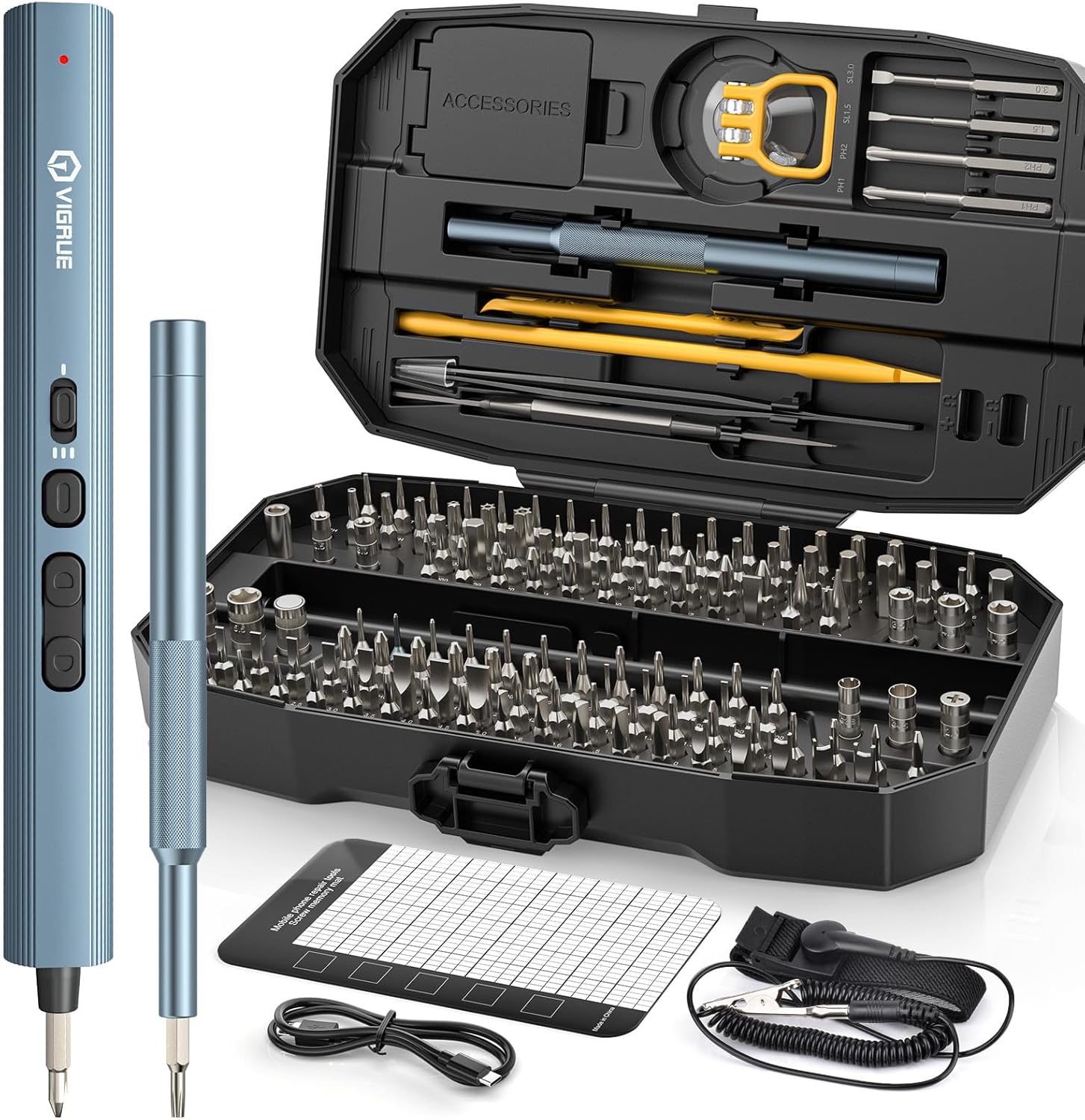
Figure 3.1: Complete VIGRUE Precision Electric Screwdriver Set.
- VIGRUE Electric Screwdriver (1 unit)
- Manual Screwdriver Handle (1 unit)
- Precision Magnetic Bits (140 pieces, various types and sizes)
- Pry Bar (1 unit)
- LED Light (integrated)
- Tweezers (1 unit)
- USB Type-C Charging Cable (1 unit)
- Anti-Static Wrist Strap (1 unit)
- Magnetic Mat (1 unit)
- Suction Cup (1 unit)
- Opening Picks (4 units)
- Flexible Extension Shaft (1 unit)
- Magnetizer/Demagnetizer (1 unit)

Figure 3.2: Detailed view of included accessories and their names.
4. Product Overview
The VIGRUE Precision Electric Screwdriver is designed for ease of use and precision. Key components include:
- Electric Screwdriver Body: Houses the motor, battery, control buttons, and LED light.
- Magnetic Bit Holder: Securely holds precision bits.
- Forward/Reverse Buttons: Controls the rotation direction of the bit.
- Torque Adjustment Button: Cycles through available torque settings.
- LED On/Off Button: Activates or deactivates the integrated LED shadowless light.
- USB-C Charging Port: For recharging the internal battery.
- Manual Screwdriver Handle: For tasks requiring higher manual torque or when the electric mode is not desired.
Figure 4.1: Key features and components of the VIGRUE Electric Screwdriver.
5. Setup
5.1 Charging the Battery
Before first use, fully charge the electric screwdriver. The device is equipped with a 650mAh rechargeable battery.
- Locate the USB Type-C charging port on the screwdriver body.
- Connect the provided USB Type-C cable to the screwdriver and a compatible USB power adapter (not included).
- The charging indicator light will illuminate (typically red) during charging.
- Once fully charged (approximately 1 hour), the indicator light will turn off.
- A full charge provides over 10 hours of continuous idle operation or allows driving over 800 screws.
Figure 5.1: Charging the VIGRUE Electric Screwdriver via USB-C.
5.2 Inserting Screwdriver Bits
The screwdriver features a magnetic bit holder for quick and secure bit changes.
- Select the appropriate precision bit for your task from the 140 included bits.
- Gently push the bit into the magnetic bit holder at the tip of the electric screwdriver until it is seated securely.
- To remove a bit, simply pull it out.
- For bits that require extra reach or flexibility, attach the flexible extension shaft before inserting the bit.
6. Operating Instructions
6.1 Electric Mode Operation
The electric screwdriver offers precise control for delicate tasks.
- Power On/Off: The screwdriver is always ready for use when charged. There is no separate power button for the motor.
- Forward/Reverse: Press the top button for forward rotation (tightening) or the bottom button for reverse rotation (loosening).
- Torque Adjustment: Press the middle button (Torque Adjustment Button) to cycle through the three available torque settings: 0.15 Nm, 0.35 Nm, and 0.7 Nm. Select the appropriate torque to prevent overtightening or stripping screws.
- LED Light: Press the LED On/Off Button to activate the integrated shadowless LED light, illuminating your work area. Press again to turn it off.

Figure 6.1: Adjusting torque settings for precision work.
6.2 Manual Mode Operation
For tasks requiring higher torque or when the battery is depleted, the screwdriver can be used manually.
- The electric screwdriver can be used as a manual screwdriver by simply rotating it by hand. It provides a manual torque of up to 5 Nm.
- Alternatively, use the dedicated manual screwdriver handle provided in the kit for tasks that require more grip and leverage.
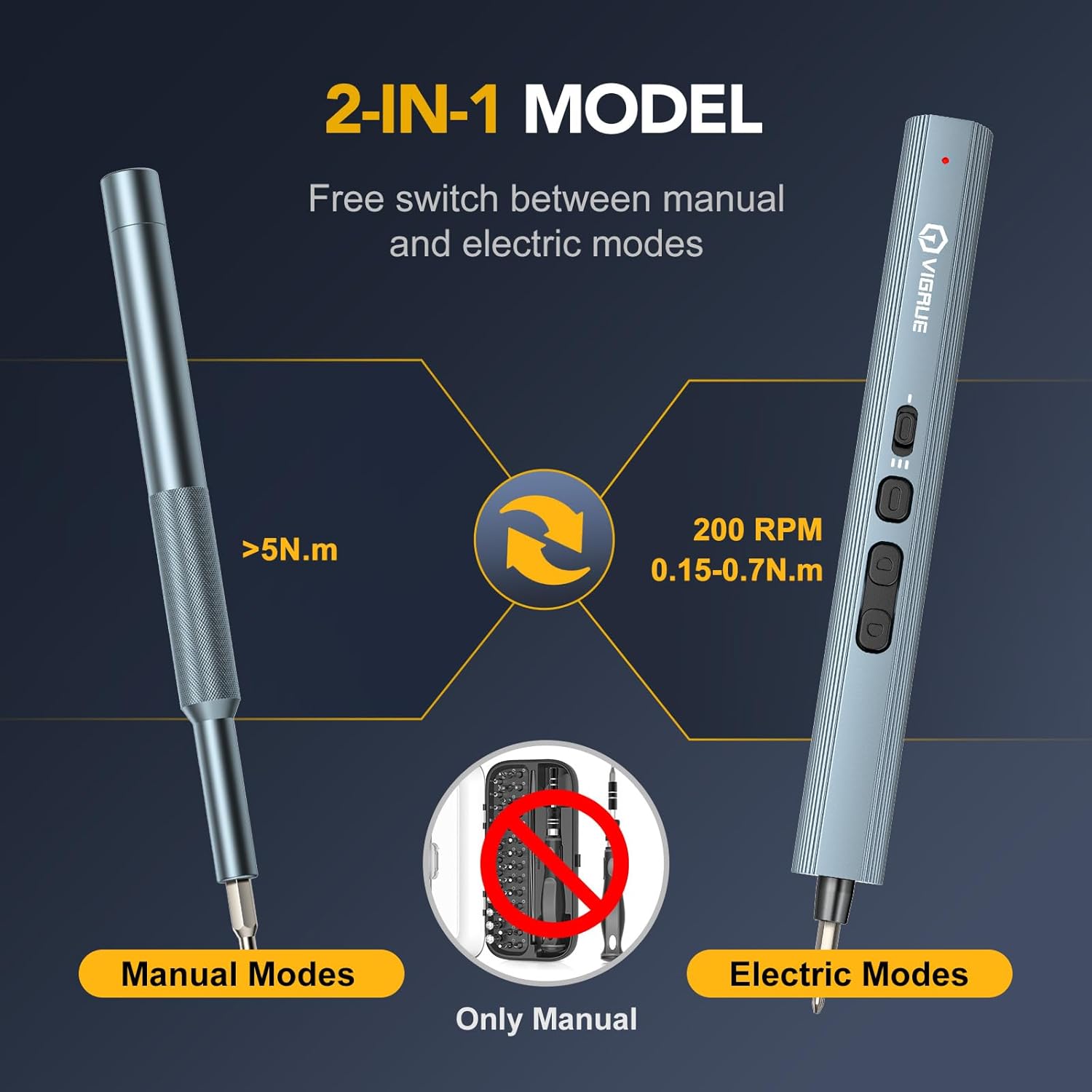
Figure 6.2: Switching between electric and manual modes.
6.3 Using the Anti-Static Wrist Strap
To protect sensitive electronic components from electrostatic discharge (ESD), use the anti-static wrist strap.
- Wrap the wrist strap snugly around your wrist.
- Connect the coiled cord to the metal clip on the strap.
- Attach the metal clip to a grounded object, such as a metal computer case or a grounded outlet cover screw. This equalizes the electrical charge between your body and the electronic device.

Figure 6.3: Proper use of the anti-static wrist strap.
6.4 Using the Flexible Extension Shaft
The flexible extension shaft allows access to screws in tight or awkward spaces.
- Insert the flexible extension shaft into the magnetic bit holder of the electric screwdriver.
- Insert the desired precision bit into the end of the flexible extension shaft.
- Bend and maneuver the shaft to reach the screw.

Figure 6.4: Utilizing the flexible extension shaft for difficult angles.
7. Maintenance
- Cleaning: Wipe the screwdriver body and bits with a clean, dry cloth after each use. Do not use abrasive cleaners or solvents.
- Bit Storage: Store all precision bits in their designated slots within the carrying case to prevent loss and damage.
- Battery Care: For optimal battery life, avoid fully discharging the battery frequently. Recharge when the indicator light flashes. If storing for extended periods, charge the battery to approximately 50% every few months.
- General Storage: Keep the entire set in its protective case in a cool, dry place away from direct sunlight and extreme temperatures.
8. Troubleshooting
| Problem | Possible Cause | Solution |
|---|---|---|
| Screwdriver not operating in electric mode. | Battery is depleted. | Charge the battery using the provided USB-C cable. |
| Bit slips or strips screw head. | Incorrect bit size/type or excessive torque. | Ensure the correct bit is used. Reduce torque setting. Apply gentle, steady pressure. |
| LED light not turning on. | LED button not pressed or battery low. | Press the LED On/Off button. If still off, charge the screwdriver. |
| Screwdriver feels weak or slow. | Low battery charge. | Recharge the screwdriver's battery. |
9. Specifications
| Feature | Specification |
|---|---|
| Brand | VIGRUE |
| Model Name | JM-02 (VIGRUE-JM156) |
| Battery Capacity | 650 mAh |
| Electric Torque Settings | 0.15 Nm, 0.35 Nm, 0.7 Nm |
| Manual Torque | Up to 5 Nm |
| No-load Speed | 400 RPM |
| Charging Port | USB Type-C |
| Material | Aluminum |
| Number of Bits | 140 (S2 hardened steel) |
| Product Dimensions | 7.67 x 4.33 x 1.96 inches |
| Item Weight | 2.09 pounds |
10. Warranty and Support
VIGRUE products are manufactured to high-quality standards. For specific warranty information, please refer to the documentation included with your purchase or contact VIGRUE customer support.
For further assistance, product inquiries, or technical support, please visit the official VIGRUE store or contact their customer service department.
Official VIGRUE Store: VIGRUE Store on Amazon