1. Introduction
This manual provides essential information for the safe and effective installation, operation, and maintenance of the NENEN EA119G Dual Power Manual Transfer Interlock Circuit Breaker. This device is designed for single-phase (1P) applications, rated for 63A at 230V/400V AC, and facilitates manual switching between two independent power sources while ensuring interlock safety. Please read this manual thoroughly before installation and use.
2. Safety Information
Warning: Electrical shock hazard. Installation and maintenance should only be performed by qualified personnel. Always disconnect power before working on the device or its connections.
- Ensure all local and national electrical codes are followed during installation.
- Verify the voltage and current ratings of the device match your application requirements.
- Do not operate the device if it appears damaged.
- Keep children away from electrical installations.
3. Product Overview and Dimensions
The NENEN EA119G is a compact manual transfer switch designed for DIN rail mounting. It features a robust interlock mechanism to prevent simultaneous connection to two power sources.

Figure 3.1: Front view of the NENEN EA119G circuit breaker with key dimensions. The image shows the overall height of 83mm, a mounting height of 35mm, a width of 43mm, and a depth of 18mm, along with the 46mm height of the switch mechanism. Terminal points 1, 3, 2, and 4 are visible.

Figure 3.2: Side view of the NENEN EA119G circuit breaker, illustrating its profile and the DIN rail mounting clips on the rear. A screw for internal access or adjustment is visible on the side.
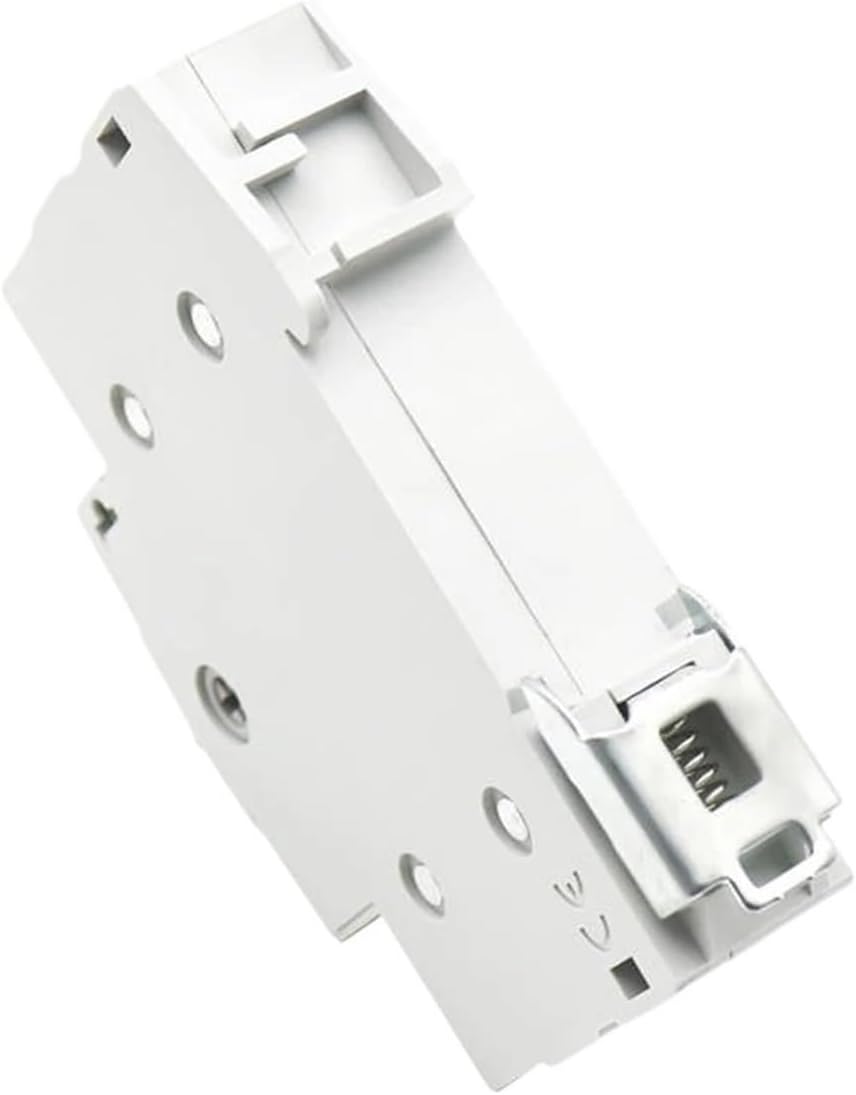
Figure 3.3: Angled view of the NENEN EA119G circuit breaker, showing the top and side. The DIN rail clip mechanism is clearly visible, indicating ease of installation onto a standard DIN rail.

Figure 3.4: Top-down view of the NENEN EA119G circuit breaker, highlighting the terminal screws labeled 1, 3, 2, and 4. The central manual transfer switch lever is also visible in its neutral position.
4. Specifications
| Feature | Specification |
|---|---|
| Type | Mini Circuit Breaker / Manual Transfer Switch |
| Model Number | EA119G |
| Number of Poles | 1P |
| Rated Current | 63A |
| Rated Voltage | 230V/400V AC |
| Rated Frequency | 50/60Hz |
| Electrical Life | 1500 cycles |
| Mechanical Life | 8500 cycles |
| Protection Degree | IP20 |
| Ambient Temperature | -5°C to 40°C |
| Installation | DIN Rail Mount |
| Material | Engineering Plastic |
| Item Weight | 1.32 pounds (approx. 0.6 kg) |
| Package Dimensions | 1.18 x 0.79 x 0.39 inches (approx. 3 x 2 x 1 cm) |
5. Setup and Installation
The NENEN EA119G is designed for quick and easy DIN rail installation. Ensure power is disconnected before proceeding.
- Mounting: Locate an appropriate position on a standard 35mm DIN rail within your control cabinet. Align the device's clips with the DIN rail and press firmly until it clicks into place.
- Wiring - Power Source 1: Connect the live (L) and neutral (N) wires from your primary power source to the input terminals labeled '1' and '3' respectively. Ensure connections are secure and wires are properly stripped.
- Wiring - Power Source 2: Connect the live (L) and neutral (N) wires from your secondary (e.g., backup generator) power source to the input terminals labeled '2' and '4' respectively. Double-check all connections for tightness.
- Load Connection: Connect your load (the circuit or equipment to be powered) to the output terminals of the device. The output terminals are typically located on the opposite side of the switch from the inputs. Refer to the product diagram for exact output terminal locations.
- Verification: After all connections are made, visually inspect all wiring to ensure there are no loose connections or exposed conductors.
6. Operating Instructions
The EA119G is a manual transfer switch with an interlock mechanism. This means only one power source can be connected to the load at any given time, preventing dangerous back-feeding.
- Switching to Power Source 1: To connect the load to Power Source 1, move the central lever to the position corresponding to Power Source 1 (usually indicated by 'I' or 'ON1'). The interlock mechanism will prevent the lever from being moved to Power Source 2's position simultaneously.
- Switching to Power Source 2: To connect the load to Power Source 2, first move the central lever to the neutral (OFF) position. Once in the neutral position, you can then move the lever to the position corresponding to Power Source 2 (usually indicated by 'II' or 'ON2').
- Neutral (OFF) Position: When the lever is in the central position, both power sources are disconnected from the load. This is the safe position for maintenance or when no power is required.
7. Maintenance
Regular maintenance helps ensure the longevity and reliable operation of your NENEN EA119G circuit breaker.
- Periodic Inspection: Annually, or more frequently in dusty environments, inspect the device for any signs of physical damage, discoloration, or loose connections.
- Cleaning: With power disconnected, gently clean the exterior of the device with a dry, soft cloth. Do not use liquid cleaners or solvents.
- Terminal Tightness: Periodically check the tightness of all terminal screws. Loose connections can lead to overheating and potential hazards.
- Functional Check: Test the manual switching mechanism to ensure it operates smoothly and the interlock functions correctly.
8. Troubleshooting
If you encounter issues with your NENEN EA119G, refer to the following common problems and solutions:
| Problem | Possible Cause | Solution |
|---|---|---|
| Device does not switch | Interlock engaged; mechanical obstruction | Ensure the lever is in the neutral position before attempting to switch to another source. Check for any foreign objects obstructing the lever's movement. |
| No power to load from Source 1/2 | Source not active; loose wiring; internal fault | Verify the selected power source is active. Check all wiring connections for tightness. If the issue persists, consult a qualified electrician. |
| Overheating at terminals | Loose connections; overloaded circuit | Disconnect power and tighten all terminal screws. Ensure the connected load does not exceed the device's 63A rating. |
9. Warranty and Support
NENEN products are manufactured to high-quality standards. For warranty information or technical support, please refer to the retailer's return policy or contact the manufacturer directly through their official website or customer service channels. Keep your purchase receipt for warranty claims.