
Introduction
Thank you for choosing the EKO Ergo Edition Wireless Bluetooth 5.0 Earbuds. These earbuds are designed to provide a high-quality audio experience with wireless freedom, intuitive touch controls, and a comfortable fit. This manual will guide you through the setup, operation, and maintenance of your new earbuds.
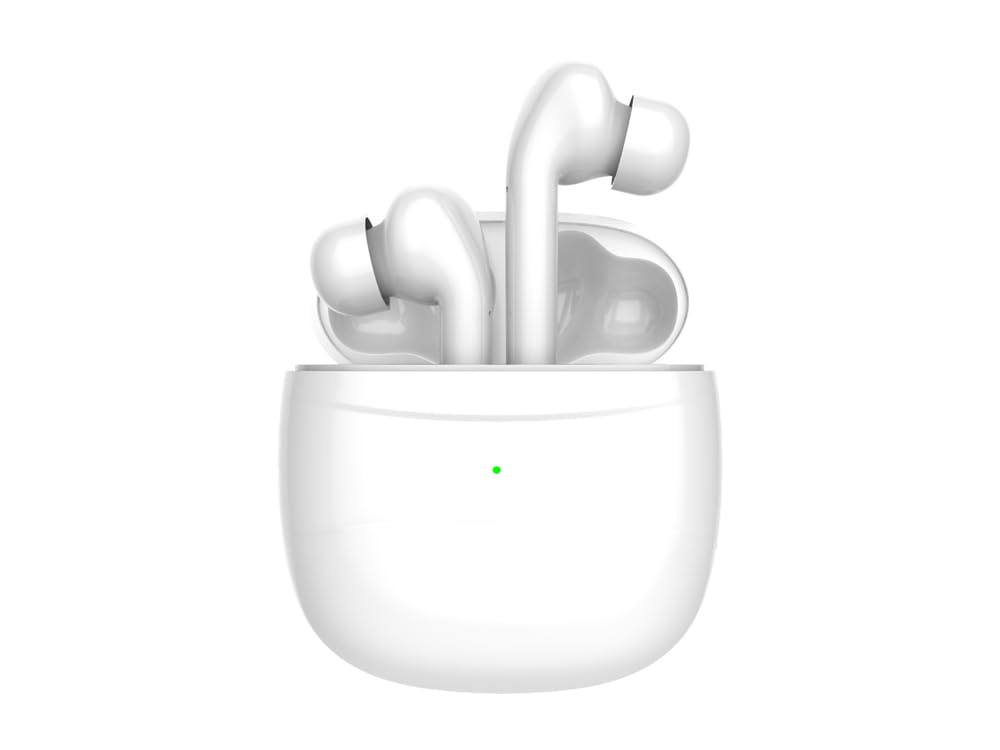
Image: The EKO Ergo Edition Wireless Bluetooth 5.0 Earbuds, featuring the two earbuds and their compact charging case. The earbuds are white, designed for an in-ear fit.
Setup
1. What's in the Box
- EKO Ergo Edition Wireless Bluetooth 5.0 Earbuds (Left and Right)
- Wireless Charging Case
- Charging Cable
- User Manual
- Interchangeable Ear Tips (3 sizes)
2. Charging the Earbuds and Case
Before first use, fully charge the earbuds and the charging case. The charging case has a capacity of 450 mAh, providing up to 3 full recharges for the earbuds.
- Place the earbuds into the charging case. Ensure they are correctly seated for magnetic charging.
- Connect the charging cable to the charging case and a suitable USB power source.
- The charging indicator lights on the case will show the charging status. A full charge typically takes approximately 1 hour.
- Once fully charged, disconnect the charging cable.
The earbuds offer 4 to 5 hours of continuous use on a single charge.
3. Pairing with Your Device
The earbuds use Bluetooth 5.0 for a stable and efficient connection.
- Ensure the earbuds are charged and placed in the charging case.
- Open the charging case. The earbuds will automatically enter pairing mode.
- On your smartphone or tablet, go to the Bluetooth settings.
- Search for available devices and select "EKO Ergo Edition" from the list.
- Once connected, you will hear an audible confirmation, and the earbuds will be ready for use.
- The earbuds will automatically reconnect to the last paired device when removed from the case, if Bluetooth is enabled on the device.
Operating Instructions
Touch Controls
The EKO Ergo Edition earbuds feature intuitive touch controls, eliminating the need for physical buttons.
| Action | Function |
|---|---|
| Single Tap (Left/Right Earbud) | Play/Pause Music, Answer/End Call |
| Double Tap (Right Earbud) | Next Track |
| Double Tap (Left Earbud) | Previous Track |
| Triple Tap (Right Earbud) | Volume Up |
| Triple Tap (Left Earbud) | Volume Down |
| Long Press (Left/Right Earbud) | Activate Voice Assistant (Siri, Google Assistant) |
| Long Press (during incoming call) | Reject Call |
Making and Receiving Calls
- Answer/End Call: Single tap on either earbud.
- Reject Call: Long press on either earbud during an incoming call.
- The earbuds feature noise reduction technology for clear stereo sound during calls.
Voice Assistant (Siri Compatibility)
The earbuds are compatible with Siri and other voice assistants. Long press on either earbud to activate your device's voice assistant for hands-free control.
Maintenance
Cleaning
- Regularly clean the earbuds and charging case with a soft, dry, lint-free cloth.
- Do not use harsh chemicals, cleaning solvents, or strong detergents.
- Remove ear tips and clean them separately with water if necessary, ensuring they are completely dry before reattaching.
- Keep charging contacts on both earbuds and case clean to ensure proper charging.
Storage
- When not in use, store the earbuds in their charging case to protect them and keep them charged.
- Store the device in a cool, dry place, away from extreme temperatures and direct sunlight.
The earbuds have an IPX4 water resistance rating, making them resistant to splashes and sweat. However, they are not designed for submersion in water.
Troubleshooting
Common Issues and Solutions
- Earbuds not pairing:
- Ensure both earbuds are charged.
- Turn off Bluetooth on your device, then turn it back on.
- Forget "EKO Ergo Edition" from your device's Bluetooth list and attempt to pair again.
- Place earbuds back in the case, close the lid, wait a few seconds, then open to re-enter pairing mode.
- No sound from one earbud:
- Ensure both earbuds are charged.
- Try placing both earbuds back in the charging case, closing the lid, and then taking them out again.
- Check your device's audio balance settings.
- Charging issues:
- Ensure the charging cable is securely connected to both the case and the power source.
- Clean the charging contacts on the earbuds and inside the case with a dry cotton swab.
- Try a different charging cable or power adapter.
- Low volume:
- Adjust the volume on both your connected device and using the earbud touch controls.
- Ensure ear tips are properly sealed in your ear canal.
- Clean any debris from the earbud speaker mesh.
Specifications
| Model Name | EKO Ergo Edition |
| Model Number | TTE486 |
| Connectivity Technology | Wireless (Bluetooth 5.0) |
| Ear Placement | In-Ear |
| Control Method | Touch |
| Noise Control | Active Noise Cancellation |
| Battery Life (Earbuds) | 4-5 Hours (continuous use) |
| Charging Case Capacity | 450 mAh (provides 3 full recharges) |
| Charging Time | Approx. 1 Hour |
| Water Resistance Level | IPX4 (Splash-proof) |
| Compatible Devices | Phone, Tablet |
| Weight | 110 grams (package weight) |
Warranty Information
EKO products are covered by a standard manufacturer's warranty against defects in materials and workmanship. The specific duration and terms of the warranty may vary by region. Please retain your proof of purchase for warranty claims. For detailed warranty information, refer to the documentation included with your purchase or contact customer support.
Customer Support
If you encounter any issues or have questions regarding your EKO Ergo Edition Wireless Bluetooth 5.0 Earbuds that are not covered in this manual, please contact our customer support team. Contact details can typically be found on the product packaging or the official EKO website.
