
1. Product Overview
The aoonav 13.6 Inch Android 13 Car Radio is a state-of-the-art multimedia system designed to upgrade your Toyota Tacoma (2016-2023). It features an IPS capacitive touch screen, a powerful Qualcomm QCM6125 (Snapdragon 665) processor with 4GB RAM and 64GB ROM, and built-in 4G LTE connectivity. Enjoy wireless Apple CarPlay and Android Auto, GPS navigation, Bluetooth 5.0, and innovative on-screen climate control. The unit supports both AUTO AC and Manual AC systems, retaining original vehicle functions like steering wheel controls and reverse signals.
2. What's in the Box
Your aoonav Android 13 Car Radio package includes the following components:
- 13.6 Inch Android 13 Car Radio Head Unit
- Power Adapter
- Screen
- Various Accessories and Wiring Harnesses (including WiFi antenna, 4G LTE antennas, GPS antenna, microphone, USB connections, RCA pre-outs, AV input, CANBUS module, and vehicle-specific power cables)
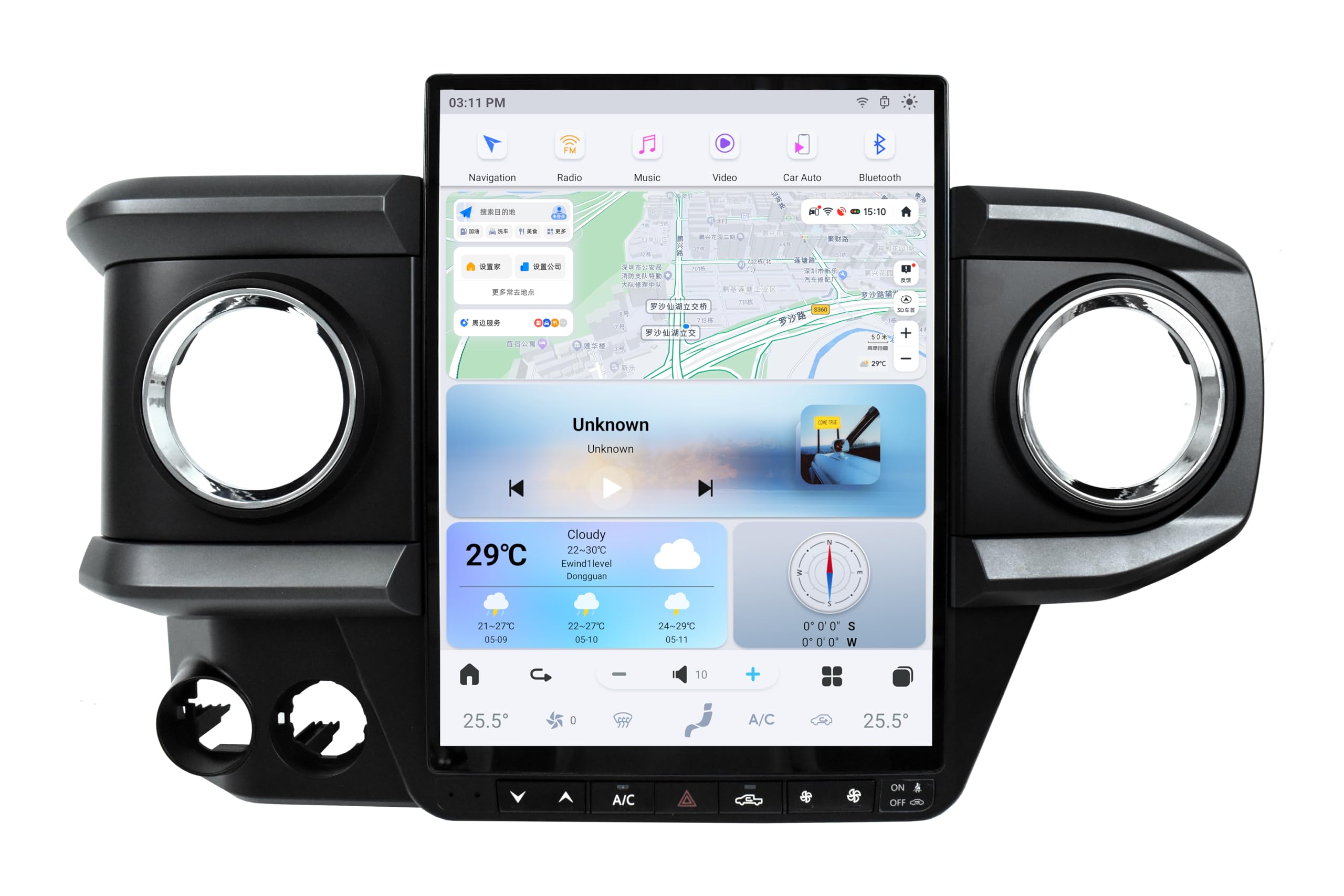
Figure 2.1: The aoonav 13.6 Inch Android 13 Car Radio Head Unit with included accessories and wiring harnesses.

Figure 2.2: A detailed view of the various cables and components included with the aoonav car radio.
Video 2.1: Unboxing and product introduction of a similar 13-inch Tacoma radio, showcasing included components and their functions. This video provides a visual guide to the items you should expect in your package.
3. Setup & Installation
3.1 Pre-Installation Checklist
- Ensure your vehicle is turned off and the battery is disconnected before starting installation.
- Gather necessary tools: Ratchet with Extension, 10mm Socket, Phillips Head Screwdriver, Plastic Pry Tool, Zip Ties.
- Review all included components and wiring harnesses.
3.2 Wiring Diagram
Refer to the provided wiring diagrams for detailed connection instructions. The kit includes different main power cables to accommodate various Toyota Tacoma generations (2016-2023). Ensure you select the correct harness for your specific vehicle model.
Video 3.1: A wiring guide for 4-core car radio installation. This video demonstrates general wiring principles that may apply to your aoonav unit.
3.3 Installation Steps
- Disassembly: Carefully pry off the factory trim panel surrounding the radio and air vents. Remove the four 10mm bolts securing the factory radio. Unplug all harnesses connected to the factory radio and remove it from the dash.
- Vent Transfer: Transfer the air vents from your original trim panel to the new aoonav trim panel. Use a plastic pry tool to carefully release the tabs holding the vents in place.
- Mounting the Head Unit: Secure the aoonav head unit to the new trim panel using the provided screws.
- Connecting Harnesses: Connect all necessary wiring harnesses from the aoonav unit to your vehicle's factory connectors. This includes power, speaker, USB, microphone, GPS, and 4G LTE antennas. Ensure the CANBUS module is correctly connected to maintain factory vehicle functions.
- Reassembly: Carefully tuck all wiring into the dash. Secure the new aoonav display assembly into the dash using the 10mm bolts. Snap the trim panel firmly into place.

Figure 3.1: Visual comparison of the vehicle's dashboard before and after the installation of the aoonav 13.6 Inch Android 13 Car Radio.
Video 3.2: A detailed review and installation process for a similar 13-inch Tacoma radio. This video provides practical steps for removing the old unit and installing the new one.
Video 3.3: Installation guide for a Stinger Heigh10 unit in a Tacoma. This video demonstrates general disassembly and reassembly steps relevant to your aoonav unit.
Video 3.4: Car stereo radio installation process for a 12.3-inch/13.1-inch unit. This video offers additional visual guidance for the installation of large screen car radios.
Video 3.5: Car radio installation video specifically for Toyota Tacoma 2020-2023 models. This video provides detailed steps for the installation process.
Video 3.6: Installation video for Tacoma 2016-2023 Android screen. This video offers a vertical format perspective on the installation process.
4. Operating Instructions
4.1 Basic Functions
- Wireless CarPlay & Android Auto: Connect your smartphone via Bluetooth to access music, navigation, and calls directly from the 13.6-inch touchscreen.
- GPS Navigation: Utilize built-in GPS with online or offline maps. The unit supports various navigation apps.
- Bluetooth 5.0: Enjoy hands-free calls, music streaming, and phonebook download.
- On-Screen Climate Control: Seamlessly control your vehicle's climate settings directly from the touchscreen interface.

Figure 4.1: The aoonav car radio displaying GPS navigation, showing various map applications.

Figure 4.2: The aoonav car radio displaying the Bluetooth 5.0 interface for calls and music.
Video 4.1: Instructions on how to connect wireless CarPlay and Android Auto. This video guides users through the smartphone connection process.
Video 4.2: Overview of the car stereo radio upgrade for Toyota Tacoma 2016-2023, demonstrating various features and user interface elements.
4.2 Advanced Features
- Day/Night Mode: The system automatically switches to a dark night theme interface when car lights are started, enhancing driving safety at night.
- High Resolution LCD Display: The 1920x1080 IPS capacitive touchscreen provides a clear viewing experience and supports 1080P video playback.
- Dynamic Sound Effects (DSP): Customize your audio experience with various sound modes and equalizer settings.

Figure 4.3: The aoonav car radio displaying high-resolution video playback on its LCD screen.
5. Maintenance
- Screen Cleaning: Use a soft, lint-free cloth (like the one provided) to gently wipe the touchscreen. Avoid harsh chemicals that may damage the display.
- Software Updates: Periodically check for software updates to ensure optimal performance and access to new features. Updates can typically be performed via Wi-Fi connection.
- General Care: Avoid exposing the unit to extreme temperatures or direct sunlight for prolonged periods.
6. Troubleshooting
- No Power: Check all power connections and ensure the vehicle's battery is properly connected.
- No Sound: Verify speaker connections and audio settings. Check if the volume is muted or too low.
- GPS Signal Loss: Ensure the GPS antenna is properly installed and has a clear line of sight to the sky.
- Bluetooth Disconnection: Re-pair your device. Check for interference from other electronic devices.
- CarPlay/Android Auto Issues: Ensure your smartphone is compatible and its software is up to date. Try reconnecting via Bluetooth.
- For any persistent issues, please refer to the Warranty & Support section for contact information.
7. Specifications
| Feature | Specification |
|---|---|
| Item Weight | 8.8 pounds |
| Package Dimensions | 24.25 x 15.25 x 7.6 inches |
| Item Model Number | Android Car Radio |
| Display Size | 13.6 Inches |
| Voice Command | Touchscreen |
| Brand | aoonav |
| Model Name | Car Radio Upgrade For New Toyota Tacoma 2016-2023 |
| Vehicle Service Type | Truck |
| Special Feature | Bluetooth, Radar Warning, Touchscreen, Waterproof, Wireless Carplay |
| Connectivity Technology | Bluetooth, Ethernet, USB, Wi-Fi |
| Map Type | North America, Worldwide |
| Included Components | Power Adapter +Screen+ Accessories |
| Audio Output Mode | AUX |
| Mounting Type | Dashboard Mount |
8. Warranty & Support
Your aoonav Android Car Radio comes with a one-year warranty and lifetime after-sales service. If you have any questions regarding installation or use, please do not hesitate to contact aoonav customer service.
- Email: autostereo@163.com
- Phone Number: 951-337-3426
- Customer service representatives are available Monday to Friday, 9:00 AM to 6:00 PM (PST).
aoonav offers a 30-day Money-Back Guarantee and 12-month Replacement for your peace of mind.