
Introduction
The NEXTORCH P80 is a high-performance rechargeable tactical flashlight designed for various applications including night duty, outdoor adventure, self-protection, and daily use. It features a powerful 1600-lumen output, multiple operating modes, and a durable aerospace-grade aluminum construction. This manual provides essential information for the proper setup, operation, and maintenance of your P80 flashlight.

Image: The NEXTORCH P80 rechargeable tactical flashlight in Wolf Brown color, showcasing its compact design and textured grip.

Image: A collage illustrating various applications of the NEXTORCH P80 flashlight, including duty patrol, outdoor adventures, vehicle maintenance, and emergency defense.
Package Contents
- NEXTORCH P80 Rechargeable Flashlight
- User Manual (this document)
- Type-C Charging Cable
- Hand Strap
- Seal Ring (x2)
- Lithium Ion Battery (pre-installed)
Setup
1. Initial Charging
Before first use, fully charge the NEXTORCH P80 flashlight. The device features a Type-C direct charging port for convenience.
- Locate the charging port. It is hidden and accessed by un-threading the bezel end of the light.
- Connect the provided Type-C cable to the flashlight's charging port.
- Connect the other end of the Type-C cable to a compatible USB power source (e.g., wall adapter, computer USB port).
- The LED battery indicator lights will show the charging status. Blue lights will flash during charging and remain solid blue when fully charged.
- Once fully charged, disconnect the cable and re-thread the bezel to protect the charging port.

Image: The NEXTORCH P80 flashlight connected to a USB-C charging cable, illustrating the hidden charging port and the blue LED indicators during charging.
2. Attaching the Hand Strap
Attach the included hand strap to the designated loop on the tail cap of the flashlight for secure carrying and to prevent accidental drops.
Operating Instructions
The NEXTORCH P80 features dual side press switches for intuitive control of its various functions.

Image: A close-up view of the NEXTORCH P80's two side-mounted switches, indicating the smaller strobe switch and the larger mode switching switch with LED battery indicators.
1. Mode Switching (Larger Switch)
- Momentary On (High Light): Half-press the larger switch to activate momentary high brightness. Release to turn off.
- Constant On (Medium Light): Full-press the larger switch until it clicks to activate constant medium brightness.
- Cycling Modes: When the light is in Constant On mode, half-press the larger switch to cycle through the brightness levels: Medium, Low, High.
- Turn Off: Full-press the larger switch until it clicks again to turn the flashlight off.
The P80 has a preset 350 lumens for the first bright mode when turned on, suitable for general duty applications.

Image: A person using the NEXTORCH P80 flashlight in a dark environment, demonstrating its high illumination output of up to 1600 lumens.
2. Strobe Function (Smaller Switch)
- In any mode, full-press the smaller switch to activate the one-step variable frequency strobe.
- Full-press the smaller switch again to turn off the strobe function.

Image: A hand holding the NEXTORCH P80 flashlight with its strobe function activated, illustrating the visual effect of the variable frequency strobe.
3. LED Battery Indicator
The LED indicators located near the switches provide real-time information on the battery level and charging status.
- Remaining Power Display: Indicates the current battery charge level.
- Low Battery Alert: Alerts when the battery is low and requires charging.
- Charging Status Display: Shows blue lights flashing during charging and solid blue when fully charged.
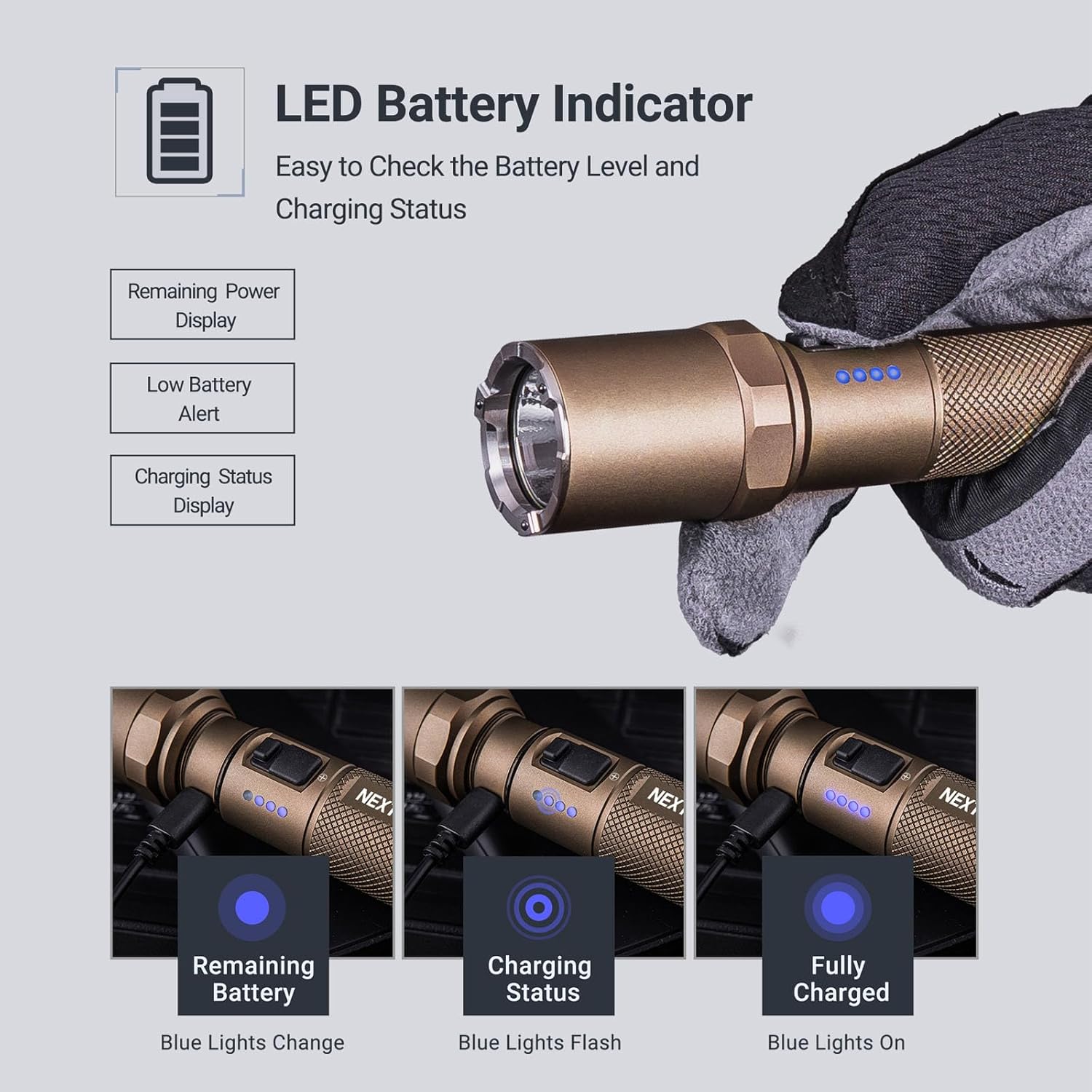
Image: A series of three images demonstrating the LED battery indicator states: remaining battery (blue lights change), charging status (blue lights flash), and fully charged (blue lights on).
4. Ceramic Bead Head (Emergency Use)
The flashlight features an ultra-high hardness ceramic bead head, designed for emergency situations such as breaking car window glass for rescue or tactical break-ins. The hardness of these beads is second only to diamond.
Caution: Use this feature responsibly and only in genuine emergency situations. Always wear appropriate hand protection when attempting to break glass.

Image: A close-up of the NEXTORCH P80's strike bezel with high-hardness nano-ceramic beads, shown against a background of shattered glass, indicating its emergency defense capability.
Maintenance
1. Cleaning
Wipe the flashlight with a clean, soft cloth. For stubborn dirt, use a slightly damp cloth. Avoid using abrasive cleaners or solvents that could damage the finish or internal components.
2. Water Resistance and Durability
The P80 is constructed from aerospace-grade aluminum alloy, providing robust durability. It is rated IPX7 waterproof (submersible up to 1 meter) and 2-meter impact-resistant. Ensure the bezel is fully threaded to protect the charging port and maintain water resistance.

Image: The NEXTORCH P80 flashlight with water droplets on its surface, highlighting its aerospace aluminum construction and waterproof (IPX7) capabilities.
3. Battery Care
To prolong battery life, avoid fully discharging the battery frequently. Recharge the flashlight regularly, especially if it has not been used for an extended period. Store the flashlight in a cool, dry place.
Troubleshooting
If you encounter issues with your NEXTORCH P80 flashlight, please refer to the following common solutions:
- Flashlight not turning on:
- Ensure the battery is charged. Connect the flashlight to the Type-C charger and check the LED indicators.
- Verify the battery is correctly installed.
- Check for any loose connections or debris in the battery compartment or around the switches.
- Light output is dim or flickering:
- The battery may be low. Recharge the flashlight.
- Ensure the lens is clean and free from obstructions.
- Check for any damage to the LED or internal components.
- Charging issues:
- Ensure the Type-C cable is securely connected to both the flashlight and the power source.
- Try a different Type-C cable or power adapter.
- Verify the charging port is clean and free of debris.
If these steps do not resolve the issue, please contact NEXTORCH customer support for further assistance.
Specifications
| Feature | Detail |
|---|---|
| Brand | NEXTORCH |
| Model | P80B |
| Light Source Type | LED |
| Brightness | Up to 1600 Lumens |
| Beam Distance | Up to 300 meters |
| Power Source | Battery Powered (Lithium Ion) |
| Battery Type | 1 Lithium Ion battery (included) |
| Charging Port | Type-C Direct Charge |
| Material | Aerospace Aluminum Alloy |
| Finish Type | Anodized |
| Water Resistance | IPX7 (1 meter submersible) |
| Impact Resistance | 2 meters |
| Product Dimensions | 6.1"D x 1.38"W x 1.12"H |
| Item Weight | 6.24 oz (without battery), 10.5 ounces (with battery) |
| Special Features | Portable, Rechargeable, Ceramic Bead Head, LED Battery Indicator |
Warranty and Support
NEXTORCH offers a ten-year warranty on all flashlights. This warranty covers manufacturing defects and material flaws under normal use.
For warranty claims, technical support, or any questions regarding your NEXTORCH P80 flashlight, please contact NEXTORCH customer service. Refer to the official NEXTORCH website or your purchase documentation for contact details.


