
1. Introduction
The KoreHealth Korescale Gen2 Digital Smart Scale is designed to provide comprehensive insights into your body composition. This smart scale measures 14 key health metrics, including weight, BMI, body fat, and muscle mass, offering a detailed overview of your well-being. It connects seamlessly with the KoreHealth app via Bluetooth, allowing you to track your progress, set goals, and integrate data with other health platforms.

Image 1.1: The KoreHealth Korescale Gen2 Digital Smart Scale shown alongside its companion mobile application interface.
2. Package Contents
Please verify that all items are present in your package:
- 1x KoreHealth Korescale Gen2 Digital Smart Scale
- 1x User Manual (this document)

Image 2.1: The Korescale Gen2 Smart Scale and its retail packaging.
3. Setup
3.1 Battery Installation
- Locate the battery compartment on the underside of the scale.
- Open the battery compartment cover.
- Insert 4 AAA batteries, ensuring correct polarity (+/-).
- Close the battery compartment cover securely.
3.2 App Download and Installation
The KoreHealth app is essential for accessing all smart features and tracking your data. It is available for both iOS and Android devices.
- For iOS devices, search for "KoreHealth" in the Apple App Store.
- For Android devices, search for "KoreHealth" in the Google Play Store.
- Download and install the app on your smartphone.

Image 3.1: Download the KoreHealth app from your device's app store.
3.3 Initial Pairing
Follow these steps to pair your scale with the KoreHealth app:
- Ensure Bluetooth is enabled on your smartphone.
- Open the KoreHealth app and create a user profile or log in.
- Follow the in-app instructions to add a new device. The app will guide you through the pairing process.
- Step onto the scale briefly to activate it and allow the app to detect it.
- Confirm the connection within the app.
Note: A 30-day free trial of the KoreHealth App is available. Continued access to advanced app features may require a monthly subscription.
4. Operating Instructions
4.1 Taking a Measurement
For accurate readings, ensure the scale is placed on a hard, flat surface. Avoid carpets or uneven flooring.
- Open the KoreHealth app on your smartphone (optional, but recommended for full data tracking).
- Step onto the scale with bare, dry feet, positioning them on the metallic sensor pads.
- Stand still until the display shows your weight and the app indicates that measurements are complete. This typically takes a few seconds.
- Your weight will be displayed on the scale's LED screen. If connected to the app, all 14 health metrics will be transferred and displayed there.

Image 4.1: Proper foot placement on the scale's biometric sensors for accurate readings.
4.2 Understanding Measurements
The Korescale Gen2 measures 14 key health metrics to provide a comprehensive view of your body composition:
- Weight
- Body Mass Index (BMI)
- Body Fat Percentage
- Basal Metabolic Rate (BMR)
- Visceral Fat
- Protein Percentage
- Fat-free Weight
- Subcutaneous Fat
- Skeletal Muscle
- Muscle Mass
- Bone Mass
- Body Water Percentage
- Metabolic Age
- Heart Rate

Image 4.2: Visual representation of the 14 health metrics tracked by the Korescale Gen2.
4.3 Using the KoreHealth App
The KoreHealth app enhances your experience by providing detailed tracking and analysis:
- Data Visualization: View helpful graphs that chart your progress over days, weeks, months, and years.
- Goal Setting: Set personal health and fitness goals within the app.
- Multi-User Support: The scale automatically recognizes up to eight family household users, allowing each person to track and save their personal readings without overriding others' data.
- Third-Party Integration: Seamlessly sync your health data with popular platforms such as Apple Health, Google Fit, and Fitbit.

Image 4.3: The Korescale Gen2 supports multiple users, allowing families to track individual health data.

Image 4.4: The KoreHealth app provides detailed tracking and historical data visualization.
5. Maintenance
5.1 Cleaning
The scale features a durable tempered glass surface. To clean:
- Wipe the surface with a soft, damp cloth.
- Avoid using abrasive cleaners or harsh chemicals, as these can damage the finish and sensors.
- Ensure the scale is dry before storage or next use.
5.2 Battery Replacement
When the battery indicator appears on the display or the scale becomes unresponsive, replace the batteries following the steps in Section 3.1.
5.3 Storage
Store the scale in a cool, dry place away from direct sunlight and extreme temperatures. Do not place heavy objects on the scale when not in use.
6. Troubleshooting
- Scale not turning on: Check if the 4 AAA batteries are correctly installed and not depleted. Replace if necessary.
- App not connecting via Bluetooth:
- Ensure Bluetooth is enabled on your smartphone.
- Make sure the scale is active (step on it briefly).
- Check app permissions for Bluetooth access.
- Restart the app and/or your phone.
- Inaccurate readings:
- Ensure the scale is on a hard, flat, and level surface.
- Stand still with bare, dry feet centered on the sensor pads.
- Avoid taking measurements immediately after intense exercise or showering.
- Display shows "Lo" or no display: Batteries are low or depleted. Replace all 4 AAA batteries.
- Display shows "Err": Indicates an overload. The scale's maximum capacity is 400 lbs (180 kg).
7. Specifications
| Model | Korescale Gen2 |
| Item Model Number | 30744 |
| Dimensions | 10.2 x 10.2 x 1 inches (26 x 26 x 2.5 cm) |
| Weight | 2.65 Pounds (1.2 kg) |
| Weight Capacity | 400 lbs (180 kg) |
| Measurement Increments | 0.2 lb / 0.05 kg |
| Power Supply | 4x AAA Batteries (not included) |
| Material | Tempered Glass, Plastic |
| Display Type | LED |
| Connectivity | Bluetooth |
| Health Metrics Tracked | 14 (Weight, BMI, Body Fat, BMR, Visceral Fat, Protein, Fat-free Weight, Subcutaneous Fat, Skeletal Muscle, Muscle Mass, Bone Mass, Body Water, Metabolic Age, Heart Rate) |
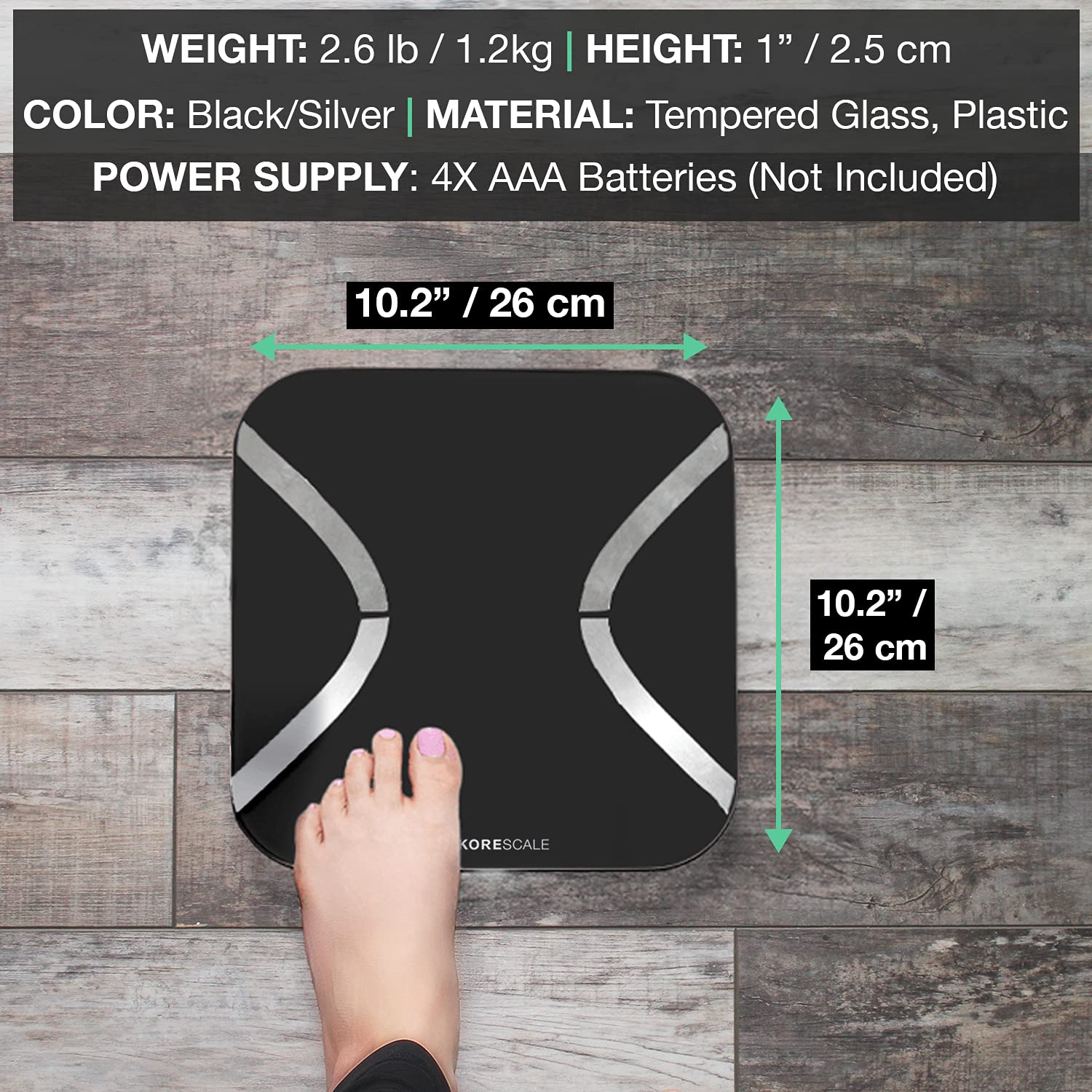
Image 7.1: Physical dimensions and design of the Korescale Gen2.
8. Warranty and Support
For detailed warranty information, please refer to the documentation included with your purchase or visit the official KoreHealth website. If you encounter any issues or require technical assistance, please contact KoreHealth customer support through their official website or the contact information provided in your product packaging.
Online Support: Visit the KoreHealth Store on Amazon for additional resources and support.

