
1. Introduction
This manual provides detailed instructions for the installation, operation, and maintenance of your OSWNKW RO600G Reverse Osmosis Water Filtration System. This tankless system is designed to provide high-efficiency water purification, featuring a 600 GPD (Gallons Per Day) capacity, real-time TDS monitoring, and a convenient filter change reminder. Please read this manual thoroughly before installation and use to ensure proper function and longevity of your system.
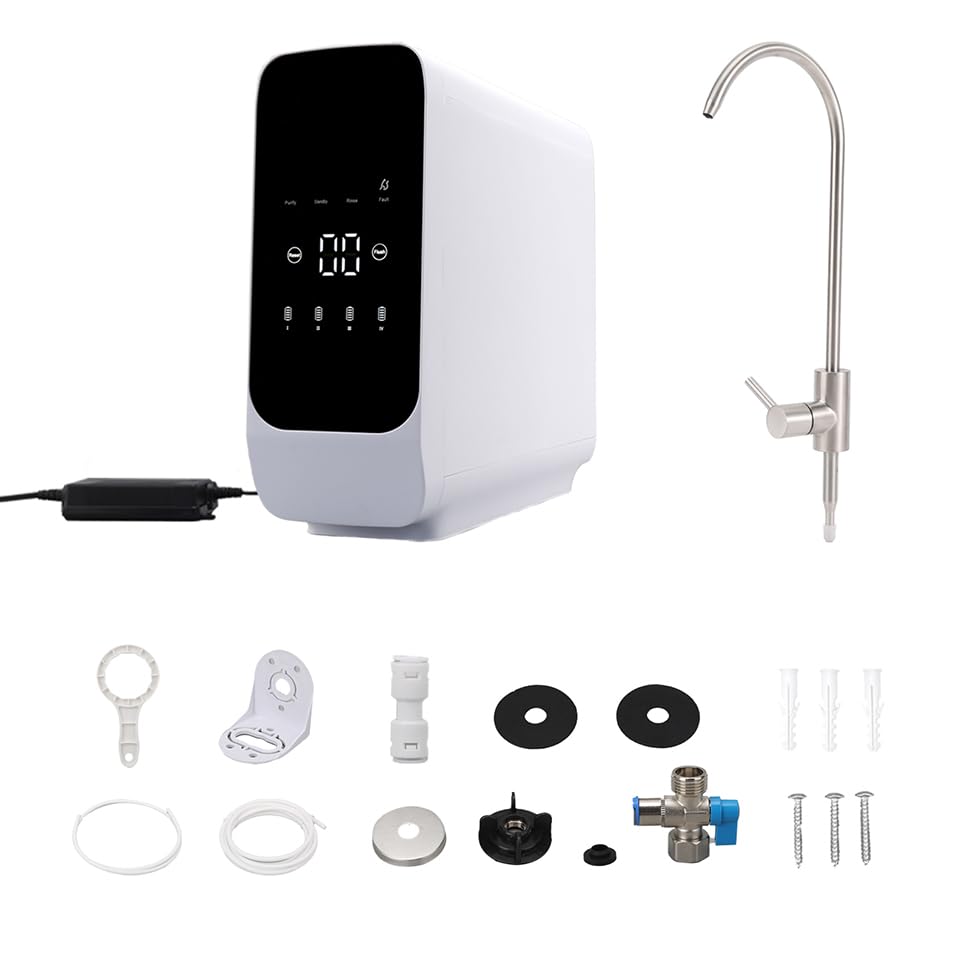
Figure 1: OSWNKW RO600G System and Included Components. This image displays the main filtration unit, a dedicated faucet, power adapter, and various installation accessories such as pipes, a three-way valve, and mounting hardware.
2. Package Contents
Verify that all components are present in the package:
- OSWNKW RO600G Main Filtration Unit
- Dedicated Faucet
- Three-way Valve
- Water Pipes
- Power Cord/Adapter
- Mounting Hardware (screws, anchors, brackets)
- Filter Wrench
- User Manual
3. Setup and Installation
The OSWNKW RO600G system is designed for under-sink installation. Its compact dimensions facilitate placement in most standard kitchen cabinets.
3.1 System Dimensions and Connections

Figure 2: Product Dimensions and Connection Diagram. This image illustrates the system's dimensions (approximately 465mm L x 150mm W x 390mm H) and a schematic of the rear connections for water inlet, purified water outlet, and drain.
3.2 Installation Steps
- Prepare the Installation Area: Ensure sufficient space under the sink for the main unit and access for maintenance.
- Install the Faucet: Drill a hole (if necessary) in the countertop or sink for the dedicated faucet and secure it according to the faucet's instructions.
- Connect to Cold Water Supply: Turn off the main cold water supply. Install the provided three-way valve to the cold water line under the sink. Connect one end of the water pipe to the three-way valve and the other to the system's water inlet port.
- Connect to Drain: Install the drain saddle valve onto the sink's drain pipe. Connect the drain pipe from the RO system to the drain saddle valve.
- Connect Purified Water Outlet: Connect the purified water pipe from the system to the dedicated faucet.
- Power Connection: Plug the power adapter into the system and then into a standard electrical outlet.
- Leak Check: Slowly turn on the main cold water supply and check all connections for leaks.
- Flush the System: Before first use, flush the system by running water through the faucet for at least 15-30 minutes to remove air and carbon fines.
4. Operating Instructions
The OSWNKW RO600G features an intelligent touch panel for easy monitoring and control.
4.1 Intelligent Touch Panel

Figure 3: Intelligent Touch Panel. This image highlights the digital display showing real-time TDS values, filter replacement indicators (I, II, III, IV), and operational status icons (Purify, Standby, Rinse, Fault), along with Reset and Flush buttons.
- TDS Display: The central digital display shows the Total Dissolved Solids (TDS) value of the purified water in real-time, indicating water quality.
- Filter Replacement Reminder: Indicators (I, II, III, IV) correspond to the different filter stages. They will illuminate or change color to remind you when a filter needs replacement.
- Operational Status: Icons for 'Purify', 'Standby', 'Rinse', and 'Fault' indicate the current status of the system.
- Reset Button: Used to reset the filter life indicator after a filter replacement.
- Flush Button: Initiates a system flush cycle, which helps maintain membrane performance.
4.2 Purification Process (4-Fold Fine Filtration)
The OSWNKW RO600G employs a multi-stage filtration process to ensure high-quality purified water.

Figure 4: 4-Fold Fine Filtration. This diagram illustrates the four stages of filtration: PP (PP filter), CTO (activated carbon filter), RO (membrane filter), and T33 (rear carbon filter), showing their effectiveness against rust, sediment, chlorine, lead, TDS, salt, PFAS, atrazine, odor, and other matter.

Figure 5: RO Membrane Filter. This image focuses on the Reverse Osmosis membrane, highlighting its 0.0001 micron fine filtration capability and its effectiveness in removing residual chlorine, heavy metals, and suspended solids.
- PP Filter (Stage I): Removes larger particles such as rust, sediment, and sand.
- CTO Activated Carbon Filter (Stage II): Absorbs chlorine, odors, and organic chemicals.
- RO Membrane Filter (Stage III): The core of the system, filtering down to 0.0001 microns to remove TDS, heavy metals, bacteria, viruses, and other dissolved solids.
- T33 Rear Carbon Filter (Stage IV): Provides final polishing of the water, improving taste and odor.
5. Maintenance
Regular maintenance, primarily filter replacement, is crucial for optimal performance and water quality.
5.1 Filter Replacement

Figure 6: Internal Filter Layout. This image displays the internal arrangement of the four filter cartridges (PP, CTO, RO, T33) within the OSWNKW RO600G unit, indicating the water flow path.
- The intelligent display will indicate when a filter needs replacement.
- The system uses universal filter elements, which can be easily sourced and replaced.
- To replace a filter: Turn off the water supply to the system and unplug the power. Use the provided filter wrench to unscrew the old filter cartridge. Insert the new filter, ensuring it is properly seated and tightened.
- After replacing a filter, press and hold the 'Reset' button on the touch panel for the corresponding filter stage until the indicator resets.
5.2 Cleaning
Wipe the exterior of the unit with a soft, damp cloth. Do not use abrasive cleaners or solvents.
6. Troubleshooting
If you encounter issues with your OSWNKW RO600G system, refer to the following common problems and solutions:
- Low Water Flow: Check for kinks in the water lines, ensure the water supply valve is fully open, and verify that filters are not clogged and are due for replacement.
- Unusual Taste or Odor: This often indicates that the carbon filters (CTO or T33) need replacement. Ensure the system has been properly flushed after installation or filter changes.
- Error Message on Display: Refer to the specific error code displayed on the intelligent panel. Consult the manufacturer's support for detailed guidance on specific error codes.
- Leaks: Turn off the water supply immediately. Check all connections for tightness. Ensure O-rings are properly seated in filter housings.
For persistent issues, contact customer support.
7. Specifications
| Feature | Specification |
|---|---|
| Brand | OSWNKW |
| Model Name | OSWNKW RO600G |
| Item Model Number | OSWNKW-RO600G |
| Purification Method | Reverse Osmosis |
| Capacity | 600 GPD (Gallons Per Day) / 2.27 Liters Per Minute |
| Installation Type | Under Sink |
| Product Dimensions | 45.5L x 15W x 39H centimetres |
| Item Weight | 11.3 Kilograms |
| Power Source | Mains Powered |
| Special Feature | Reverse Osmosis, TDS Reduction |
| Included Components | Three-way Valve, Pipe, Faucet, Power Cord |
8. Warranty and Support
For warranty information or technical support, please refer to the documentation provided with your purchase or contact the manufacturer directly. Keep your proof of purchase for warranty claims.
Manufacturer: Shantou Yansheng E-commerce Co., Ltd.