
1. Introduction
Thank you for choosing the Huanyu Pottery Wheel Machine CBY-14. This manual provides essential information for the safe and efficient operation, setup, and maintenance of your pottery wheel. Please read this manual thoroughly before using the machine and retain it for future reference.
2. Safety Instructions
- Electrical Safety: Ensure the power supply matches the machine's requirements (110V). Do not operate with wet hands or in wet conditions. Always unplug the machine when not in use or before cleaning.
- Stable Placement: Place the pottery wheel on a stable, level surface to prevent tipping during operation.
- Children and Pets: Keep children and pets away from the machine during operation. This is not a toy.
- Proper Attire: Avoid loose clothing, jewelry, or long hair that could get caught in the rotating wheel.
- Ventilation: Ensure adequate ventilation when working with clay, especially if dust is generated.
- Emergency Stop: Familiarize yourself with the power switch location for quick shutdown in emergencies.
3. Package Contents
Verify that all items are present in the package:
- Huanyu Pottery Wheel Machine (Main Unit)
- Detachable Extended Tray
- Foot Pedal
- 12-inch (30 cm) Aluminum Alloy Wheel-Head
- Bat System (1 bat, 2 extra inserts)
- Basic Pottery Tools (8 pieces)
- Sculpting Scrapers (4 pieces)
- Mug Cup Handle Scrapers (5 pieces)
- Power Cord

Image: The Huanyu Pottery Wheel Machine with its foot pedal, detachable tray, and a comprehensive set of pottery tools.
4. Product Overview
The Huanyu Pottery Wheel Machine CBY-14 features a robust design for pottery creation. Key components include:
- Wheel-Head: A 12-inch (30 cm) aluminum alloy turntable for clay.
- Splash Pan: A detachable ABS basin designed to contain clay and water, preventing mess.
- Control Panel: An LCD touch screen for power, speed adjustment (0-320 rpm), and rotation direction (clockwise/counter-clockwise).
- Foot Pedal: Provides stepless speed regulation for hands-free control.
- Detachable Extended Tray: Offers additional workspace and storage for tools.

Image: A diagram illustrating the product parameters, including dimensions, power, speed range, and materials.
5. Setup
Follow these steps to set up your pottery wheel:
- Unpacking: Carefully remove all components from the packaging.
- Placement: Position the main unit on a sturdy, level surface.
- Attach Detachable Tray: Align the extended tray with the designated slots on the side of the main unit and secure it.
- Connect Foot Pedal: Plug the foot pedal cable into the corresponding port on the machine.
- Power Connection: Plug the power cord into a suitable 110V electrical outlet.

Image: Illustration of the detachable extended tray, showing how it can be added to the pottery wheel for extra workspace.

Image: A visual guide demonstrating the simple steps to assemble the detachable splash pan and extended tray.
6. Operating Instructions
This section guides you through the operation of your Huanyu Pottery Wheel Machine.
6.1 Power On/Off and Speed Control
- Power: Press the power button on the LCD touch screen to turn the machine on or off.
- LCD Speed Adjustment: Use the 'Up' and 'Down' arrows on the LCD panel to adjust the rotation speed from 0 to 320 rpm. The current speed is displayed on the screen.
- Foot Pedal Control: The foot pedal provides stepless speed control. Press the front of the pedal to increase speed and the back to decrease speed. The LCD screen will display the speed.
- Rotation Direction: Use the 'Positive Rotation' or 'Reversal' buttons on the LCD panel to change the direction of the wheel-head.
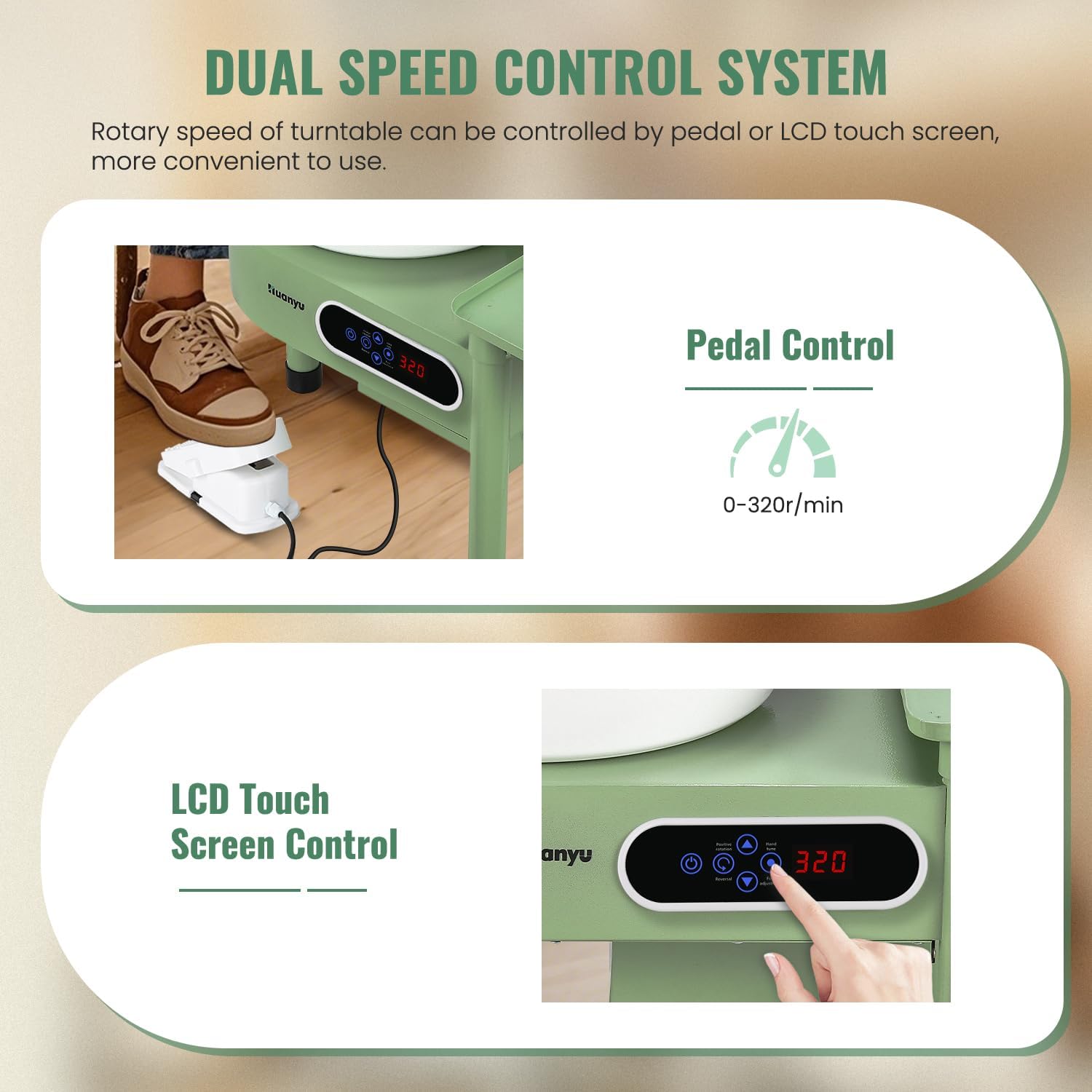
Image: The LCD touch screen control panel, highlighting buttons for speed adjustment, rotation direction, and power.

Image: A close-up of the LCD display, detailing the functions for ON/OFF, speed adjustment, real-time speed display, positive/reversal direction, and hand tune/foot adjustment.

Image: A visual representation of how to use the foot pedal to adjust the pottery wheel's speed, with forward for acceleration and backward for deceleration.
6.2 Using the Bat System
The 12-inch wheel-head is compatible with the included bat system. Place a bat on the wheel-head, ensuring it is securely seated on the pins. This allows for easy removal of finished pieces without disturbing them.
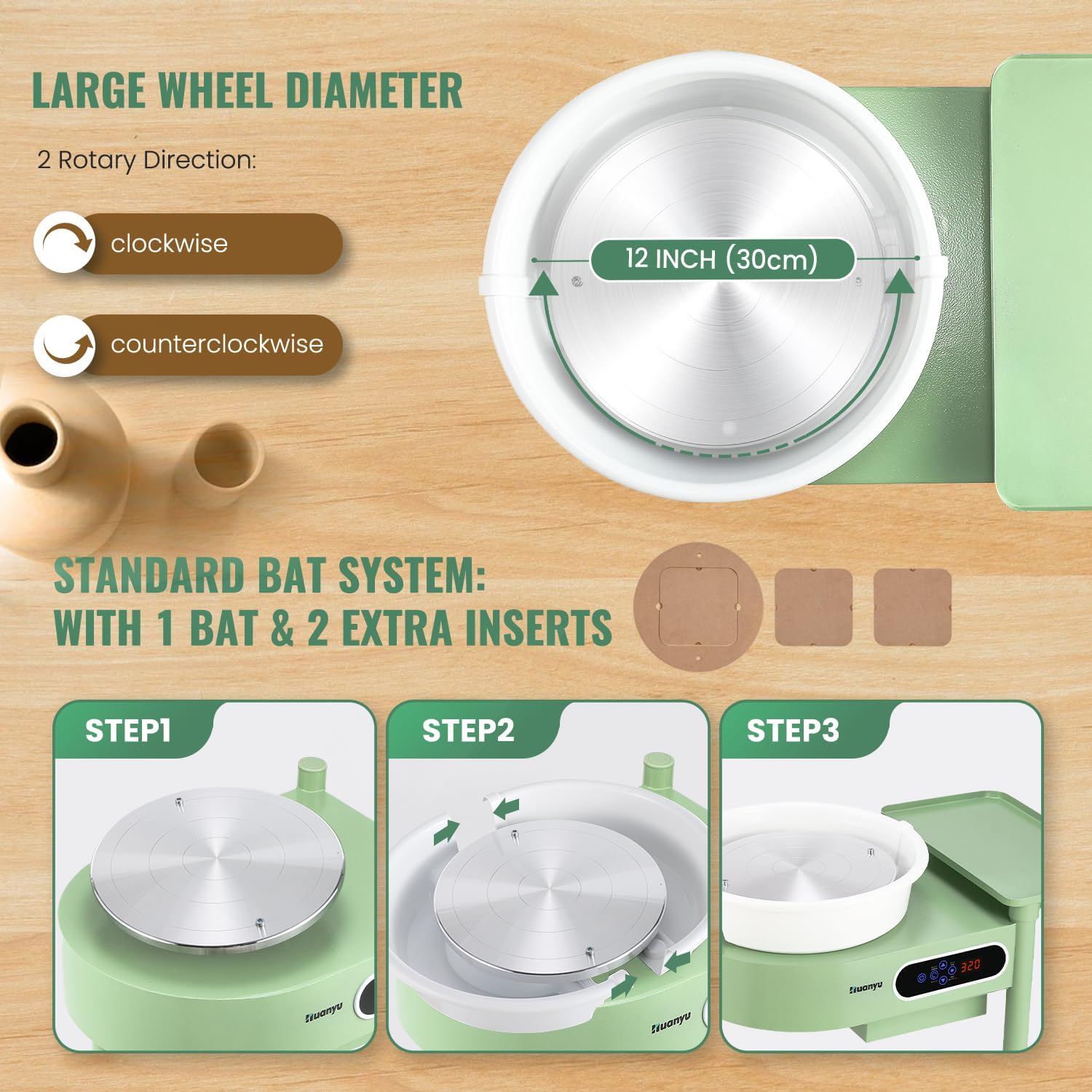
Image: A diagram illustrating the 12-inch wheel diameter and a three-step process for installing and using the bat system on the pottery wheel.
6.3 Basic Pottery Throwing Steps
- Center the Clay: Place a lump of clay in the center of the wheel-head. Start the wheel at a moderate speed and use your hands to gently push the clay into a centered cone shape.
- Set Appropriate Speed: Adjust the wheel speed using either the LCD screen or the foot pedal to a comfortable working speed for forming.
- Form the Pottery: Use your hands and various tools to shape the clay as desired.
- Trim the Pottery: Once the piece is firm enough, use trimming tools to refine its shape and remove excess clay.

Image: A user demonstrating the process of centering clay on the pottery wheel to begin shaping a vessel.

Image: Close-up of hands working to center a lump of clay on the spinning pottery wheel.

Image: Hands carefully shaping a clay pot as it spins on the pottery wheel.

Image: A close-up of hands using a trimming tool to refine the base of a clay pot on the spinning wheel.
6.4 Instructional Video
Video: This video demonstrates the features and basic operation of the Huanyu Pottery Wheel, including speed control, direction change, and the use of the bat system for centering and forming clay.
7. Maintenance
Regular cleaning and maintenance will ensure the longevity and optimal performance of your pottery wheel.
- Cleaning the Splash Pan: The ABS splash pan is detachable for easy cleaning. Remove it after each use and wash off any clay residue with water.
- Cleaning the Wheel-Head: Wipe down the aluminum alloy wheel-head with a damp cloth after each session. Avoid abrasive cleaners that could damage the surface.
- General Cleaning: Keep the main unit and control panel clean and free of clay dust. Use a dry or slightly damp cloth.
- Storage: Store the machine in a dry, dust-free environment when not in use.
Image: A visual guide demonstrating the simple steps to detach the splash pan and extended tray for thorough cleaning.
8. Troubleshooting
If you encounter issues with your pottery wheel, refer to the following common problems and solutions:
| Problem | Possible Cause | Solution |
|---|---|---|
| Machine does not power on. | Power cord not securely plugged in; no power from outlet. | Check power cord connection. Test outlet with another device. |
| Wheel-head wobbles or vibrates excessively. | Machine not on a level surface; clay not centered; loose wheel-head. | Ensure machine is on a stable, level surface. Re-center the clay. Check if the wheel-head is securely attached. |
| Foot pedal not responding or inconsistent speed. | Foot pedal cable loose; internal pedal issue. | Ensure foot pedal cable is firmly connected. If issue persists, contact customer support. |
| LCD screen not displaying correctly. | Loose connection to the screen; internal display issue. | Ensure all connections are secure. If the screen is physically damaged or unresponsive, contact customer support. |
If you experience any issues not listed here or if the suggested solutions do not resolve the problem, please contact Huanyu customer support for assistance.
9. Specifications
Detailed specifications for the Huanyu Pottery Wheel Machine CBY-14:
| Feature | Specification |
|---|---|
| Model Number | CBY-14 |
| Working Power | 350W |
| Rated Voltage | 110V |
| Turntable Speed | 0-320 rpm (stepless speed) |
| Speed Control Direction | Forward / Reverse |
| Noise Level | <60dB |
| Turntable Material | Aluminum Alloy |
| Basin Material | ABS Material (detachable) |
| Expand Tray Material | Metal Material (detachable) |
| Body Structure | Steel Structure & Paint Process |
| Clay Capacity | 20 lbs |
| Product Dimensions | 19.69 x 14.96 x 15.75 inches |
| Item Weight | 40.9 pounds |
10. Warranty and Support
For warranty information, technical support, or any inquiries regarding your Huanyu Pottery Wheel Machine CBY-14, please contact the seller or manufacturer directly. Refer to your purchase documentation for specific contact details.
You can also visit the official Huanyu store on Amazon for more information: Huanyu Store