Introduction
This manual provides essential information for the proper use and maintenance of your BRINKS 50mm Dial Combination Padlock. Please read these instructions carefully to ensure optimal performance and security.
Product Overview
The BRINKS 50mm Dial Combination Padlock is designed for security in various applications, including school lockers, gym lockers, bikes, and storage containers. It features a durable anodized body and a hardened steel shackle for enhanced cut resistance.
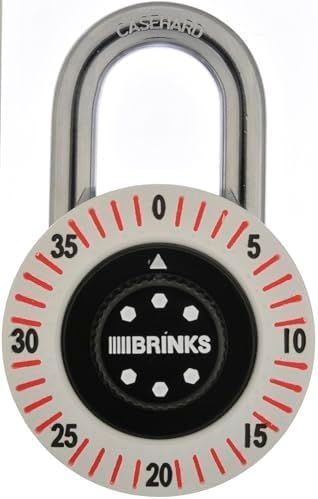
This image displays the BRINKS 50mm Dial Combination Padlock. It features a white dial with red markings for numbers 0-35, a black center with the BRINKS logo, and a silver hardened steel shackle at the top.
Key Features:
- 50mm Anodized Lock Body: Durable finish designed to resist wear and corrosion.
- Chrome Plated, Hardened Steel Shackle: Provides enhanced cut resistance.
- 3-Digit Combination Lock: Offers keyless convenience with a preset combination.
- Versatile Use: Suitable for school lockers, gym lockers, storage containers, and bikes.
Setup and Initial Use
This padlock comes with a factory-preset 3-digit combination. The combination cannot be changed by the user. The preset combination is typically found on a sticker or tag attached to the lock packaging at the time of purchase. Please retain this information for future reference.
To Open the Padlock:
- Locate the preset 3-digit combination provided with your lock.
- Align the numbers of the combination with the indicator mark on the top of the dial.
- Pull up on the shackle to open the lock.
Operating Instructions
Locking the Padlock:
- Ensure the shackle is fully inserted into the lock body.
- Scramble the numbers on the dial to a random sequence. This secures the lock.
Unlocking the Padlock:
- Rotate the dial to align your preset 3-digit combination with the indicator mark.
- Pull the shackle upwards to release it.
Maintenance
Your BRINKS padlock is designed for durability and requires minimal maintenance. To ensure its longevity:
- Keep the lock clean and free from dirt and debris.
- Periodically apply a small amount of graphite lubricant or a silicone-based spray to the shackle and internal mechanism to maintain smooth operation. Avoid oil-based lubricants as they can attract dirt.
- Store the lock in a dry environment when not in use to prevent corrosion.
Troubleshooting
| Issue | Possible Cause / Solution |
|---|---|
| Lock is difficult to open or close. |
|
| Shackle is stuck. |
|
| Cannot remember the preset combination. | The combination is factory-preset and cannot be reset by the user. Refer to the original packaging or documentation for the combination. If lost, the lock may need to be replaced. |
Specifications
| Feature | Detail |
|---|---|
| Brand | BRINKS |
| Model Number | 887132 |
| Lock Type | 3-Digit Dial Combination Padlock |
| Body Material | Anodized Metal |
| Shackle Material | Chrome Plated, Hardened Steel |
| Body Width | 50mm |
| Color | White |
| Dimensions (L x W x H) | 3 x 1 x 4 inches |
| Item Weight | 6.9 ounces |
| UPC | 039208251167 |
Warranty and Support
BRINKS products are manufactured to high-quality standards. For specific warranty information or technical support, please refer to the documentation included with your purchase or visit the official BRINKS website. Keep your proof of purchase for warranty claims.
For further assistance, you may contact BRINKS customer service through their official channels.


