1. Introduction
The Metravi PRO DIT-960PV Digital Solar Insulation Tester is designed for precise measurement of insulation resistance in various electrical systems. It features the capability to measure Photovoltaic (PV) live insulation resistance, standard insulation resistance (for de-energized circuits), and automatic recognition of AC and DC voltage. This versatile instrument is ideal for applications involving solar panels, battery energy storage systems, and new energy vehicles.
Key functionalities include PV insulation resistance measurement without solar panel power, voltage stepping, Bluetooth data transmission, automatic discharge, high voltage warnings, and remote-controlled test lead operation.
2. Safety Information
WARNING: Improper use of this instrument can cause electric shock, injury, or death. Always follow safety precautions and operating instructions.
- Read this manual thoroughly before operation.
- Do not use the tester if it appears damaged or operates abnormally.
- Ensure test leads are in good condition and properly connected.
- Always wear appropriate personal protective equipment (PPE), including insulated gloves and eye protection.
- Do not touch the test leads or the circuit under test during measurement.
- Verify that the circuit is de-energized before connecting test leads for non-live insulation resistance tests.
- Be aware of high voltage warnings and automatic discharge functions.
- Replace batteries only with the specified type and ensure correct polarity.
3. Package Contents
Verify that all items listed below are present in your package:
- Metravi PRO DIT-960PV Digital Solar Insulation Tester
- Carrying Case
- AA Alkaline Batteries (6x 1.5V)
- Test Leads (Red and Black)
- Remote-controlled Test Lead
- USB Cable
- User Manual

Figure 3.1: Complete package contents of the Metravi PRO DIT-960PV.
4. Product Overview
The Metravi PRO DIT-960PV is a robust and feature-rich digital insulation tester. Its design prioritizes safety and ease of use for professionals in the solar and electrical industries.
4.1 Key Features
- PV Live Insulation Resistance: Measures insulation resistance on energized photovoltaic systems up to 1000V DC.
- Standard Insulation Resistance: Measures insulation resistance on de-energized circuits.
- Automatic AC/DC Voltage Recognition: Simplifies voltage measurements.
- Multiple Test Voltages: Selectable output voltages for various applications.
- Bluetooth Connectivity: For data transfer to a smartphone application.
- Data Logging: Stores up to 1000 sets of testing data.
- Automatic Discharge: Safely discharges capacitive energy after tests.
- High Voltage Warning: Visual and audible alerts for hazardous voltage levels.
- Remote-Controlled Test Lead: Enhances safety and convenience during testing.
4.2 Display and Controls
The tester features a backlit LCD high-definition segmented display with an analog bar-graph for clear and comprehensive readings.

Figure 4.1: Front view of the Metravi PRO DIT-960PV.

Figure 4.2: Detailed view of the tester's backlit LCD display.
5. Setup
5.1 Battery Installation
- Locate the battery compartment on the rear of the tester.
- Open the battery compartment cover.
- Insert six (6) 1.5V AA alkaline batteries, ensuring correct polarity as indicated inside the compartment.
- Close the battery compartment cover securely.
5.2 Connecting Test Leads
- Ensure the tester is powered off before connecting test leads.
- Insert the red test lead into the positive (+) terminal and the black test lead into the negative (-) terminal on the tester.
- For remote-controlled operation, connect the specialized test lead as per the instructions in its dedicated section.
- Ensure all connections are firm and secure.
6. Operating Instructions
6.1 Powering On/Off
- Press the POWER button to turn the tester on.
- Press and hold the POWER button for approximately 2 seconds to turn the tester off. The tester also features an automatic power-off function to conserve battery life.
6.2 Measuring PV Live Insulation Resistance
This mode allows for insulation resistance measurement on energized photovoltaic systems up to 1000V DC.
- Connect the test leads to the PV system according to safety guidelines and the system's specifications.
- Select the PV insulation resistance mode (PV(IR)) on the tester.
- Choose the appropriate test voltage (e.g., 500V or 1000V) using the voltage selection buttons.
- Press the TEST button to initiate the measurement. The display will show the insulation resistance value.
- Observe the high voltage warning indicator during the test.
- After the test, the system will automatically discharge.
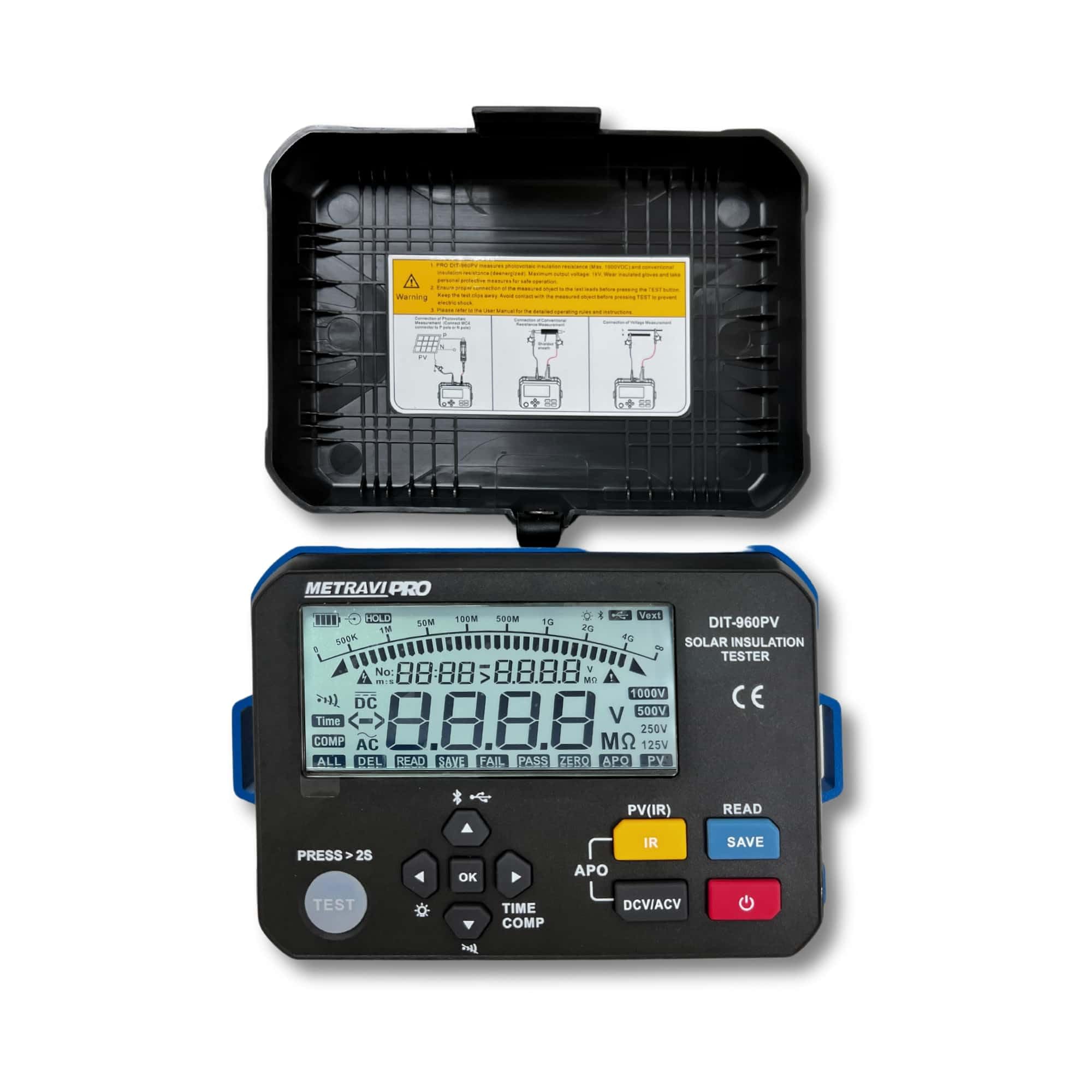
Figure 6.1: Measuring PV live insulation resistance on solar panels.
6.3 Measuring Conventional Insulation Resistance
This mode is for measuring insulation resistance on de-energized circuits.
- Ensure the circuit under test is completely de-energized and locked out.
- Connect the test leads to the circuit.
- Select the standard insulation resistance mode (IR) on the tester.
- Choose the desired test voltage (e.g., 125V, 250V, 500V, 1000V).
- Press the TEST button. The insulation resistance value will be displayed.
- The tester will automatically discharge the circuit after the test.

Figure 6.2: Measuring insulation resistance on an industrial motor.

Figure 6.3: Measuring insulation resistance on a battery energy storage system.
6.4 AC/DC Voltage Measurement
The tester can automatically identify and measure AC or DC voltage.
- Select the DCV/ACV mode.
- Connect the test leads to the voltage source.
- The display will show the measured voltage and indicate whether it is AC or DC.
6.5 Data Logging and Bluetooth Connectivity
The PRO DIT-960PV can store up to 1000 sets of measurement data and transfer them via Bluetooth to a smartphone application.
- Saving Data: After a measurement, press the SAVE button to store the reading.
- Accessing Data: Use the READ button to review stored data on the device.
- Bluetooth Connection: Activate Bluetooth on the tester and pair it with your smartphone using the dedicated Metravi application. Follow the app's instructions to upload and manage data.
7. Maintenance
7.1 Cleaning
- Wipe the exterior of the tester with a soft, damp cloth. Do not use abrasive cleaners or solvents.
- Ensure the device is dry before storage or next use.
7.2 Battery Replacement
- When the low battery indicator appears, replace all six (6) 1.5V AA alkaline batteries promptly.
- Refer to Section 5.1 for battery installation instructions.
7.3 Storage
- Store the tester in its carrying case in a cool, dry place away from direct sunlight and extreme temperatures.
- If storing for extended periods, remove the batteries to prevent leakage.

Figure 7.1: Tester and accessories stored in the carrying case.
8. Troubleshooting
| Problem | Possible Cause | Solution |
|---|---|---|
| Tester does not power on. | Dead or incorrectly installed batteries. | Replace batteries, ensuring correct polarity. |
| Inaccurate readings. | Poor test lead connection, dirty terminals, or incorrect mode selection. | Check test lead connections, clean terminals, ensure correct measurement mode is selected. |
| Bluetooth connection failure. | Bluetooth not enabled on tester/smartphone, app not installed, or interference. | Ensure Bluetooth is active on both devices, install the Metravi app, move closer to the device, or restart both devices. |
| High voltage warning persists. | Circuit still energized or residual charge. | Ensure circuit is de-energized. Allow automatic discharge to complete. Do not touch test leads. |
9. Specifications
| Parameter | Value |
|---|---|
| Brand | METRAVI |
| Model Number | Metravi PRO DIT-960PV |
| Output Voltage Ranges | 125V / 250V / 500V / 1000V (Standard IR) |
| PV Output Voltage Ranges | 500V / 1000V (PV IR) |
| Insulation Resistance Test Range | 0.125 MΩ to 4000 MΩ |
| Short Circuit Current (Standard) | <1.5mA |
| Short Circuit Current (PV) | <1.2mA |
| Power Supply | 6 x 1.5V LR6 AA alkaline batteries (included) |
| Modes of Measurement | Continuous, Comparative, Time-set |
| Display | Backlit LCD high-definition segmented display with Analogue Bar-graph |
| Data Logging | 1000 sets of testing data |
| Interfaces | USB and Bluetooth |
| Item Weight | 675 g |
| Package Dimensions | 25.2 x 15.2 x 10.2 cm |
| Included Components | Carrying Case, Meter, Batteries, Test Leads, User Manual |
10. Warranty and Support
10.1 Warranty Information
The Metravi PRO DIT-960PV Digital Solar Insulation Tester typically comes with a standard manufacturer's warranty. Additionally, a 1-Year Extended Warranty Plan by Onsitego may be available for purchase, offering extended coverage beyond the standard period. Please refer to your purchase documentation for specific warranty terms and conditions.
10.2 Customer Support
For technical assistance, service, or warranty claims, please contact the manufacturer:
- Manufacturer: Metravi Instruments Pvt Ltd
- Email: servicing@metravi.com
When contacting support, please have your product model number (PRO DIT-960PV) and purchase details readily available.


