
Introduction
This manual provides instructions for the safe and efficient use of your De'Longhi Magnifica Plus ECAM320.61.G bean-to-cup coffee machine. Please read all instructions carefully before using the appliance and keep this manual for future reference.
Product Overview
The De'Longhi Magnifica Plus ECAM320.61.G is an automatic bean-to-cup coffee machine designed to prepare a variety of coffee and milk-based beverages. It features an intuitive touchscreen display and an integrated milk system.
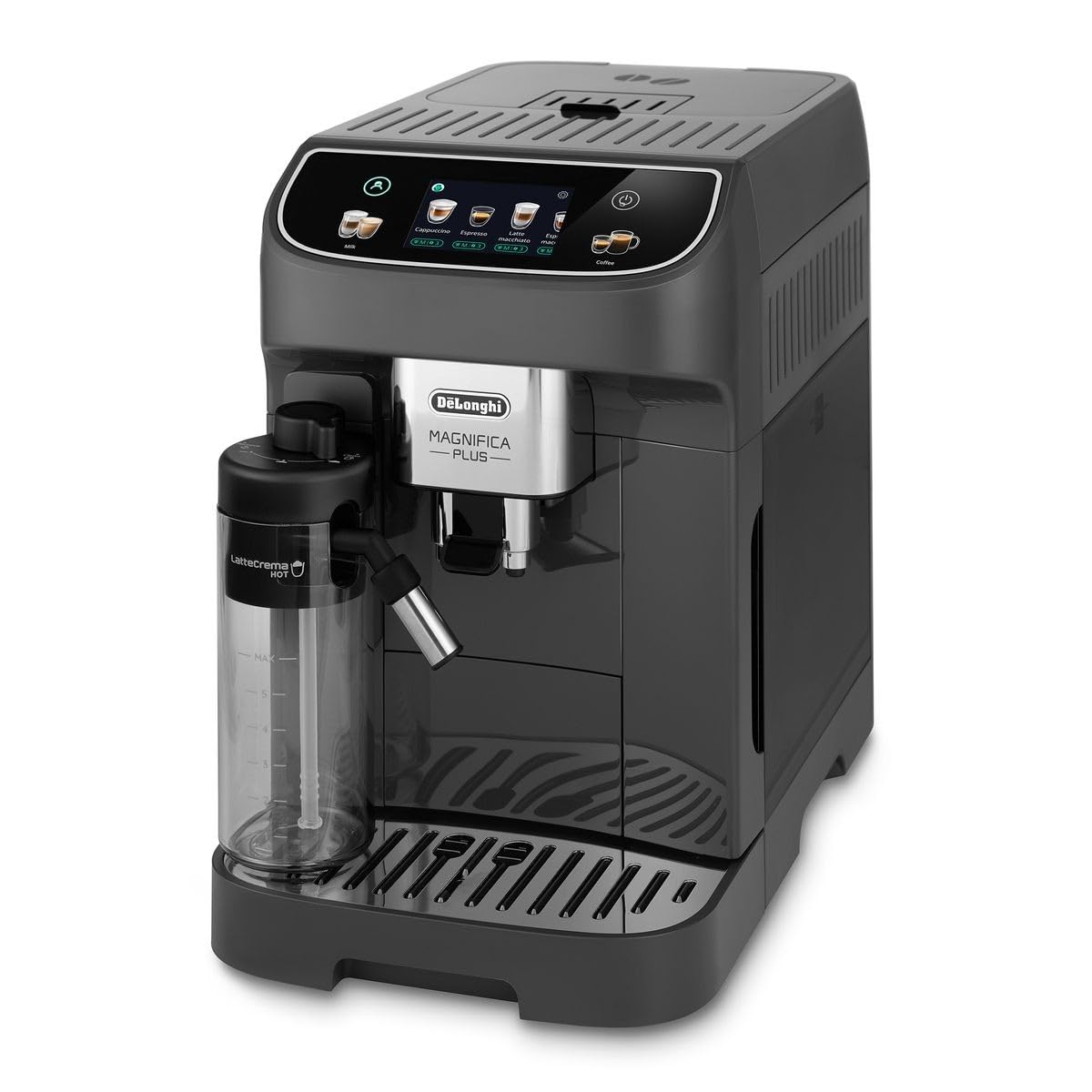
Figure 1: Front view of the De'Longhi Magnifica Plus ECAM320.61.G coffee machine, showing the main unit, milk carafe, and drip tray.
Main Components:
- Bean Hopper: For whole coffee beans.
- Water Tank: Removable tank for fresh water.
- Touchscreen Display: For selecting beverages and settings.
- Coffee Spout: Dispenses prepared coffee.
- LatteCrema Hot Milk System: Integrated system for frothing milk.
- Drip Tray: Collects excess liquid.
- Grounds Container: Collects used coffee grounds.
- Brewing Unit: Internal component for coffee preparation.
Setup
1. Unpacking and Initial Cleaning
- Remove all packaging materials from the appliance.
- Wipe the exterior of the machine with a soft, damp cloth.
- Wash the water tank, drip tray, grounds container, and milk carafe with warm water and mild detergent. Rinse thoroughly.
2. Filling the Water Tank
- Remove the water tank from the back of the machine.
- Fill the tank with fresh, cold tap water up to the MAX level indicator.
- Replace the water tank securely.
3. Adding Coffee Beans
- Open the bean hopper lid located on top of the machine.
- Pour fresh coffee beans into the hopper. Do not overfill.

Figure 2: Adding fresh coffee beans to the machine's bean hopper.
4. Adjusting the Grinder
The grinder setting can be adjusted to suit your preference. A finer grind produces a stronger coffee, while a coarser grind results in a milder taste. Adjust the grinder only when the grinder is operating.
- Locate the grinder adjustment dial inside the bean hopper.
- Turn the dial clockwise for a finer grind or counter-clockwise for a coarser grind.

Figure 3: Adjusting the coffee grinder setting for desired fineness.
5. First Use / Priming
- Plug the machine into a power outlet.
- Press the power button to turn on the machine.
- Follow the on-screen instructions to complete the initial setup and priming cycle. This typically involves rinsing the internal circuits.
Operating Instructions
1. Basic Coffee Preparation (Espresso)
- Ensure the water tank is filled and the bean hopper contains coffee beans.
- Place a cup under the coffee spout.
- On the touchscreen display, select your desired coffee type, such as "Espresso".
- The machine will automatically grind the beans, brew, and dispense the coffee.

Figure 4: Using the touchscreen to select a coffee beverage.
2. Milk-Based Beverages (Cappuccino, Latte Macchiato)
- Fill the LatteCrema Hot milk carafe with cold milk up to the indicated level.
- Attach the milk carafe to the machine's milk spout.
- Place a suitable cup under the coffee and milk spouts.
- On the touchscreen, select your desired milk-based beverage (e.g., "Cappuccino" or "Latte Macchiato").
- The machine will automatically froth the milk and then dispense the coffee.

Figure 5: The machine preparing a milk-based coffee, demonstrating the milk frothing process.
3. Hot Water Dispensing
- Ensure the milk carafe is removed or the hot water spout is in place (if applicable).
- Place a cup under the hot water spout.
- Select the "Hot Water" option on the touchscreen.
- The machine will dispense hot water.
Maintenance
Regular cleaning and maintenance ensure optimal performance and longevity of your coffee machine.
1. Daily Cleaning
- Drip Tray and Grounds Container: Empty and rinse daily. The drip tray is dishwasher-safe.
- Milk Carafe: After each use, perform the automatic cleaning cycle for the milk carafe as prompted by the machine. Then, disassemble and rinse all components of the milk carafe with water.

Figure 6: Performing the automatic cleaning cycle for the milk carafe.
2. Weekly/Monthly Cleaning
- Brewing Unit: Remove the brewing unit (refer to the machine's internal diagram for location), rinse it under running water, and allow it to air dry before reinserting.
- Water Tank: Clean the water tank periodically with a soft brush.
- Descaling: The machine will prompt you when descaling is required. Follow the on-screen instructions and use a De'Longhi descaling solution.

Figure 7: Cleaning removable components of the coffee machine under running water.
Troubleshooting
Refer to this section for common issues and their solutions.
| Problem | Possible Cause | Solution |
|---|---|---|
| No coffee is dispensed. | Water tank empty; brewing unit blocked; coffee spout blocked. | Fill water tank; clean brewing unit; clean coffee spout. |
| Coffee is too weak. | Grind setting too coarse; insufficient coffee dose. | Adjust grinder to a finer setting; select a stronger aroma setting. |
| Milk is not frothing correctly. | Milk carafe dirty; milk type unsuitable; milk temperature too high. | Clean milk carafe thoroughly; use cold, fresh milk (dairy or suitable plant-based); ensure milk is chilled. |
| Machine displays 'Descaling required'. | Mineral buildup in internal circuits. | Perform the descaling cycle as prompted by the machine. |
Specifications
Key technical specifications for the De'Longhi Magnifica Plus ECAM320.61.G coffee machine.
| Feature | Detail |
|---|---|
| Brand | De'Longhi |
| Model Name | Magnifica Plus |
| Model Number | ECAM320.61.G |
| Capacity | 5 Cups (Water Tank) |
| Color | Gray |
| Product Dimensions (D x W x H) | 44D x 36W x 24H centimetres |
| Item Weight | 9.8 Kilograms |
| Material | Aluminum, Plastic |
| Wattage | 1450 watts |
| Voltage | 240 Volts |
| Filter Type | Reusable |
| Dishwasher Safe Components | Yes (Removable components) |
| Country of Origin | Italy |

Figure 8: Product dimensions of the De'Longhi Magnifica Plus ECAM320.61.G.
Warranty and Support
For warranty information and customer support, please refer to the warranty card included with your product or visit the official De'Longhi website. Keep your proof of purchase for warranty claims.
