
1. Product Overview
The Brightever Solar Powered Outdoor String Lights provide ambient illumination for various outdoor settings. This 27-foot string features 12 shatterproof LED Edison bulbs, plus one spare, powered by a high-efficiency solar panel. It includes a remote control for convenient operation and offers multiple lighting modes and dimming options.
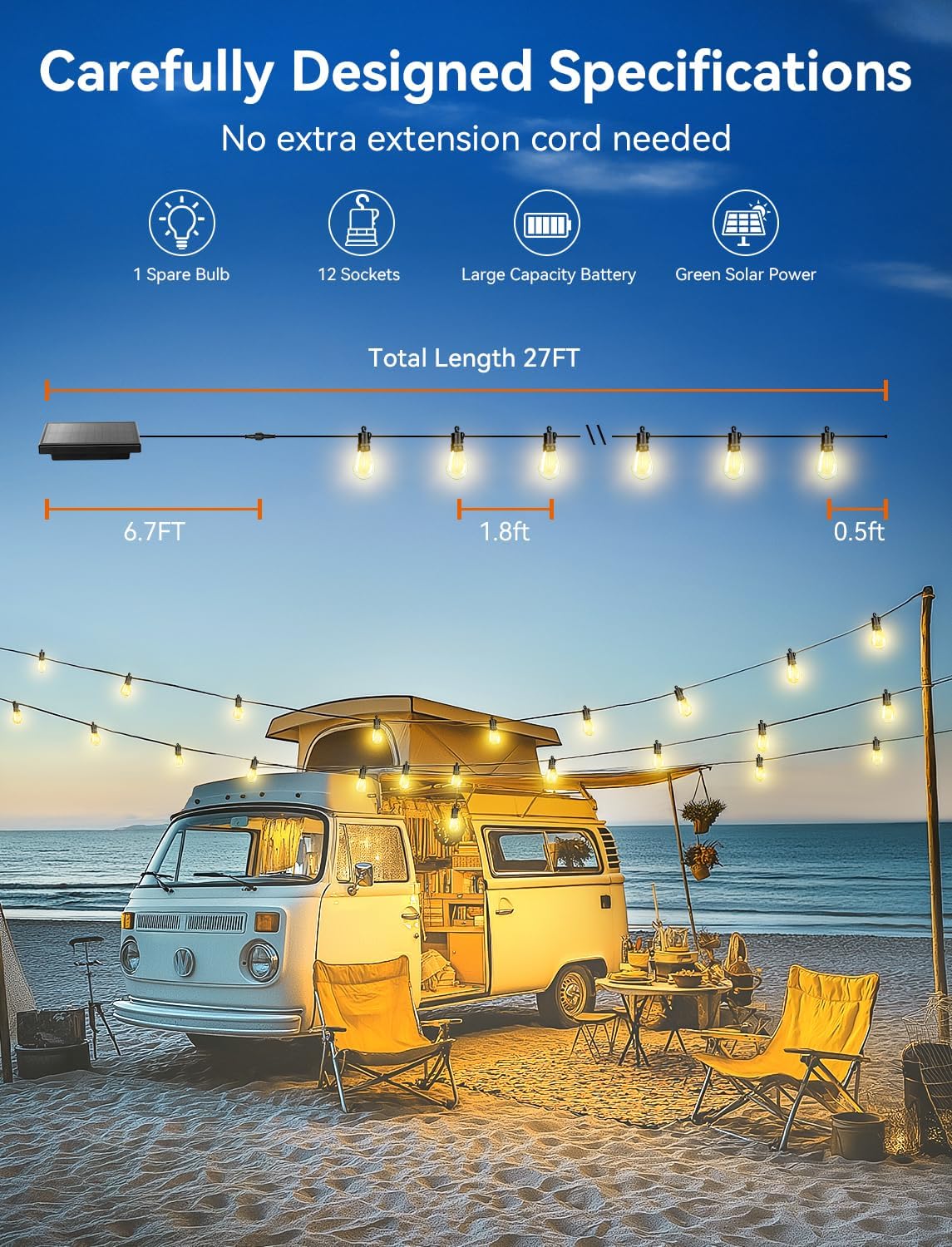
Figure 1: Product Specifications and Dimensions
2. Setup
2.1 Unboxing and Component Check
Carefully remove all components from the packaging. Verify that all items listed in the package contents are present and undamaged.
Video 1: Unboxing and Initial Setup
2.2 Solar Panel Installation
The solar panel can be installed in two ways:
- Ground Stake: Attach the provided ground stake to the solar panel unit. Insert the stake firmly into the ground in a location that receives direct sunlight for 6-8 hours daily.
- Wall Mount: Use the included mounting screws to secure the solar panel to a wall or fence. Ensure the panel is positioned to maximize sun exposure.
Ensure the solar panel is uncovered and free from obstructions to allow for optimal charging.

Figure 2: Solar Panel Installation Options
2.3 String Light Placement
Hang the string lights in your desired location. The bulbs feature hooks for easy hanging on pergolas, fences, trees, or other structures. The string is 27 feet long with 1.8 feet spacing between bulbs. The first bulb is 6.7 feet from the solar panel connection point.
2.4 Connecting the Solar Panel to Lights
Connect the cable from the solar panel to the string lights. Ensure the connection is secure and fully tightened to maintain the IP65 waterproof rating.
2.5 Remote Control Battery Installation
The remote control requires 2 AAA batteries (included). Open the battery compartment on the back of the remote and insert the batteries, observing the correct polarity.
3. Operating Instructions
3.1 Initial Charging
Before first use, ensure the solar panel is exposed to direct sunlight for 6-8 hours to fully charge the internal battery. A full charge can provide over 20 hours of continuous illumination.
3.2 Automatic Operation
The string lights feature a built-in light sensor. They will automatically charge during the day and turn on at dusk, providing illumination for up to 8 hours depending on the charge level and selected brightness.
3.3 Dual Charging Methods
- Solar Charging: Place the solar panel in direct sunlight for 6-8 hours.
- USB-C Charging: For indoor use or during periods of low sunlight, the solar panel has a USB-C charging port. Connect a USB-C cable (not included) to charge the unit in approximately 4 hours.

Figure 3: Solar and USB-C Charging Options
3.4 Remote Control Functions
Use the included remote control to manage the lights:
- ON/OFF: Turn the lights on or off.
- Brightness Adjustment: Select from 25%, 50%, 75%, or 100% brightness levels. Use the '+' and '-' buttons for stepless dimming.
- Lighting Modes: Choose from three modes: Lighting (Steady-on), Flash, and Breath (gradual dimming and brightening).
- Timer: Set the lights to turn off automatically after 3 hours (3H) or 5 hours (5H).

Figure 4: Remote Control Functions
3.5 Manual Control Buttons
The solar panel unit also features two buttons on its back:
- ON/OFF Switch: For manual power control.
- Mode Button: To cycle through the available lighting modes.
4. Maintenance
4.1 Cleaning the Solar Panel
Regularly wipe the solar panel surface with a soft, damp cloth to remove dust, dirt, or debris. This ensures maximum sunlight absorption and charging efficiency.
4.2 Bulb Replacement
The string lights come with 12 main bulbs and 1 spare. While the bulbs are shatterproof, if a bulb needs replacement, carefully unscrew the old bulb and screw in a new one. Ensure the power is off before handling bulbs.
4.3 General Care
The lights are IP65 waterproof and designed for all-weather use. However, for prolonged lifespan, avoid submerging the unit in water and protect it from extreme physical impact.

Figure 5: IP65 Waterproof Rating
5. Troubleshooting
If you encounter issues with your Brightever Solar Powered Outdoor String Lights, refer to the following common problems and solutions:
- Problem: Some bulbs are not lighting up.
Solution: Please try reinstalling the bulbs. Ensure each bulb is securely screwed into its socket. - Problem: String light is not working.
Solution:- Check the wire connections between the solar panel and the lights. Ensure they are firmly connected.
- Check the solar panel to ensure it is turned on and uncovered. The solar panel is UV-sensitive and will only operate after dark when there is no strong UV radiation.
- Problem: Short runtime.
Solution: Ensure that the solar panel is fully charged. Solar charging typically takes 6-8 hours of ample direct sunlight. USB-C charging takes approximately 4 hours. Note that the runtime will be shorter with increased bulb brightness. - Problem: The remote does not work.
Solution:- Take the remote closer to the solar panel to determine if the issue is related to distance or direction.
- Change the batteries in the remote control.
Video 2: Troubleshooting Guidance
6. Specifications
| Model Number | CMQC-O25XA |
| Total Length | 27 Feet |
| Number of Bulbs | 12 + 1 Spare (Shatterproof LED Edison Bulbs) |
| Bulb Spacing | 1.8 Feet |
| First Bulb to Panel | 6.7 Feet |
| Bulb Lifespan | 30,000 Hours |
| Solar Panel Type | Monocrystalline Silicon with Tempered Glass |
| Photoelectric Conversion Rate | 22% |
| Solar Panel Charge Lifespan | 1,500 Charge Cycles (approx. 4 years) |
| Charging Time (Solar) | 6-8 Hours (direct sunlight) |
| Charging Time (USB-C) | 4 Hours |
| Continuous Runtime | Over 20 Hours (fully charged) |
| Lighting Modes | Steady-on, Flash, Breath |
| Dimmable Levels | 25%, 50%, 75%, 100% (Stepless adjustment via remote) |
| Timer Functions | 3H, 5H |
| Control Methods | Remote Control, Manual Buttons on Solar Panel |
| Waterproof Rating | IP65 |
| Light Color Temperature | 2700K |
| Material | Plastic |
7. Warranty
For detailed warranty information, please refer to the product packaging or visit the official Brightever website. A 1-year warranty is typically offered for this product.
8. Support
If you require further assistance or have questions not covered in this manual, please contact Brightever customer support through their official channels or website.