
1. Introduction
This instruction manual provides detailed guidance for the use and maintenance of your Effireli Replacement Remote Control for LG Air Conditioners. Please read this manual thoroughly before operating the remote control to ensure proper function and longevity.
2. Product Overview
The Effireli Replacement Remote Control is designed to operate various LG Air Conditioner models without the need for programming. It offers direct functionality for common air conditioner features.
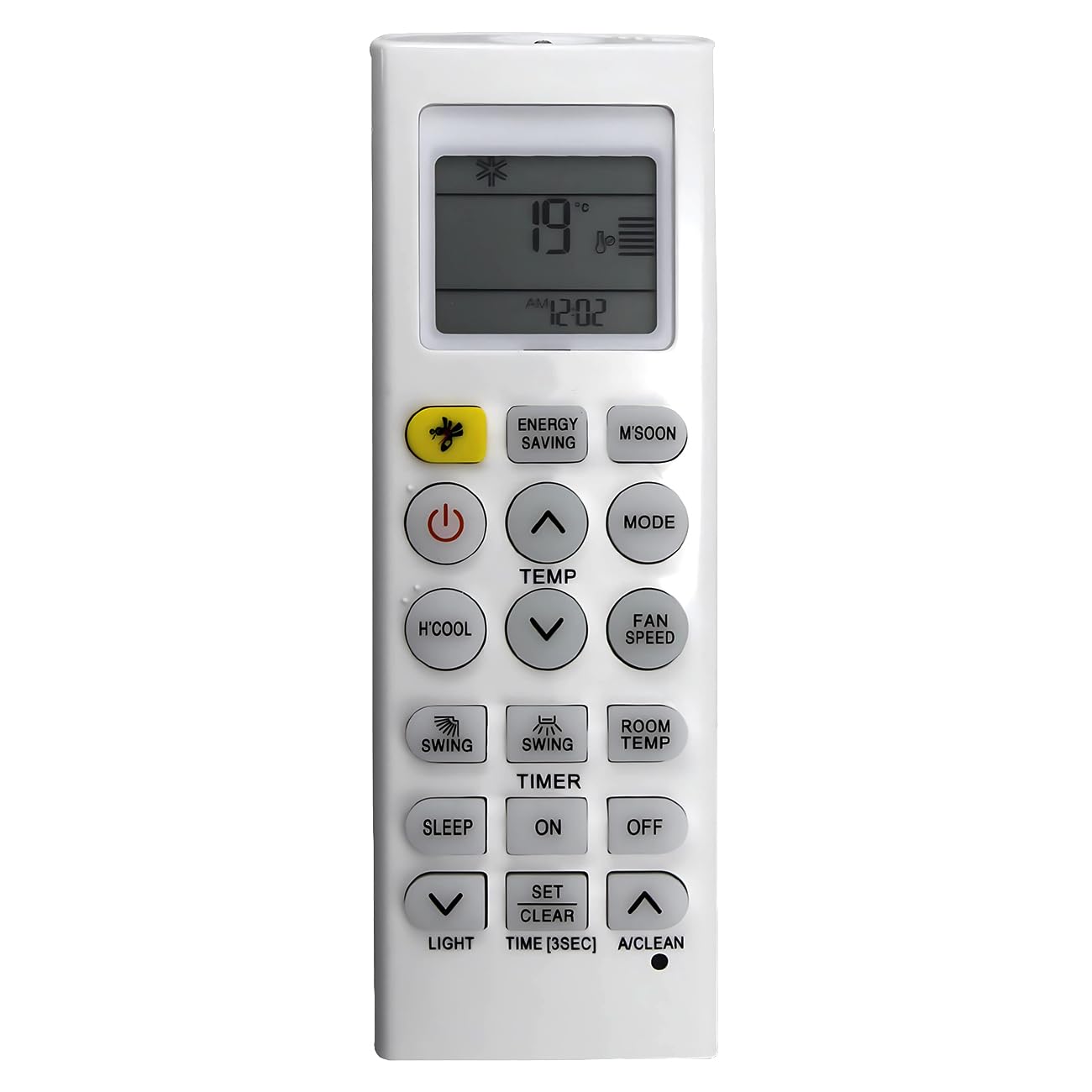
Image: Front view of the Effireli Replacement Remote Control, showing its display and various function buttons.
2.1 Compatible Models
This remote control is compatible with a wide range of LG Air Conditioner models, including but not limited to:
- AKB73456104
- AKB74515420
- LMCN185HV
- MA09AH1
- MA12AH1
- MU4M25
- P12EN
- USNW096H4A0
- A4UW246FA4
- APNH2433LAE
- APNH423TLAE
- LMCN077HV
- LMCN125HV
- AD0121
- LCN097HV4
- LCN127HV4
- AMNH09GAF11
- AMNH12GAF11
- AMNW24GECA0
- AMNW36GNJA0
- A12AW1 NF2
- AKB73315611
- ASNH18G8RU3
- ASNH24G8RU3
- ASNW126F1G2
- E09EM.NSW
- LC097HV4
- LC127HV4
- LCM42HV
- LCN187HV
- LCN246HV
- LCN247HV
- LCN367HV
- LCN426HV
If your specific LG Air Conditioner model is not listed or if your original remote appears significantly different, please contact the manufacturer for compatibility confirmation.
3. Setup
3.1 Battery Installation
- Locate the battery compartment on the back of the remote control.
- Slide the battery cover downwards or in the direction indicated by an arrow to open it.
- Insert two AAA batteries (not included), ensuring the positive (+) and negative (-) terminals align correctly with the markings inside the compartment.
- Replace the battery cover by sliding it back into position until it clicks securely.
3.2 Initial Use
This replacement remote control requires no programming. Once batteries are installed, it is ready for immediate use. Simply point the remote control towards your LG Air Conditioner unit and press the desired function button.
4. Operating Instructions
Familiarize yourself with the buttons and their functions:
| Button | Function |
|---|---|
| Power (Red Circle) | Turns the air conditioner unit ON or OFF. |
| TEMP (Up/Down Arrows) | Adjusts the desired temperature setting. |
| MODE | Cycles through operating modes (e.g., Cool, Heat, Fan, Dry, Auto). |
| FAN SPEED | Adjusts the fan speed (e.g., Low, Medium, High, Auto). |
| SWING (Horizontal) | Controls the horizontal movement of the air deflector. |
| SWING (Vertical) | Controls the vertical movement of the air deflector. |
| ENERGY SAVING (Bee icon) | Activates or deactivates the energy-saving operation mode. |
| M'SOON | Activates a specific mode, often optimized for humid conditions (Monsoon mode). |
| H'COOL | Initiates a rapid or high-power cooling function. |
| ROOM TEMP | Displays the current room temperature on the remote's screen. |
| TIMER ON | Sets a timer for the air conditioner to automatically turn ON. |
| TIMER OFF | Sets a timer for the air conditioner to automatically turn OFF. |
| SLEEP | Activates sleep mode, which adjusts temperature and fan speed for comfortable sleep. |
| LIGHT (Down Arrow) | Controls the display backlight or indicator lights on the air conditioner unit. |
| SET/CLEAR TIME [3SEC] | Press to set or clear timer settings. Hold for 3 seconds to set the current time. |
| A/CLEAN (Up Arrow) | Activates the auto-clean function for the indoor unit. |
5. Maintenance
5.1 Cleaning
To clean the remote control, wipe it gently with a soft, dry cloth. Do not use liquid cleaners, sprays, or abrasive materials, as these may damage the remote's surface or internal components.
5.2 Battery Replacement
Replace batteries when the remote control's operating range decreases or if the display becomes dim. Always replace both batteries at the same time with new ones of the same type (AAA). Dispose of used batteries according to local regulations.
6. Troubleshooting
- Remote not responding: Ensure batteries are correctly installed and not depleted. Point the remote directly at the air conditioner's receiver. Remove any obstructions between the remote and the unit.
- Intermittent operation: Replace batteries with new ones. Check for strong light sources (like direct sunlight or fluorescent lights) that might interfere with the infrared signal.
- Display issues: If the display is faint or incomplete, replace the batteries.
7. Specifications
| Feature | Detail |
|---|---|
| Brand | Effireli |
| Model Number | YK-AKB73975615 |
| Product Dimensions | 4.33 x 1.57 x 0.63 inches |
| Item Weight | 2.22 ounces |
| Connectivity Technology | Infrared |
| Compatible Devices | Air Conditioner |
| Special Feature | No Programming Required |
| Power Source | 2 x AAA Batteries (not included) |
8. Warranty and Support
8.1 Warranty Information
This Effireli Replacement Remote Control comes with a 12-month warranty covering manufacturing defects from the date of purchase. A 30-day money-back guarantee is also offered. Returns and exchanges are accepted within the warranty period for eligible issues.
8.2 Customer Support
For any questions, troubleshooting assistance, or warranty claims, please contact your retailer or the manufacturer directly. Provide your product model number (YK-AKB73975615) and details of your issue for efficient support.