
1. Introduction
The MiLESEEY IONJET 2 is a high-precision laser rangefinder designed for hunting and outdoor activities. It offers advanced ranging capabilities, multiple target modes, and a durable, waterproof design to assist users in accurately measuring distances in various environments. This manual provides detailed instructions for the proper setup, operation, and maintenance of your IONJET 2 rangefinder.

Figure 1.1: The MiLESEEY IONJET 2 Hunting Rangefinder, showcasing its compact and ergonomic design.
2. What's in the Box
Upon opening the package, verify that all the following items are included:
- IONJET 2 Rangefinder: The main unit for distance measurement.
- Magnetic Rangefinder Holder: For quick and secure attachment to gear.
- Protective Pouch: A carrying case for safe storage and transport.
- Spring Lanyard: To secure the device and prevent accidental drops.
- USB-C Charging Cable: For recharging the internal lithium battery.
- User Manual: This instruction guide.
- Cleaning Cloth: For maintaining the optical lenses.

Figure 2.1: All components included in the IONJET 2 package.
3. Product Features and Components
3.1 Optical System
- 7x Magnification: Provides clear and detailed views of distant targets.
- 7.5° Field of View (FOV): Offers a wide visual range for quick target acquisition.
- 90% Visible Light Transmittance (VLT): Ensures optimal clarity in various lighting conditions, reducing glare in bright light and enhancing visibility in low light.
- Fog-Resistant Lens Coating: Protects against rain, fog, and dust for reliable outdoor performance.
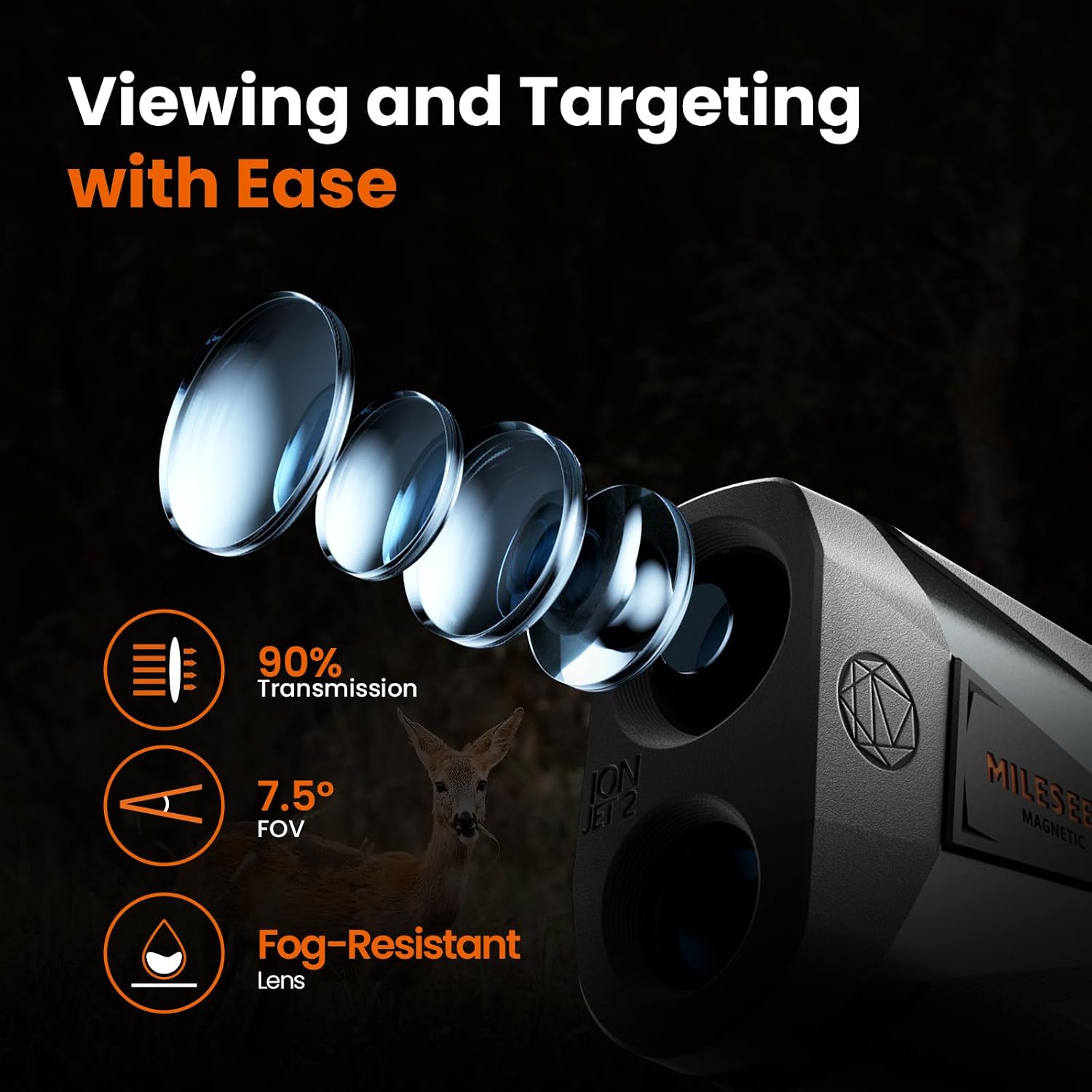
Figure 3.1: Illustration of the IONJET 2's advanced optical system.
3.2 Ranging and Target Modes
- Max Range: Up to 2,000 yards (1,400 yards on game) with ±0.5-yard accuracy.
- LOS (Line of Sight) Mode: Measures the direct distance from the device to the target.
- HD (Horizontal Distance) Mode: Calculates the horizontal distance to the target, compensating for elevation angle.
- ARCH (Archery) Mode: Provides ballistic correction for precise bowhunting, accounting for extreme vertical angles.
- Scan Mode: Allows continuous measurement by panning across multiple targets.
- Target Modes (Best, Auto, First, Last): Adapt to various field conditions to filter background or foreground interference and lock onto the correct target.

Figure 3.2: Explanation of LOS, HD, and ARCH ranging modes.

Figure 3.3: Overview of versatile ranging and targeting modes.
3.3 Power and Display
- Dual Power System: Features a 450 mAh USB-C rechargeable lithium battery and supports replaceable CR2 batteries. The unit prioritizes CR2 battery usage first.
- Battery Life: Each power source supports 10,000+ measurements.
- Dual Display: Black and red display with four adjustable brightness levels for clear readings in any light condition.

Figure 3.4: The IONJET 2's dual power supply system.

Figure 3.5: The dual display with adjustable brightness for low-light environments.
3.4 Design and Durability
- Magnetic Mount: Noise-dampened magnetic mount for fast attachment to the included silicone-wrapped iron-core clip.
- Silent Operation: Designed to reduce handling noise, minimizing disturbance to wildlife.
- Rugged Rubber Housing: Improves impact resistance and dampens vibration noise.
- IP65 Rating: Built to withstand dust, rain, and demanding outdoor conditions.
- 1/4"-20 UNC Tripod Mount: Allows for stable mounting on a tripod.

Figure 3.6: Magnetic mount and lanyard for convenient and quiet use.

Figure 3.7: The IP65 waterproof rating ensures durability in wet conditions.
4. Setup
4.1 Battery Installation and Charging
- CR2 Battery (Optional): If using a replaceable CR2 battery, unscrew the battery cap located at the bottom of the unit. Insert a fresh CR2 battery with the correct polarity (+/-) as indicated inside the compartment. Replace the cap securely. The unit will draw power from the CR2 battery first if installed.
- Internal Lithium Battery: The IONJET 2 comes with a built-in 450 mAh rechargeable lithium battery. To charge, connect the provided USB-C charging cable to the charging port on the unit and to a compatible USB power source (e.g., wall adapter, power bank, computer USB port). The charging indicator will show the charging status.
4.2 Diopter and Eyecup Adjustment
To ensure a clear view through the eyepiece, adjust the diopter and eyecup:
- Diopter Adjustment: Look through the eyepiece and rotate the diopter ring (located near the eyepiece) until the display and target appear sharp and in focus. This compensates for individual eyesight differences.
- Eyecup Adjustment: The twist-up eyecup can be adjusted to optimize eye relief, reducing vignetting and stray light, and allowing for faster eye alignment. Twist the eyecup up or down to find the most comfortable viewing position.

Figure 4.1: Adjusting the diopter and eyecup for optimal clarity.
5. Operating Instructions
5.1 Powering On/Off
- Power On: Press the Power/Measure Button (top button) once to activate the display.
- Power Off: The unit will automatically power off after a period of inactivity to conserve battery. To manually power off, press and hold the Power/Measure Button.
5.2 Measuring Distance
- Aim: Look through the eyepiece and align the reticle with your desired target.
- Measure: Press the Power/Measure Button once. The measured distance will appear on the display almost instantly (response time <1s).

Figure 5.1: The IONJET 2 provides ultra long-range precision.
5.3 Switching Ranging Modes (LOS, HD, ARCH)
To cycle through the ranging modes (LOS, HD, ARCH), press the Mode Button (side button) repeatedly until the desired mode is displayed. Each mode is designed for specific measurement needs:
- LOS (Line of Sight): Standard direct distance.
- HD (Horizontal Distance): Ideal for uphill/downhill shots, providing the true horizontal distance.
- ARCH (Archery): Specifically for bowhunting, providing compensated distance for angled shots.
5.4 Using Target Modes (Best, Auto, First, Last)
The IONJET 2 features four target modes to optimize measurements in challenging environments:
- First Mode: Measures the closest target, useful when there are obstructions in front of your desired target.
- Last Mode: Measures the farthest target, ideal for situations where the target is in the background with obstacles blocking it.
- Auto Mode: Measures the distance to both the nearest and farthest targets simultaneously.
- Best Mode: Recommended when there are no obvious obstructions and minimal background interference.
To select a target mode, press the Mode Button until you enter the target mode selection, then use the Power/Measure Button to cycle through the options.
5.5 Adjusting Display Brightness
The dual display offers four brightness levels (L0-L3). To adjust, press and hold the Mode Button until the brightness setting appears, then use the Power/Measure Button to cycle through the levels.
6. Maintenance
- Cleaning Lenses: Use the provided cleaning cloth or a soft, lint-free cloth to gently wipe the lenses. Avoid using abrasive materials or excessive force.
- Cleaning Body: Wipe the body of the rangefinder with a soft, damp cloth. Do not use harsh chemicals or solvents.
- Storage: Store the rangefinder in its protective pouch in a cool, dry place when not in use. Avoid extreme temperatures and direct sunlight.
- Battery Care: If storing for extended periods, remove the CR2 battery. Ensure the internal lithium battery is charged periodically to maintain its health.
7. Troubleshooting
| Problem | Possible Cause | Solution |
|---|---|---|
| No display/Unit won't turn on. | Low or depleted battery. | Charge the internal lithium battery via USB-C or replace the CR2 battery. |
| Inaccurate readings. | Dirty lenses; target too far/small; environmental interference (heavy fog/rain). | Clean lenses with provided cloth. Ensure target is within range and sufficiently reflective. Avoid use in extreme weather if possible. |
| Display is dim or hard to read. | Brightness setting is too low. | Adjust display brightness using the Mode Button (refer to Section 5.5). |
| Unit not responding to button presses. | Temporary software glitch. | Power off the unit and restart. If issue persists, ensure battery is fully charged. |
8. Specifications
- Brand: MiLESEEY
- Model Name: IONJET 2
- Measuring Range: Up to 2000 yards
- Accuracy: ±0.5 yards
- Magnification: 7X
- Field of View (FOV): 7.5°
- Lens Transmittance (VLT): 90%
- Power Source: Dual power system (450 mAh USB-C rechargeable Lithium battery and replaceable CR2 battery)
- Display: Dual Red & Black Display with 4 brightness levels
- Waterproof Rating: IP65
- Material: Metal with rugged rubber housing
- Dimensions (LxWxH): Approximately 4 x 2 x 3 inches
- Weight: Approximately 0.55 Kilograms
- Tripod Mount: 1/4"-20 UNC
- Included Components: IONJET 2 Rangefinder, Magnetic Rangefinder Holder, Protective Pouch, Spring Lanyard, USB-C Charging Cable, User Manual, Cleaning Cloth.
9. Warranty and Support
The MiLESEEY IONJET 2 Rangefinder comes with a 5-Year Manufacturer Warranty. For any product-related inquiries, technical assistance, or warranty claims, MiLESEEY offers Lifetime VIP Support. Please refer to the contact information provided in your product packaging or visit the official MiLESEEY website for support details.