Download PDFFree PDF. The Save button below keeps a bookmark and private notes in your account.
Noorio B210 & CL200 User Manual
Your comprehensive guide to setup, operation, and maintenance.
Introduction
This manual provides detailed instructions for the Noorio B210 2K Wireless Outdoor Security Camera and the Noorio CL200 2-Way Video Calling Indoor Camera. Please read this manual carefully before using the devices to ensure proper operation and to maximize their features.
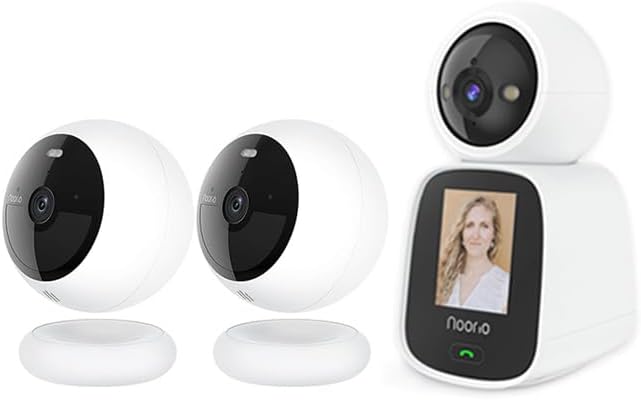
Image: The Noorio B210 wireless outdoor security camera (left) and the Noorio CL200 2-way video calling indoor camera (right).
Product Overview
Noorio B210 2K Wireless Outdoor Security Camera
The Noorio B210 is designed for robust outdoor surveillance, offering high-resolution video and advanced detection capabilities.
Key Features:
2K Resolution with HDR Video: Provides clear and detailed footage.
Two-Way Talk with Audio+: Enables clear communication through the camera.
Motion-Activated Spotlights: Deters intruders and enhances color night vision.
Color Night Vision: Offers full-color video even in low-light conditions.
Customizable Motion Zones: Allows users to define specific areas for motion detection.
16GB Local Storage: Built-in storage for video clips, no monthly fees required.
2.4G Wi-Fi & Alexa Compatibility: Easy connectivity and smart home integration.
100% Wireless & Battery Powered: Flexible placement without wiring constraints.
Magnetic Mounting: Simple and secure installation on iron surfaces.
IP66 Weather Resistant: Ensures reliable performance in various weather conditions.
AI Detection: Reduces false alerts by distinguishing between objects.
Image: A hand holding the Noorio B210 camera, surrounded by icons illustrating its features: Color Night Vision, 2K QHD, IP66 Waterproof, Magnetic Wireless, Two Way Audio, AI Detection, Battery Powered, and Free Local Storage.
Image: A visual comparison demonstrating the clarity of Noorio's Premium Night Vision, showing both regular night vision (monochrome) and enhanced color night vision.
Image: The Noorio B210 camera with an overlay highlighting its 16GB eMMC local storage, capable of recording up to 6000 video clips securely.
Image: The Noorio B210 camera mounted outdoors, with raindrops on its lens, illustrating its IP66 Weather Resistant rating for reliable performance in wind, rain, or snow.
Noorio CL200 2-Way Video Calling Indoor Camera
The Noorio CL200 is an innovative indoor camera designed for seamless two-way video and voice communication, ideal for families with children or elderly members.
Key Features:
Two-Way Video & Voice Communication: Facilitates real-time, face-to-face conversations.
Built-in 2.4-inch Screen: Provides a clear display for video calls directly on the device.
High-Quality Audio: Features noise reduction and echo cancellation for clear sound.
Convenient One-Button Video Call: Simplifies initiating video calls to linked mobile phones.
2K 3MP Resolution: Delivers sharp and detailed video quality.
360° Pan & Tilt: Allows for comprehensive room coverage and remote adjustment.
Auto Tracking: Automatically follows moving subjects within its field of view.
APP Push Notifications: Alerts users to detected activity via the mobile application.
Image: The Noorio CL200 indoor camera with icons illustrating its features: Two-Way Video, Night Vision, Motion Detection, One Click Call, 2K 3MP, 360° Pan&Tilt, Auto Tracking, and APP Push.
Image: A child pressing the one-click call button on the Noorio CL200, demonstrating how to instantly connect with loved ones with a single touch.
Image: The Noorio CL200 displaying a video call, illustrating its two-way video calling capability for engaging in real-time, face-to-face conversations.
Image: A collage of images showing the Noorio CL200 in various family settings, highlighting its role as an all-in-one solution for preserving memories and providing constant care for loved ones.
Setup Guide
Noorio B210 Installation
Charge the Camera: Before first use, fully charge the B210 camera using the provided USB cable.
Choose a Location: Select an outdoor location with good Wi-Fi signal and a clear view of the area you wish to monitor.
Mounting:
Magnetic Mounting: Affix the included magnetic bracket to an iron surface (e.g., refrigerator, electrical box). The camera can then be securely mounted onto this bracket without screws.
Screw Mounting (Optional): For non-magnetic surfaces, use the provided screws and anchors to secure the bracket to a wall or ceiling, then attach the camera magnetically.
Adjust Angle: Once mounted, adjust the camera's angle to cover the desired area.
Noorio CL200 Setup
Power On: Place the CL200 on a stable surface indoors and connect it to a power outlet using the provided power adapter.
Initial Boot: The camera will power on and display a startup sequence on its screen.
Connecting to the Noorio App (Both Cameras)
Download the App: Search for "Noorio" in your mobile device's app store (iOS or Android) and download the official application.
Create Account: Open the app and follow the on-screen instructions to create a new Noorio account or log in if you already have one.
Add Device: Tap the "+" icon or "Add Device" button in the app.
Select Model: Choose the specific camera model you are setting up (B210 or CL200).
Follow In-App Prompts: The app will guide you through connecting the camera to your 2.4GHz Wi-Fi network. This typically involves scanning a QR code displayed on your phone with the camera's lens or entering Wi-Fi credentials.
Name Your Camera: Assign a name to your camera (e.g., "Front Door B210", "Living Room CL200") for easy identification.
Operating Instructions
Using the Noorio App
Live View: Tap on a camera in the app to view its live feed.
Playback: Access recorded events and review footage from the timeline.
Settings: Adjust camera-specific settings such as motion detection sensitivity, notification preferences, and night vision modes.
B210 Specific Operations
Motion Detection: Configure motion zones and sensitivity in the app to receive alerts for specific areas.
Spotlight Control: Manually activate or set the motion-activated spotlights via the app.
Two-Way Talk: Use the microphone and speaker icons in the live view to communicate with visitors or deter unwanted guests.
CL200 Specific Operations
One-Button Video Call: Instruct family members to press the call button on the CL200 to initiate a video call to your linked mobile device.
Pan & Tilt Control: In the live view, swipe on the screen to remotely control the camera's pan (horizontal) and tilt (vertical) movements.
Two-Way Video: Engage in video calls directly from your phone to the CL200, allowing face-to-face interaction with those near the camera.
Auto Tracking: Enable this feature in settings to have the camera automatically follow detected motion.
Maintenance and Care
Cleaning: Use a soft, dry cloth to clean the camera lens and body. Avoid abrasive cleaners or solvents.
Battery Care (B210): For optimal battery life, avoid extreme temperatures. Recharge the camera when the battery level is low.
Software Updates: Regularly check the Noorio app for firmware updates to ensure your cameras have the latest features and security enhancements.
Storage Management: While the B210 has local storage, periodically review and manage recorded footage if needed.
Troubleshooting
Issue
Possible Solution
Camera not connecting to Wi-Fi
Ensure your Wi-Fi is 2.4GHz. Check Wi-Fi password. Move camera closer to router. Restart camera and router.
Poor video quality
Check Wi-Fi signal strength. Ensure lens is clean. Adjust camera placement for better lighting.
B210 battery draining fast
Reduce motion detection sensitivity. Decrease live view usage. Ensure camera is not in an area with constant motion.
CL200 one-button call not working
Ensure the CL200 is connected to Wi-Fi. Verify the linked mobile device is online and has the Noorio app running.
No motion alerts
Check motion detection settings in the app. Ensure notifications are enabled for the app on your phone. Verify motion zones are correctly set.
Technical Specifications
Feature
Noorio B210
Noorio CL200
Resolution
2K (HDR Video)
2K 3MP
Power Source
Battery Powered
Wired (Power Adapter)
Connectivity
2.4G Wi-Fi
2.4G Wi-Fi
Storage
16GB Local Storage (eMMC)
Local Storage (details not specified, typically microSD)
Special Features
Color Night Vision, Motion-Activated Spotlights, IP66 Weather Resistant, Magnetic Mount
2.4-inch Screen, One-Button Video Call, 360° Pan & Tilt, Auto Tracking
Recommended Use
Outdoor Security
Indoor Security, Baby Monitor, Pet Camera
Warranty Information
Noorio products typically come with a limited warranty. Please refer to the warranty card included in your product packaging or visit the official Noorio website for detailed warranty terms and conditions. Keep your purchase receipt as proof of purchase for warranty claims.
Customer Support
For any questions, technical assistance, or support, please contact Noorio Customer Service:
Phone: 800-642-5905 (9 AM - 6 PM ET, Business Day)
Ask about setup, troubleshooting, compatibility, parts, safety, or missing instructions. Manuals+ will review the question and use this page’s manual context to help answer it.