1. Introduction and Overview
The HFBTE POA-3H Power Quality Analyzer is a comprehensive, multi-functional, and intelligent instrument designed for field testing of three-phase power systems. It features a user-friendly interface, a large LCD color screen for high-resolution display, and a robust, shock-proof shell structure. This manual provides essential information for the safe and effective operation of your POA-3H analyzer.
Key Features:
- Simultaneous measurement of 4-channel current (ABC three phase and neutral wire) and 4-channel voltage (ABC three-phase voltage and neutral line voltage to ground).
- Measures peak current/voltage, maximum/minimum values over a period, three-phase imbalance factor, short-time voltage flicker, and transformer K factor.
- Analyzes active power, reactive power, apparent power, power factor, and displacement power factor.
- Equipped with a DSP + ARM dual-processor architecture for efficient data collection, algorithm processing, communication protocol, and human-machine interface management.
- Features a 5.6-inch LCD color screen (640x480 dots) for clear display of phase parameters, waveforms, vector diagrams, and harmonic ratios.
- Built-in flash memory stores 60 screenshots, 150 transient voltage/current waveform figures, and 12800 alarm lists.
- Starting current detection mode can continuously capture starting current waveforms for 100 seconds.
- Includes a 2GB memory card for trend curve records, storing 20 selectable parameters with data collected every five seconds for up to 300 days.
2. Package Contents
Verify that all items listed below are present in your package:
- POA-3H Power Quality Analyzer Unit
- 4 x Round Jaw Current Clamps (0.10A~100A, CT Size 35mm×40mm)
- USB Communication Cable
- Power Adapter/Charger
- Voltage Test Wires (3M length)
- Current Clamp Wires (2M length)
- User Manual
- Carrying Bag

Image: The POA-3H Power Quality Analyzer unit, along with its various accessories including current clamps, test leads, power adapter, USB cable, and user manual, neatly organized within a black carrying bag.

Image: Four blue and black round jaw current clamps, each with a connecting cable, used for measuring current in a three-phase system.
3. Safety Information
Before operating the POA-3H, please read and understand all safety warnings and instructions. Failure to do so may result in electric shock, fire, or damage to the instrument.
- Always use the instrument within its specified voltage and current ranges.
- Ensure all connections are secure before applying power.
- Do not operate the instrument in wet conditions or in the presence of explosive gases or vapors.
- Refer to the detailed safety guidelines in the printed manual for comprehensive information.
4. Device Layout and Connections
Familiarize yourself with the physical layout and connection ports of the POA-3H analyzer.

Image: The rear panel of the POA-3H analyzer, illustrating the voltage test line ports (L1/A, L2/B, L3/C, E/GND, N/D), current clamp ports (L1/A, L2/B, L3/C, N/D), the power adapter port with charging indicator, and the USB communication interface.
Connection Ports:
- Voltage Test Line Ports: L1/A, L2/B, L3/C, E/GND (Ground), N/D (Neutral). These are used for connecting the voltage test leads.
- Current Clamp Ports: L1/A, L2/B, L3/C, N/D. Connect the current clamps to these ports for current measurement.
- Power Adapter Port: For connecting the external power supply and charging the internal battery. A charging indicator is located next to this port.
- USB Interface: For communication with a computer to download data or update firmware.
5. Setup and Initial Operation
5.1. Charging the Battery
The POA-3H is powered by a rechargeable lithium-ion battery pack (9.6V). Before first use, fully charge the battery using the provided power adapter. Connect the adapter to the power adapter port on the device and plug it into a suitable power outlet. The charging indicator will illuminate during charging.
5.2. Connecting Test Leads and Clamps
- Connect the voltage test leads to the corresponding voltage test line ports (L1/A, L2/B, L3/C, E/GND, N/D). Ensure correct phase and neutral connections.
- Connect the current clamps to the current clamp ports (L1/A, L2/B, L3/C, N/D). Ensure the clamps are securely attached and oriented correctly around the conductors for accurate measurement.
5.3. Powering On/Off
Press and hold the power button (usually located at the bottom right of the keypad) to turn the device on or off. The device will display a boot-up sequence and then show the main measurement screen.
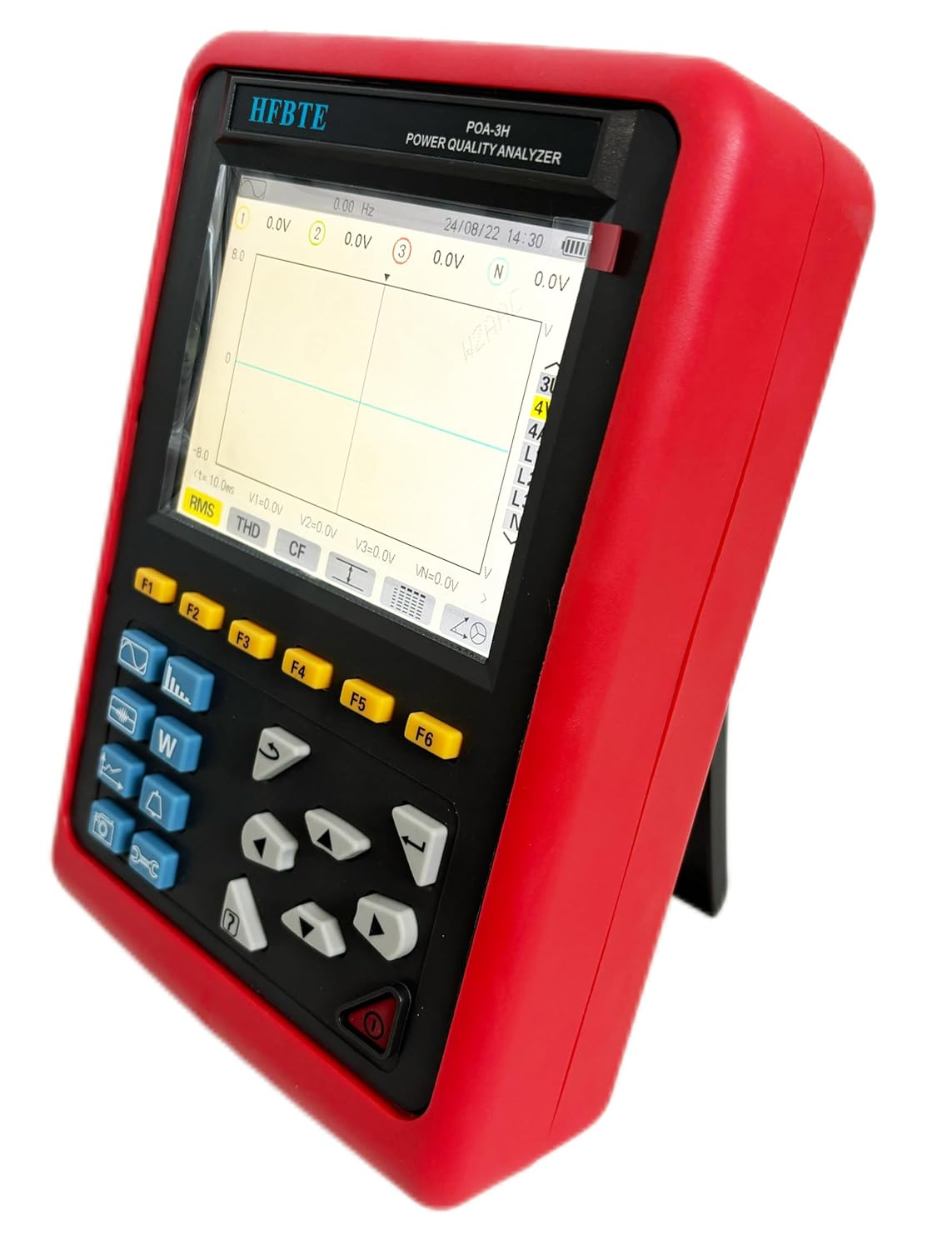
Image: The POA-3H Power Quality Analyzer showing its front panel with the LCD screen displaying voltage and current waveforms, along with various function buttons and navigation keys.
6. Operating Instructions
6.1. Navigation and Menu System
The POA-3H features a keypad with function keys (F1-F6), navigation arrows, and dedicated measurement mode buttons. Use the arrow keys to navigate through menus and adjust settings. The F-keys provide quick access to various functions displayed on the screen.
6.2. Measurement Modes
The analyzer supports various measurement modes, accessible via dedicated buttons or the menu system:
- Voltage/Current Waveform: Displays real-time voltage and current waveforms for each phase.
- Harmonic Analysis: Measures and displays harmonic content up to the 50th order for voltage and current.
- Power Parameters: Shows active power (W), reactive power (Var), apparent power (VA), power factor (PF), and displacement power factor (DPF).
- Energy Parameters: Records Wh, Varh, and Vah.
- Transient Recording: Captures and records transient events such as voltage sags, swells, and interruptions.
- Starting Current Mode: Monitors and records inrush currents for up to 100 seconds.
- Voltage Flicker: Measures and analyzes voltage flicker according to standards.
- Three-Phase Unbalance: Calculates and displays the unbalance factor for three-phase systems.
6.3. Data Logging and Storage
The POA-3H can log measurement data to its internal 2GB memory card. You can configure logging intervals and select up to 20 parameters for continuous recording. Logged data can be retrieved via the USB interface for analysis on a computer.
6.4. USB Communication
Connect the analyzer to a computer using the provided USB cable. The device will appear as a mass storage device, allowing you to access recorded data files. Refer to the software manual (if applicable) for detailed instructions on data analysis and report generation.
Video: A demonstration of the HFBTE POA-3H Power Quality Analyzer's display and user interface, showing various measurement screens and navigation through its functions.
7. Maintenance
7.1. Cleaning
Wipe the instrument's exterior with a soft, damp cloth. Do not use abrasive cleaners or solvents. Ensure no moisture enters the device.
7.2. Battery Care
To prolong battery life, avoid fully discharging the battery frequently. Recharge the battery when the low battery indicator appears. If storing the device for an extended period, ensure the battery is partially charged (around 50%) and recharge it every few months.
7.3. Storage
Store the POA-3H in its carrying bag in a cool, dry place, away from direct sunlight and extreme temperatures.
8. Troubleshooting
This section addresses common issues you might encounter with your POA-3H analyzer.
| Problem | Possible Cause | Solution |
|---|---|---|
| Device does not power on. | Low or depleted battery; Power adapter not connected or faulty. | Charge the battery using the power adapter. Ensure the power adapter is functioning correctly and connected securely. |
| No readings or incorrect readings. | Incorrect connection of test leads/clamps; Faulty leads/clamps; Measurement range incorrect. | Verify all connections are secure and correct. Check the integrity of test leads and clamps. Ensure the appropriate measurement range is selected. |
| Screen is blank or frozen. | Software error; Device malfunction. | Perform a hard reset by holding the power button for an extended period (e.g., 10 seconds). If the issue persists, contact customer support. |
| Cannot connect to computer via USB. | Faulty USB cable; Driver issues on computer; Device not in correct mode. | Try a different USB cable. Ensure necessary drivers are installed on your computer. Check the device settings for USB communication mode. |
9. Technical Specifications
Below are the detailed technical specifications for the HFBTE POA-3H Power Quality Analyzer.
| Parameter | Specification |
|---|---|
| Power Supply | Rechargeable lithium-ion battery packs 9.6V, backup charger |
| Working Current | About 590mA, continuous working 8 hours |
| Display Mode | LCD color screen, 640x480 dots, 5.6 inches, display field 116mm × 88mm |
| Instrument Size | 240mm × 170mm × 68mm |
| CT Size (Round Jaw Current Clamp) | 35mm × 40mm |
| Line Voltage | 1.0V ~ 2000V |
| Phase Voltage | 1.0V ~ 1000V |
| Current (100A clamp) | 0.10A ~ 100A |
| Frequency | 40Hz ~ 70Hz |
| Electricity Energy Parameter | W, VA, Var, PF, DPF, cosφ, tanφ |
| Energy Parameters | Wh, Varh, Vah |
| Harmonic Wave | 0 - 50 times |
| Total Harmonic Distortion | 0 - 50 times, each phase |
| Transient Record Groups | 150 groups |
| Voltage Flicker | Yes |
| Start Current Mode | Yes, 100 seconds |
| Three-phases Unbalance | Yes |
| Peak | Yes |
| Phasor Diagram Display | Automatic |
| Screenshot Capacity | 60PCS |
| Communication Interface | USB |
| Voltage Test Wire Length | 3M |
| Current Clamp Wire Length | 2M |
| Working Temperature | -10°C ~ 40°C, below 80%Rh |
| Storage Temperature | -10°C ~ 60°C, below 70%Rh |
| Input Impedance | Test voltage input impedance: 1MΩ |
| Withstand Voltage | Withstand between the wire AC voltage of 3700V/50Hz one minute between the instrument line and out shell |
| Insulation | Between instrument line and shell ≥10MΩ |
| Structure | Double insulation, with insulation shock-proof sheath |
| Suitable Safety Standard | IEC 61010-1:2001 CAT III 600V CAT IV 300V, IEC61010-031, IEC61326, Pollution degree 2 |
Note: For detailed accuracy specifications, please refer to the full printed manual.
10. Warranty and Support
HFBTE products are designed for reliability and performance. For warranty information, please refer to the warranty card included with your product or contact HFBTE customer support directly. Keep your purchase receipt as proof of purchase.
Customer Support:
If you encounter any issues or have questions regarding the operation or maintenance of your POA-3H Power Quality Analyzer, please contact HFBTE customer support. Contact details can typically be found on the manufacturer's website or in the product packaging.