
1. Introduction
This manual provides instructions for the Effireli YKR-N/301E replacement remote control. This remote is designed to operate various AUX Air Conditioner models, offering a straightforward solution for controlling your unit. It requires no complex programming or setup, allowing for immediate use.
Compatible Models: YKR-N/002E, YKR-N/001E, YKR-N/301E.
If your specific air conditioner model is not listed or your original remote appears different, please contact customer support to verify compatibility before use.
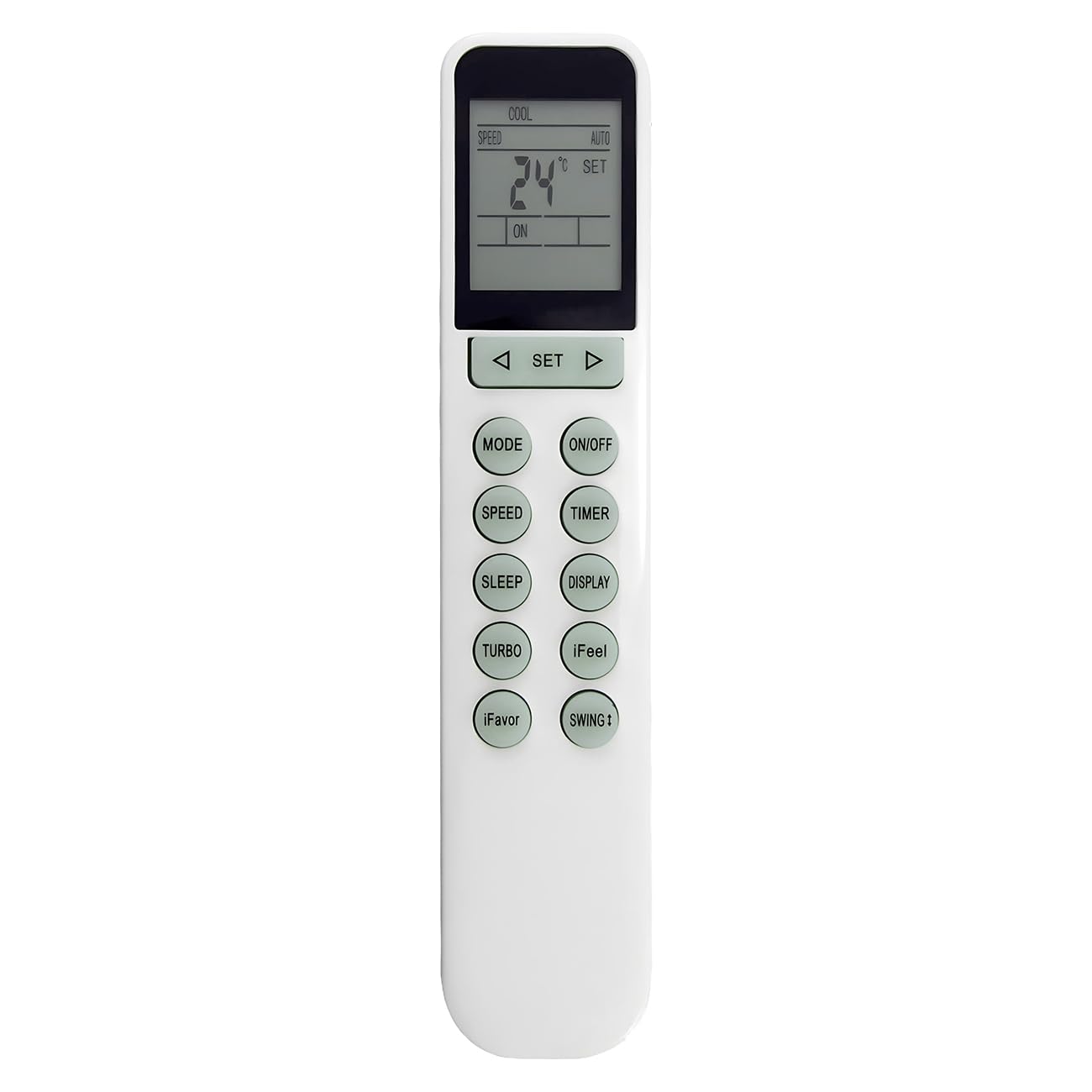
Image: Effireli YKR-N/301E Replacement Remote Control. This image displays the front view of the remote control, highlighting its buttons and display area.
2. Setup
The Effireli YKR-N/301E remote control is designed for immediate use without any programming. Simply insert batteries, and it is ready to operate your compatible AUX Air Conditioner.
2.1 Battery Installation
- Locate the battery compartment on the back of the remote control.
- Slide open the battery compartment cover.
- Insert two new AAA batteries, ensuring the positive (+) and negative (-) terminals match the diagrams inside the compartment.
- Close the battery compartment cover securely.
Important: Always use new batteries and replace both batteries at the same time. Do not mix old and new batteries or different types of batteries.
3. Operating Instructions
To operate your air conditioner, point the remote control directly at the air conditioner's receiver window. Ensure there are no obstructions between the remote and the air conditioner.
3.1 Basic Functions
- Power Button: Press to turn the air conditioner ON or OFF.
- Mode Button: Cycles through operating modes such as Cool, Heat, Fan, Dry, and Auto.
- Temperature Adjustment Buttons (▲/▼): Adjusts the desired temperature setting.
- Fan Speed Button: Changes the fan speed (e.g., Low, Medium, High, Auto).
- Timer Button: Sets the timer for automatic ON/OFF operations.
- Swing Button: Controls the louver movement for air direction.
Note: Specific button labels and functions may vary slightly depending on the air conditioner model. Refer to your air conditioner's manual for detailed function descriptions.
4. Maintenance
4.1 Battery Replacement
Replace batteries when the remote control's range decreases or if the air conditioner does not respond to commands. Follow the battery installation steps outlined in Section 2.1.
4.2 Cleaning
Wipe the remote control with a soft, dry cloth. Do not use liquid cleaners, sprays, or abrasive materials, as these can damage the remote's surface or internal components.
4.3 Storage
If the remote control will not be used for an extended period, remove the batteries to prevent leakage and potential damage to the device.
5. Troubleshooting
- Remote not responding:
- Check if the batteries are correctly inserted and have sufficient charge. Replace if necessary.
- Ensure there are no obstructions between the remote control and the air conditioner's receiver.
- Verify that you are within the effective operating range (typically up to 8 meters).
- Limited operating range:
- Replace the batteries with new ones.
- Ensure the remote's infrared emitter and the air conditioner's receiver are clean and unobstructed.
- Air conditioner functions incorrectly:
- Confirm that the remote control is compatible with your specific AUX Air Conditioner model.
- Refer to your air conditioner's user manual for specific operational details and error codes.
6. Specifications
| Feature | Specification |
|---|---|
| Brand | Effireli |
| Model Number | YK-YKR-N/301E |
| Special Feature | No Programming Required |
| Max Number of Supported Devices | 1 |
| Compatible Devices | Air Conditioner |
| Connectivity Technology | Infrared |
| Item Weight | 86 Grams |
| Item Dimensions (L x W x H) | 4.72"L x 0.87"W x 0.51"H |
7. Warranty and Support
This Effireli remote control comes with a 30-day money-back guarantee, allowing you to return the product if you are not satisfied. Additionally, it includes a 12-month warranty covering manufacturing defects from the date of purchase. Returns and exchanges are accepted within this warranty period for eligible issues.
For any questions regarding compatibility, troubleshooting, or warranty claims, please contact our customer support directly. Providing your air conditioner's model number will help us assist you more efficiently.