
1. Introduction
Thank you for choosing the CODN LT-117 Handheld Car Vacuum. This versatile 2-in-1 device combines powerful vacuuming with efficient air dusting, making it ideal for cleaning your car, home, office, and even pet hair. Its compact, cordless design and multi-nozzle accessories ensure a thorough and convenient cleaning experience. Please read this manual carefully before use to ensure proper operation and maintenance.

The CODN LT-117 Handheld Car Vacuum with its various attachments, showcasing its dual functionality and portability.
2. Product Features
- 12000PA Powerful Suction: Equipped with a motor speed of 75000RPM, providing strong suction for deep and efficient cleaning of various impurities and hair.
- Multifunctional 2-in-1 Design: Functions as both a vacuum cleaner for suction and an air duster for blowing, with additional inflation capabilities.
- Type-C Charging: Features a 4000mAh battery with a Type-C charging cable for safe and efficient charging in various locations via a USB port. Full charge in 3 hours provides 30 minutes of operation.
- HEPA High Efficiency Filter: Equipped with a reusable and washable HEPA filter that efficiently traps impurity particles, protecting the motor and extending the vacuum's lifespan.
- Lightweight and Portable: Weighs just 0.8LB, offering a cordless and portable design for easy handling and storage.
- Integrated LED Light: Helps illuminate dust and stains in dark corners or hard-to-see areas, improving cleaning efficiency.

Visual representation of the vacuum's powerful 12000PA suction capability.

The device demonstrating its dual functionality as a vacuum cleaner for keyboards and an air duster for car interiors.

Illustration of the Type-C charging port and various charging methods, including car charger, power bank, computer, and adapter.

The compact dimensions of the vacuum cleaner, highlighting its lightweight design and ease of storage in small spaces like a car door pocket.
3. What's in the Box
Your CODN LT-117 Handheld Car Vacuum package includes:
- 1 x Handheld Vacuum Cleaner
- 1 x Instruction Manual
- 1 x Multifunctional Suction Nozzle
- 1 x Floor Brush
- 1 x Multifunctional Air Nozzle
- 1 x HEPA Filter (pre-installed)
- 1 x Type-C Charging Line

A visual guide to the contents of the product package, including the main unit, various nozzles, filter, and charging cable.
4. Setup
4.1 Charging the Vacuum
- Before first use, fully charge the vacuum cleaner.
- Connect the provided Type-C charging cable to the vacuum's charging port.
- Plug the other end of the cable into a compatible USB power source (e.g., car charger, power bank, computer USB port, or a USB wall adapter).
- The charging indicator light will show red during charging and turn green when fully charged. Charging typically takes about 3 hours.
4.2 Attaching Accessories
The vacuum cleaner comes with various accessories for different cleaning tasks. Attach the desired nozzle or brush firmly to the appropriate end of the vacuum:
- For suction (vacuum) function, attach the floor brush, suction nozzle, or brush to the end with the transparent dust bin.
- For blowing (air duster) or inflating function, attach the mouthpiece or inflating nozzle to the opposite end of the vacuum.
5. Operating Instructions
To turn the vacuum on or off, press the power button located on the handle. The integrated LED light will activate when the device is on, illuminating the cleaning area.
The vacuum cleaner in action, demonstrating its effectiveness with different nozzles for suction, blowing, and inflation.
5.1 Vacuum Cleaner Function (Suction)
- Ensure the desired suction accessory (suction nozzle, floor brush, or brush) is securely attached to the dust bin end.
- Press the power button to turn on the vacuum. The LED light will illuminate the area.
- Move the nozzle over the surface to be cleaned, allowing the powerful suction to pick up dust, debris, and pet hair.
- After cleaning, turn off the vacuum by pressing the power button.

Instructions for using the vacuum cleaner function, highlighting the correct attachment of accessories for suction.
5.2 Air Blower Function (Dusting)
- Attach the appropriate air nozzle (e.g., mouthpiece) to the blowing end of the vacuum.
- Press the power button to activate the air blower.
- Direct the airflow to blow away fine dust from crevices, keyboards, windows, or other hard-to-reach areas.
- Turn off the device when finished.

Instructions for using the air blower function, showing how to attach nozzles for effective dusting.
5.3 Air Inflation Function
- Attach the inflating nozzle to the blowing end of the vacuum.
- Press the power button to start the inflation.
- Use this function to inflate items such as balloons or swimming rings.
- Turn off the device once inflation is complete.

Instructions for using the air inflation function, demonstrating its use for inflating various items.
6. Maintenance
6.1 Cleaning the HEPA Filter
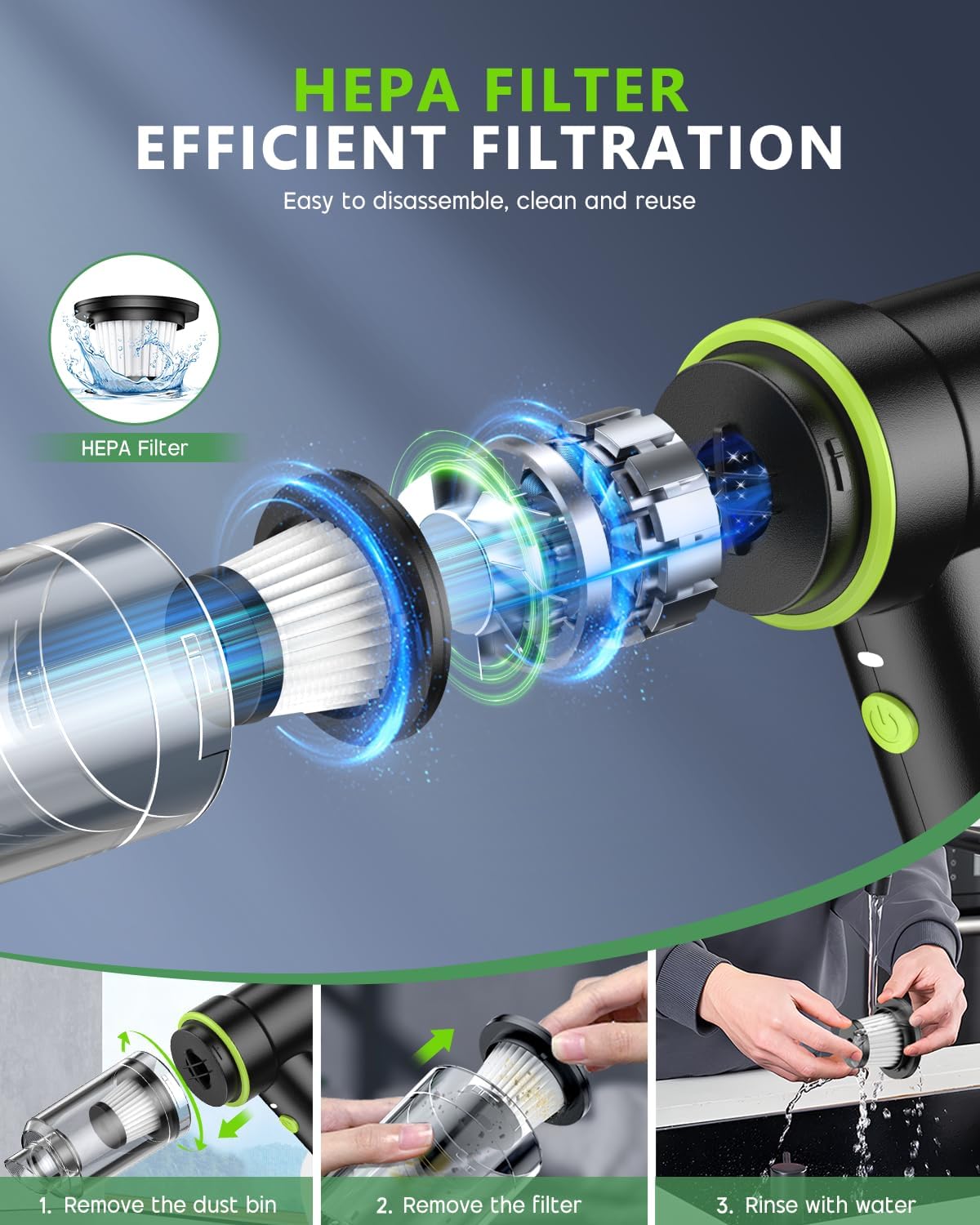
Regular cleaning of the HEPA filter is crucial for maintaining optimal suction performance and extending the lifespan of your vacuum cleaner. The filter can be easily removed, cleaned, and reused.

A visual guide to the HEPA filter, emphasizing its efficiency and ease of disassembly for cleaning and reuse.
- Ensure the vacuum is turned off.
- Remove the transparent dust bin by twisting it counter-clockwise and pulling it away from the main body.
- Carefully remove the HEPA filter from the dust bin.
- Tap the filter gently to dislodge loose dust and debris. You can also use a small brush to clean the filter thoroughly.
- Rinse the filter with clean water. Do not use cleaning agents.
- Allow the filter to air dry completely before reinserting it into the dust bin. Do not use a hair dryer or other heat sources.
- Reassemble the dust bin and filter onto the vacuum cleaner.

Detailed steps on how to disassemble the dust bin, remove the filter, rinse with water, and air dry for proper maintenance.
7. Troubleshooting
- No Power/Does Not Turn On: Ensure the battery is fully charged. Connect the Type-C charging cable and allow it to charge for 3 hours.
- Low Suction Power: Check if the dust bin is full and needs emptying. Inspect the HEPA filter for excessive dust buildup and clean it as per maintenance instructions. Ensure all attachments are securely fitted.
- LED Light Not Working: The LED light is integrated with the power function. If the device is on and the light is off, ensure the battery is charged. If the issue persists, contact customer service.
- Unusual Noise: Turn off the vacuum immediately. Check for any obstructions in the nozzles or the dust bin. Clear any blockages before resuming operation.
8. Specifications
| Feature | Detail |
|---|---|
| Brand | CODN |
| Model Name | LT-117 |
| Special Feature | Portable, Spotless Cleaning, Cordless, Compact, Powerful |
| Filter Type | HEPA Filter |
| Included Components | Multifunctional Accessory Kit, Vacuum cleaner, Type-C Charging Line, Owner's Manual |
| Is Cordless? | Yes |
| Capacity | 130 ml/min |
| Runtime | 30 minutes |
| Charging Time | 3 Hours |
| Recommended Uses | Office, Car, Pet Hair, Home |
| Form Factor | Handheld |
| Color | Black |
| Product Dimensions | 7.9"L x 2.7"W x 6.5"H |
| Item Weight | 1 pounds |
| Battery Type | Lithium-Ion (1 included) |
| Connectivity Technology | USB |
| UPC | 762949440438 |
9. Warranty and Support
This handheld vacuum is a great choice for car, home, and office use. If you have any questions or encounter any issues after purchase, please do not hesitate to contact CODN customer service for assistance. We are committed to providing high-quality products and support to enhance your cleaning experience.