1. Introduction
This manual provides essential information for the safe and effective operation, maintenance, and setup of your FMS 1/10 LC80 Brushless RC Crawler Pro V2 FCX10 Toyota Land Cruiser. Please read this manual thoroughly before operating the vehicle to ensure optimal performance and longevity.
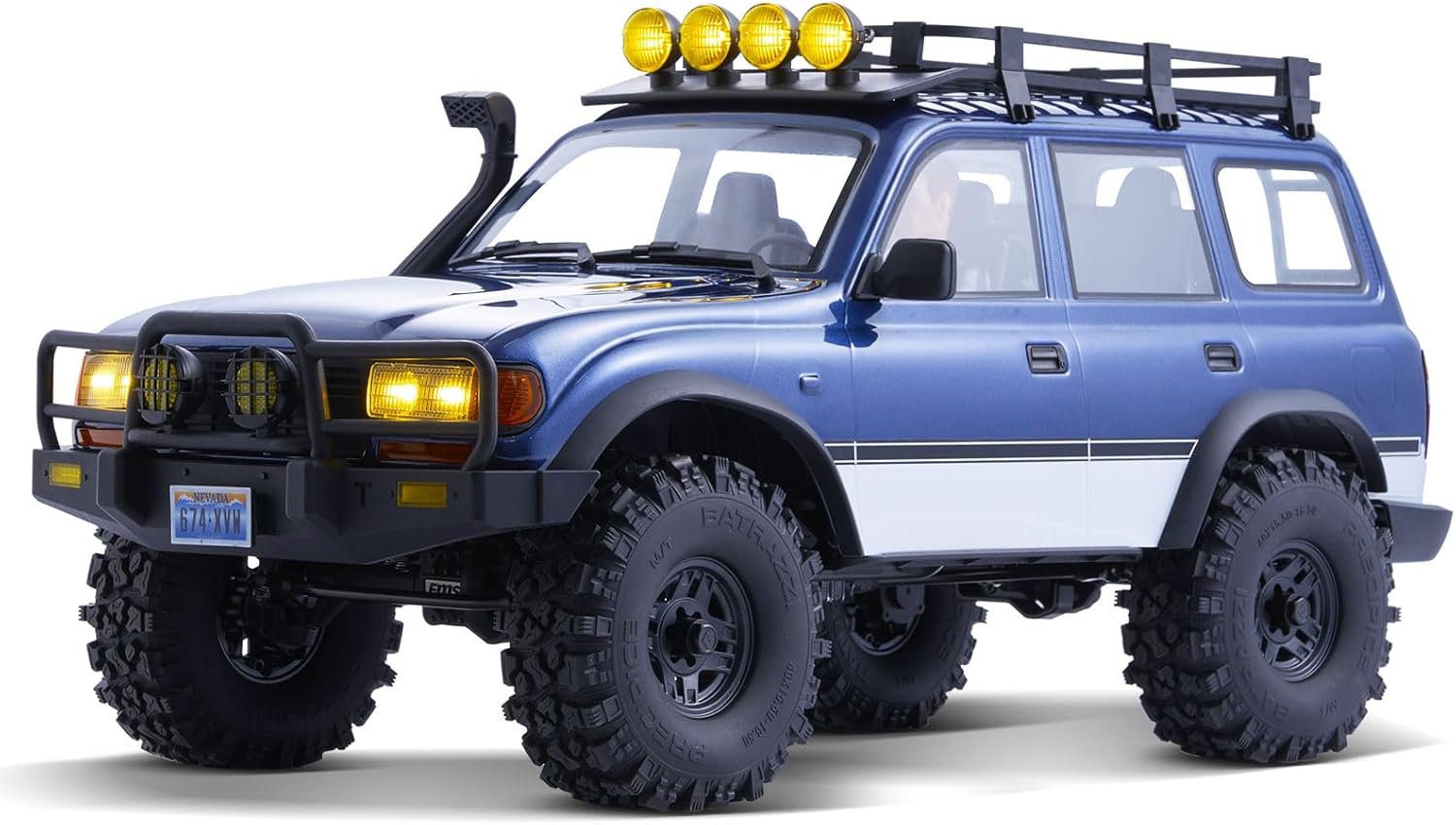
Figure 1: FMS 1/10 LC80 Brushless RC Crawler Pro V2
2. What's in the Box
- FMS 1/10 LC80 Brushless RC Crawler Pro V2 (Assembled)
- Remote Control Transmitter
- Decal Sheet (FMS, InJora, license plates)
- Hitch Attachment
- Screwdriver
- Allen Key
- Product Manual (this document)
3. Key Features
- Toyota Licensed LC80 Body: A highly detailed 1/10 scale replica of the Land Cruiser 80, featuring a PC blister soft shell with two-color spraying for a realistic finish. Includes high-simulation figures, an exquisite dashboard, and a detailed cockpit interior.
- Realistic Exterior Details: Equipped with functional rearview mirrors, waders, a roof rack with four orange off-road searchlights, and a standard rear ladder. Pre-installed fenders help prevent mud splash.
- Brushless Power System: Features a 50A independent brushless ESC paired with a 3541 outrunner brushless motor, providing delicate linear control and excellent low-speed crawling capability.
- Magnetic Interface & Lighting System: The car shell utilizes a magnetic interface to draw power from the chassis. A remote control button activates a full lighting expression, including factory headlights, front turn signals, side turn signals, rear turn signals, and reversing lights.
- FCX10 Simulated Climbing Chassis: Designed with a mainstream mid-front power layout and four-link suspension. Larger diameter tires ensure sufficient ground clearance and climbing ability. The mid-front motor and gearbox assembly contribute to a lower center of gravity, reducing the likelihood of rollovers.
- Convenient Inspection & Maintenance: The battery compartment features a flip-back or quick-release knob-type structure for easy access. The power supply and signal lines for the light set are integrated with a magnetic module for simplified connection.

Figure 2: Brushless Motor and Quick Release Structure

Figure 3: Pre-installed Lighting System

Figure 4: Three-position Switch for Differential Control
Video 1: Overview of the FMS 1/10 RC Crawler FCX10 Land Cruiser LC80 PRO RS, highlighting its features and capabilities.
4. Setup
4.1 Battery Installation
- Ensure the vehicle's power switch is in the 'OFF' position.
- Locate the battery compartment at the front of the chassis.
- Utilize the quick-release knob or flip-back mechanism to open the battery compartment.
- Connect the fully charged battery to the vehicle's ESC using the magnetic module.
- Securely close the battery compartment.
4.2 Remote Control Setup
- Install the required batteries (not included) into the remote control transmitter.
- Turn on the remote control transmitter.
- Turn on the vehicle's power switch. The vehicle and remote should automatically bind. If not, refer to the binding instructions in the remote control's specific manual.
5. Operating Instructions
5.1 Basic Controls
- Throttle: Use the trigger on the remote control for forward and reverse movement.
- Steering: Use the steering wheel on the remote control to turn left or right.
5.2 Two-Speed Transmission
The vehicle is equipped with a remote-controlled two-speed transmission. Use the designated switch on your remote control to shift between high and low gears for varying terrain and speed requirements.
5.3 Differential Lockers
The front and rear differentials can be individually remote-controlled and locked. Use the three-position switch on your remote control to select between 'RD/4WD/FD' (default) or 'DIG/4WD/FD' (optional) modes, allowing for enhanced traction and maneuverability on challenging surfaces.
5.4 Lighting Control
The integrated lighting system can be controlled via the remote. A dedicated button or switch on the remote allows for activating headlights, turn signals, and other pre-installed lights.
Video 2: Demonstrates the FMS 1/10 FCX10P LC80 RC Crawler in action, showcasing its features and performance.
6. Maintenance
- Cleaning: After each use, especially in dirty or wet conditions, clean the vehicle using a soft brush and a damp cloth. Avoid using harsh chemicals or excessive water directly on electronic components.
- Inspection: Regularly inspect all screws, linkages, and moving parts for looseness or damage. Tighten any loose screws and replace damaged parts promptly.
- Lubrication: Periodically lubricate moving parts such as gears and bearings with appropriate RC-grade lubricant to ensure smooth operation and reduce wear.
- Battery Care: Always disconnect the battery after use and store it in a cool, dry place. Follow the battery manufacturer's instructions for charging and storage.
7. Troubleshooting
- Vehicle not responding: Ensure the battery is charged and properly connected. Check that both the vehicle and remote control are powered on and correctly bound.
- Loss of power/intermittent operation: Check battery charge. Inspect all wiring connections for looseness or damage.
- Steering issues: Verify the steering trim on the remote control is centered. Inspect the steering servo and linkages for any obstructions or damage.
- Transmission not shifting: Ensure the transmission switch on the remote is functioning correctly. Check for any debris or obstructions in the gearbox mechanism.
8. Specifications
| Feature | Specification |
|---|---|
| Product Dimensions | 22.5 x 9.88 x 11.3 inches |
| Item Weight | 12.82 pounds |
| Item Model Number | 11042 |
| Manufacturer Recommended Age | 17 years and up |
| Manufacturer | Fms |
9. Safety Information
This product requires a battery for operation. Always ensure the correct battery type and voltage are used. Follow all battery safety guidelines, including proper charging, storage, and disposal procedures. Keep the vehicle away from water and extreme temperatures unless specifically designed for such conditions. Adult supervision is recommended for users under the manufacturer's recommended age.
10. Warranty and Support
For warranty information, technical support, or replacement parts, please contact the manufacturer directly. Refer to the packaging or the manufacturer's official website for contact details. Keep your proof of purchase for warranty claims.