
1. Introduction
Thank you for choosing the Qecnato T12 Wireless Earbuds. These earbuds are designed to provide a high-quality audio experience with advanced features such as Bluetooth 5.4 connectivity, long battery life, and an IP7 waterproof rating. This manual will guide you through the setup, operation, and maintenance of your new earbuds.
2. Package Contents
Please ensure all items are present in your package:
- Qecnato T12 Wireless Earbuds (Left and Right)
- Portable Charging Case
- USB-C Charging Cable
- Silicone Earplugs (S / M / L sizes)
- User Manual
3. Product Overview
The Qecnato T12 earbuds feature an ergonomic over-ear hook design for secure fit, a touch control area on each earbud, and a charging case with an LED display for battery status. The earbuds are equipped with 14.2mm dynamic drivers for clear audio.
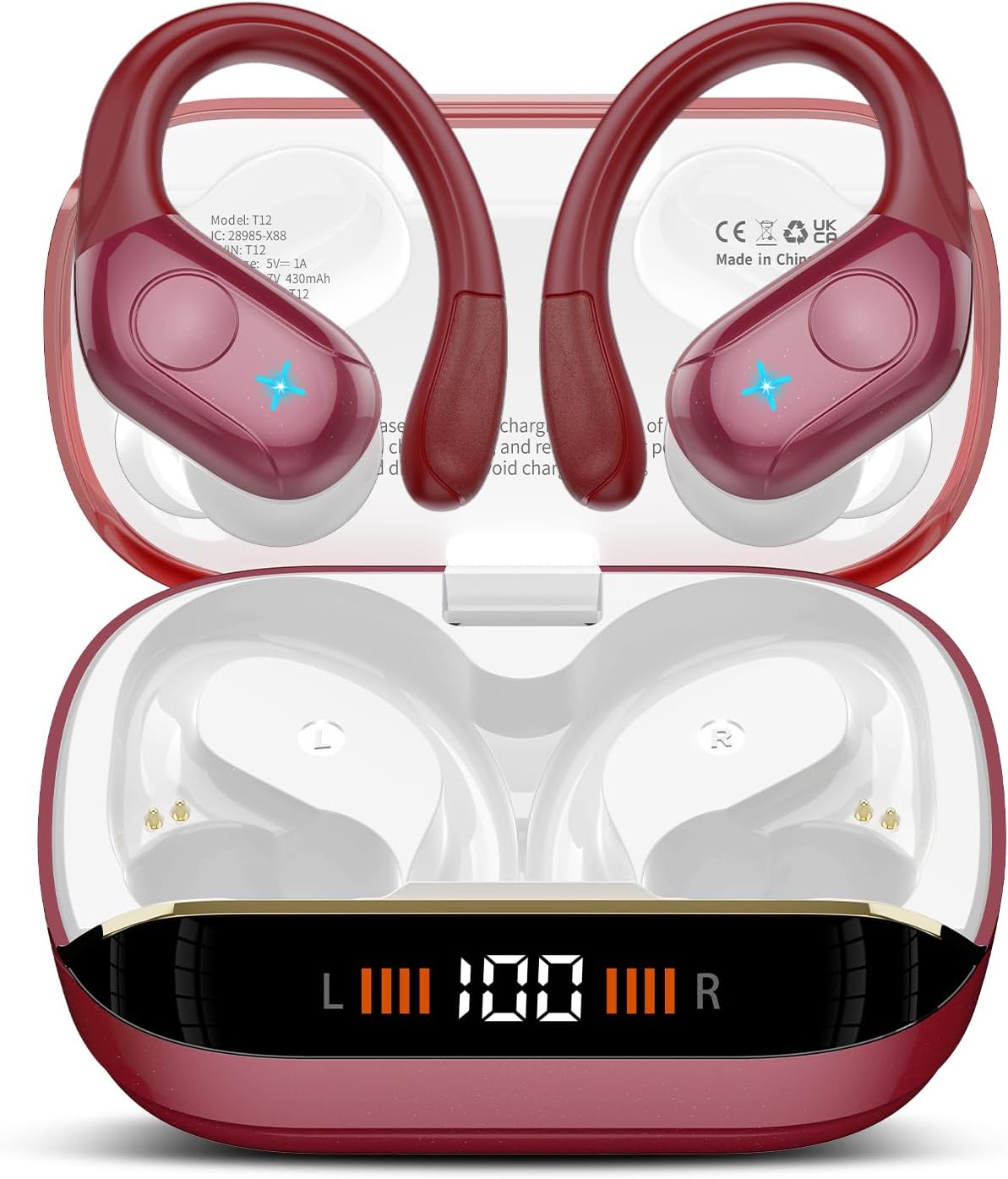
Image: Qecnato T12 Wireless Earbuds shown inside their charging case, displaying the LED battery indicator.

Image: Close-up of the Qecnato T12 charging case, highlighting the Type-C charging port and the LED display indicating charging status for both earbuds and the case.
4. Charging the Earbuds and Case
Before first use, fully charge the earbuds and charging case.
4.1 Charging the Charging Case
- Connect the provided USB-C charging cable to the charging port on the case and to a USB power adapter (not included).
- The LED display on the case will show the charging progress. A full charge takes approximately 1.5 hours.
4.2 Charging the Earbuds
- Place the earbuds into the charging slots inside the case. Ensure the charging contacts align.
- The LED display on the case will indicate the charging status of each earbud.
- The earbuds offer up to 15 hours of playtime on a single charge, with the charging case providing an additional 60 hours, totaling 75 hours of use.

Image: Diagram illustrating the 75-hour total battery life, with 15 hours per earbud charge and 60 hours from the 430mAh charging case.
5. Pairing and Connection
The earbuds utilize Bluetooth 5.4 technology for stable and efficient connections.
5.1 Initial Pairing
- Open the charging case. The earbuds will automatically power on and enter pairing mode.
- Enable Bluetooth on your device (smartphone, tablet, etc.).
- Search for "T12" in the list of available Bluetooth devices and select it to connect.
- Once connected, a voice prompt will confirm successful pairing.
5.2 Automatic Reconnection
After initial pairing, the earbuds will automatically connect to the last paired device when taken out of the charging case, provided Bluetooth is enabled on the device and it is within range.
5.3 Single and Dual Earbud Use
You can use both earbuds together for stereo sound or either earbud individually for mono sound. Simply take one earbud out of the case to use it independently.

Image: X-ray view of an earbud highlighting the integrated Bluetooth 5.4 chip, indicating lower power consumption and faster transmission.

Image: Illustration showing the Qecnato T12 earbuds and a smartphone, demonstrating the flexibility of using one or both earbuds without master/slave restrictions.
6. Wearing the Earbuds
For optimal sound quality and comfort, choose the correct ear tip size and ensure the earbuds are worn properly.
- Select Ear Tips: Choose the silicone earplugs (S, M, L) that provide the best seal and comfort for your ears.
- Insert Earbuds: Gently insert the earbud into your ear canal.
- Adjust Earhooks: Position the earhook over your ear, adjusting it until it sits securely and comfortably behind your ear.

Image: Step-by-step visual guide on how to properly wear the Qecnato T12 earbuds, including selecting ear tips, inserting the earbud, and adjusting the earhook for a secure fit.
7. Touch Controls
The Qecnato T12 earbuds feature smart touch controls for easy management of music, calls, and voice assistant.
| Function | Action |
|---|---|
| Play/Pause Music | Double-tap (x2) on either earbud |
| Next Track | Long press (2S) on the Right earbud |
| Previous Track | Long press (2S) on the Left earbud |
| Volume Up | Single-tap (x1) on the Right earbud |
| Volume Down | Single-tap (x1) on the Left earbud |
| Answer/End Call | Single-tap (x1) on either earbud |
| Reject Call | Long press (2S) on either earbud |
| Activate Voice Assistant | Triple-tap (x3) on either earbud |

Image: Visual representation of the touch control functions for calls, music playback, and voice assistant activation on the Qecnato T12 earbuds.
8. Water Resistance
The Qecnato T12 earbuds are IP7 waterproof, making them resistant to sweat and rain. This makes them suitable for sports and outdoor activities. However, they are not designed for swimming or prolonged submersion in water.

Image: The Qecnato T12 earbuds being splashed with water, illustrating their IP7 dust and water resistance for everyday use.
9. Specifications
| Feature | Detail |
|---|---|
| Model Name | T12 |
| Bluetooth Version | 5.4 |
| Bluetooth Range | 15 Meters |
| Audio Driver Size | 14.2 mm |
| Frequency Range | 20 Hz - 20,000 Hz |
| Impedance | 32 Ohm |
| Battery Life (Earbuds) | Up to 15 hours per charge |
| Total Playtime (with Case) | Up to 75 hours |
| Charging Case Battery Capacity | 430 mAh |
| Charging Port | USB-C |
| Water Resistance Rating | IP7 |
| Noise Control | Passive Noise Cancellation, Sound Isolation |
| Control Type | Touch Control |
| Material | Acrylonitrile Butadiene Styrene (ABS) |
10. Troubleshooting
If you encounter issues with your earbuds, please refer to the following common solutions:
- Earbuds not pairing: Ensure both earbuds are fully charged. Place them back in the case, close it, then open it again to re-enter pairing mode. Check your device's Bluetooth settings and try reconnecting.
- Only one earbud working: Place both earbuds back into the charging case, close the lid, and wait a few seconds. Then, open the lid and take them out simultaneously. This should re-sync them. If the issue persists, try resetting the earbuds (refer to manufacturer's specific reset instructions if available, otherwise unpair and re-pair).
- No sound: Check the volume level on both your device and the earbuds. Ensure the earbuds are properly connected to your device.
- Charging issues: Ensure the charging cable is securely connected to both the case and the power source. Clean the charging contacts on the earbuds and inside the case with a dry cotton swab.
- Poor sound quality: Ensure the ear tips provide a good seal in your ear canal. Try different sized ear tips. Ensure there are no obstructions between your device and the earbuds.
11. Maintenance and Care
To ensure the longevity and optimal performance of your Qecnato T12 earbuds, follow these maintenance guidelines:
- Cleaning: Regularly clean the earbuds, ear tips, and charging contacts with a soft, dry, lint-free cloth. Do not use harsh chemicals or abrasive materials.
- Storage: When not in use, store the earbuds in their charging case to protect them from dust and damage.
- Avoid Extreme Conditions: Do not expose the earbuds or charging case to extreme temperatures, direct sunlight, or high humidity.
- Water Exposure: While IP7 waterproof, avoid prolonged submersion or exposure to saltwater. Dry thoroughly if exposed to water.
12. Safety Information
Please read and follow these safety instructions to prevent injury or damage:
- Do not disassemble, repair, or modify the product.
- Keep the product away from fire, water, and high voltage equipment.
- Avoid listening at high volume levels for extended periods to prevent hearing damage.
- Use caution when using earbuds in situations requiring awareness of your surroundings.
- Keep out of reach of children and pets.
13. Warranty and Support
Qecnato products are designed with quality and reliability in mind. For warranty information, technical support, or any questions regarding your T12 Wireless Earbuds, please refer to the contact information provided on the product packaging or visit the official Qecnato website. Please retain your proof of purchase for warranty claims.