
1. Product Overview
This manual provides instructions for the Amico 2x4 LED Troffer Panel Light. This fixture is designed for drop ceilings and features adjustable color temperature (CCT) and wattage settings, along with 0-10V dimming capabilities. It is suitable for various indoor commercial and institutional applications.

Image 1.1: Four Amico 2x4 LED Troffer Panel Lights, illustrating the product's appearance.
2. Safety Information
Please read all instructions carefully before installation and use. Retain this manual for future reference.
- Electrical Safety: Installation should be performed by a qualified electrician in accordance with national and local electrical codes. Ensure power is disconnected at the circuit breaker before installation or maintenance.
- Grounding: The fixture must be properly grounded to prevent potential electrical shock.
- Voltage: Verify that the supply voltage is compatible with the fixture's operating voltage (10 Volts DC for control, consult product label for main power).
- Indoor Use Only: This product is designed for indoor use in dry locations. Do not expose to moisture or extreme temperatures.
- Handling: Handle the fixture with care to avoid damage to components.
3. Package Contents
Verify that all components are present before beginning installation:
- Amico 2x4 LED Troffer Panel Light(s)
- Mounting Hardware
4. Installation Instructions
The Amico 2x4 LED Troffer Panel Light is designed for easy installation in standard drop ceilings using its built-in clips and included mounting hardware.
4.1 Pre-Installation Steps
- Power Disconnection: Turn off power at the circuit breaker before starting any electrical work.
- Fixture Inspection: Unpack the fixture and inspect it for any damage. Do not install if damaged.
- Prepare Ceiling Opening: Ensure the ceiling grid opening is appropriate for a 2x4 (approximately 23.74" x 47.76") panel light.
4.2 Wiring
- Connect the AC power supply wires to the fixture's input wires (Line, Neutral, Ground) according to local electrical codes.
- If using 0-10V dimming, connect the dimming wires (purple and gray) from the fixture to the compatible 0-10V dimmer switch. Ensure polarity is correct.
- Secure all wire connections with appropriate connectors.
4.3 Mounting
- Carefully lift the LED panel into the ceiling grid opening.
- Engage the built-in clips on the sides of the fixture with the ceiling grid rails to secure the panel in place.
- For added security, use the provided mounting hardware to attach the fixture to the building structure, if required by local codes or desired.

Image 4.1: Product dimensions (47.76"L x 23.74"W x 1.91"H) for installation planning.
5. Operating Instructions
The Amico LED Troffer Panel Light offers adjustable wattage and color temperature settings to customize your lighting environment.
5.1 Adjusting Wattage (Brightness)
The fixture features a toggle switch on the back to select the desired wattage, which directly affects the brightness (lumens). Choose from 25W, 30W, 35W, 40W, or 50W.

Image 5.1: Location of the 5-position power toggle switch for wattage adjustment.

Image 5.2: Visual representation of brightness levels at 25W, 30W, 35W, 40W, and 50W.
5.2 Adjusting Color Temperature (CCT)
A separate toggle switch on the back of the fixture allows you to select the desired color temperature: 3000K (Warm White), 3500K (Neutral White), 4000K (Cool White), or 5000K (Daylight White).

Image 5.3: Location of the 4-position CCT toggle switch for color temperature adjustment.

Image 5.4: Examples of different color temperatures (3000K, 3500K, 4000K, 5000K) in various environments.
5.3 0-10V Dimming
The fixture supports 0-10V dimming, allowing for smooth brightness adjustment from 0% to 100% when connected to a compatible 0-10V dimmer switch.

Image 5.5: Illustration of 0-10V dimming capability in a conference room setting.
6. Maintenance
The Amico LED Troffer Panel Light requires minimal maintenance.
- Cleaning: Ensure power is off before cleaning. Wipe the fixture with a soft, dry, or slightly damp cloth. Do not use abrasive cleaners or solvents.
- No User-Serviceable Parts: The LED chips and driver are integrated and not user-serviceable. Attempting to open or modify the fixture will void the warranty.
- Lifespan: The fixture is designed for over 50,000 hours of continuous operation.
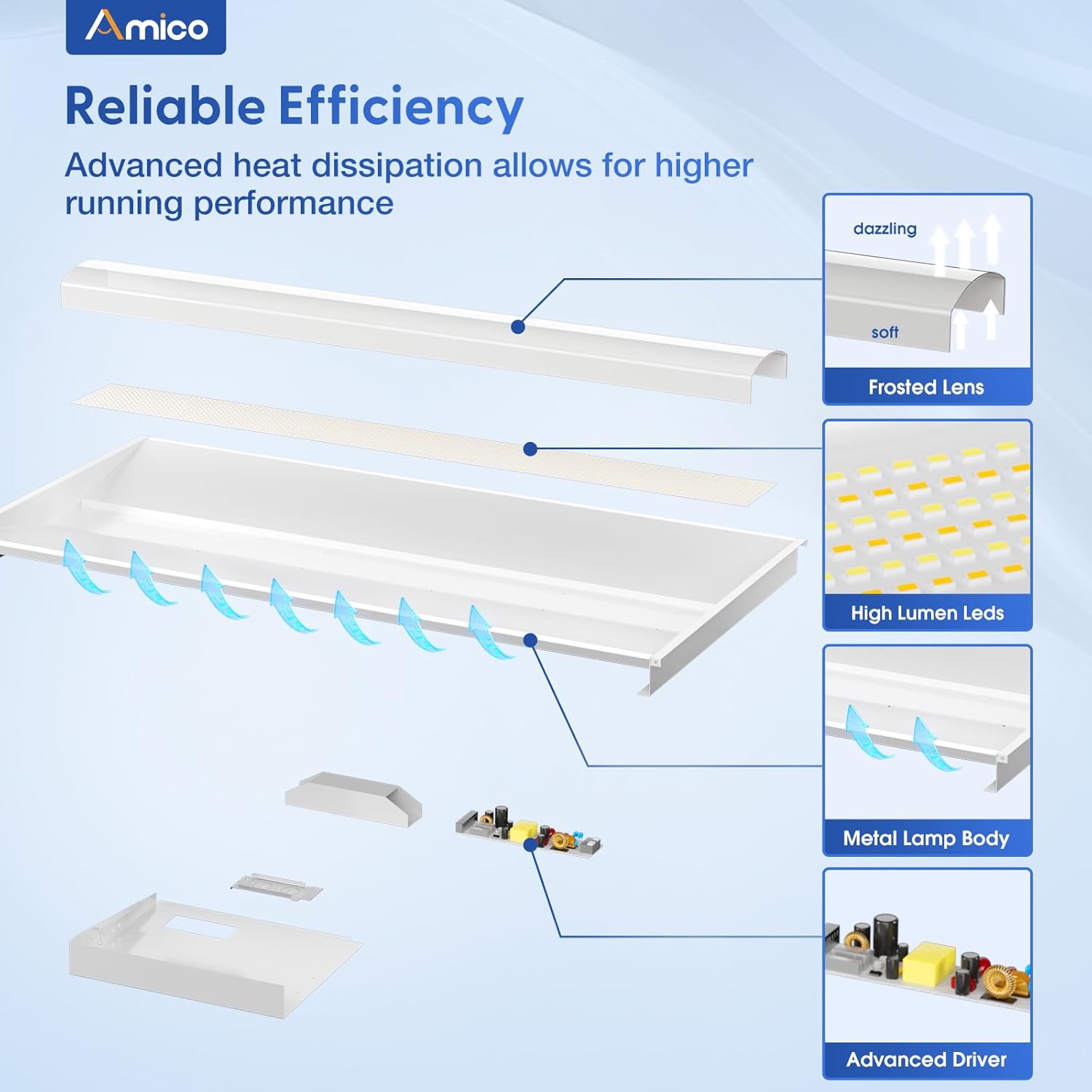
Image 6.1: Internal components of the LED Troffer Panel Light, highlighting its durable design.
7. Troubleshooting
If you encounter issues with your Amico LED Troffer Panel Light, refer to the following common troubleshooting steps:
| Problem | Possible Cause | Solution |
|---|---|---|
| Light does not turn on | No power supply Incorrect wiring Faulty switch/dimmer | Check circuit breaker and power connections. Verify wiring connections are secure and correct. Test switch/dimmer or bypass temporarily. |
| Light flickers | Loose wiring connection Incompatible dimmer Voltage fluctuations | Check all wiring connections. Ensure 0-10V dimmer is compatible. Consult an electrician to check power supply stability. |
| Dimming not working | Incorrect dimmer wiring Incompatible dimmer | Verify 0-10V dimming wire connections (purple/gray). Use a compatible 0-10V dimmer. |
| Light is too dim/bright | Incorrect wattage setting Dimmer setting | Adjust the wattage toggle switch on the fixture. Adjust the 0-10V dimmer to the desired level. |
If these steps do not resolve the issue, contact customer support.
8. Specifications
| Feature | Specification |
|---|---|
| Model | led troffer light |
| Dimensions (L x W x H) | 47.76" x 23.74" x 1.91" |
| Adjustable Wattage | 25W / 30W / 35W / 40W / 50W |
| Brightness | Up to 7000 Lumens (at 50W) |
| Color Temperature (CCT) | 3000K / 3500K / 4000K / 5000K Selectable |
| Dimmability | 0-10V Dimmable |
| Voltage (Control) | 10 Volts (DC) |
| Material | Aluminum |
| Finish Type | Powder Coated |
| Light Source Type | LED |
| Lifespan | 50,000 Hours |
| Certifications | ETL, DLC |
| Installation Type | Ceiling Mount (Drop Ceiling) |
| Indoor/Outdoor Usage | Indoor |
9. Warranty & Support
The Amico 2x4 LED Troffer Panel Light comes with a limited warranty. For specific warranty terms and conditions, please refer to the product packaging or contact Amico customer service.
For technical assistance, troubleshooting not covered in this manual, or warranty claims, please contact Amico customer support through their official channels.


