
1. Introduction
The Haozee Irrigation Computer WLAN with 2 Outputs is an advanced smart water timer designed to automate your garden and plant watering needs. This device integrates seamlessly with your home WiFi network via a dedicated gateway, providing convenient remote control and flexible scheduling options. With its dual independent outlets, you can customize watering plans for different areas of your garden, ensuring optimal hydration while conserving water.
This manual provides detailed instructions on setting up, operating, and maintaining your Haozee Smart Water Timer to ensure its efficient and long-lasting performance.
2. Key Features
- Smart WiFi Watering Timer: Connects via WiFi (gateway included) for intelligent remote control and easy operation. Offers various watering modes to suit diverse needs.
- Two Independent Water Outlets: Each outlet has an independent switch, allowing separate settings for watering times and durations for different garden zones (e.g., flower beds, lawns, vegetable gardens).
- Manual and Remote Control: Operate the device manually or remotely via the mobile app. Remote control offers timed and cyclic modes for precise watering schedules.
- Rain Delay Mode: Manually delay watering for 1 to 7 days based on real-time weather forecasts, preventing over-irrigation during rainy periods.
- High Quality and Durability: Features an IPX5 waterproof rating and a rubber ring to prevent water ingress. The water inlet connection is made from 30% reinforced nylon fiber material for improved durability and extended service life.
3. Setup Guide
3.1 Package Contents
Before beginning, ensure all components are present:
- Haozee Smart Water Timer (Main Unit)
- WiFi Gateway
- User Manual (this document)
- Required connectors/adapters (if applicable)

Image: The main unit of the Haozee Smart Water Timer shown alongside its compact WiFi gateway.
3.2 Initial Installation
- Install Batteries: Open the battery compartment on the water timer and insert the required batteries (not included). Ensure correct polarity.
- Connect to Faucet: Securely attach the water timer to your outdoor faucet. Ensure the connection is tight to prevent leaks.
- Connect Hoses: Attach your garden hoses to the two independent water outlets at the bottom of the timer.
3.3 WiFi Gateway Setup
- Power On Gateway: Plug the WiFi gateway into a power outlet within range of your home WiFi router and the water timer.
- Download App: Download the official Haozee smart home application from your smartphone's app store (iOS/Android).
- Pair Devices: Follow the in-app instructions to add the WiFi gateway and then pair the water timer with the gateway. This typically involves pressing a button on the gateway and confirming in the app.

Image: An illustration showing the Haozee Smart Water Timer connected to a faucet, with the WiFi gateway positioned to extend smart irrigation capabilities across a garden.
4. Operating Instructions
4.1 Remote Control via App
Once connected, you can manage your watering schedules from anywhere using the mobile application.

Image: A smartphone displaying the Haozee app interface for remotely controlling the water timer, showing options for Zone 1 and Zone 2.
4.1.1 Setting Up Independent Zones
The timer features two independent water outlets, allowing for customized watering schedules for different areas.

Image: An illustration demonstrating the ability to set distinct watering plans for two separate zones (Zone 1 and Zone 2) simultaneously using the Haozee timer.
4.1.2 Timed Mode
In timed mode, you can set specific ON/OFF times for watering. This is ideal for maintaining consistent humidity levels.
4.1.3 Cyclic Mode
In cyclic mode, watering can be repeated within a set period of time, allowing for regular, short bursts of irrigation.
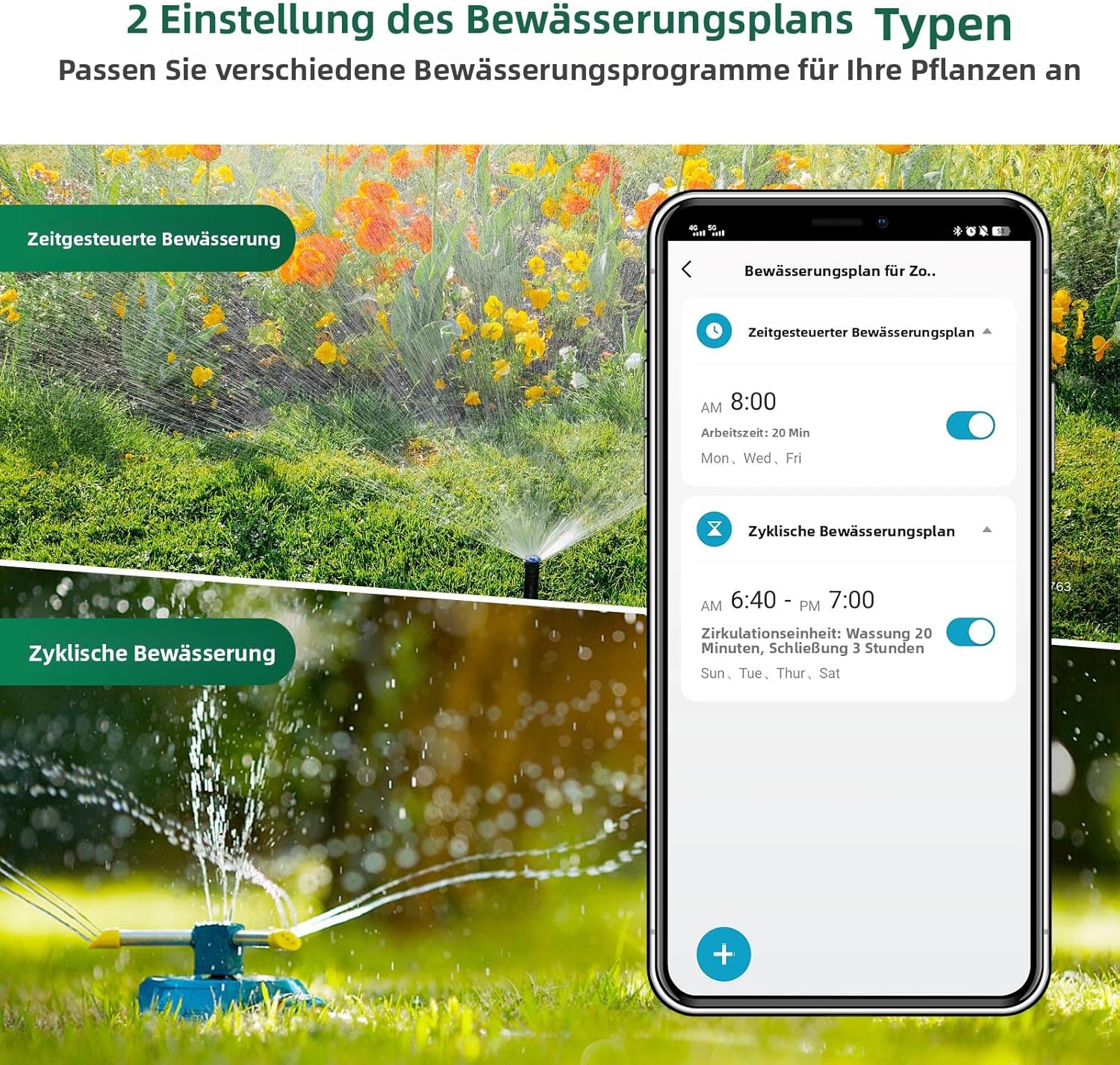
Image: A visual representation of the two primary irrigation plan types available in the app: timed watering (Zeitgesteuerte Bewässerung) and cyclic watering (Zyklische Bewässerung).
4.2 Manual Control
You can manually activate or deactivate the water flow directly from the device or through the app at any time, regardless of the set schedule.

Image: A user interacting with the app to manually control the watering duration, demonstrating the flexibility of the manual watering mode.
4.3 Rain Delay Mode
To prevent over-watering during rainy periods, use the Rain Delay mode. This mode is manually activated via the mobile app.
- Open the app and view the real-time weather forecast on the homepage.
- Based on weather conditions, manually select a delay period from 1 to 7 days.
- The timer will pause all scheduled watering for the selected duration.

Image: The rain delay feature interface in the app, showing options to delay watering for 1 to 7 days, highlighting the device's IP55 water resistance.
4.4 Voice Control Integration
The Haozee Smart Water Timer supports voice control through popular smart assistants like Amazon Alexa and Google Assistant, allowing for hands-free operation.

Image: A user interacting with a smart speaker (Alexa) to control the water timer, illustrating compatibility with Amazon Alexa and Google Assistant for voice commands.
5. Maintenance
Regular maintenance ensures the longevity and optimal performance of your water timer.
- Cleaning: Periodically clean the exterior of the timer with a damp cloth. Do not use harsh chemicals or abrasive cleaners.
- Filter Inspection: Check the inlet filter (if present) for debris and clean it as needed to prevent blockages and ensure proper water flow.
- Winterization: Before freezing temperatures, disconnect the timer from the faucet and hoses. Remove batteries and store the unit indoors in a dry, frost-free location.
- Battery Replacement: Replace batteries annually or when the low battery indicator appears in the app or on the device.
6. Troubleshooting
If you encounter issues with your Haozee Smart Water Timer, refer to the following common solutions:
- No Water Flow:
- Ensure the faucet is fully open.
- Check if the timer is set to ON (manual or scheduled).
- Inspect the inlet filter for clogs.
- Verify battery levels.
- App Connectivity Issues:
- Ensure the WiFi gateway is powered on and within range of your router and the timer.
- Check your home WiFi network status.
- Restart the app, gateway, and timer.
- If issues persist, try re-pairing the devices through the app.
- Timer Not Responding:
- Replace batteries.
- Ensure the timer is securely connected to the faucet.
- Leaks from Connections:
- Ensure all connections are tightened securely.
- Check for damaged washers or O-rings and replace if necessary.
7. Specifications
| Feature | Detail |
|---|---|
| Model Number | HZ-WiFi-WT |
| Product Dimensions | 6 x 14 x 12 cm |
| Weight | 470 g |
| Batteries Required | Yes |
| Waterproof Rating | IPX5 |
| Material | Rubber, Reinforced Nylon Fiber |
| Color | Grey |
| Number of Settings | 5 |
8. Warranty and Support
Your Haozee Smart Water Timer is designed for reliable performance. For any manufacturing defects or issues not covered by normal wear and tear, please refer to your purchase documentation for standard warranty terms.
Extended warranty options may be available for purchase, offering additional coverage beyond the standard period. Please check with your retailer or the product's listing for details on 1-Year or 2-Year Extended Warranty plans.
For technical support or further assistance, please contact Haozee customer service through the contact information provided on the product packaging or the official website.

Image: The product packaging displaying key information such as product name, model number, manufacturer details, and compliance marks.