
ARCCAPTAIN MIG205MP
ARCCAPTAIN MIG205MP Multiprocess Welder User Manual
Model: MIG205MP | Brand: ARCCAPTAIN
1. Introduction
The ARCCAPTAIN MIG205MP is a versatile 9-in-1 multiprocess welding machine designed for a wide range of applications, from home DIY projects to professional repairs. It integrates Gas MIG, Gasless MIG, Plasma Cutting, DC HF TIG, DC Lift TIG, MMA Stick, Clean, Spot Welding, and Spool Gun Aluminum Welding capabilities. This model features an iControl APP for remote parameter adjustment and monitoring, a large LED display for clear operation, and dual 120V/240V voltage compatibility.
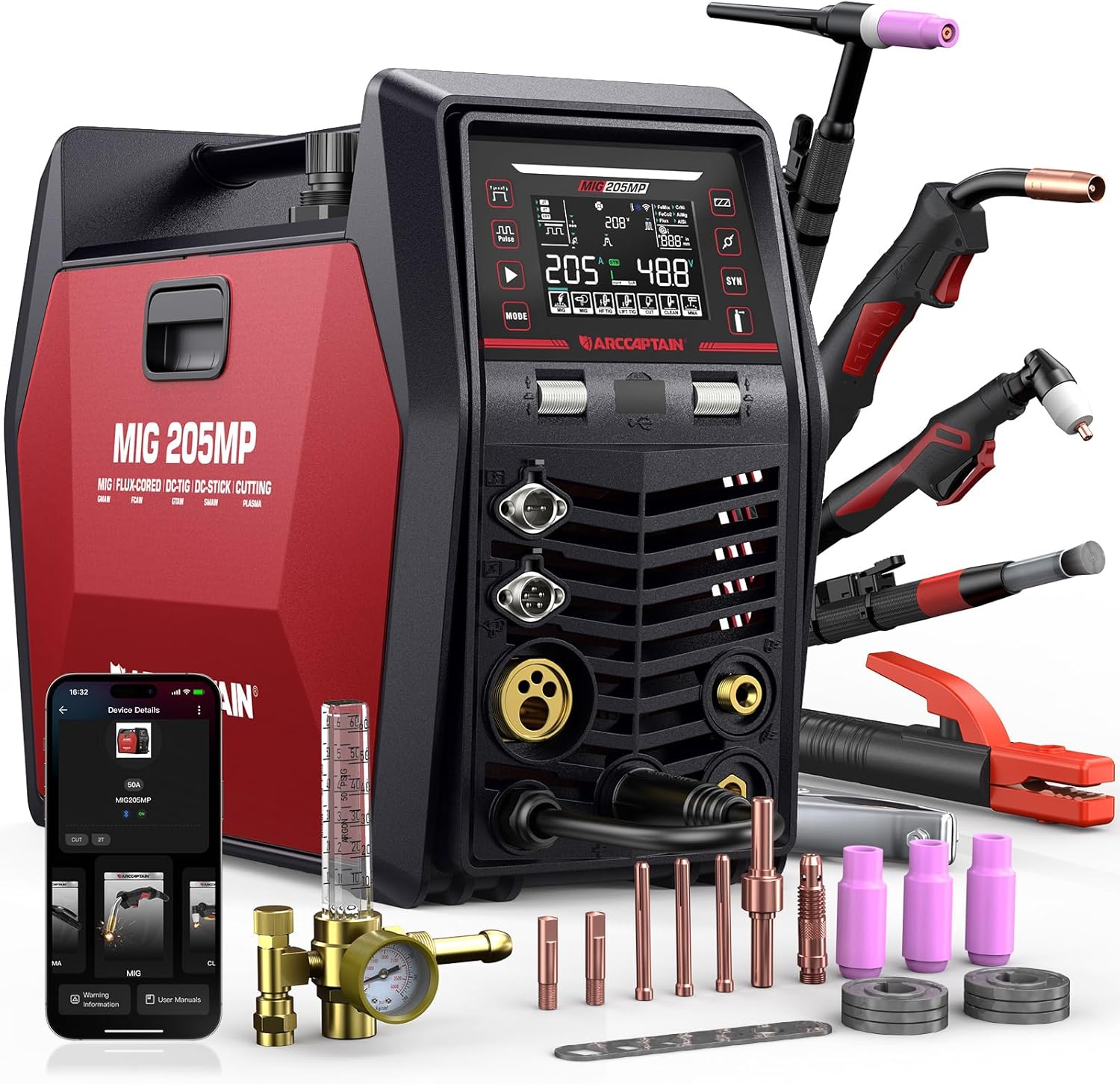
Figure 1: The ARCCAPTAIN MIG205MP Multiprocess Welder and its included accessories.
2. Key Features
- 9-in-1 Welding Modes: Offers Gas MIG, Gasless MIG, Plasma Cutting, DC HF TIG, DC Lift TIG, MMA Stick, Clean, Spot Welding, and Spool Gun Aluminum Welding.
- iControl APP & Memory Function: Allows parameter adjustment, real-time monitoring, and status detection via a mobile app within a 10-meter range. Supports unlimited preset memory for custom settings.
- Large LED Display & SYN Function: Provides clear visibility of welding parameters and settings. The smart parameter-matching system automatically adjusts current and voltage based on selected metal type and electrode size.
- Technical Upgrade: Advanced parameter control for experienced users, including adjustments for MIG (Inductance, Burn-back), DC TIG (pulse frequency, initial current), and MMA (Hot start, Arc force).
- Dual Voltage (120V/240V): Flexible power switching for various environments.
- High Performance: Rated duty cycle of 60%. Welding current: MIG: 30-205A; DC TIG/MMA: 20-205A; Clean: 20-40A; Cut: 20-50A.

Figure 2: Overview of the 9 welding functions available on the MIG205MP.

Figure 3: The large LED display provides comprehensive welding parameter information.

Figure 4: The iControl mobile application allows for remote adjustment and monitoring of the welder.
3. Setup and Installation
3.1 Unpacking and Inspection
Carefully unpack all components and inspect for any damage. Refer to the packing list to ensure all items are present.

Figure 5: Standard accessories included with the MIG205MP welder.
3.2 Power Connection
The MIG205MP supports dual voltage input (120V/240V). Ensure the correct power cable is used and the voltage switch on the machine is set appropriately before connecting to power. Important: Do not switch between 110V and 220V while the screen is still on. Wait until it turns off first.
3.3 Wire Spool Installation (MIG/Flux Core)
Open the side panel of the welder to access the wire feed mechanism. Install the appropriate wire spool (e.g., 0.035" Vulcan wire for flux core) onto the spindle. Thread the wire through the feed rollers and into the MIG torch liner. Adjust the wire tension as needed.
3.4 Gas Connection (Gas MIG/TIG/Plasma)
For Gas MIG, TIG, or Plasma Cutting operations, connect the appropriate gas cylinder (e.g., CO2 for MIG, Argon for TIG, compressed air for Plasma) to the gas inlet on the rear of the machine using a regulator and gas hose. Ensure all connections are secure and leak-free.
4. Operating Instructions
The MIG205MP offers multiple welding processes. Select the desired mode using the control panel or the iControl app.
4.1 MIG Welding (Gas/Gasless/Pulsed)
Connect the MIG torch and ground clamp. Select "Gas MIG" or "Gasless MIG" mode. Adjust wire feed speed and voltage according to the material thickness and wire type. The SYN function can assist in setting optimal parameters automatically. For advanced users, inductance and burn-back can be fine-tuned.
4.2 TIG Welding (DC HF/Lift TIG)
Connect the TIG torch and ground clamp. Select "DC HF TIG" or "DC Lift TIG" mode. Ensure proper gas flow (Argon). Adjust current, pulse frequency, initial current, descent time, and finish time as required for your application. Foot pedal compatibility is available for enhanced control (foot pedal sold separately).
4.3 MMA (Stick) Welding
Connect the electrode holder and ground clamp. Select "MMA Stick" mode. Insert the appropriate electrode. The machine supports both acidic and alkaline electrodes. Utilize Hot Start and Arc Force functions for improved arc ignition and stability.
4.4 Plasma Cutting
Connect the plasma cutting torch and ground clamp. Select "Cut" mode. Ensure compressed air supply is connected. Adjust cutting current and air pressure based on material type and thickness. The machine can cut quality 12mm (1/2") and maximum 18mm (2/3") thickness.
4.5 Clean Function
The Clean function is designed for post-weld cleaning to remove oxidation and impurities. Connect the cleaning gun and select "Clean" mode. Note: Welding cleaning solution needs to be purchased separately.
4.6 Spot Welding
The Spot Welding feature provides precision high-current joins for rapid production. This function is available in MIG, HF TIG, and Lift TIG modes.

Figure 6: The MIG205MP is suitable for various daily repair and fabrication tasks.
5. Specifications
| Specification | Value |
|---|---|
| Manufacturer | ARCCAPTAIN |
| Item Weight | 46.2 pounds |
| Product Dimensions | 17.3 x 7.88 x 12.7 inches |
| Item Model Number | MIG205MP |
| Power Source | DC |
| Input Voltage | 120V/240V Dual Voltage |
| Rated Duty Cycle | 60% |
| MIG Welding Current | 30-205A |
| DC TIG/MMA Current | 20-205A |
| Clean Current | 20-40A |
| Cut Current | 20-50A |
| Cutting Thickness (Quality) | 12mm (1/2") |
| Cutting Thickness (Maximum) | 18mm (2/3") |
| Included Components | MIG Welder (and standard accessories) |
6. Maintenance
Regular maintenance ensures the longevity and optimal performance of your ARCCAPTAIN MIG205MP welder.
6.1 General Cleaning
Keep the welder clean and free from dust and debris. Use a dry, soft cloth to wipe down the exterior. Periodically use compressed air to clear ventilation openings and internal components, ensuring the machine is unplugged before doing so.
6.2 Wire Feed System
Inspect the wire feed rollers and liner regularly for wear or blockages. Clean any wire shavings or dust from the feed mechanism. Replace worn rollers or liners to ensure smooth wire feeding.
6.3 Torch and Consumables
Regularly check the MIG torch nozzle, contact tip, and diffuser for wear and spatter buildup. Clean or replace consumables as needed to maintain arc quality. For TIG and Plasma torches, inspect electrodes, collets, and nozzles for wear and replace when necessary.
6.4 Cooling System
The welder is equipped with dual cooling fans. Ensure that the air inlets and outlets are not obstructed to allow for proper heat dissipation. Keep the area around the welder clear during operation.
7. Troubleshooting
This section provides solutions to common issues you might encounter. For more detailed troubleshooting, refer to the FAQs section within the iControl APP.
7.1 No Power/Machine Not Turning On
- Check the power cable connection to both the welder and the power outlet.
- Ensure the power switch on the welder is in the "ON" position.
- Verify the circuit breaker or fuse for the power outlet has not tripped.
- Confirm the correct input voltage (120V/240V) is selected on the machine.
7.2 Poor Arc Starting or Instability
- Ensure the ground clamp has a clean, secure connection to the workpiece.
- Check the contact tip (MIG) or electrode (MMA/TIG) for wear or contamination and replace if necessary.
- Verify the correct welding parameters (current, voltage, wire speed) are set for the material and process.
- For MIG, check wire feed tension and ensure the wire is not tangled.
- For gas-shielded processes, confirm gas flow and check for leaks in the gas line.
7.3 Overheat Protection Activated
- Allow the machine to cool down. The overheat protection will automatically reset once the internal temperature returns to a safe level.
- Ensure proper ventilation around the welder and that cooling fans are operating correctly.
- Check that the duty cycle is not being exceeded for prolonged periods.
8. Warranty
ARCCAPTAIN provides 2 Years Quality Service for the MIG205MP welder. This service ensures prompt resolution of any issues by our technical personnel. The product is also equipped with comprehensive protection against overcurrent, overvoltage, overload, and overheating, enhancing its reliability and safety.
9. Support
For further assistance, technical inquiries, or to access troubleshooting guides and solutions, please utilize the FAQs section available within the ARCCAPTAIN iControl APP. You may also contact ARCCAPTAIN customer support directly through the contact information provided on our official website or your purchase platform.
Related documentsMIG205MP


Ask a question about this manual
Ask about setup, troubleshooting, compatibility, parts, safety, or missing instructions. Manuals+ will review the question and use this page’s manual context to help answer it.