
1. Introduction
Thank you for purchasing the Ymiko 8 in 1 Electric Cleansing Brush. This versatile and efficient cleaning tool is designed to simplify your cleaning tasks, offering powerful performance for various surfaces including tubs, tiles, showers, and even cars. Its cordless design and long handle provide convenience and reduce physical strain during use. Please read this manual thoroughly before operating the device to ensure safe and optimal performance.
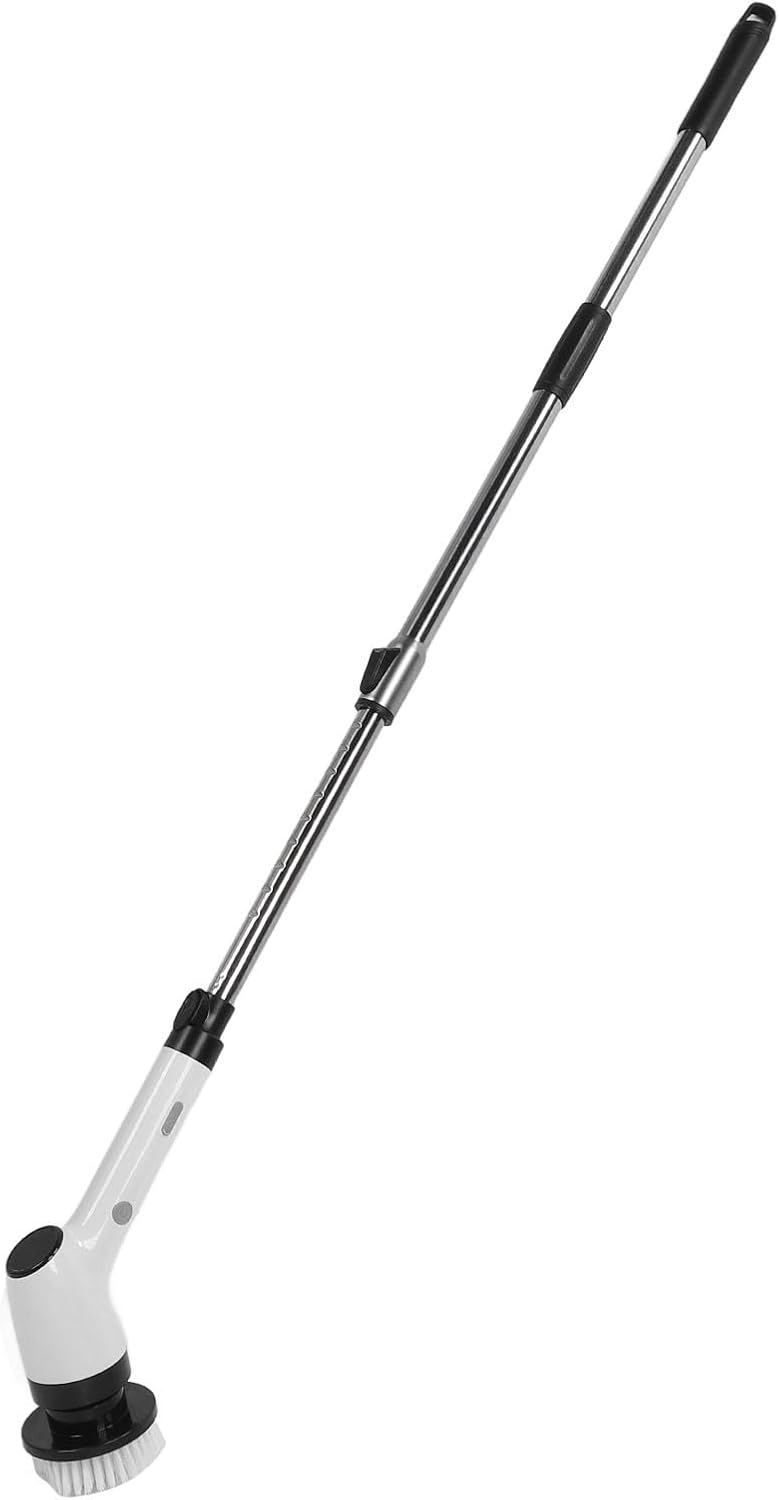
Image 1.1: The Ymiko 8 in 1 Electric Cleansing Brush in its extended configuration, showcasing the long handle for reaching high or low areas.
2. Package Contents
Please verify that all items listed below are included in your package. If any items are missing or damaged, please contact customer support.
- 1 Set x Cleansing Brush (12 pieces in total)
- 1 x English Instruction Manual
- 1 x Charging Cable
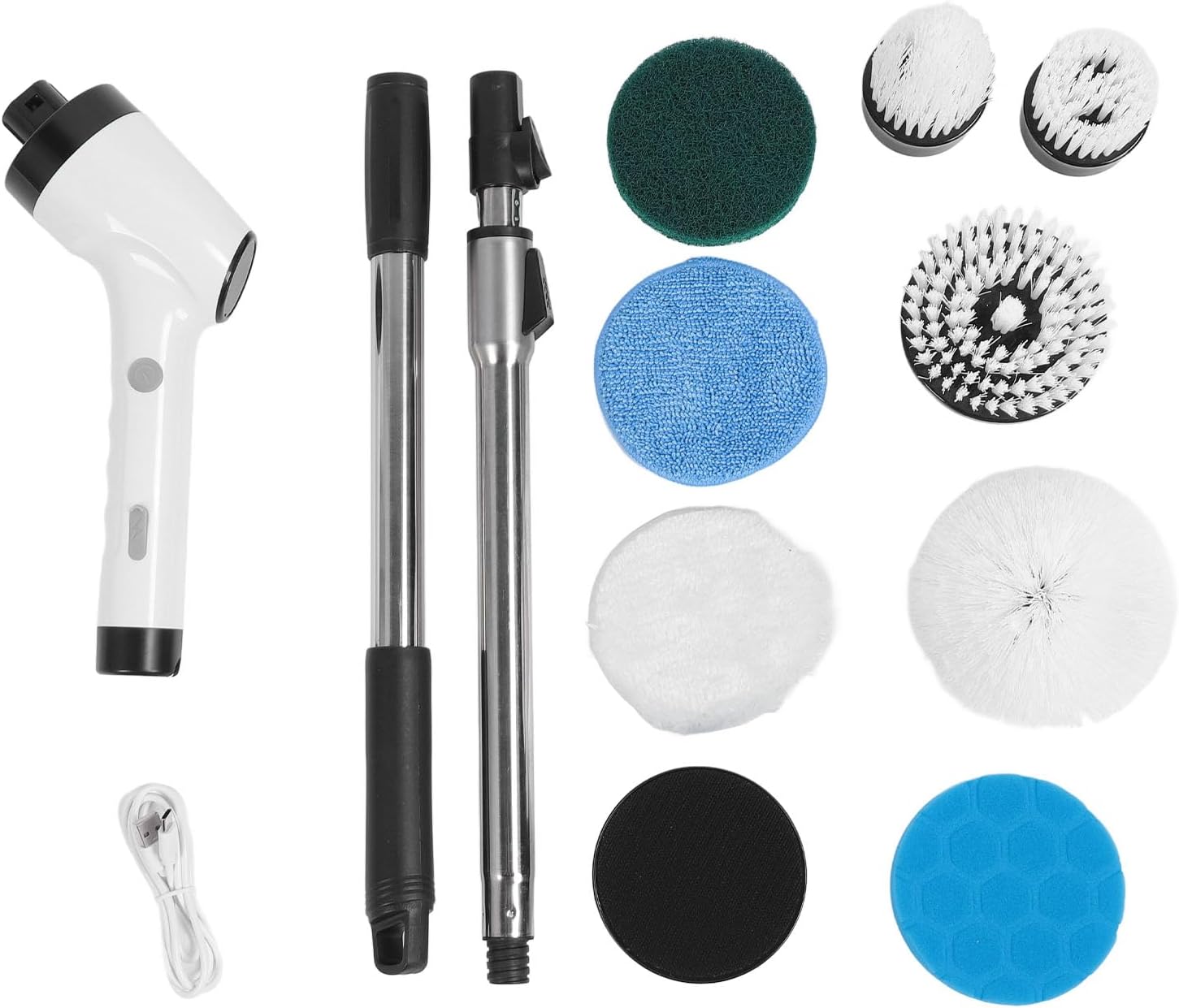
Image 2.1: All components of the cleansing brush set, including the main unit, extension rods, various brush heads, and charging cable.
3. Product Components and Features
Familiarize yourself with the main parts and features of your electric cleansing brush:
- Main Brush Unit: The core handheld device containing the motor and battery.
- Extension Rods: Allows for adjustable length to reach various cleaning areas.
- Interchangeable Brush Heads: A variety of brush heads for different cleaning tasks and surfaces.
- Charging Port: For connecting the charging cable.
- Power Button: To turn the device on/off and control operation.

Image 3.1: A close-up view of the handheld main unit, showing the ergonomic grip and power button.

Image 3.2: Side view of the handheld unit with a brush head attached, illustrating the angle of the brush.
4. Setup and Initial Use
4.1 Charging the Battery
Before first use, fully charge the device. The built-in 2500mAh battery provides convenience and saves costs.
- Connect the charging cable to the charging port on the main brush unit.
- Plug the other end of the charging cable into a compatible USB power adapter (not included) or a USB port.
- The charging indicator (if present) will illuminate or change color to indicate charging status.
- Allow the device to charge until fully charged. Unplug the charger once charging is complete.
4.2 Assembling the Brush
The brush can be assembled with or without the extension rods depending on your cleaning needs.
- Attach a Brush Head: Select the appropriate brush head for your task. Align the brush head with the rotating shaft on the main unit and push firmly until it clicks into place.
- Attach Extension Rods (Optional): If a longer reach is required, connect the extension rods to the main unit and to each other. Ensure they are securely locked. The extended length can reach approximately 127cm (50 inches).

Image 4.1: The electric cleansing brush fully assembled with its extension handle, ready for use.
5. Operating Instructions
The Ymiko Electric Cleansing Brush is designed for fast and thorough cleansing with simple operation.
- Prepare the Surface: For best results, pre-wet the surface to be cleaned and apply your preferred cleaning solution.
- Select Brush Head: Choose the appropriate brush head for the surface and type of dirt. For example, a softer brush for delicate surfaces and a stiffer brush for stubborn grime.
- Power On: Press the power button on the main unit to start the brush. The brush will begin to rotate.
- Clean the Surface: Gently guide the rotating brush over the surface, applying light pressure. Allow the electric brush to do the work. Avoid excessive force, as this can reduce efficiency and potentially damage the surface or the brush.
- Reach Difficult Areas: Utilize the long handle design to easily cope with stubborn and hard-to-remove dirt in high or low areas, reducing bending strain.
- Power Off: Once cleaning is complete, press the power button again to turn off the device.
- Rinse: Rinse the cleaned surface thoroughly with water.

Image 5.1: The brush head actively cleaning a surface, demonstrating its effectiveness in water.
6. Maintenance and Storage
Proper maintenance ensures the longevity and optimal performance of your cleansing brush.
6.1 Cleaning the Brush Heads
- After each use, detach the brush head from the main unit.
- Rinse the brush head thoroughly under running water to remove any dirt, debris, or cleaning solution residue.
- Allow the brush heads to air dry completely before storing.
6.2 Cleaning the Main Unit
- Wipe the main unit with a damp cloth to remove any splashes or residue.
- Do not submerge the main unit in water.
- Ensure the charging port is dry before charging.
6.3 Storage
Store the cleansing brush and its accessories in a cool, dry place, away from direct sunlight and extreme temperatures. Keep out of reach of children.
7. Troubleshooting
If you encounter any issues with your Ymiko Electric Cleansing Brush, please refer to the following common problems and solutions:
| Problem | Possible Cause | Solution |
|---|---|---|
| Brush does not turn on. | Battery is low or depleted. | Charge the device fully. |
| Brush head not rotating properly. | Brush head not securely attached. Excessive pressure applied. |
Ensure brush head is clicked into place. Reduce pressure during cleaning. |
| Reduced cleaning efficiency. | Brush head is worn out. Insufficient cleaning solution. |
Replace with a new brush head. Apply more cleaning solution. |
| Device stops unexpectedly. | Battery depleted. Overload protection activated. |
Recharge the battery. Reduce pressure or allow device to cool down. |
If the problem persists after trying these solutions, please contact Ymiko customer support.
8. Specifications
Technical details for the Ymiko 8 in 1 Electric Cleansing Brush:
| Feature | Detail |
|---|---|
| Item Type | 8 in 1 Electric Cleansing Brush |
| Brush Size | Approx. 27 x 9cm / 10.63 x 3.54in |
| Length of Connecting Rod | Approx. 105cm / 41.34in |
| Extended Length | Approx. 127cm / 50in |
| Handle Length | Approx. 42cm / 16.54in |
| Extension Rod Length | Approx. 58cm / 22.83in |
| Material | Plastic |
| Voltage | 3.7V |
| Power | 25W |
| Battery | 2500mAh (built-in) |
| Product Dimensions | 17.71 x 9.44 x 3.54 inches |
| Item Weight | 2.93 pounds |
| Item Model Number | Ymikopbrga14m0s-12 |
| Color | Black |

Image 8.1: A visual representation of the dimensions for the main unit, handle, extension rod, and total extended length.
9. Safety Information
WARNING: To reduce the risk of fire, electric shock, or injury, read and understand all instructions before using this appliance.
- Do not immerse the main unit of the brush in water or other liquids. It is designed to be splash-proof, but not fully submersible.
- Keep the charging port dry and clean. Do not charge the device in wet conditions.
- Do not operate the brush if it has been dropped, damaged, left outdoors, or dropped into water.
- Do not use the brush on sensitive skin or areas of the body. This product is intended for household cleaning surfaces only.
- Keep hair, loose clothing, fingers, and all parts of the body away from openings and moving parts.
- Use only as described in this manual. Use only manufacturer's recommended attachments.
- Do not use with damaged cord or plug. If the appliance is not working as it should, has been dropped, damaged, left outdoors, or dropped into water, return it to a service center.
- This appliance is not intended for use by persons (including children) with reduced physical, sensory or mental capabilities, or lack of experience and knowledge, unless they have been given supervision or instruction concerning use of the appliance by a person responsible for their safety.
- Children should be supervised to ensure that they do not play with the appliance.
10. Warranty and Customer Support
For any questions, concerns, or support regarding your Ymiko 8 in 1 Electric Cleansing Brush, please contact Ymiko customer service. While specific warranty details are not provided in this manual, most products come with a standard manufacturer's warranty covering defects in materials and workmanship.
You can often find support information and contact details on the official Ymiko brand store or website. For Amazon purchases, you may also refer to your order details for seller contact information.
Visit the official Ymiko store for more information: Ymiko Store on Amazon