
Haozee HZ-WF-WV-US
Haozee WiFi Smart Water Valve and Automatic Shutoff
User Manual - Model: HZ-WF-WV-US
1. Introduction
The Haozee WiFi Smart Water Valve is an advanced device designed to provide intelligent control and monitoring of your home's water system. Featuring WiFi connectivity for remote app control, ultrasonic flow detection for accurate water usage tracking, and a built-in rechargeable battery for continuous operation, this valve enhances water safety and efficiency. It can also integrate with other smart home devices, such as leak detectors, for automated water shutoff in emergencies.
2. Product Features
- WiFi Function and APP Remote Control: Connects to 2.4Ghz and 5Ghz WiFi for quick remote opening/closing of the water valve and real-time monitoring of water flow rate and consumption via the mobile app.
- Ultrasonic Flow Detection: Utilizes W-type ultrasonic water flow measurement technology for accurate and reliable readings. Allows setting water flow rate alarms to automatically open or close the valve based on set values, protecting against pipe bursts.
- Smart Water Meter: Monitors water usage with daily, monthly, and last usage statistics, promoting efficient water management and waste reduction.
- Easy Installation & Power Options: Requires a 5V/2A AC power adapter. Equipped with a long-life 2600mAh built-in rechargeable NiMH battery for backup during power outages, allowing manual valve control. Note: APP control and monitoring are not available in battery-only mode.
- Automated Scenes: Compatible with Tuya app to set up automation scenes, such as automatically shutting off the valve when a water leak detector (sold separately) detects a leak.
3. What's in the Box
Upon opening the product packaging, you will find the following components:

Image: All components included in the Haozee Smart Water Valve package.
- Haozee WiFi Smart Water Valve Unit
- 5V/2A AC Power Adapter
- Power Cable
- Plumbing Tape
- Silicone Waterproof Rings (2)
- 3/4-Inch Adapters (2)
- User Manual
Video: Unboxing and initial product display of the Haozee Smart Water Valve.
4. Setup & Installation
4.1 Physical Installation
The Haozee Smart Water Valve is designed for easy integration into your existing water pipe system. It is compatible with DN20 3/4-inch diameter pipes and includes necessary adapters. Ensure the installation location is dry and protected from extreme temperatures.
- Turn off the main water supply before beginning installation.
- Identify the section of pipe where the valve will be installed. Ensure it is a straight section for optimal flow measurement.
- Use the provided 3/4-inch adapters and plumbing tape to securely connect the valve to your water pipes. Ensure a watertight seal to prevent leaks.
- Connect the power cable to the valve and then to the 5V/2A AC power adapter. Plug the adapter into a suitable power outlet.

Image: Haozee Smart Water Valve installed in a water line, showing its connection to a smartphone app.
4.2 Powering On and Pairing
After physical installation and connecting the power, proceed with powering on and pairing the device with your mobile app.
- Ensure the power cable is securely plugged into the valve and the power adapter.
- Once powered on, press and hold the pairing button on the valve for 6 seconds until the blue light flashes. This indicates the device is in pairing mode.
- Open the Tuya Smart app (or compatible smart home app) on your smartphone.
- Click on the "+" sign to add a new device. The app should automatically detect the "Valve Controller". If not, select it manually from the device list.
- Enter your 2.4GHz or 5GHz WiFi network credentials when prompted. Ensure your phone is connected to the same WiFi network.
- Follow the on-screen instructions to complete the pairing process. Once successfully added, the device will appear in your app's device list.

Image: The smart water valve supports both 2.4GHz and 5GHz network connections for flexible setup.
Video: Demonstrates the power-on sequence, pairing process, and direct Wi-Fi connection setup via the mobile app.
5. Operation
5.1 Real-time Water Monitoring and Control
Once connected, the app provides a dashboard to monitor and control your water valve.
- Flow Rate Display: View the current water flow rate in real-time (e.g., gallons per hour).
- Total Water Usage: Track the total water consumed over time.
- Valve Control: Manually open or close the water valve directly from the app.

Image: Real-time screen display of water flow data and app interface for monitoring.
5.2 Smart Water Meter Functions
The app allows you to access historical water consumption data and manage settings related to water usage.
- Historical Data: Navigate to the "History" section in the app to view daily, monthly, and yearly water usage statistics.
- Reset Usage: In the "Settings" menu, you can reset the water usage data.
- Unit Change: Adjust the flow rate unit (e.g., gal/h, m³/h, L/h) in the settings.

Image: App interface for monitoring and recording water status, helping to save water and energy.
5.3 Automated Scenes and Alarms
Leverage the automation features to enhance water safety and convenience.
- Flow Rate Alarms: Set high or low flow rate thresholds in the "Flow Rate Alarm" settings. If the water flow exceeds or falls below these values, the valve can be configured to automatically close, preventing water waste or damage from leaks.
- Integration with Leak Detectors: Create custom scenes in the Tuya app to link the water valve with a Tuya WiFi Water Leak Detector (sold separately). For example, if a leak is detected, the scene can trigger the smart water valve to automatically shut off the water supply.
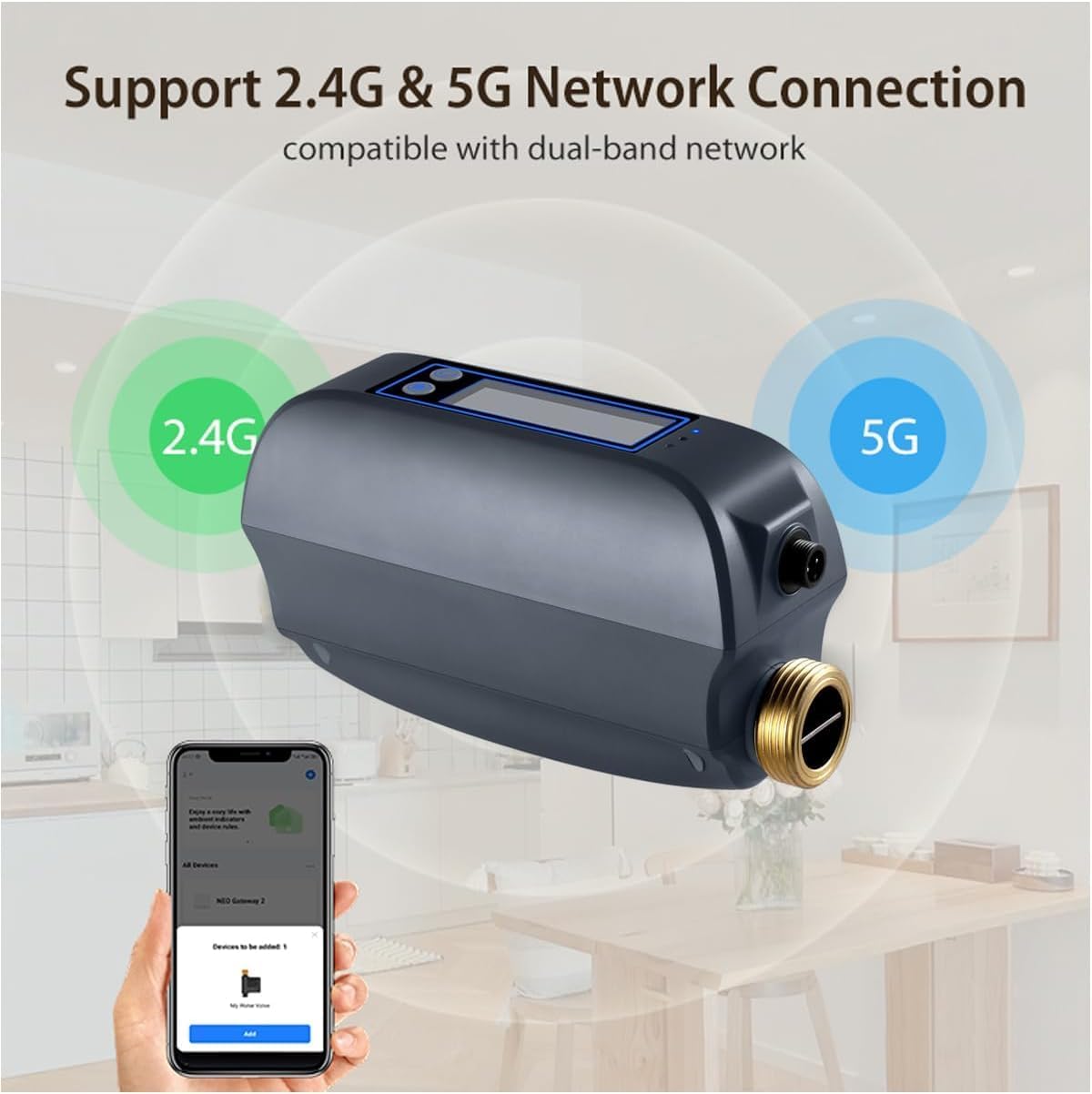
Image: Automation scene setup, demonstrating how the valve works with a leak sensor to detect and shut off water.
Video: Demonstrates how to create an automation scene in the app, using water consumption as an example to automatically turn off the valve when a set usage limit is reached.
6. Maintenance
To ensure the longevity and optimal performance of your Haozee Smart Water Valve, follow these maintenance guidelines:
- Regularly check for any signs of leaks around the valve connections.
- Keep the valve unit clean and free from dust or debris. Use a soft, dry cloth for cleaning.
- Ensure the power adapter and cable are in good condition and not damaged.
- The built-in rechargeable battery is designed for long life. If the device is frequently operating on battery power, ensure it gets sufficient time connected to AC power to recharge.
- Periodically check the app for firmware updates to ensure you have the latest features and bug fixes.
7. Troubleshooting
If you encounter issues with your Haozee Smart Water Valve, refer to the following common troubleshooting steps:
- Device Offline in App:
- Check if the device is powered on and connected to AC power.
- Verify your WiFi network is active and stable (2.4GHz or 5GHz).
- Ensure the valve is within range of your WiFi router.
- If operating on battery, remember that app control is not available.
- Try restarting the valve by unplugging and replugging the power.
- Valve Not Responding to App Commands:
- Confirm the device is online in the app.
- Check your internet connection.
- Ensure the valve's internal battery is not depleted if AC power is disconnected.
- Attempt to re-pair the device if the issue persists.
- Inaccurate Water Flow Readings:
- Ensure the valve is installed correctly in a straight section of pipe.
- Check for any blockages or debris inside the valve that might affect the ultrasonic sensor.
- Verify the unit settings in the app are correct (e.g., flow rate unit).
- Blue Light Not Flashing During Pairing:
- Ensure the device is powered on.
- Press and hold the pairing button for the full 6 seconds.
- If still unresponsive, try a power cycle.
For further assistance, please refer to the manufacturer's support channels.
8. Specifications
| Feature | Value |
|---|---|
| Power | DC 5V/2A |
| Built-in Battery | 3 x Ni-MH rechargeable AA batteries (2600mAh total) |
| Valve Diameter | DN20 (3/4-inch) |
| Water Flow Reporting Accuracy | 0.1 gal |
| Working Water Pressure | 0 ~ 1.3 MPa |
| Wireless Frequency | 2.412 ~ 2.483GHz / 5.18 ~ 5.85GHz |
| Wireless Standard | IEEE 802.11a/b/g/n; IEEE 802.11a/n/11ac |
| Bluetooth | Bluetooth 5.0 |
| Wireless Distance | 45M |
| Thread Specification | Available in NPT & BSP |
| Waterproof Level | IP66 |
| Working Temperature | 1 ~ 60°C (34 ~ 140°F) |
| Working Humidity | 1 ~ 95%RH |
| Product Dimensions | 195mm*78mm*102mm (7.68"L x 3.07"W x 4.02"H) |
| Item Weight | 3.75 pounds |
| Control Method | App |
| Sensor Technology | Ultrasonic Sensor |
| UPC | 607609867005 |
| Model Number | HZ-WF-WV-US |
9. Warranty & Support
For warranty information, technical support, or service inquiries, please contact Haozee customer service through the contact details provided with your purchase or visit the official Haozee website. Please retain your proof of purchase for warranty claims.
Related documentsHZ-WF-WV-US

Ask a question about this manual
Ask about setup, troubleshooting, compatibility, parts, safety, or missing instructions. Manuals+ will review the question and use this page’s manual context to help answer it.