
1. Introduction
Thank you for choosing the WAVLINK Wireless Lavalier Microphone System. This manual provides detailed instructions for the setup, operation, maintenance, and troubleshooting of your new microphone system. Please read this manual thoroughly before use to ensure optimal performance and longevity of the product.
This system includes two transmitters (TX) and one USB Type-C receiver (RX), designed for high-quality audio recording with compatible devices.
2. Product Overview

Image 2.1: Overview of the WAVLINK Wireless Lavalier Microphone System, showing the charging case, two transmitters, and one USB-C receiver.
2.1 Included Components
- 2 x Wireless Microphone Transmitters (TX)
- 1 x USB Type-C Receiver (RX)
- 1 x Smart Charging Case
- 1 x USB Charging Cable
- 1 x Instruction Manual
2.2 Key Features
- Plug and Play Operation: No complex setup, Bluetooth pairing, or app installation required. Simply plug the receiver into your device to begin recording.
- High Sound Clarity: Captures audio with detail, delivering clear sound for recordings and videos.
- Omnidirectional Noise Reduction: Features an integrated intelligent active noise cancellation chip for clear audio quality, even in noisy environments.
- Extended Battery Life: Each transmitter provides approximately 6 hours of use. The smart charging case extends total battery life up to 42 hours.
- Long Wireless Range: Offers a wireless transmission range of up to 328 feet (100 meters) in unobstructed, interference-free conditions using advanced 2.4G technology.
- Wide Compatibility: Compatible with various devices including iPhone 15/16 series, Android smartphones, iPad Pro (with Type-C interface), and laptops.
- Versatile Attachment: Microphones can be attached via clip-on design or magnetic attachment.
3. Setup
3.1 Initial Charging
Before first use, ensure both transmitters and the charging case are fully charged. Place the transmitters into the charging case. Connect the charging case to a power source using the provided USB charging cable. The digital display on the case will indicate the charging status.
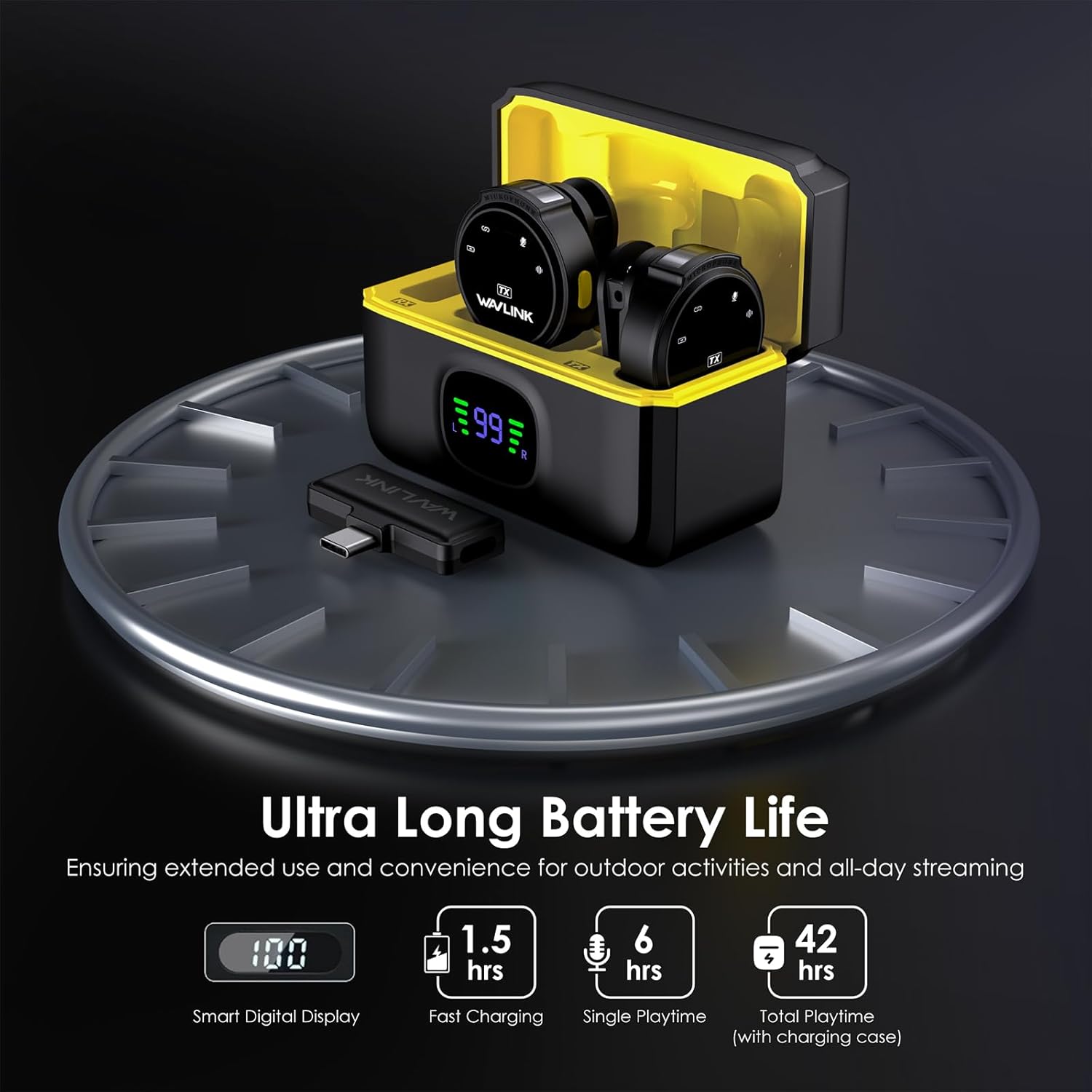
Image 3.1: The charging case displaying battery life and charging status for the transmitters.
3.2 Connecting the Receiver
- Locate the USB Type-C port on your recording device (smartphone, tablet, or laptop).
- Plug the USB Type-C receiver (RX) firmly into your device's port. Ensure the connection is secure.
3.3 Powering On and Pairing Transmitters
- Remove the transmitters (TX) from the charging case. They will automatically power on.
- The transmitters will automatically pair with the receiver within seconds. A successful connection is typically indicated by a solid blue light on the transmitter.

Image 3.2: The USB-C receiver connected to a smartphone, demonstrating universal compatibility with Type-C devices.
4. Operating Instructions
4.1 Attaching the Microphone
The transmitters can be attached to clothing using either the integrated clip or the magnetic attachment feature. For best audio quality, position the microphone approximately 6-8 inches (15-20 cm) from your mouth.

Image 4.1: Demonstrates both the magnetic and clip-on attachment methods for securing the microphone transmitter.
4.2 Microphone Functions
Each transmitter features a multi-function button for controlling various audio settings:
- One-Click: Activates Noise Reduction mode.
- Double Click: Activates Silent (Mute) Mode.
- Triple Click: Activates Reverb Mode.

Image 4.2: Illustration of the multi-function button on the transmitter and its corresponding actions for noise reduction, mute, and reverb.
4.3 Noise Reduction
The integrated AI noise-cancelling chip helps to reduce ambient noise, providing clearer audio. Activate this feature with a single click on the transmitter's multi-function button.

Image 4.3: Visual representation of the intelligent noise cancelling technology, showing sound wave reduction.
4.4 Charging While Recording
The receiver allows for simultaneous charging of your device while recording. This is useful for extended recording sessions.

Image 4.4: A smartphone connected to the USB-C receiver, which is simultaneously charging the phone while recording.
5. Maintenance
- Cleaning: Use a soft, dry cloth to clean the microphone transmitters, receiver, and charging case. Avoid using liquids or abrasive cleaners.
- Storage: When not in use, store the microphone system in its charging case in a cool, dry place away from direct sunlight and extreme temperatures.
- Battery Care: To prolong battery life, avoid fully discharging the devices frequently. Charge them regularly, even if not in constant use.
6. Troubleshooting
| Issue | Possible Cause | Solution |
|---|---|---|
| Microphone not connecting/pairing | Receiver not fully inserted; transmitters not powered on; low battery. | Ensure receiver is fully inserted. Check transmitter battery levels and charge if necessary. Power cycle transmitters. |
| Poor audio quality/noise | Microphone too far from source; noise reduction off; environmental interference. | Ensure microphone is properly positioned. Activate noise reduction (one-click on TX). Move away from strong electromagnetic sources. |
| Short battery life | Incomplete charging; aged battery. | Ensure full charge cycle. If battery life significantly degrades over time, contact support. |
| Firmware upgrade unsuccessful | Browser cache issues; incorrect firmware file. | Clear your browser's cache (Ctrl+Shift+Delete). Download the correct firmware from the official WAVLINK website (www.wavlink.com) and retry the upgrade. |
7. Specifications
| Feature | Detail |
|---|---|
| Model Number | 2TX+1RX (USB Type-C) |
| Brand | WAVLINK |
| Microphone Form Factor | Lavalier |
| Polar Pattern | Omnidirectional |
| Connectivity Technology | 2.4G Wireless, USB Type-C |
| Connector Type | USB Type-C |
| Number of Channels | 2 |
| Wireless Transmission Range | Up to 328 feet (100 meters) in open areas |
| Frequency Response | 20 Hz - 20 kHz |
| Signal-to-Noise Ratio (SNR) | ≥70 dB |
| Power Source | Battery Powered (1 Lithium Polymer battery required per unit) |
| Transmitter Battery Life | Approx. 6 hours (single playtime) |
| Total Playtime (with charging case) | Up to 42 hours |
| Item Weight | 5.9 ounces (total package) |
| Package Dimensions | 4.84 x 4.33 x 1.85 inches |
| Compatible Devices | Smartphones (iPhone 15/16 series, Android), iPad Pro (Type-C), Laptops |
| Special Features | Clip-on design, Magnetic attachment, Omnidirectional Noise Reduction |
8. Warranty and Support
For warranty information, please refer to the documentation included with your product packaging or visit the official WAVLINK website. WAVLINK is committed to providing quality products and customer service.
8.1 Customer Support
If you encounter any issues or have questions regarding your WAVLINK Wireless Lavalier Microphone System, please contact our support team:
- Amazon Message: Contact us directly through your Amazon order page.
- Phone Support: +1 8889730883 (Monday - Friday, 9 AM - 6 PM UTC-5)
- Official Website: For product information, FAQs, and firmware updates, visit www.wavlink.com.

Image 8.1: Customer support contact details, including phone number and website.