
HWG180
Smart Digital Body Composition Scale User Manual
Model: HWG180
1. Introduction
This Smart Digital Body Composition Scale with Bluetooth connectivity provides a convenient and intelligent way to monitor your health and fitness progress. Featuring an easy-to-read LCD display and a maximum capacity of 180 kg, it delivers precise measurements of weight, body fat, muscle mass, basal metabolic rate, and other vital data. Connect to the dedicated application via Bluetooth to track your metrics over time and set personalized goals. The scale is compact and elegantly designed, with simple visual instructions to help you get started quickly. Stay motivated and achieve your health objectives with this intelligent digital scale. It uses 2 AAA batteries (included).

Image: The Smart Digital Body Composition Scale in use, showing a foot on the scale and the accompanying mobile application on a smartphone. The scale displays a weight reading.
2. Safety Information
- Do not use this device if you are pregnant, have a pacemaker, or other internal medical devices.
- Keep the scale on a flat, hard surface for accurate readings. Avoid carpets or uneven floors.
- The scale surface can be slippery when wet. Ensure it is dry before stepping on it.
- Do not jump on the scale or drop heavy objects on it.
- Keep out of reach of children.
- Do not attempt to disassemble or repair the scale yourself. Contact customer support if issues arise.
- Dispose of batteries according to local regulations.
3. Package Contents
Please check the box for the following items:
- 1 x Smart Digital Body Composition Scale
- 2 x AAA Batteries
- 1 x User Manual (this document)
4. Product Features
- Bluetooth Connectivity: Connects to your smartphone for data tracking via a dedicated smart application.
- High Capacity: Supports a maximum capacity of 180 kg (396 lbs) with 50 g (0.1 lb) precision for accurate body weight monitoring.
- Comprehensive Body Analysis: Measures not only weight but also body fat, body water, muscle mass, bone mass, and basal metabolic rate.
- Modern Design: Elegant and minimalist appearance with an LCD display and illustrated instructions for ease of use.
- Easy to Use: Simply connect to the app, step on the scale, and obtain precise readings of various important body metrics.
- LCD Display: Clear digital display for easy reading of measurements.
- Automatic Shut-off: Conserves battery life by automatically turning off when not in use.
- High-Resistance Tempered Glass: Durable and safe weighing surface.

Image: This image highlights the Bluetooth connectivity and the various body composition metrics the scale can measure, including Body Mass Index (BMI), Muscle Mass, Body Fat, and Body Water.

Image: This image emphasizes the scale's LCD display, automatic shut-off feature, and its maximum capacity of 180 kg. It also shows a simplified user manual diagram printed on the scale's surface.
5. Setup
5.1. Battery Installation
- Open the battery compartment on the back of the scale.
- Insert the 2 AAA batteries, ensuring correct polarity (+/-).
- Close the battery compartment securely.
5.2. App Installation and Pairing
To utilize the full features of your Smart Digital Body Composition Scale, you need to download and connect to the dedicated mobile application.
- Scan the QR code provided in the scale's packaging or search for the recommended app (e.g., "OKOK International" or similar, as suggested by the image) in your smartphone's app store (App Store for iOS, Google Play Store for Android).
- Download and install the application.
- Open the app and create a user profile. You will need to enter personal information such as gender, age, height, and activity level for accurate body composition analysis.
- Ensure Bluetooth is enabled on your smartphone.
- Step onto the scale with bare feet. The scale will activate and attempt to pair with the app.
- Follow the in-app instructions to complete the pairing process. Once connected, your measurements will automatically sync to your profile.
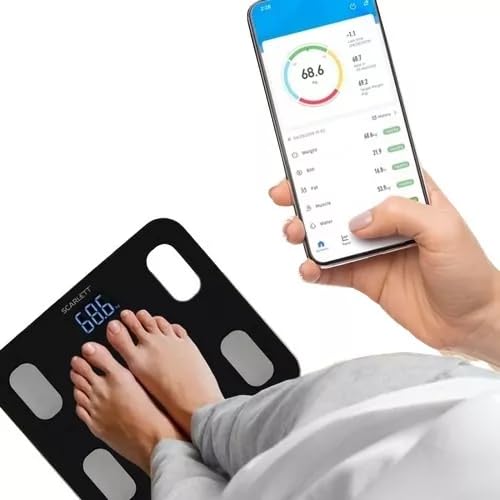
Image: A user standing on the scale with bare feet, while simultaneously viewing their health data on the connected smartphone application. This illustrates the seamless integration between the scale and the app.
6. Operation
6.1. Weighing Mode (Normal Weighing)
- Place the scale on a hard, flat surface.
- Gently step onto the scale. The display will light up.
- Stand still until your weight measurement stabilizes and flashes on the LCD display.
- Step off the scale. The measurement will be held for a few seconds before the scale automatically turns off.
6.2. Body Composition Analysis Mode (Fat Measurement Mode)
For body composition analysis, ensure your feet are bare and make full contact with the four metal electrodes on the scale's surface.
- Ensure the scale is paired with the app and your Bluetooth is on.
- Open the mobile application on your smartphone.
- Step onto the scale with bare, dry feet, ensuring each foot covers two metal electrodes.
- Stand still. The scale will display your weight first, then begin the body composition analysis.
- The app will display all your body metrics (body fat, muscle mass, etc.) once the analysis is complete.
6.3. Understanding Measurements
The app provides detailed insights into various body metrics. Refer to the app's help section for specific interpretations of your results and recommended healthy ranges.
- Weight: Your total body mass.
- Body Fat: Percentage of fat in your body.
- Body Water: Percentage of water in your body.
- Muscle Mass: Total weight of muscle in your body.
- Bone Mass: Total weight of bone in your body.
- Basal Metabolic Rate (BMR): The number of calories your body needs to perform basic, life-sustaining functions.
- BMI (Body Mass Index): A measure of body fat based on your weight in relation to your height.
7. Maintenance
- Cleaning: Wipe the scale surface with a damp cloth and mild detergent. Do not use abrasive cleaners or immerse the scale in water.
- Storage: Store the scale in a cool, dry place. Avoid extreme temperatures and direct sunlight.
- Battery Replacement: Replace batteries when the display indicates low power or if the scale becomes unresponsive.
8. Troubleshooting
| Problem | Possible Cause | Solution |
|---|---|---|
| Scale does not turn on. | Batteries are dead or incorrectly installed. | Check battery polarity or replace with new AAA batteries. |
| Inaccurate readings. | Scale is on an uneven surface; not standing still; scale needs calibration. | Place scale on a hard, flat surface. Stand still during measurement. Step on and off the scale quickly to re-calibrate to zero. |
| Cannot connect to app/Bluetooth. | Bluetooth is off; app not open; scale not activated; app permissions. | Ensure Bluetooth is on. Open the app. Step on the scale to activate it. Check app permissions for Bluetooth access. Restart phone/app. |
| Body composition data not showing. | Feet not bare or not making full contact with electrodes; profile incomplete. | Step on with bare, dry feet, ensuring full contact with all four electrodes. Complete your profile in the app with accurate personal data. |
9. Specifications
| Feature | Detail |
|---|---|
| Model | HWG180 |
| Brand | Generic |
| Maximum Capacity | 180 kg (396 lbs) |
| Precision | 50 g (0.1 lb) |
| Display Type | LCD |
| Power Source | 2 x AAA Batteries (included) |
| Connectivity | Bluetooth |
| Special Features | Temperature Measurement, Mobile App Connectivity, Body Composition Analysis (Body Fat, Water, Muscle, Bone, BMR, BMI) |
| Product Dimensions | Approximately 26 cm x 26 cm |
| Package Dimensions | 26.9 x 26.8 x 2.9 cm; 900 g |
| Origin | China |
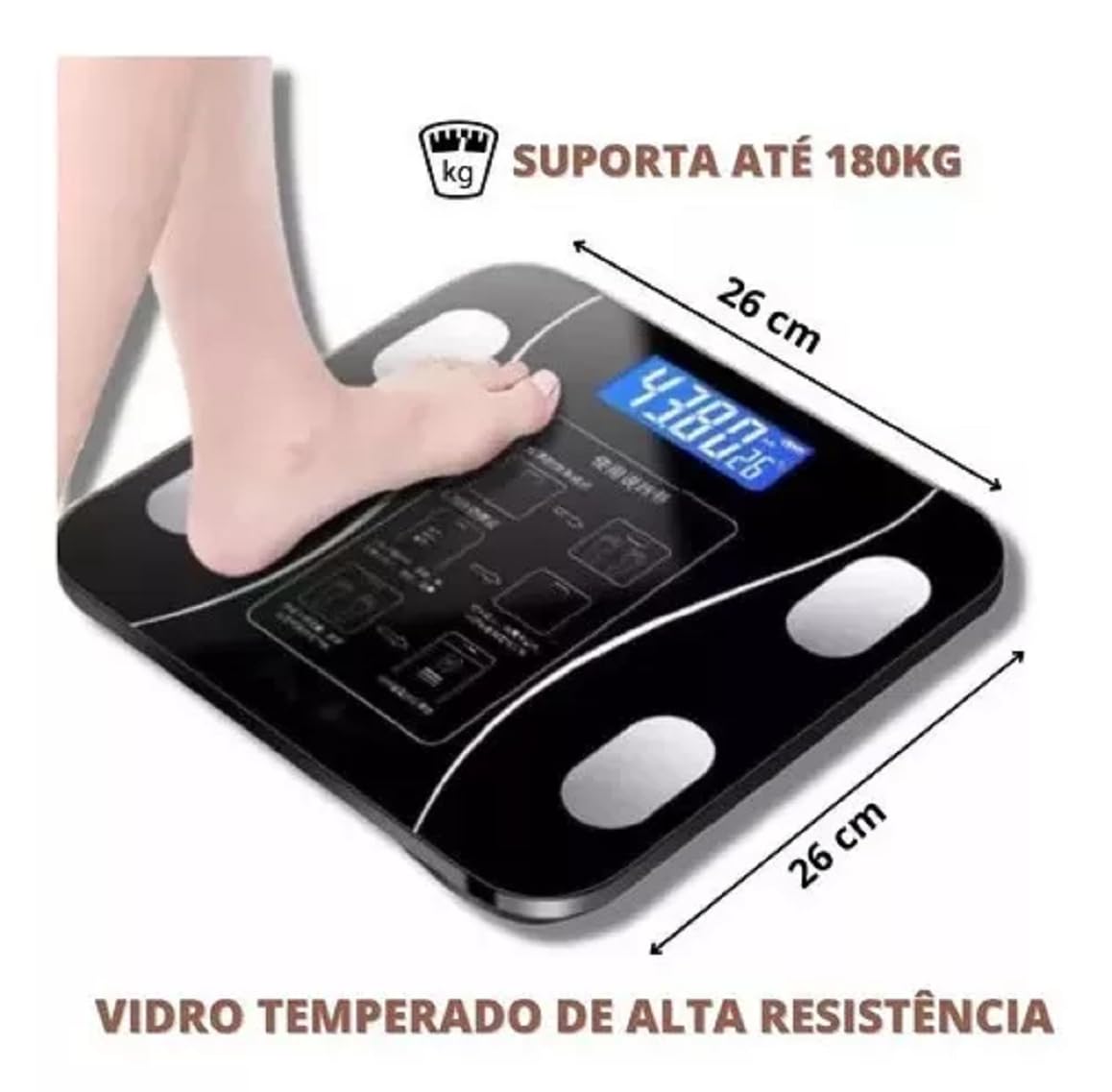
Image: This image illustrates the physical dimensions of the scale (26 cm x 26 cm), its maximum weight capacity of 180 kg, and highlights its construction from high-resistance tempered glass.
10. Warranty and Support
For warranty information and customer support, please refer to the contact details provided by your retailer or the product packaging. Keep your purchase receipt as proof of purchase.
Related documentsHWG180


Ask a question about this manual
Ask about setup, troubleshooting, compatibility, parts, safety, or missing instructions. Manuals+ will review the question and use this page’s manual context to help answer it.