
1. Introduction
The Rand McNally RANDTAB6 is a rugged 6-inch GPS navigation tablet designed for professional truck drivers and fleet operators. This Android-powered device offers advanced navigation capabilities, real-time traffic updates, and productivity tools to enhance your journey. It provides truck-optimized routing, considering vehicle size, weight restrictions, and bridge clearances for safe and efficient travel planning.
2. Product Overview
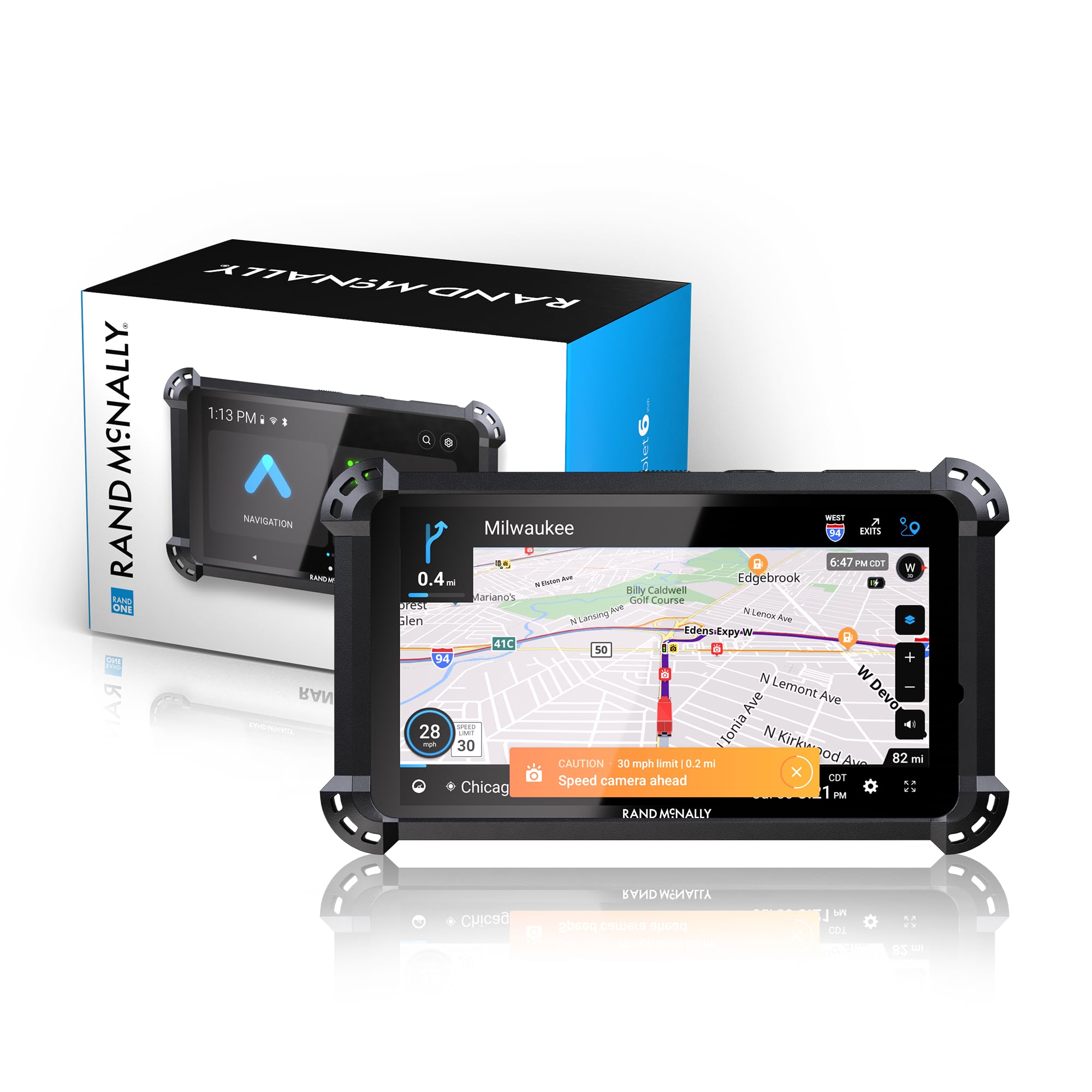
Figure 1: Rand McNally RANDTAB6 GPS Tablet
The RANDTAB6 features a bright, easy-to-read 6-inch touchscreen display. Its robust design includes a rubber guard for durability in demanding environments. The device runs on Android and integrates Rand Navigation 2.0 software with updated maps.
Key Features:
- Truck-Specific Navigation: Routes are customized based on truck dimensions, weight, and load type, including HazMat classifications.
- Real-Time Information: Provides live traffic, weather overlays, and fuel price comparisons along your route.
- Driver Alerts: Includes warnings for weigh stations, curves, hills, engine brake restrictions, narrow roads, construction zones, speed limit changes, red light cameras, and speed cameras.
- Points of Interest (POIs): Access to a comprehensive database of truck services, parking, restaurants, financial services, and medical services.
- Modern Interface: Features a newly rebuilt, intuitive user interface for ease of use.
- Durable Design: Built with a rubber guard to withstand the rigors of long-haul trucking.
3. Setup
3.1 Unboxing and Components
Your Rand McNally RANDTAB6 package includes:
- RandTab 6 GPS Tablet
- Screen Protector (pre-applied or separate)
- Heavy-duty Suction Mount
- Truck Charger & USB-C Cable
- Rand Road IQ for Custom Truck-safe Routes (software feature)
- Contained Lithium Ion Battery (internal)
3.2 Mounting the Device
Use the provided heavy-duty suction mount to securely attach the RANDTAB6 to your vehicle's windshield or dashboard. Ensure the mounting surface is clean and dry for optimal adhesion. The tablet features a powerful magnetic mount for easy attachment and removal.

Figure 2: RANDTAB6 with internal components and key features highlighted
3.3 Powering On and Initial Configuration
Connect the tablet to your truck's power outlet using the truck charger and USB-C cable. Press and hold the power button to turn on the device. Follow the on-screen prompts to complete the initial setup, including language selection, Wi-Fi connection, and setting up your truck profile (height, weight, length, load type, etc.).
4. Operating the RANDTAB6
4.1 Navigation Interface
The RANDTAB6 features a modern and intuitive user interface. From the main menu, select 'Navigation' to access mapping and routing functions.

Figure 3: Main menu showing Navigation, Apps, and ELD
4.2 Entering Destinations
To enter a destination, tap the 'Where to?' search bar on the navigation screen. You can search by address, city center, intersection, or coordinates. The device also allows you to save frequently visited locations in an address book or access recent destinations from your history.

Figure 4: Navigation screen with destination input options
4.3 Truck-Specific Routing
The RANDTAB6 utilizes Rand Road IQ for custom truck-safe routes. It considers your truck's specific attributes (set during initial setup) to avoid restricted roads, low bridges, and other hazards. The navigation display provides clear lane guidance and alerts for upcoming turns and exits.

Figure 5: Navigation view with truck-specific routing and alerts
4.4 Real-Time Traffic and Weather
When connected to Wi-Fi, the device provides real-time traffic updates and weather overlays to help you anticipate road conditions and potential delays. Fuel price comparisons are also available along your route.
5. Maintenance
To ensure optimal performance and longevity of your RANDTAB6 GPS Tablet:
- Screen Care: Clean the touchscreen with a soft, lint-free cloth. Avoid abrasive cleaners or materials that could scratch the screen.
- Software Updates: Regularly connect your device to Wi-Fi to check for and install map and software updates. This ensures you have the most current navigation data and features.
- Battery Life: The internal battery provides approximately 5 hours of use. For longer trips, keep the device connected to the truck charger.
- Storage: Store the device in a cool, dry place when not in use. Avoid extreme temperatures.
6. Troubleshooting
6.1 GPS Signal Loss
If the device frequently loses GPS signal, ensure it has a clear line of sight to the sky. Obstructions like tall buildings or dense tree cover can interfere with signal reception. If the issue persists, try restarting the device.
6.2 Battery Not Charging/Draining Quickly
Ensure the truck charger and USB-C cable are securely connected and functioning correctly. Check for any damage to the cable or charging port. If the battery drains quickly even when plugged in, it may indicate an issue with the charger or the device's power management. Contact customer support if the problem continues.
6.3 Incorrect Routing
Verify that your truck's dimensions and load type are accurately entered in the device's profile settings. Incorrect settings can lead to inappropriate routing. Ensure maps are up-to-date through Wi-Fi connection.
7. Specifications
| Feature | Detail |
|---|---|
| Brand | Rand McNally |
| Model Name | Rand McNally |
| Model Number | RANDTAB6 |
| Screen Size | 6 Inches |
| Resolution | 800 x 480 |
| Operating System | Android |
| Memory Storage Capacity | 32 GB |
| Connectivity Technology | Bluetooth, Direct Plug, Pwr: USB-C, USB, Wi-Fi |
| Supported Satellite Navigation System | GPS |
| Battery Life | 5 Hours |
| Mounting Type | Heavy-duty Suction Mount |
| Item Weight | 9.6 ounces |
| Item Dimensions (L x W x H) | 6.3"L x 0.7"W x 3.3"H |
8. Warranty and Support
The Rand McNally RANDTAB6 GPS Tablet comes with a 1 Year Limited Warranty. For technical support, warranty claims, or further assistance, please refer to the contact information provided in your product packaging or visit the official Rand McNally website.


