
1. Introduction
Thank you for choosing the PATONA Premium Dual PD Charger. This device is designed to efficiently charge two NP-W235 batteries simultaneously and features a USB-C Powerbank function for charging external devices. It incorporates an intelligent charging system for safety and durability. Please read this manual carefully before use to ensure proper operation and to maximize the lifespan of your product.
2. Product Features
- Dual Charging Capability: Charges two NP-W235 batteries simultaneously.
- USB-C Power Delivery (PD): Supports fast charging with PD20W (minimum) and PD45W input.
- USB-C Powerbank Function: Provides 5V/2A output to charge external devices like smartphones and tablets.
- LCD Display: Clear display for monitoring charging status, battery voltage, and charge percentage.
- Intelligent Protection System: Built-in safeguards against overcharge, overheating, and short-circuiting.
- Wide Compatibility: Compatible with Fujifilm GFX 100, GFX 100 II, GFX 100S, GFX 50S II, X-H2, X-H2S, X-S20, X-T4, X-T5 cameras.
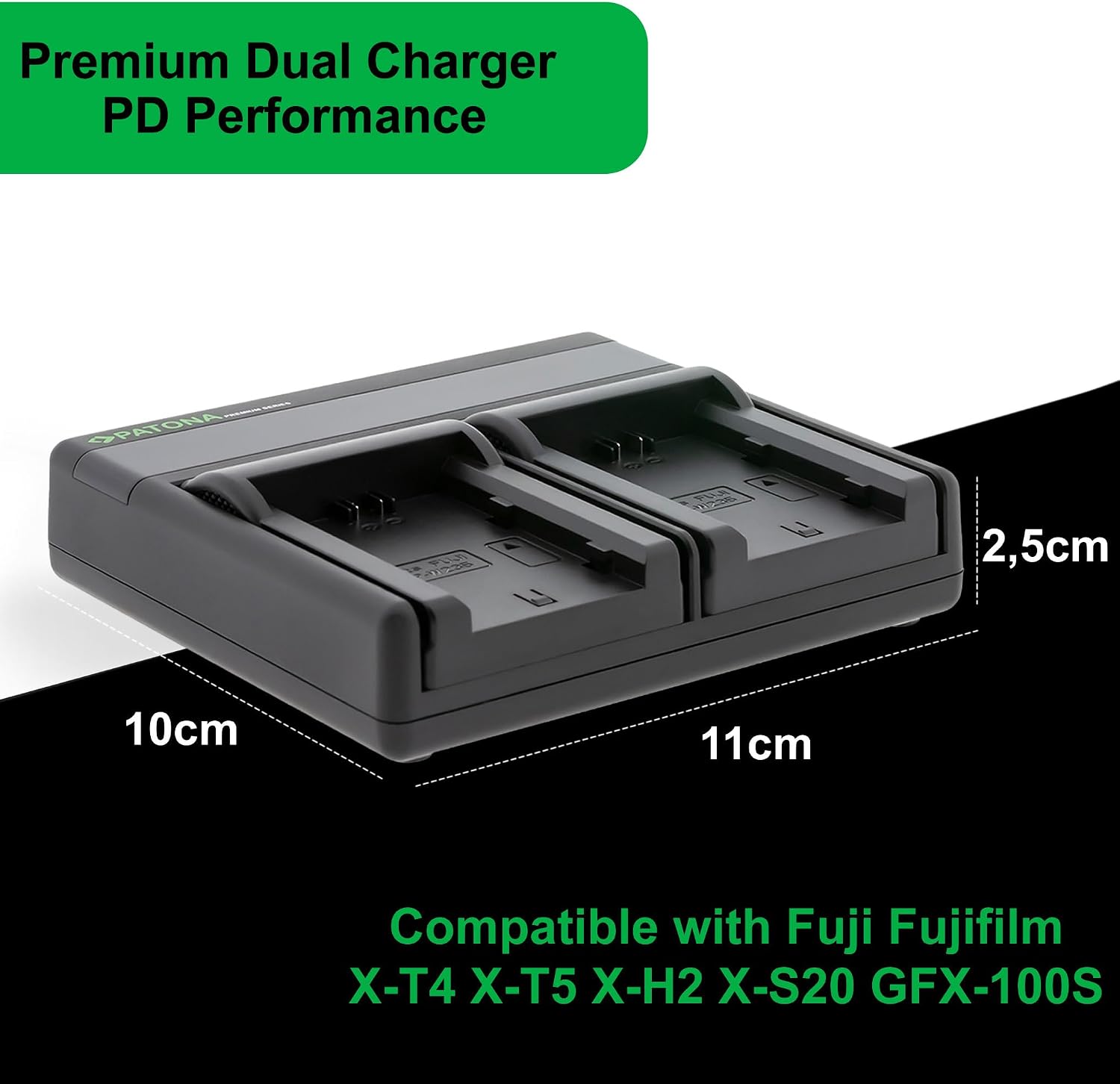
Figure 2.1: Overview of PATONA Premium Dual PD Charger features. This image illustrates the key features of the PATONA Premium Dual PD Charger, highlighting its PD20W Power Delivery, 5V 2A USB-C output, minimum PD20W USB-C input, and the ability to charge two batteries simultaneously. It also shows the included transport bag and USB-C cable.
3. Package Contents
Verify that all items are present in your package:
- PATONA Premium Dual PD Charger (Model: DU_PD121695)
- USB-C to USB-C Charging Cable
- Transport Bag
- Instruction Manual (this document)

Figure 3.1: Package contents. This image shows the complete package contents: the PATONA Premium Dual PD Charger, a USB-C charging cable, and a green drawstring transport bag for convenient storage and portability.
4. Setup
- Unpack the Charger: Carefully remove the charger and all accessories from the packaging.
- Connect Power: Connect the provided USB-C cable to the USB-C input port on the charger. Connect the other end of the USB-C cable to a compatible USB-C Power Delivery (PD) power adapter (not included) with a minimum output of 20W, or preferably 45W for optimal performance.
- Initial Check: The LCD display should illuminate, indicating the charger is powered on and ready for use.
5. Operating Instructions
5.1. Charging Camera Batteries
- Insert Batteries: Carefully insert one or two compatible NP-W235 batteries into the charging slots. Ensure the battery contacts align correctly with the charger pins.
- Monitor Charging: The LCD display will show the charging status for each battery, including voltage and charge percentage. The charging process will begin automatically.
- Charging Completion: Once a battery is fully charged, the display will indicate 100%, and the charging process for that slot will stop automatically to prevent overcharging.
- Remove Batteries: Once charging is complete, carefully remove the batteries from the slots.
5.2. Using the Powerbank Function
The charger can also function as a power bank to charge external devices when not connected to an external power source.
- Ensure Batteries are Inserted: For the power bank function, at least one charged battery must be inserted into the charger.
- Connect External Device: Connect your external device (e.g., smartphone, tablet) to the USB-C output port (5V/2A) on the charger using a compatible USB-C cable.
- Charging: The charger will begin supplying power to your external device. The LCD display may show the discharge status of the internal batteries.
- Disconnect: Disconnect your external device once it is charged or when you no longer need the power bank function.
6. LCD Display Information
The integrated LCD display provides real-time information about the charging process:
- Battery Icons: Separate icons for each charging slot indicate the presence and charging status of the inserted batteries.
- Charge Percentage: Displays the approximate charge level (0-100%) for each battery.
- Voltage: Shows the current voltage of the batteries being charged.
- Charging Status: Indicators (e.g., flashing segments) may show that charging is in progress. A solid 100% indicates a full charge.
7. Safety Precautions
- Use only compatible batteries as specified in this manual.
- Do not expose the charger to moisture, rain, or extreme temperatures.
- Avoid dropping or subjecting the charger to strong impacts.
- Do not attempt to disassemble or modify the charger. This will void the warranty.
- Keep out of reach of children.
- Ensure proper ventilation during use. Do not cover the charger.
- Disconnect the charger from the power source when not in use.
- If the charger emits smoke, unusual odors, or excessive heat, immediately disconnect it from the power source and discontinue use.
8. Maintenance
- Cleaning: Use a soft, dry cloth to clean the charger's exterior. Do not use liquid cleaners or solvents.
- Storage: Store the charger in a cool, dry place away from direct sunlight and extreme temperatures when not in use.
- Contact Pins: Periodically check the charging contact pins for any debris or corrosion. Clean gently if necessary.
9. Troubleshooting
- Charger not powering on:
- Ensure the USB-C cable is securely connected to both the charger and the power adapter.
- Verify that the power adapter is functioning and provides sufficient power (minimum PD20W).
- Batteries not charging:
- Check if batteries are inserted correctly and contacts are clean.
- Ensure the batteries are compatible (NP-W235).
- If only one battery is not charging, try it in the other slot to rule out a faulty battery.
- LCD display not showing information:
- Ensure the charger is powered on and batteries are inserted.
- If the display remains blank, contact customer support.
- Powerbank function not working:
- Ensure at least one charged battery is inserted in the charger.
- Verify the external device's cable is connected to the USB-C output port.
- Check if the external device is compatible with 5V/2A charging.
10. Specifications
| Model Number | DU_PD121695 |
| Dimensions (L x W x H) | 10.95 cm x 10.1 cm x 2.5 cm |
| Weight | 118 g |
| Input | USB-C PD20W (min) / PD45W (max) |
| Charging Output (per slot) | 4.2V/4.35V: 800mA (x1) / 800mA (x2) 8.4V: 1000mA (x1) / 1000mA (x2) 12.6V/16.8V: 1500mA (x1) / 1000mA (x2) |
| USB-C Output (Powerbank) | 5V / 2A |
| Compatible Batteries | NP-W235 |
| Compatible Camera Models | Fujifilm GFX 100, GFX 100 II, GFX 100S, GFX 50S II, X-H2, X-H2S, X-S20, X-T4, X-T5 |

Figure 10.1: Charger dimensions and compatibility. The image displays the physical dimensions of the PATONA Premium Dual PD Charger, measuring approximately 11cm in length, 10cm in width, and 2.5cm in height. It also lists compatible Fujifilm camera models including X-T4, X-T5, X-H2, X-S20, and GFX-100S.

Figure 10.2: Detailed specifications label. The bottom of the charger is shown, displaying the PATONA Premium Series logo, regulatory compliance marks (UKCA, CE, FCC, WEEE), and detailed electrical specifications for input and output currents for various battery voltages.
11. Warranty and Support
11.1. Warranty Information
This PATONA product comes with a two-year manufacturer's warranty from the date of purchase. This warranty covers defects in materials and workmanship under normal use. It does not cover damage caused by misuse, accidents, unauthorized modifications, or normal wear and tear.
11.2. Customer Support
For technical support, warranty claims, or any questions regarding your PATONA Premium Dual PD Charger, please contact us:
- Manufacturer: PATONA International S.L.U.
- Address: Uniere Giesswiesen 17, 78247 Hilzingen, Germany
- Website: www.patona.de
- Email: info@patona.de

Figure 11.1: Regulatory marks and contact information. This image presents various regulatory compliance symbols including CE, UKCA, FCC, and the WEEE directive symbol. It also provides the manufacturer's contact details: PATONA International S.L.U., Uniere Giesswiesen 17, 78247 Hilzingen, Germany, along with their website www.patona.de and email info@patona.de.

