
1. Introduction
The HIWONDER JetRover Developer Kit is a professional robotic platform designed for learning and development in ROS1 and ROS2 environments. Powered by a Jetson controller, it integrates advanced AI capabilities including ChatGPT large AI models, Lidar SLAM mapping, navigation, AI vision, a 6DOF robotic arm, voice control, and smart sorting functionalities. This manual provides essential information for setting up, operating, and understanding the various features of your JetRover.

Figure 1: The HIWONDER JetRover Developer Kit, fully assembled.
2. Key Features
- Smart ROS Robotics: Professional platform for ROS1 & ROS2 learning and development, powered by Jetson controller, supporting mainstream deep learning frameworks like MediaPipe and YOLO.
- SLAM Development: Equipped with 3D depth camera, Lidar, and microphone array. Utilizes advanced algorithms including gmapping, hector, karto, and cartographer for precise multi-point navigation, TEB path planning, and dynamic obstacle avoidance.
- High-performance Vision Robotic Arm: Features a 6DOF vision robot arm with intelligent serial bus servos (35KG torque) and an HD camera for object-grabbing tasks.
- Large AI Model Integration: Deploys multimodal models with ChatGPT at its core, integrating 3D vision and a 6-microphone array for enhanced perception, reasoning, and embodied AI applications.
- Multi-platform Control: Supports control via WonderAi app (iOS/Android), wireless handle, Robot Operating System (ROS), and keyboard.
3. Components and Packing List
The JetRover Developer Kit includes the following main components:
- Hiwonder JetRover ROS Robot (user included, assembled)
- Robot arm
- 12.6V 2A charger
- Card reader
- Wireless controller
- 3D depth camera
- Type-C cable (800mm)
- Camera bracket
- Colored blocks (30*30mm)
- Tags (30*30mm)
- Accessory bag
- User manual
- 7-inch LCD screen Expansion Pack (7-inch LCD screen, HDMI cable, micro-USB cable, screen bracket)
- 6-Microphone array Expansion Pack (6-Microphone array, Type-C cable)
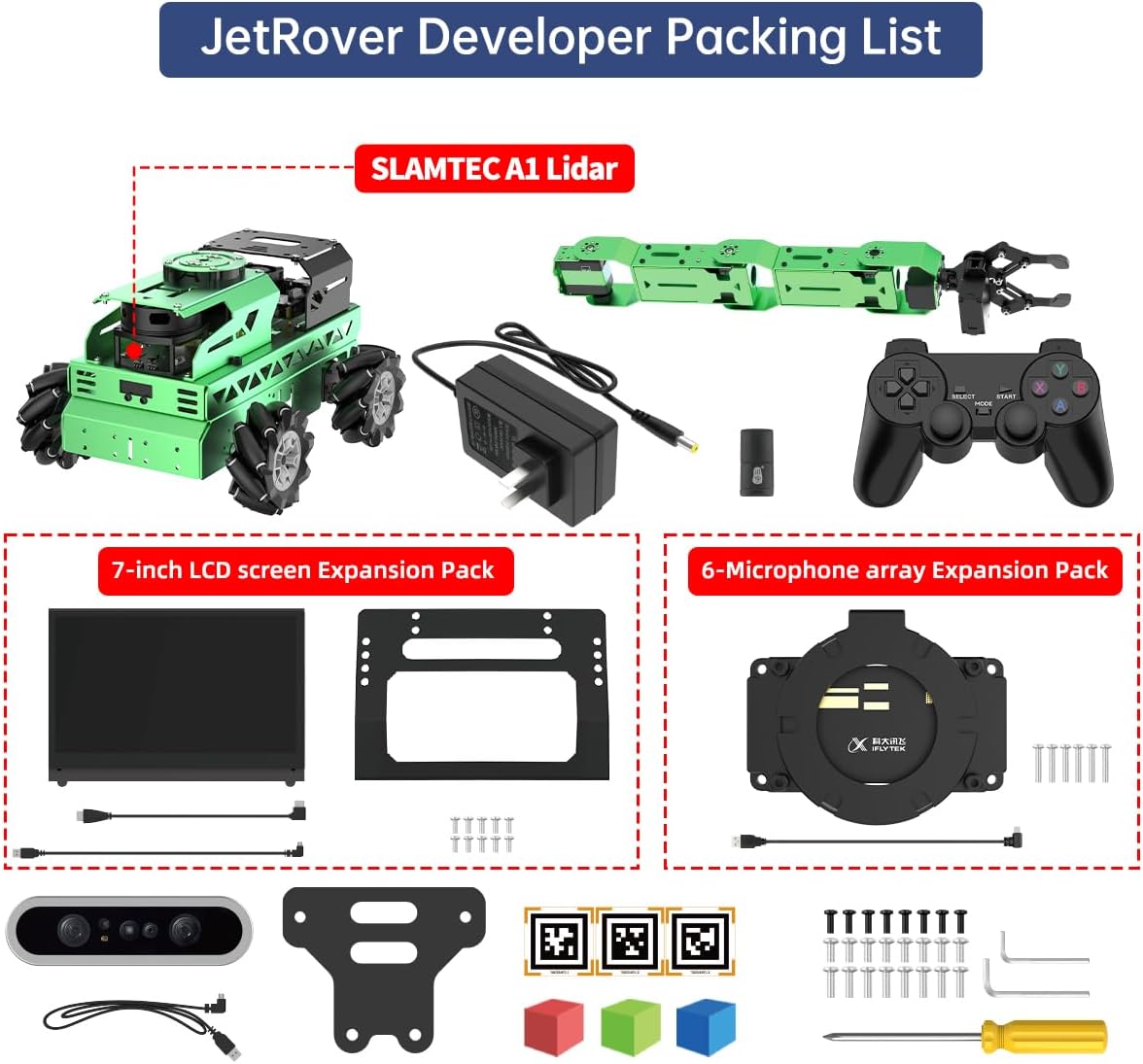
Figure 2: Detailed view of the components included in the JetRover Developer Kit.
4. Technical Specifications
| Feature | Specification |
|---|---|
| Model | JetRover M1 |
| Chassis type | Mecanum chassis |
| Size | 324*260*659mm |
| Weight | 4700g |
| Motor | MC520 metal gear-geared motor |
| Encoder | 1024-line AB-phase high-precision quadrature encoder |
| ROS controller | NVIDIA Jetson Nano / Jetson Orin Nano / Jetson Orin NX / Raspberry Pi 5 |
| Control method | USB serial port, CAN port, Bluetooth app, remote controller |
| USB expansion | USB HUB expansion board with 5A high current |
| Operating system | Ubuntu 18.04 LTS + ROS Melodic / Ubuntu 22.04 / ROS2 humble |
| Software | iOS / Android app |
| Communication method | USB/ WiFi/ Ethernet |
| Programming language | Python/ C/ C++/ JavaScript |
| Servo type | HTS-20H/ HTS-21H/ HTD-35H/ HX-12H intelligent serial bus servo |
| Package weight | About 6.5kg |
| Package size | 41*52*25cm |

Figure 3: Detailed specifications and dimensional drawing of the JetRover M1.
5. Operating the JetRover
5.1. SLAM Mapping and Navigation
The JetRover utilizes its integrated Lidar and 3D depth camera for Simultaneous Localization and Mapping (SLAM). This allows the robot to build a map of its environment while simultaneously tracking its own position within that map. Various algorithms are supported for 2D and 3D mapping and navigation.

Figure 4: Examples of 2D Lidar mapping methods (Cartographer, Hector, Karto, Gmapping) and fixed-point navigation.

Figure 5: RTAB-VSLAM for 3D vision mapping and navigation, alongside ORB-SLAM for 3D reconstruction.
5.2. AI Model Capabilities and Interaction
The JetRover integrates large AI models, including ChatGPT, to enable advanced human-robot interaction and intelligent functionalities.
- Large Language Model: Comprehends complex commands, performs text generation, translation, interactive Q&A, and summarization.
- Large Speech Model: Utilizes a 6-microphone array for sound source localization, speech recognition, and natural voice interaction.
- Vision Language Model: Identifies and locates objects, describes visual scenes, and understands spatial layouts.

Figure 6: Overview of Large Language, Speech, and Vision Model capabilities.

Figure 7: Voice control for commands and real-time color tracking using vision language models.
5.3. Robotic Arm Operations
The 6DOF robotic arm allows for precise manipulation and interaction with objects. The integrated HD camera provides a first-person view for tasks such as object grabbing and sorting.

Figure 8: The robotic arm performing object grabbing during autonomous navigation and transportation tasks.
5.4. Advanced Vision and Deep Learning
JetRover supports various vision-based functionalities and deep learning applications:
- KCF Target Tracking: Image-based tracking for selected objects.
- Vision Line Following: Supports custom color line detection and following.
- Color/Tag Recognition & Tracking: Recognizes and tracks multiple AprilTags and their coordinates.
- AR Augmented Reality: Displays graphics based on AprilTag codes.
- MediaPipe Development: Enables fingertip detection, human body recognition, 3D object recognition, and face detection.
- AI Autonomous Driving: Utilizes PyTorch, OpenCV, YOLOv5, and TensorRT for road sign detection, lane keeping, autonomous parking, and turning decision making.

Figure 9: Demonstrations of KCF target tracking, vision line following, color/tag recognition, and augmented reality.

Figure 10: MediaPipe development for fingertip trajectory, human body, 3D object, and face detection.
6. Learning Capabilities
The JetRover Developer Kit offers extensive learning opportunities across various domains:

Figure 11: Comprehensive list of functions and capabilities that can be learned and developed with the JetRover.
7. Troubleshooting
For common issues, please refer to the official HIWONDER documentation available online. Ensure all connections are secure and power supplies are correctly attached. If you encounter persistent problems, consult the online community forums or contact technical support.
- Power Issues: Verify the charger is connected and the battery is charged. Check the power indicator lights on the robot control board.
- Connection Problems: Ensure Wi-Fi/Ethernet connections are stable. For app control, confirm the robot and device are on the same network.
- Software Errors: Review console output for error messages. Ensure all ROS nodes are running correctly. Reinstalling system images or specific packages might resolve software conflicts.
- Movement Irregularities: Check for physical obstructions. Verify servo connections and calibration. Ensure IMU and odometry data are being received correctly.
8. Warranty and Support
HIWONDER products come with a standard manufacturer's warranty. For detailed warranty terms, technical support, and service inquiries, please visit the official HIWONDER website or contact their customer service department. Keep your purchase receipt as proof of purchase.
Official HIWONDER Store: HIWONDER Store on Amazon


