
Introduction
Thank you for choosing the Crecolife 50 Pint Dehumidifier. This manual provides important information for the proper operation, maintenance, and troubleshooting of your new appliance. Please read this manual thoroughly before use and keep it for future reference.
This dehumidifier is designed to efficiently remove excess moisture from indoor environments, helping to prevent issues such as mold, mildew, and musty odors. It is suitable for areas up to 4,000 square feet, including basements, homes, and other large rooms.

Image: Front view of the Crecolife 50 Pint Dehumidifier, a white rectangular unit with a black top panel and digital display.
Safety Information
Please observe the following safety precautions to reduce the risk of electric shock, fire, or injury:
- Always plug the unit into a grounded electrical outlet.
- Do not operate the dehumidifier with a damaged power cord or plug.
- Do not block air inlets or outlets.
- Keep the unit away from water and other liquids.
- Ensure the unit is placed on a stable, level surface.
- Unplug the unit before cleaning or performing any maintenance.
- Do not allow children to play with or operate the dehumidifier.
Product Overview
Key Features:
- High Capacity: Removes up to 50 pints of moisture per day, suitable for areas up to 4,000 sq. ft.
- Smart Humidity Control: Automatically adjusts operation based on preset humidity levels.
- Multiple Modes: DEHU (Dehumidify), DRY (Clothes Drying), CONT (Continuous).
- 24-Hour Timer: Schedule operation for energy efficiency.
- Ultra-Quiet Operation: Designed for minimal noise output (35.5-40dB).
- Two Drainage Options: Manual (0.58-gallon tank) or Continuous (6.56 ft drain hose included).
- Washable Filter: Easy to clean and maintain for optimal performance.
- Portability: Equipped with a convenient carry handle and 360° universal casters.
- Child Lock: Prevents accidental changes to settings.
- Auto Defrost: Automatically defrosts evaporator coils when frost forms.
Control Panel:

Image: Close-up view of the dehumidifier's touch control panel, showing icons for Child Lock, Timer, Speed, Humi (Humidity), Mode, and Power.
- Child Lock: Press to lock or unlock the control panel.
- Timer: Set a 1 to 24-hour timer for automatic power off.
- Speed: Adjust the fan speed (Low/High).
- Humi (Humidity): Set the desired humidity level up or down.
- Mode: Switch between DEHU, DRY, and CONT modes.
- Power: Turn the dehumidifier on or off.
Setup
- Unpacking: Carefully remove the dehumidifier from its packaging. Retain packaging materials for future storage or transport.
- Placement: Place the dehumidifier on a firm, level surface in the desired location. Ensure there is at least 8 inches (20 cm) of space around the unit for proper airflow.
- Compressor Settlement: IMPORTANT NOTE: Due to the presence of a compressor, allow the unit to stand upright for at least 24 hours before plugging it in and operating it. This allows the refrigerant to settle, ensuring optimal performance and longevity.
- Power Connection: Plug the power cord into a grounded electrical outlet.

Image: Diagram showing the internal components of the dehumidifier, highlighting the compressor and airflow. A text overlay emphasizes the 24-hour settlement period.
Operating Instructions
Turning On/Off:
Press the Power button on the control panel to turn the unit on or off.
Selecting a Mode:
Press the Mode button to cycle through the available modes:
- DEHU Mode (Dehumidify): The unit will operate to reach and maintain your preset humidity level. This is the standard mode for general dehumidification.
- DRY Mode (Clothes Drying): The unit will run continuously at high fan speed to quickly remove moisture, ideal for drying clothes.
- CONT Mode (Continuous): The unit will operate continuously regardless of the humidity level, suitable for very damp spaces like basements.

Image: The dehumidifier operating in a bedroom setting, illustrating the DEHU mode for auto-start and stop based on humidity needs.

Image: The dehumidifier placed in a laundry room, demonstrating the DRY mode for quick clothes drying.

Image: The dehumidifier in a bathroom setting, illustrating the CONT mode for constantly damp spaces.

Image: A visual representation of the three dehumidification modes (DEHU, DRY, CONT) and their typical use environments.
Setting Humidity Level (DEHU Mode only):
In DEHU mode, press the Humi button to adjust the desired humidity level. The unit will cycle on and off to maintain this level.

Image: A room before and after dehumidification, showing humidity levels dropping from 80% to 30% with the dehumidifier operating.
Setting the Timer:
Press the Timer button to set the desired operating time (1-24 hours) before the unit automatically turns off. Each press increases the time by one hour.

Image: The dehumidifier in a home setting with a graphic illustrating the 24-hour timer function.
Adjusting Fan Speed:
Press the Speed button to switch between Low and High fan speeds.
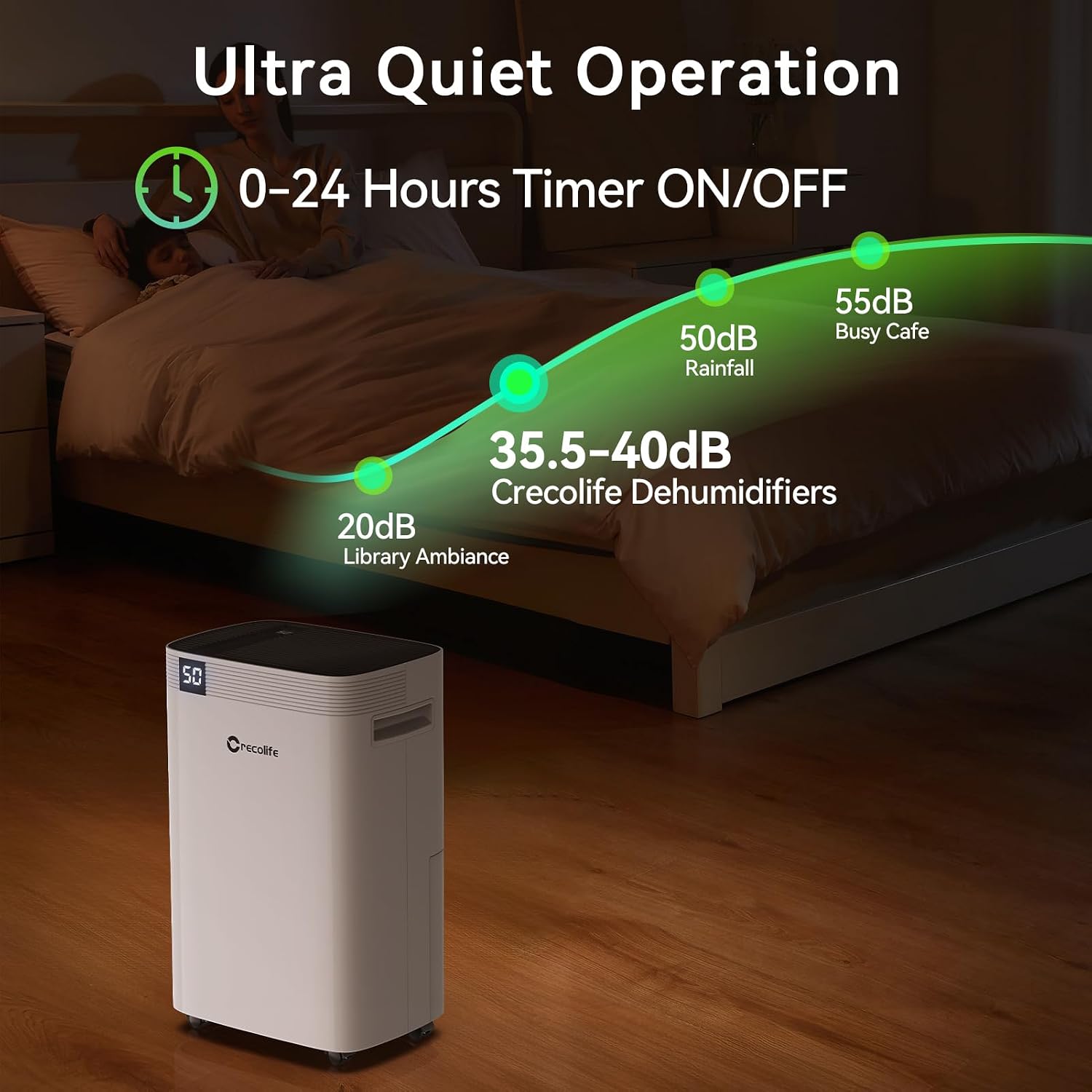
Image: The dehumidifier in a bedroom setting, illustrating its quiet operation with noise levels compared to rainfall and a busy cafe.

Image: The dehumidifier in a bedroom, highlighting its low noise level (35.5dB) compared to normal breathing and air conditioning.
Child Lock Function:
Press and hold the Child Lock button for a few seconds to activate or deactivate the child lock. When activated, the control panel buttons will not respond to presses.

Image: A child playing near the dehumidifier, illustrating the child safety lock feature.
Drainage Methods
The Crecolife dehumidifier offers two convenient drainage options:
1. Manual Drainage (Water Tank):
The unit collects condensed water in its 0.58-gallon (2.2-liter) internal water tank. When the tank is full, the dehumidifier will automatically shut off and an indicator light will illuminate to prevent overflow. Empty the tank by carefully pulling it out, discarding the water, and reinserting it until it clicks into place.
2. Continuous Drainage (Drain Hose):
For continuous operation without needing to empty the tank, connect the included 6.56 feet (2-meter) drain hose to the continuous drainage port on the back of the unit. Route the hose to a suitable drain (e.g., floor drain, large bucket) ensuring it is sloped downwards for gravity drainage.
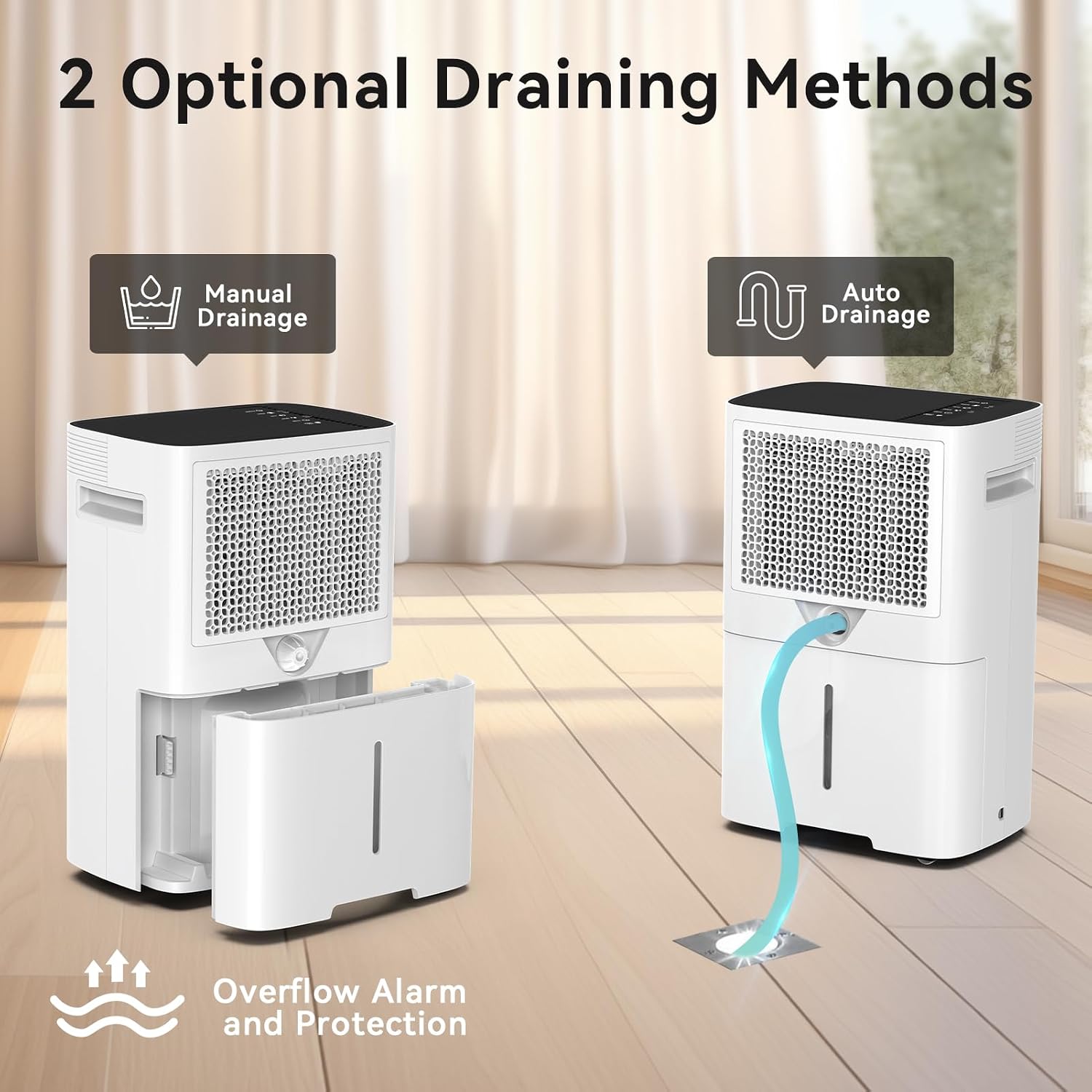
Image: A side-by-side comparison showing the manual drainage method with the water tank removed and the auto drainage method with a hose connected to a floor drain.
Maintenance
Regular maintenance ensures optimal performance and extends the lifespan of your dehumidifier.
Cleaning the Air Filter:
The air filter should be cleaned regularly, approximately every two weeks, or more often depending on usage and air quality. A dirty filter can reduce efficiency and airflow.
- Turn off the dehumidifier and unplug it from the power outlet.
- Locate the air filter on the back or side of the unit.
- Gently pull out the filter.
- Wash the filter with warm, soapy water. Rinse thoroughly.
- Allow the filter to air dry completely before reinserting it. Do not use a dishwasher or hot water.
- Slide the dry filter back into its slot.

Image: The removable air filter being cleaned with water, demonstrating the ease of maintenance.
Cleaning the Unit Exterior:
Wipe the exterior of the dehumidifier with a soft, damp cloth. Do not use harsh chemicals, abrasives, or solvents.
Storage:
If storing the unit for an extended period:
- Empty the water tank and ensure it is dry.
- Clean the air filter.
- Coil the power cord neatly.
- Cover the unit with a plastic bag or original packaging to protect it from dust.
- Store in a cool, dry place.
Troubleshooting
| Problem | Possible Cause | Solution |
|---|---|---|
| Dehumidifier does not turn on. | No power; Power cord loose; Water tank full or not properly inserted; Child lock activated. | Check power outlet and connection; Empty and reinsert water tank; Deactivate child lock. |
| Unit is running but not collecting water. | Humidity setting too high; Room temperature too low; Air filter clogged; Unit recently moved (compressor needs to settle). | Lower humidity setting; Ensure room temperature is above 5°C (41°F); Clean air filter; Allow 24 hours for compressor to settle if recently moved. |
| Unit is noisy. | Unit not on a level surface; Air filter clogged; Obstruction in fan. | Place on a level surface; Clean air filter; Check for and remove any obstructions. |
| "Full Tank" indicator is on, but tank is not full. | Water tank not properly seated; Float switch malfunction. | Remove and reinsert water tank firmly; Contact customer support if issue persists. |
| Frost on coils. | Low room temperature; Auto defrost function working. | The unit has an auto defrost function. If frost forms, the compressor switches off and the fan continues to run until the frost has disappeared. This is normal operation. |

Specifications
| Feature | Detail |
|---|---|
| Brand | Crecolife |
| Model | 50 Pint Dehumidifier |
| Colour | White |
| Product Dimensions | 32 x 22.5 x 49 cm (12.6 x 8.86 x 19.29 inches) |
| Item Weight | 14.5 kg |
| Water Tank Capacity | 0.58 gallons (approx. 2.2 liters) |
| Dehumidification Capacity | Up to 50 pints/day |
| Coverage Area | Up to 4000 Sq. Ft. |
| Power/Wattage | 350 watts |
| Auto Shut-off | Yes (when tank is full) |
| Special Features | Automatic Defrost, Automatic Moisture Removal, Automatic Shutoff, Bucket Storage, Built-In Pump, Continuous Draining, Quiet Operation, Removable Tank, Washable Filter, Water Level Indicator, Timer, Child Lock. |
| Drain Hose Length | 6.56 feet (2 meters) |

Warranty and Support
The Crecolife 50 Pint Dehumidifier comes with a 30-day return policy, a 2-year extended warranty, and lifetime technical support.
Should you have any inquiries or require assistance, please contact Crecolife customer support. Our team is committed to responding within 24 hours to provide comprehensive support.
For support, please refer to the contact information provided with your product packaging or visit the official Crecolife website.